 By James
You want audio that sounds worse — on purpose. Maybe it’s a deep-fried meme that needs to crunch, a voiceover that should sound like it’s coming through a 1940s radio, or a clip that has to read as a tinny phone call. “Low quality” isn’t a single effect: it’s a handful of specific levers — bitrate, sample rate, and channel count — that each remove something different from the sound. Pull the right ones in the right amounts and you get the exact flavour of bad you’re after, repeatably, instead of randomly mangling the file. We verified the technical numbers below (the telephone band, the 8 kHz sample-rate math, the AMR codec range) against the standards and reference docs.
Quick answer: To degrade audio deliberately, lower three things: bitrate (drop to 64 kbps or far below for crunchy compression artifacts), sample rate (set 8000 Hz for the classic muffled telephone/lo-fi sound — it hard-caps audio at 4 kHz), and channels (switch to mono). For a phone-call voice, 8 kHz mono at a low bitrate gets you most of the way; the real telephone band is roughly 300–3400 Hz. For a deep-fried meme, push the bitrate as low as it goes and re-encode. Do it in one pass with an MP3 compressor.
Jump to a section
- The three levers that degrade audio
- Sample rate: the muffled, telephone sound
- Bitrate: the crunchy, artifact sound
- Recipes for specific effects
- Make audio lower quality on xconvert
- FAQ
The three levers that degrade audio
“Audio quality” isn’t one dial. When you lower quality intentionally, you’re really touching three independent properties, and each one ruins the sound in a distinct, recognisable way:
- Sample rate — how many times per second the audio is measured, in Hz. By the Nyquist–Shannon theorem, the highest frequency a file can represent is exactly half the sample rate. CD audio is 44,100 Hz (44.1 kHz), so it reaches up to ~22 kHz — past human hearing. Drop the sample rate and you chop off the top of the frequency range: the sound gets darker, thinner, more muffled.
- Bitrate — how many bits per second the (lossy) encoder is allowed to spend, in kbps. Lower it and the encoder throws away more detail, producing audible compression artifacts: warbling, metallic ringing, swirly “underwater” textures. This is the crunchy kind of bad.
- Channels — stereo (two channels) vs mono (one). Folding to mono flattens the stereo image and removes the sense of space, and roughly halves the data.
For a deeper, neutral explanation of how these interact, see understanding audio bitrate and sample rate. Here we’re using them as weapons, not avoiding them.
Sample rate: the muffled, telephone sound
This is the lever most people don’t know about, and it’s the one that delivers the iconic “phone call” and “old radio” character.
Set the sample rate to 8000 Hz (8 kHz) and, per Nyquist, the file can no longer carry any frequency above 4000 Hz. Everything brighter — the sparkle of cymbals, the air of a voice, sibilant “s” sounds — is gone. That’s not a coincidence: 8 kHz is the sample rate the telephone network itself uses (the ITU-T G.711 PCM standard), precisely because human speech stays intelligible inside a narrow band. The classic telephone passband runs roughly 300 Hz to 3400 Hz, which is why phone calls sound thin and boxy but you can still understand the words.
A quick map of what each sample rate does to perceived quality:
| Sample rate | Max frequency (Nyquist) | Character |
|---|---|---|
| 44,100 Hz (CD) | ~22,050 Hz | Full, normal “good” audio |
| 22,050 Hz | ~11,025 Hz | Slightly dull, “AM radio”-ish |
| 16,000 Hz | 8,000 Hz | “Wideband” voice; noticeably reduced highs |
| 11,025 Hz | ~5,512 Hz | Vintage, lo-fi, retro |
| 8,000 Hz | 4,000 Hz | Telephone / muffled / lo-fi |
The lower you go, the more of the high end disappears and the more “transmitted through a tin can” it sounds. 8 kHz is the sweet spot for phone and lo-fi effects; 11,025 Hz is a gentler vintage feel.
Bitrate: the crunchy, artifact sound
Sample rate removes the highs; low bitrate adds garbage. A lossy encoder (MP3, AAC) at a low bitrate has to represent the audio with very few bits, so it approximates aggressively — and you hear those approximations as artifacts.
- 128 kbps and up — generally “transparent” enough that most people don’t notice degradation on a typical track.
- 64 kbps — clearly compressed; a hollow, slightly swirly quality creeps in. Good for a mild “low-quality download” feel.
- 32 kbps and below — heavy, obvious warbling and metallic ringing. This is the crunchy sound, and it’s the backbone of the deep-fried meme aesthetic.
- Re-encoding the same file repeatedly at low bitrate compounds the damage — each pass loses more, so the “JPEG-artifacts-but-for-audio” effect intensifies.
If your goal is simply a smaller, lower-bitrate file (not a cartoonish effect), the focused walkthrough is lower the bitrate of an audio file. For deliberate degradation, just push the same control further than you normally would.
A note on the genuinely destroyed deep-fried sound: the most extreme examples combine a very low bitrate with digital clipping — amplifying the signal past the 0 dBFS maximum so the waveform’s peaks get flattened into a square-ish shape, adding harsh distortion on top of the artifacts. Bitrate and sample rate get the recognisable “low quality” sound; clipping (an editor’s gain or distortion control) takes it all the way to “earrape.”
Recipes for specific effects
Concrete starting points. Treat the numbers as a baseline and adjust to taste.
Phone-call voice (☎️)
- Sample rate: 8000 Hz
- Channels: mono
- Bitrate: 24–48 kbps
- Why: 8 kHz mono mimics the telephone network’s own format; the result naturally lands near the 300–3400 Hz telephone band, so the voice sounds tinny and “down the line.” The dedicated AMR speech codec used by old mobile phones runs at exactly 8 kHz and 4.75–12.2 kbps — so a very low bitrate here is authentic, not just lazy.
Vintage radio / old recording
- Sample rate: 11,025 Hz (or 8000 Hz for a harsher era)
- Channels: mono
- Bitrate: 48–64 kbps
- Why: the reduced sample rate strips the highs for that dusty, archival feel without going full telephone; mono suits the period.
Lo-fi / “potato quality” background
- Sample rate: 22,050 Hz or 11,025 Hz
- Channels: mono or stereo
- Bitrate: 64 kbps
- Why: enough degradation to read as deliberately lo-fi, while staying listenable as a backing layer.
Deep-fried meme (crunch)
- Sample rate: 8000 Hz (or lower)
- Channels: mono
- Bitrate: as low as it goes (16–32 kbps)
- Then: re-encode the output again at the same low bitrate to stack artifacts; for the truly fried sound, boost the volume past clipping in an editor first.
Make audio lower quality on xconvert
The xconvert MP3 compressor exposes the exact levers above — bitrate, sample rate, and channels — in one place, so you can dial in any of the recipes:
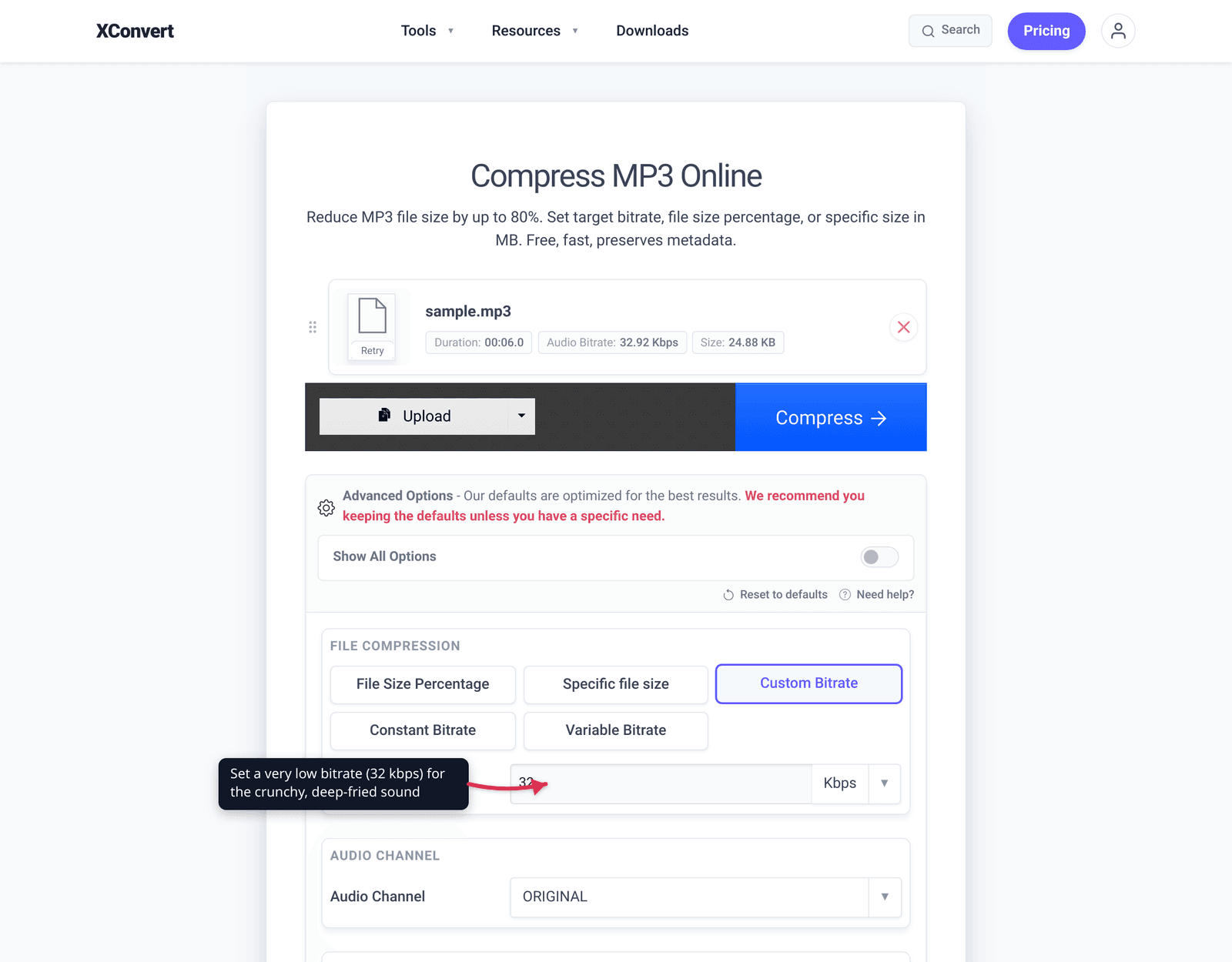
- Open xconvert.com/compress-mp3 and click Upload to add your file (From my Computer, Google Drive, or Dropbox).
- Open Advanced Options (the gear).
- For the crunch, choose Custom Bitrate and set a low value — 64 kbps for mild, 32 kbps or lower for deep-fried. (Or use Specific file size to force a tiny target, which has the same effect.)
- Set Audio Sample Rate to 8000 Hz for the muffled telephone/lo-fi sound (it defaults to ORIGINAL). Try 11025 Hz for a gentler vintage feel.
- Set Audio Channel to mono to flatten the stereo image and complete the phone-call effect.
- Click Compress, then download. Run the output back through again if you want to stack the degradation.
Your file uploads over an encrypted connection, is processed on our servers, and is deleted automatically a few hours later. Nothing stays around.
For the non-destructive versions of these controls, see understanding audio bitrate and sample rate and lower the bitrate of an audio file.
FAQ
How do I make audio sound like a phone call?
Set the sample rate to 8000 Hz, switch to mono, and use a low bitrate (around 24–48 kbps). The 8 kHz sample rate matches the telephone network’s own format and caps the audio at 4 kHz, which is what makes a phone call sound thin and boxy. The real telephone passband is roughly 300–3400 Hz. For an even more “down the line” result, a steep EQ that cuts below ~300 Hz and above ~3.4 kHz in an audio editor nails the band exactly.
What sample rate makes audio sound low quality?
8000 Hz (8 kHz) is the classic low-quality / telephone setting — by the Nyquist theorem it removes every frequency above 4000 Hz, stripping all the brightness and sparkle. 11,025 Hz gives a milder vintage/lo-fi feel. Anything at or below 8 kHz reads clearly as “degraded.”
What bitrate is considered bad or low quality?
Below about 64 kbps audio sounds noticeably compressed, and at 32 kbps or lower you get obvious warbling and metallic artifacts — the “crunchy” sound. By contrast, 128 kbps and up is usually transparent enough that most listeners don’t notice. For a deliberate effect, push the bitrate well under 64 kbps.
How do I make deep-fried meme audio?
Stack the degradation: 8 kHz sample rate, mono, and the lowest bitrate you can set (16–32 kbps), then re-encode the result again at that low bitrate to compound the artifacts. The truly “fried” sound also involves digital clipping — boosting the volume past the 0 dBFS maximum in an editor so the waveform flattens and distorts. Bitrate plus sample rate gets the recognisable crunch; clipping takes it to the extreme.
Does converting to mono lower the quality?
It changes the character more than the fidelity. Mono collapses the left and right channels into one, removing the stereo image and sense of space — which is exactly what you want for a phone-call or old-recording effect. It also roughly halves the data, so combined with a low bitrate it pushes quality down further.
Can I get the real “old mobile phone” voice codec?
That sound comes from AMR (Adaptive Multi-Rate), the narrowband speech codec used by 2G/3G phones — it runs at 8000 Hz and 4.75–12.2 kbps, covering roughly the 300–3400 Hz voice band. You can approximate it closely with an MP3 at 8 kHz, mono, and a very low bitrate; the result sounds authentically tinny and compressed.
Sources
Last verified 2026-06-25.
- MDN — Digital audio concepts (sample rate, Nyquist, bit rate) — confirms the Nyquist theorem (max frequency = half the sample rate), 8000 Hz as the telephone/VoIP rate, and that lower bitrate means more compression artifacts.
- Wikipedia — Voice frequency — telephone voice band of ~300–3400 Hz and the 8 kHz sampling rate (cites the underlying ITU-T standards).
- Wikipedia — Adaptive Multi-Rate audio codec (AMR) — AMR narrowband: 8 kHz sample rate, 4.75–12.2 kbit/s, 200–3400 Hz, optimised for speech.
- LedgerNote — What is audio clipping — digital clipping at 0 dBFS flattens waveform peaks into distortion (the deep-fried/earrape mechanism).