 By Stephanie Taylor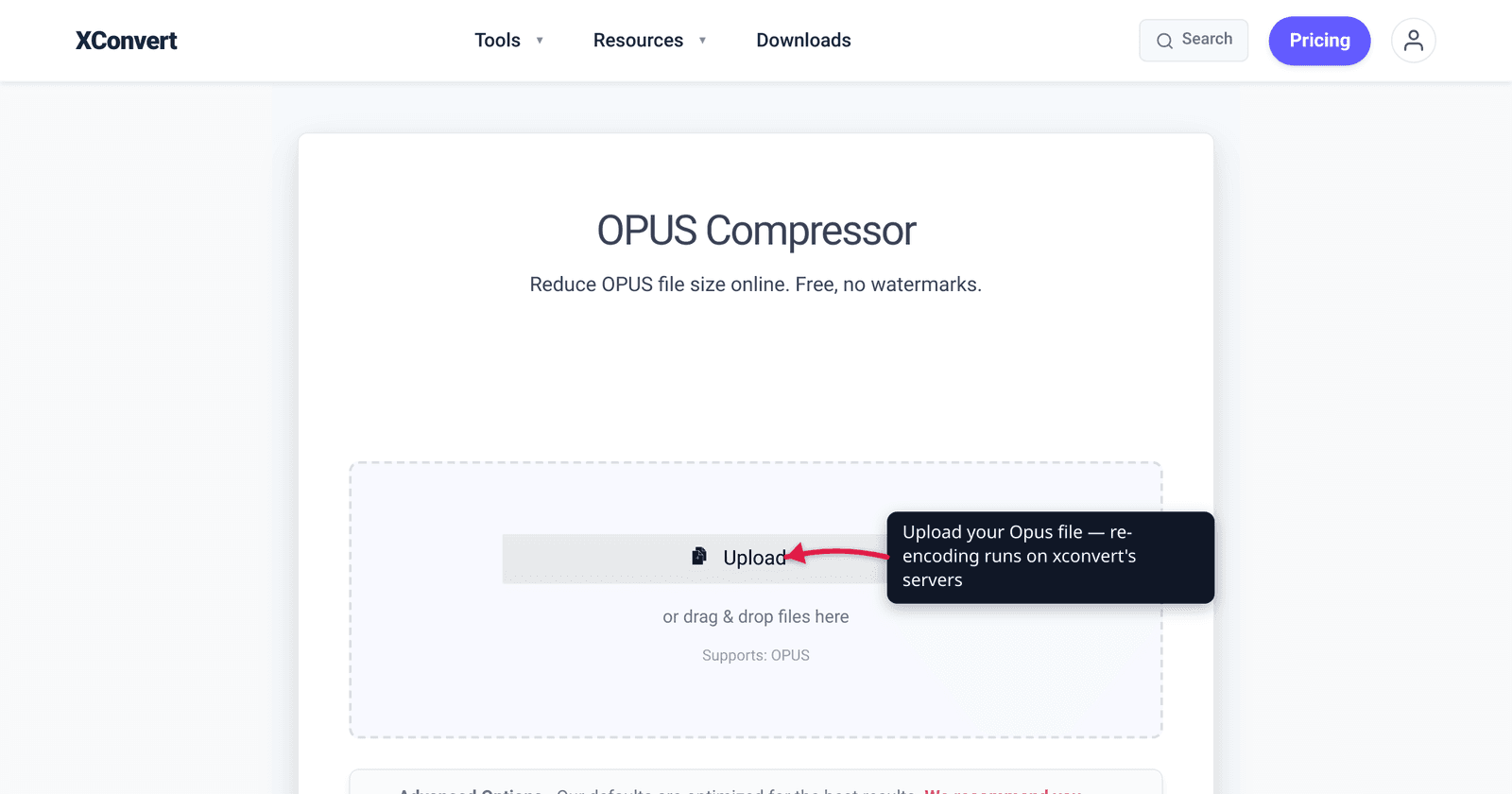
You exported a podcast episode as a .ogg file, or saved a voice note as .opus, and it’s still bigger than the upload limit you’re fighting. Here’s the catch most “OGG compressor” articles skip: OGG and Opus are already lossy and already efficient — they’re usually small to begin with, so the easy wins you’d get on a WAV aren’t on the table. This guide explains what’s actually inside a .ogg or .opus file, which levers genuinely shrink it (bitrate, channels, sample rate), and when re-compressing is worth it versus a waste. We verified the codec and container facts against Xiph.org and MDN, and the bitrate numbers against the Opus standard.
Quick answer: A .ogg file is a container that usually holds Vorbis audio; a .opus file is an Ogg container holding the newer Opus codec. Both are lossy and efficient, so they’re already fairly small. To shrink one further, lower the bitrate (e.g. 128 → 96 kbps), convert stereo to mono for voice (cuts size ~half), and optionally drop the sample rate. Opus is exceptionally good at low bitrates for speech. xconvert’s OPUS Compressor re-encodes to Opus output; for OGG/Vorbis or other targets, use the Audio Compressor.
Jump to a section
- OGG vs Opus: container vs codec
- Why these files are already small
- What actually shrinks an OGG or Opus file
- How small can Opus go? (bitrate guide)
- Compress an OGG or Opus file on xconvert
- FAQ
OGG vs Opus: container vs codec
The single most confusing thing about these files is that “OGG” and “Opus” describe different layers, and the file extension doesn’t always tell you which codec is inside.
- Ogg is a container format — Xiph.org calls it “a multimedia container format, and the native file and stream format for the Xiph.org multimedia codecs.” Like a
.zipfolder or a.mp4, it wraps compressed audio; it isn’t the compression itself. An.oggfile most commonly holds Vorbis audio, but it can also carry Opus, FLAC, or Speex. - Vorbis is the older Xiph audio codec — lossy, royalty-free, and generally more efficient than MP3 at the same quality (per MDN). It’s what most legacy
.oggfiles contain. - Opus is the newer Xiph codec, standardized by the IETF as RFC 6716. It’s lossy and royalty-free, and Xiph explicitly designed it to replace both Vorbis and Speex for new applications. A standalone
.opusfile is an Ogg container — its media type is literallyaudio/ogg— it just carries Opus instead of Vorbis.
So “compress my OGG” and “compress my Opus” are usually the same job at different efficiency tiers. If you’re not sure which codec your .ogg holds, a media inspector (MediaInfo, or ffprobe yourfile.ogg) will print vorbis or opus on the audio stream.
Why these files are already small
This matters before you spend time compressing. WAV and AIFF are uncompressed — a 4-minute stereo WAV is ~40 MB, so converting it to almost anything is a huge win. OGG/Vorbis and Opus are already lossy compression: the encoder threw away inaudible data when the file was first created.
Two consequences:
- There’s less low-hanging fruit. A 128 kbps Opus voice memo is already a fraction of the WAV it came from. You can still make it smaller, but the savings come from accepting lower quality, not from removing redundancy that’s still there.
- Re-encoding lossy → lossy is generational loss. Every time you decode and re-encode a lossy file, you lose a little more. It’s usually fine for one pass, but don’t repeatedly re-compress the same file expecting it to stay clean.
The takeaway: only re-compress when you actually need a smaller file (an upload cap, email limit, storage budget), and pick efficient settings so one pass does the job.
What actually shrinks an OGG or Opus file
There are three real levers. They all trade quality or fidelity for size — there’s no free shrink on an already-lossy file.
1. Lower the bitrate (the main lever). Bitrate is how many kilobits per second the encoder is allowed to spend. Halving it roughly halves the file. Dropping a 256 kbps file to 128 kbps, or a 128 to 96, is the most direct size cut. Opus and Vorbis are both variable-bitrate by nature, but you can target a lower average.
2. Convert stereo to mono (big win for voice). Spoken-word content — podcasts, voice memos, audiobooks, lectures — gains almost nothing from stereo. Collapsing two channels to one can cut the file by close to half at the same per-channel quality. For music, keep stereo.
3. Lower the sample rate (situational). Audio sampled at 48 kHz can be downsampled to, say, 24 kHz for voice, which lets the encoder spend fewer bits. This helps for speech but degrades music noticeably, so reserve it for voice-only files.
For a deeper treatment of how these levers interact without trashing the audio, see compress audio without losing quality.
How small can Opus go? (bitrate guide)
This is where Opus earns its reputation. Per the Opus codec project, it supports bitrates from 6 kb/s to 510 kb/s and is “unmatched for interactive speech and music transmission over the Internet.” MDN describes it as able to “efficiently handle both low-complexity audio such as speech as well as music.”
Rough guidance for Opus output (figures are content-dependent — treat them as starting points, not guarantees):
| Use case | Opus bitrate (mono unless noted) | Notes |
|---|---|---|
| Voice / podcast (lowest acceptable) | ~16–24 kbps | Speech stays intelligible; Opus excels here |
| Voice / podcast (good) | ~32–48 kbps | Clean spoken word; Opus can do fullband music as low as ~32 kbps (Opus 1.2) |
| Music (transparent-ish, stereo) | ~96 kbps | MDN’s general recommendation at 48 kHz stereo |
| Music (high quality, stereo) | ~128 kbps+ | Diminishing returns above this |
Opus’s advantage is steepest at the low end: at 32–64 kbps it sounds clearly better than older codecs, which is why messaging apps and voice notes use it. Vorbis can’t go nearly as low — MDN lists its usable range starting around 45 kbps, and it lacks Opus’s dedicated speech mode. So if your .ogg is Vorbis and you need it really small for voice, re-encoding to Opus often beats squeezing Vorbis harder.
One honest caveat: because both codecs are already efficient, don’t expect WAV-style 90% reductions. Going from a 128 kbps file to a tasteful 64 kbps mono Opus is a realistic ~halving — meaningful, but not magic.
Compress an OGG or Opus file on xconvert
The xconvert OPUS Compressor re-encodes to Opus output and exposes the levers above directly. One honesty note up front: its uploader is scoped to .opus input and produces Opus, so for a legacy .ogg/Vorbis source — or if you want a different output format — use the general Audio Compressor, which accepts OGG, OPUS, MP3, WAV, M4A, FLAC, and more.
To compress an Opus file:
- Open xconvert.com/compress-opus and click Upload to add your file (From my Computer, From Google Drive, or From Dropbox).
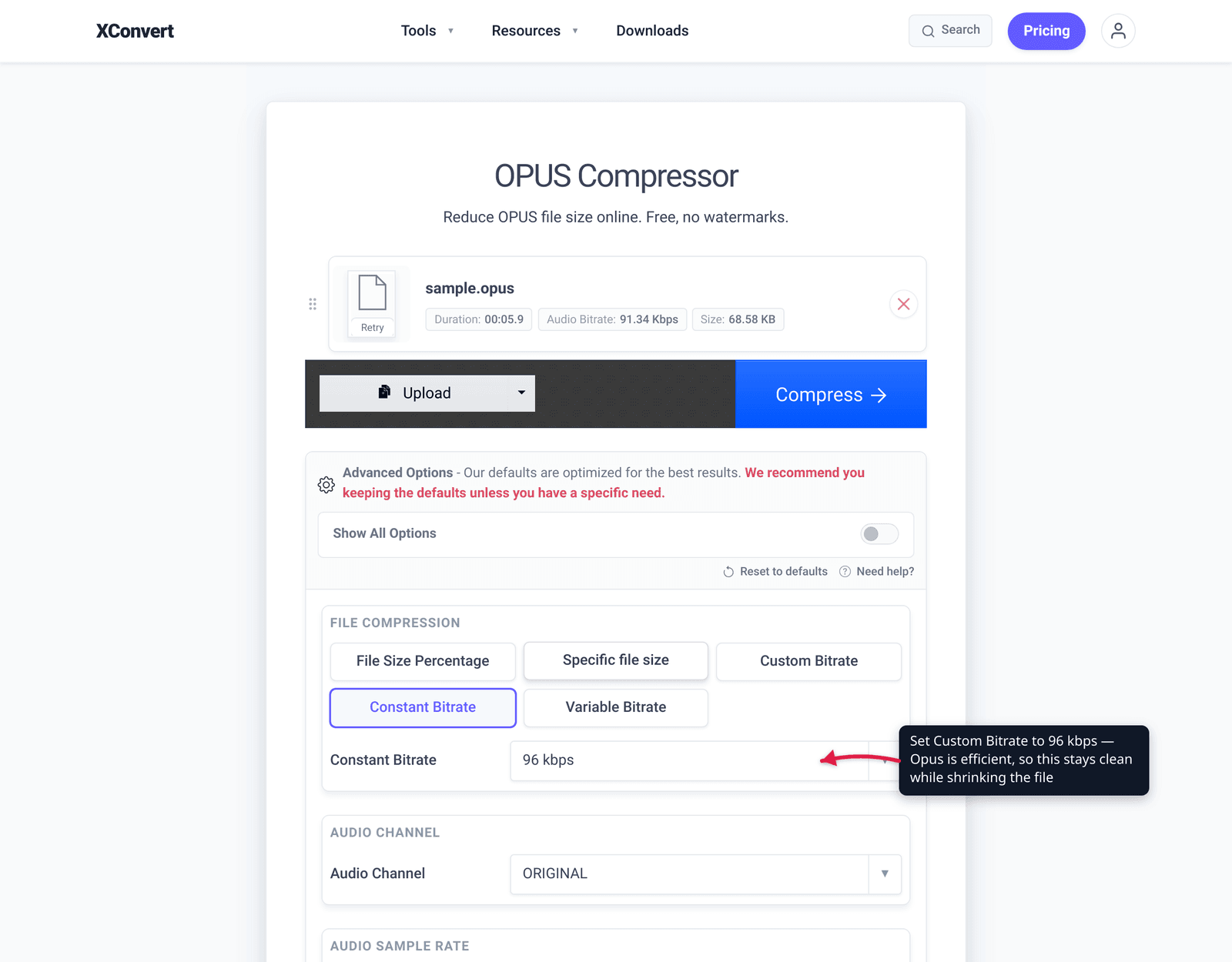
- Open Advanced Options to reveal the controls.
- Under File Compression, choose how to control size: File Size Percentage, Specific file size (enter an exact target in MB), or a bitrate mode — Custom Bitrate, Constant Bitrate, or Variable Bitrate.
- For spoken-word audio, set Audio Channel to mono to roughly halve the size. (It defaults to ORIGINAL.)
- Optionally lower Audio Sample Rate for voice-only files (defaults to ORIGINAL); leave it for music.
- Click Compress, then download the result.
Your file uploads over an encrypted connection, is processed on our servers, and is automatically deleted a few hours later. Nothing stays around.
If you need to land at an exact email or chat limit instead, compress audio without losing quality walks through choosing settings by target size.
FAQ
Is OGG the same as Opus?
No — OGG is a container, Opus is a codec. A .ogg file is a wrapper that usually holds Vorbis audio, but can also hold Opus. A .opus file is also an Ogg container, just carrying the newer Opus codec (its media type is audio/ogg). So “OGG” describes the box; “Vorbis” and “Opus” describe what’s inside it.
Can you compress an OGG or Opus file to make it smaller?
Yes, but the savings are modest because these formats are already lossy and efficient. The levers are lowering the bitrate, converting stereo to mono for voice (cuts size ~half), and dropping the sample rate for speech. You won’t see the huge reductions you’d get compressing an uncompressed WAV — expect a sensible halving, not 90% off.
How do I know if my .ogg file is Vorbis or Opus?
Inspect the audio stream. Open the file in MediaInfo or run ffprobe yourfile.ogg in a terminal — the codec line will read either vorbis or opus. Most older .ogg files are Vorbis; files created by recent apps and messaging tools are typically Opus.
What bitrate should I use for an Opus voice recording?
For spoken word, around 24–48 kbps in mono is a strong target. Opus is exceptionally efficient at low bitrates — it has a dedicated speech mode and stays intelligible far lower than older codecs. For music, aim higher — ~96 kbps is MDN’s general recommendation, and 128 kbps+ for high quality.
Will converting OGG (Vorbis) to Opus make it smaller?
Often yes, especially for voice. Opus is more efficient at low bitrates than Vorbis and supports bitrates down to 6 kb/s, whereas Vorbis’s usable range starts around 45 kbps. Re-encoding Vorbis to a lower-bitrate Opus can shrink a voice file meaningfully. It’s a lossy-to-lossy step, so do it once with good settings rather than repeatedly.
Why does xconvert’s Opus tool only output Opus?
The OPUS Compressor is purpose-built to re-encode to Opus, the most efficient general-purpose codec — ideal when you want the smallest possible voice or web audio. If you need a .ogg/Vorbis output, or to compress a different input format, use the general Audio Compressor instead, which handles OGG, OPUS, MP3, WAV, FLAC, and more.
Sources
Last verified 2026-06-25.
- Xiph.org — Ogg — “Ogg is a multimedia container format” for the Xiph codecs; container-vs-codec distinction.
- Opus Codec project — Opus bitrate range 6 kb/s–510 kb/s, royalty-free, “unmatched for interactive speech and music,” standardized as IETF RFC 6716.
- MDN — Web audio codec guide — Opus and Vorbis are lossy; Opus range 6–510 kbps and ~96 kbps recommendation; Vorbis range from ~45 kbps; Opus handles speech and music efficiently; Vorbis more efficient than MP3.
- Opus (audio format) — Wikipedia —
.opusis an Ogg container (audio/ogg); Opus replaces Vorbis and Speex for new applications; fullband music as low as ~32 kbps (Opus 1.2); RFC 6716; lossy and royalty-free. - xconvert OPUS Compressor — live tool UI: Upload sources, File Compression modes, Audio Channel, Audio Sample Rate, Compress button; Opus input/output.
- xconvert Audio Compressor — accepts OGG, OPUS, MP3, WAV, FLAC, M4A and more for other targets.