 By James
You exported a looping logo animation as a GIF, dropped it onto a dark page, and every anti-aliased edge came back wearing a jagged white halo. That is not a bad export — it is GIF doing exactly what a 1980s format was designed to do. APNG fixes it. What APNG does not reliably do is the thing every comparison article promises: produce a smaller file. We checked the claims against the W3C’s PNG specification, the CompuServe GIF89a spec and caniuse, and the size story is the one everybody gets backwards.
Quick answer: Convert GIF to APNG when you need real transparency or real colour — 8-bit alpha instead of GIF’s on/off transparency, 16.7 million colours instead of 256, and exact frame timing instead of GIF’s hundredth-of-a-second rounding. Do not convert expecting a smaller file. At the same colour depth APNG usually compresses better than GIF, but APNG’s default true-colour mode keeps every pixel losslessly, while GIF’s 256-colour quantisation is its compression. For photographic or video-derived animation, the GIF is very often the smaller file. APNG is supported by about 96% of browsers and degrades to a static first frame everywhere else.
Jump to a section
- APNG is now part of the official PNG standard
- GIF vs APNG, side by side
- The size myth: when APNG wins and when it loses
- Frame timing: GIF’s hundredth-of-a-second problem
- Where each format actually plays
- Convert a GIF to APNG on xconvert
- FAQ
APNG is now part of the official PNG standard
For twenty years the honest caveat about APNG was “it’s not really a standard.” That caveat expired. The PNG Specification (Third Edition) became a W3C Recommendation on 24 June 2025, defining animation as a first-class part of PNG through three chunks:
acTL— declares the file animated and carriesnum_framesandnum_plays(0 means loop forever). It must appear before the firstIDAT.fcTL— one per frame, carrying the frame’swidth,height,x_offset,y_offset, its delay, and itsdispose_op/blend_opbehaviour.fdAT— the frame data, structured likeIDATbut prefixed with a sequence number.
APNG began life as a Mozilla extension, which is why the spec notes acTL is “exceptionally defined as if it were a private chunk” for web compatibility. That design buys the best fallback story in animated imagery: a decoder that doesn’t understand APNG ignores the animation chunks and renders the still image, so an unsupporting client shows a clean first frame rather than a broken-image icon. And because fcTL carries per-frame offsets and dimensions, APNG gets the same “only store the rectangle that changed” optimisation GIF has.
GIF vs APNG, side by side
| Property | GIF | APNG |
|---|---|---|
| Specification | GIF89a, CompuServe — document dated 31 July 1990, copyright 1987–1990 | PNG Third Edition, W3C Recommendation, 24 June 2025 |
| Colour | Up to 256 entries per colour table (8-bit indexed only) | Greyscale, indexed (1/2/4/8-bit), or true colour at 8 or 16 bits per component |
| Transparency | Binary. A Transparency Flag nominates one palette entry as the Transparent Color Index — a pixel is fully on or fully off | Full alpha channel at 8 or 16 bits per sample — genuine semi-transparency |
| Compression | Variable-length-code LZW | deflate (32 KB window) with per-scanline prediction filters: None, Sub, Up, Average, Paeth |
| Lossy or lossless | Lossless after the 256-colour quantisation, which is itself destructive | Lossless. Nothing is discarded |
| Frame delay | Whole hundredths of a second | A fraction: delay_num / delay_den, so any rate is exact |
| Frame regions | Yes | Yes (fcTL offsets and dimensions) |
| Loop control | Netscape application extension | num_plays in acTL |
| Fallback when unsupported | n/a — universal | Renders the still first frame |
| Browser support | Universal | 95.94% — Chrome 59+, Edge 79+, Firefox 3+, Safari 8+, Opera 46+ |
The row that decides most real jobs is transparency. GIF’s transparency is a single palette index — a pixel either shows or it doesn’t, with no way to encode “this edge pixel is 40% opaque.” So every anti-aliased curve has to be pre-blended against one assumed background colour, and that assumption becomes a visible fringe the moment the animation lands on any other background. APNG’s 8-bit alpha stores that 40% directly, which is why the same sticker drops cleanly onto white, black, or a photo.
The size myth: when APNG wins and when it loses
“APNG produces smaller files than GIF” is repeated everywhere, and it is true only under a condition nobody states.
The condition is equal colour depth. Compare a 256-colour GIF against a 256-colour indexed APNG and APNG generally wins, for a straightforward reason: GIF compresses with variable-length-code LZW, an algorithm frozen in 1987, while PNG runs deflate over data first passed through per-scanline prediction filters (Sub, Up, Average, Paeth). Prediction plus a modern entropy coder beats LZW on almost any real image.
Now change one thing. Encode the same animation as APNG in its natural mode — true colour with alpha — and the comparison inverts, because you are no longer comparing compressors. GIF’s 256-colour quantisation is not a limitation sitting next to its compression; it is the bulk of its compression. A photographic or video-derived animation reduced to 256 dithered colours can be a fraction of the size of the same animation stored losslessly in 24-bit RGBA, and no amount of deflate tuning closes that gap.
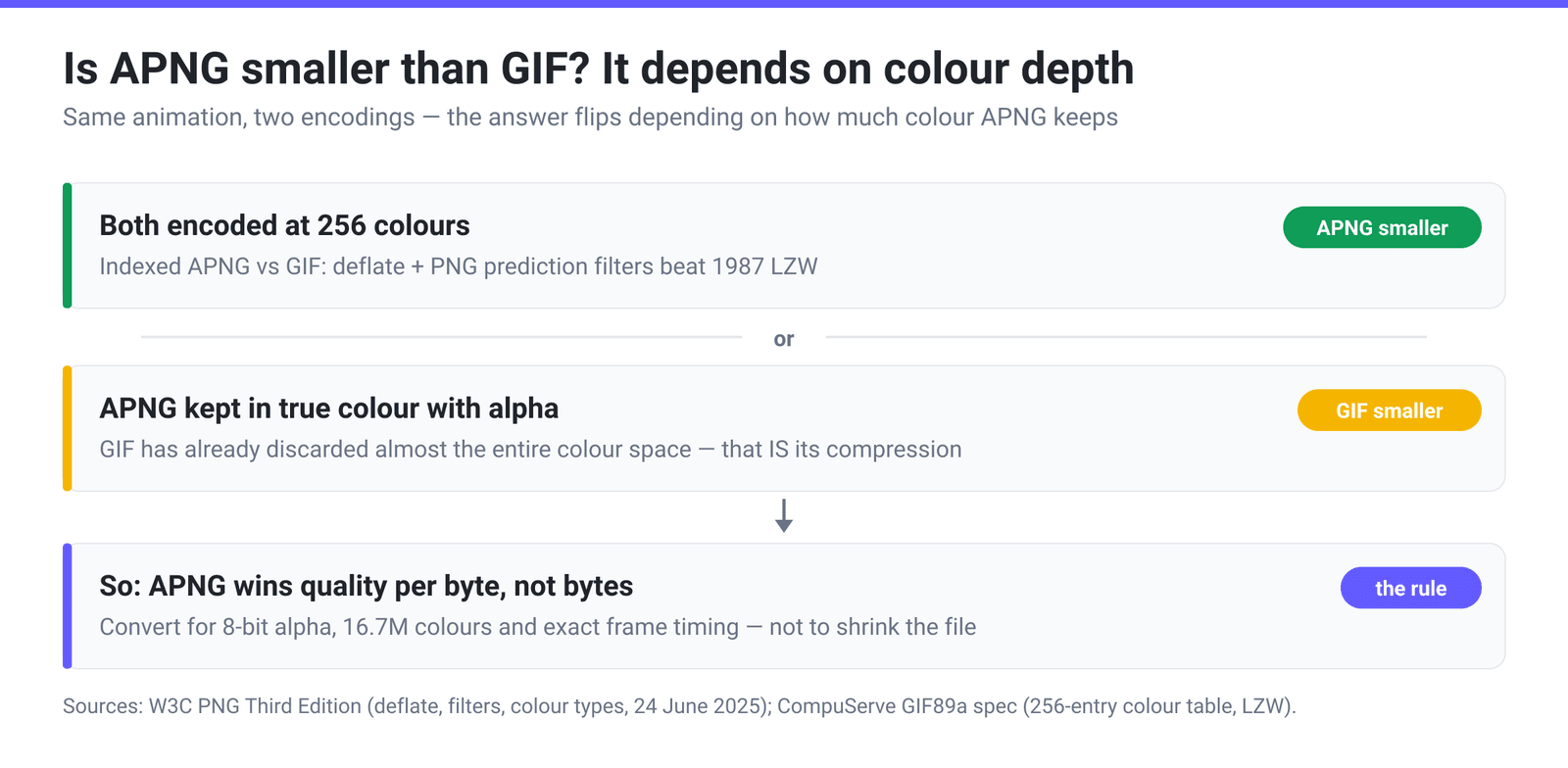
So the honest rule:
- Flat-colour, synthetic animation — UI recordings, line art, logos, pixel art. APNG is competitive on size and strictly better on quality, because there was little colour to throw away.
- Photographic, gradient-heavy or video-derived animation. Expect the APNG to be larger, often much larger. You are buying colour fidelity and alpha, and paying in bytes.
- Anything needing semi-transparent edges. Size is the wrong question — GIF physically cannot represent the picture; APNG can.
If your actual goal was “smaller file,” neither format is the answer. A modern codec is: convert the GIF to WebP for a format with both lossy and lossless modes plus a real alpha channel, or convert it to MP4 if it is really a video wearing an animation format’s clothes.
Frame timing: GIF’s hundredth-of-a-second problem
GIF89a’s Graphic Control Extension defines Delay Time as “the number of hundredths (1/100) of a second to wait before continuing with the processing of the Data Stream.” Whole hundredths. That means a GIF can only play at rates that divide 100 evenly — 50, 25, 20, 10, 5, 2 and 1 FPS are exact; anything else rounds to the nearest centisecond and plays at a different speed than the number you asked for. APNG’s fcTL stores delay as a rational fraction, delay_num over delay_den, so 1/30 of a second is exactly 1/30 of a second.
Here is what the rounding costs, for the rates in xconvert’s own Framerate dropdown:
| You ask for | Nearest GIF delay | GIF actually plays at | APNG plays at |
|---|---|---|---|
| 50 FPS | 2/100 s | 50 FPS — exact | 50 FPS |
| 30 FPS | 3/100 s | ≈33.3 FPS | 33 FPS |
| 25 FPS | 4/100 s | 25 FPS — exact | 25 FPS |
| 20 FPS | 5/100 s | 20 FPS — exact | 20 FPS |
| 15 FPS | 7/100 s | ≈14.3 FPS | 14 FPS |
| 12 FPS | 8/100 s | 12.5 FPS | 12 FPS |
| 10 FPS | 10/100 s | 10 FPS — exact | 10 FPS |
| 8 FPS | 12/100 s | ≈8.3 FPS | 8 FPS |
Two of those APNG cells need a footnote, because they are our doing rather than the format’s. The Framerate dropdown is shared with the GIF pages, so it stores 30 FPS as the centisecond-friendly value 100/3 and 15 FPS as 100/7. An APNG frame delay is an exact fraction, so the APNG path collapses those to whole rates before encoding — 100/3 becomes 33 and 100/7 becomes 14. Pick 50, 25, 20, 12, 10, 8, 5, 2 or 1 FPS and you get exactly the number on the label; pick 30 or 15 and the APNG plays a little off it — 33 FPS in the first case, 14 in the second. The container is still exact — 1/33 of a second is stored precisely — it is the requested rate that gets rounded.
For a three-second loop the drift is imperceptible. For an animation that has to line up with something else — a UI beat, a countdown, a loop stitched to another asset — it is the difference between matching and slowly sliding out of phase.
Where each format actually plays
GIF is universal and will stay that way; nothing displaces a format every decoder written since 1990 can read.
APNG sits at 95.94% global support per caniuse: Chrome from 59, Edge from 79, Firefox from 3, Safari from 8 (including iOS Safari 8), Opera from 46. The gaps are Internet Explorer and Opera Mini. Outside browsers support is patchier — plenty of desktop viewers, chat clients and CMS thumbnailers read an APNG’s first frame and quietly treat it as a still PNG.
Plan around that failure mode; it is benign. An unsupporting client shows frame one, because the animation chunks are ancillary and skippable — so design your first frame to work as a poster image. Also check which extension your destination expects: an APNG is a valid PNG stream, and some platforms want .png while others look for .apng.
Convert a GIF to APNG on xconvert
The xconvert GIF to APNG converter rebuilds the animation frame by frame rather than renaming a container, so colour depth and the alpha channel are genuinely rewritten.
- Open xconvert.com/convert-gif-to-apng and click Upload to add your GIF — or drag it onto the drop zone. Google Drive and Dropbox also work.
- Open Advanced Options to reveal the controls.
- Check the Framerate dropdown. It opens on 10 FPS (Recommended) — fine for a screen recording, too slow for a smooth motion graphic. If your source GIF is livelier than that, raise it to 20, 25 or 50 FPS — those land exactly on the label. The 30 and 15 entries land at 33 and 14 for the reason set out in the timing section above. This is the setting most worth changing here.
- Under Image resolution, keep Keep original for a faithful conversion, or scale down with Resolution Percentage, a Preset Resolutions entry, or an exact Width × Height.
- Uploading several GIFs? Combine? → Single animation stitches them into one APNG; Individual files returns one per input.
- Click Convert and download.
Files are uploaded over an encrypted connection, processed on our servers, and deleted automatically a few hours later. No sign-up, no watermark.
Going the other way is APNG to GIF — with the same trade in reverse: you lose the alpha channel and everything past 256 colours.
FAQ
Is APNG smaller than GIF?
Not by default. At the same colour depth — a 256-colour indexed APNG against a 256-colour GIF — APNG usually wins, because deflate with PNG’s prediction filters compresses better than GIF’s 1987-vintage LZW. But APNG’s normal mode is lossless 24-bit true colour with an 8-bit alpha channel, and against that a GIF has already discarded almost the entire colour space. For photographic or video-derived animation the GIF is frequently the smaller file, sometimes dramatically. Convert to APNG for quality and transparency, not for size.
Is APNG a real standard or still a Mozilla extension?
It is a real standard. Animation was folded into the PNG Specification (Third Edition), which became a W3C Recommendation on 24 June 2025, defining the acTL, fcTL and fdAT chunks. Before that, APNG had been a widely-implemented but formally non-standard extension for roughly two decades — which is why a lot of older writing still describes it as unofficial.
Will an APNG still show up if the browser doesn’t support it?
Yes, as a static image. The animation chunks are ancillary, so a decoder that doesn’t recognise them skips them and renders the base PNG image — the viewer sees your first frame rather than a broken image. That is a meaningfully better failure mode than most alternatives, and it means you should treat frame one as a deliberate poster frame.
Why does my GIF logo have white edges and the APNG doesn’t?
Because GIF transparency is a single flag plus one Transparent Color Index: a pixel is either fully visible or fully invisible. There is no way to store a half-opaque pixel, so anti-aliased edges have to be pre-blended against an assumed background — usually white. Put that GIF on a dark page and the pre-blended pixels show as a fringe. APNG stores a real 8-bit alpha value per pixel, so the same edge composites correctly against any background.
Should I use APNG or WebP for an animated logo?
WebP if you control the delivery and want the smallest file: it has an alpha channel and a lossy mode, which APNG lacks entirely. APNG if you want a lossless master, the widest still-image fallback behaviour, or a destination that specifically accepts PNG/APNG but not WebP. The two overlap heavily; the deciding question is usually whether you can accept lossy compression. See GIF to WebP for that route.
Does APNG support more than 256 colours per frame?
Yes. PNG’s colour types cover greyscale, indexed colour at 1, 2, 4 or 8 bits, true colour at 8 or 16 bits per component, and both greyscale and true colour with alpha. Animated GIF is restricted to 8-bit indexed colour — a maximum of 256 entries per colour table. That difference is why gradients that band and dither in a GIF stay smooth in an APNG.
Sources
Last verified 2026-08-31.
- W3C — Portable Network Graphics (PNG) Specification (Third Edition) — W3C Recommendation, 24 June 2025;
acTL/fcTL/fdATchunk definitions,delay_num/delay_den,dispose_op/blend_op, colour types and bit depths, deflate compression and the five filter types. - W3C-hosted GIF89a specification (CompuServe) — document dated 31 July 1990; 256-entry colour table limit, Transparency Flag and Transparent Color Index, Delay Time in hundredths of a second, variable-length-code LZW.
- caniuse — APNG (Animated PNG) — 95.94% global support; Chrome 59+, Edge 79+, Firefox 3+, Safari 8+, Opera 46+; unsupported browsers show the first frame only.
- MDN — Image file type and format guide — APNG introduced by Mozilla; APNG colour-depth options versus animated GIF’s 8-bit indexed colour.
- xconvert conversion configuration and APNG encoder, checked 2026-08-31 — the shared Framerate dropdown stores 30 FPS as
100/3and 15 FPS as100/7(the centisecond values GIF needs), and the APNG path rounds a100/Nrate to the nearest whole number before extraction, so those two entries encode at 33 and 14 FPS.100/8(12 FPS) and100/12(8 FPS) round back to their own labels.