 By James
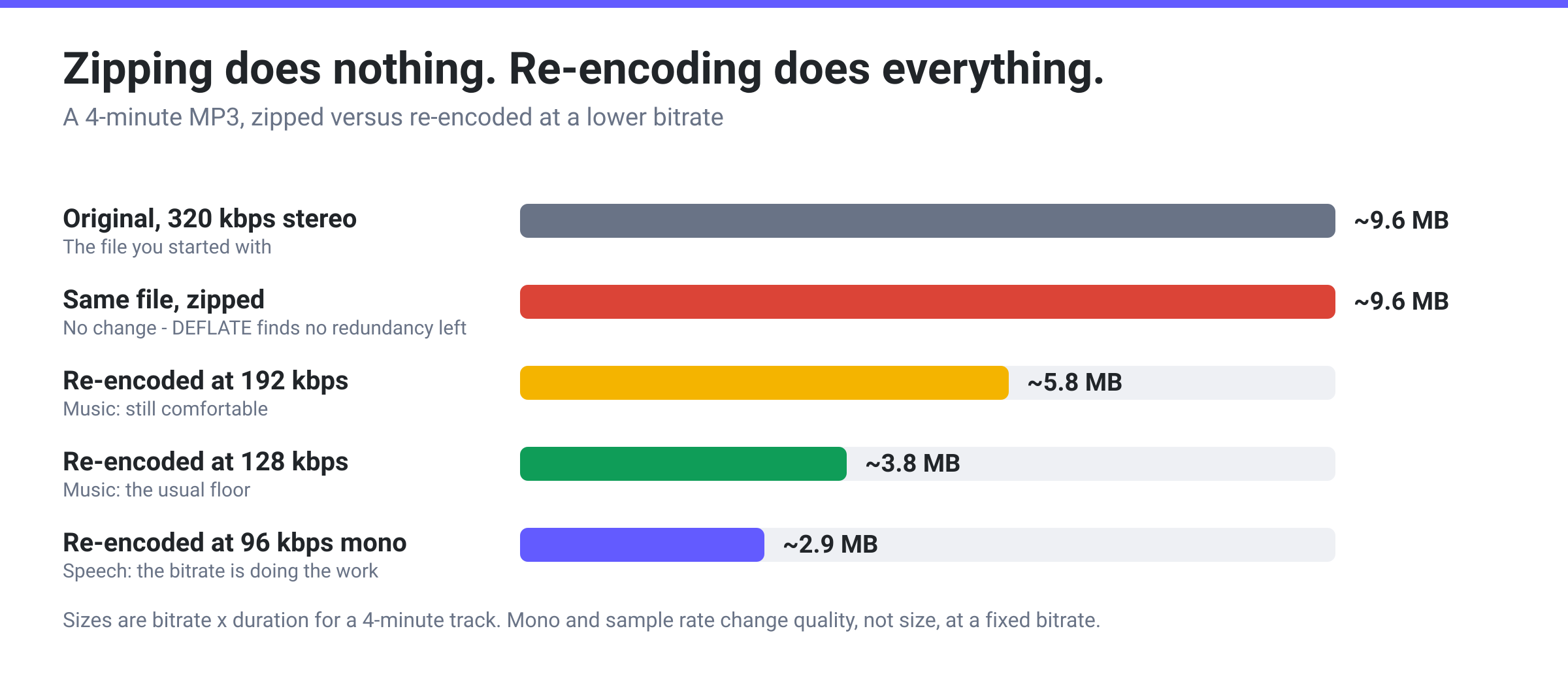
You need to email a 9 MB MP3 and it’s over someone’s attachment limit, so you do the obvious thing: right-click, compress to a ZIP, check the result. The ZIP is 9 MB. Occasionally it is a few hundred bytes bigger. Nothing is broken, your zipper is not misconfigured, and no setting will fix it — the MP3 has already been compressed, by a far more aggressive algorithm than the one inside a ZIP file, and there is nothing left for ZIP to find.
Quick answer: ZIP compresses with DEFLATE, which works by spotting repeated byte strings and skewed symbol frequencies. An MP3 is the output of a lossy encoder that has already stripped exactly that kind of redundancy out, so DEFLATE finds almost nothing to remove — and the ZIP container itself adds at least 98 bytes of headers plus your filename stored twice, which is why a zipped MP3 sometimes ends up marginally larger. The only thing that genuinely shrinks an MP3 is re-encoding it at a lower bitrate. Going mono or dropping the sample rate does not make a fixed-bitrate file any smaller — those are quality dials that let a lower bitrate stay listenable. Zip it only to bundle several files into one attachment.
Jump to a section
- What ZIP actually looks for
- Why an MP3 has nothing left to give
- What actually shrinks an MP3
- The exception: uncompressed audio really does zip
- Compress audio on xconvert
- FAQ
What ZIP actually looks for
The ZIP format supports several compression methods, but in practice one is used almost universally. PKWARE’s own .ZIP File Format Specification puts it plainly: “Compression method 8 (Deflate) is the method used by default by most ZIP compatible application programs.”
DEFLATE is defined in RFC 1951, and its abstract describes exactly what it does: it “compresses data using a combination of the LZ77 algorithm and Huffman coding.” Those two halves are the entire story:
- LZ77 hunts for repeated byte strings, replacing each one it has seen before with a short back-reference — “copy 40 bytes from 900 bytes ago.” This is why a document with the same boilerplate on every page collapses so dramatically.
- Huffman coding exploits uneven symbol frequencies, giving common byte values short codes and rare ones long codes. This is why text compresses so well — the letter
eand the space character dominate.
RFC 1951 even quantifies the everyday case: “English text usually compresses by a factor of 2.5 to 3; executable files usually compress somewhat less; graphical data such as raster images may compress much more.”
Both halves need the same thing to work: statistical structure in the input. Repetition, predictability, imbalance. Remove that structure and DEFLATE has nothing to trade on.
Why an MP3 has nothing left to give
An MP3 is a lossy file — MDN’s audio codec guide describes MP3, MPEG-1 Audio Layer III, introduced in 1991 and finalised in 1992, as lossy compression, and that is the whole point of it. The encoder’s job is to throw away everything it can, then pack what remains as tightly as possible into the target bitrate.
By the time you get a .mp3, the file is close to the densest representation of that audio the encoder could produce. The repeated byte strings LZ77 needs are gone, and the byte values are spread nearly evenly rather than clustering the way text does. DEFLATE scans the whole file and finds essentially nothing worth encoding differently.
Microsoft says the same thing in its own support documentation about zipping already-compressed files — for a folder of JPEGs, “the total size of the folder will be about the same as the original collection of pictures.” Audio behaves identically.
The reference ZIP implementation goes a step further and gives you a switch to stop trying. Info-ZIP’s zip manual documents a -n suffixes option: “Do not attempt to compress files named with the given suffixes. Such files are simply stored (0% compression) in the output zip file, so that zip doesn’t waste its time trying to compress them,” with the parenthetical explanation that “image and sound files often have their own specialized compression methods.” When the archiver’s own manual tells you not to bother, that is your answer.
And then the container adds bytes. A ZIP holding a single file carries, per PKWARE’s specification, a 30-byte local file header, a 46-byte central directory header and a 22-byte end-of-central-directory record — 98 bytes minimum — plus your filename stored twice, once in each header. DEFLATE’s own worst case adds a little more: RFC 1951 bounds it at “5 bytes per 32K-byte block, i.e., a size increase of 0.015% for large data sets.”
So the arithmetic on a single MP3 is roughly: no meaningful saving, minus about a hundred bytes of overhead. A zipped MP3 that comes out slightly bigger than the original is the expected result, not a glitch.
What actually shrinks an MP3
An MP3’s size is set almost entirely by one thing: bitrate × duration. Change one of those and the file changes. Wrap it in a container and it does not.
| Lever | Typical effect | What it costs you |
|---|---|---|
| Zip it | ~0%, occasionally slightly negative | Nothing — but it achieves nothing either |
| Lower the bitrate | Proportional: 320 → 128 kbps is roughly a 60% cut | The real trade. MDN suggests at least 128 kbps for stereo music, and 192 kbps if you can |
| Stereo → mono | No change at a fixed bitrate — 128 kbps mono and 128 kbps stereo are the same size | Nothing on speech, and it is not a size lever: it hands the encoder all its bits for one channel, so a lower bitrate becomes acceptable. Where the encoder picks the rate — Variable Bitrate, or a percentage / Specific-file-size target — an easier job needs fewer bits |
| Lower the sample rate | No change at a fixed bitrate either — the bitrate is the bitrate | Cuts high frequencies: inaudible on voice, obvious on music. Same role as mono — it buys quality at a low bitrate, and fewer bits in the encoder-chooses modes |
| Trim silence or dead air | Proportional to what you remove | Nothing, if the removed part was genuinely dead |
| Convert to a newer codec | Opus or AAC hold up better than MP3 at low bitrates | Compatibility — MP3 plays absolutely everywhere |
Which to reach for depends on the content. For speech — a podcast, interview, lecture or voice memo — the combination of mono, a lower sample rate and a much lower bitrate gets an enormous reduction with no meaningful loss. Be clear about which part does what: the low bitrate is what shrinks the file, and mono and the sample rate are what make that low bitrate sound fine. For music, bitrate is the only honest lever, and you should go down it slowly. For the archive-format question itself — which container to use when you are bundling files — see ZIP vs RAR vs 7z.
The exception: uncompressed audio really does zip
There is one audio case where zipping genuinely works, and it is the one that makes people expect it to work everywhere else.
A WAV or AIFF file is uncompressed PCM — raw samples written out one after another with no compression stage at all. That is exactly the kind of data DEFLATE was built for, and a WAV really will shrink inside a ZIP. Someone who once zipped a folder of WAVs and watched it halve is not misremembering.
But do not do it that way. A lossless audio codec — FLAC or ALAC — beats a general-purpose archiver decisively, because it understands what the bytes mean: it predicts each sample from the ones before it and stores only the difference. A ZIP has no idea it is looking at a waveform. And a FLAC file is still playable — drop it into a player, a DAW or a phone — where a zipped WAV has to be extracted first.
So: uncompressed audio, use WAV to FLAC, not ZIP. Already-compressed audio — MP3, AAC, M4A, OGG, Opus, WMA — neither works, and re-encoding is the only route.
Compress audio on xconvert
The xconvert audio compressor re-encodes rather than repackages, which is why it actually changes the number.
- Open xconvert.com/audio-compressor and click Upload, or drag your audio onto the drop zone. It accepts MP3, WAV, FLAC, AAC, M4A, OGG, OPUS, WMA, AIFF, AC3, AMR and more, several at a time.
- Open Advanced Options. Leave Audio File Extension on MP3 to stay in the same format, or pick another output.
- Choose your File Compression mode. File Size Percentage opens on 80, which trims a fifth off. Specific file size lets you type an exact KB or MB target and back-solves the bitrate for you. Constant Bitrate gives you a fixed ladder from 8 kbps up to 384 kbps.
- For speech, set Audio Channel to MONO and drop Audio Sample Rate to 24000 HZ or 16000 HZ. Neither shrinks a fixed-bitrate file by itself — what they do is let you take the bitrate much lower before it sounds bad, and where the encoder is choosing the rate for you (Variable Bitrate, or the percentage and Specific-file-size targets this page opens on) an easier job needs fewer bits.
- Use Trim with a start time and duration if there is dead air at either end.
- Click Compress and download.
xconvert’s own production data, published on the tool page, puts the median audio file at about 50% smaller — a 9.4 MB file becoming 4.7 MB — with a 30-minute WAV interview of roughly 300 MB landing near 21 MB at 96 kbps mono MP3.
Files are uploaded over an encrypted connection, processed on our servers, and deleted automatically a few hours later. No sign-up, no watermark.
FAQ
Does zipping an MP3 make it smaller at all?
Effectively no. You might see a fraction of a percent in either direction depending on how much ID3 tag and cover-art data is riding along, but the audio itself will not move. The MP3 encoder already removed the redundancy that ZIP’s DEFLATE algorithm looks for. Add the ZIP container’s own overhead — a 30-byte local header, a 46-byte central directory entry and a 22-byte end record, plus the filename twice — and a single zipped MP3 frequently ends up a few hundred bytes larger than the original.
Why did my ZIP come out bigger than the MP3?
Because there was no compression to offset the container overhead. Every ZIP entry costs at least 98 bytes of structural headers before any data, and DEFLATE’s worst case on incompressible input adds a further 5 bytes per 32 KB block — RFC 1951 puts that at a 0.015% size increase for large files. On something already as dense as an MP3, that overhead is all you get.
Would RAR or 7z do better than ZIP on an MP3?
Not meaningfully. They use stronger algorithms than DEFLATE — better dictionaries, better modelling — but they are still general-purpose compressors looking for statistical redundancy in a stream that no longer has any. On text or source code the difference between ZIP and 7z is large; on an MP3, all three land within a rounding error of the original size. Choose an archive format on compatibility and features, not on what it will do to your audio.
Should I zip a folder of MP3s to email them?
Yes, but for the right reason. Zipping several MP3s will not shrink them, and it will not get you under an attachment limit that the raw files already exceed. What it does do is bundle them into one attachment, preserve the folder structure and filenames, and avoid a recipient’s mail client mangling twenty separate files. If size is the problem, compress the audio first and then zip the results.
Why does zipping a WAV work when zipping an MP3 doesn’t?
Because a WAV is uncompressed. It is raw PCM samples written straight to disk with no compression stage, so it is full of exactly the redundancy DEFLATE is built to exploit. An MP3 has already been through a lossy encoder that removed it. That said, a ZIP is still the wrong tool for a WAV — FLAC or ALAC compress audio far better because they model the waveform, and the result stays playable without extracting anything.
What is the smallest I can make an MP3 without it sounding bad?
It depends entirely on the content. For speech, mono at 16 kHz and 48–64 kbps stays perfectly intelligible and is a fraction of the original. For music, MDN’s guidance is a minimum of 128 kbps for stereo and 192 kbps if you can afford it — below that, cymbals and reverb tails start to smear audibly. If you have a hard size limit rather than a quality target, use the Specific file size mode and let the encoder solve for the bitrate instead of guessing.
Sources
Last verified 2026-08-31.
- RFC 1951 — DEFLATE Compressed Data Format Specification version 1.3 (P. Deutsch, May 1996) — DEFLATE as “a combination of the LZ77 algorithm and Huffman coding”; stored / fixed-Huffman / dynamic-Huffman block types; “the worst case expansion is 5 bytes per 32K-byte block, i.e., a size increase of 0.015%”; the English-text compression factor of 2.5 to 3.
- PKWARE — .ZIP File Format Specification (APPNOTE.TXT, v6.3.10) — “Compression method 8 (Deflate) is the method used by default by most ZIP compatible application programs”; the 30-byte local file header (§4.3.7), 46-byte central directory header (§4.3.12) and 22-byte end-of-central-directory record (§4.3.16).
- Info-ZIP
zipmanual, version 3.0 — the-n suffixesoption: files “are simply stored (0% compression) … so that zip doesn’t waste its time trying to compress them,” because “image and sound files often have their own specialized compression methods.” - Microsoft — Zip and unzip files — the Windows path (right-click → Show more options → Send to → Compressed (zipped) folder) and the caveat that for already-compressed types “the total size of the folder will be about the same as the original collection of pictures.”
- MDN — Web audio codec guide — MP3 as MPEG-1/MPEG-2 Part 3, introduced 1991 and finalised 1992, lossy; the 32–320 kbps MPEG-1 bitrate ladder; the recommendation of at least 128 kbps for stereo music and 192 kbps for downloads.