 By Stephanie Taylor
An invoice.zip arrives from a company you half-recognise. A driver bundle from a search result comes as a .rar. A game mod lands on Discord as a .7z with the password in the message. All three raise the same question: is opening the archive the dangerous part, or is it what you do next? It matters, because the stock advice — “never open ZIPs from strangers” — is too vague to protect you from the deliveries that actually work.
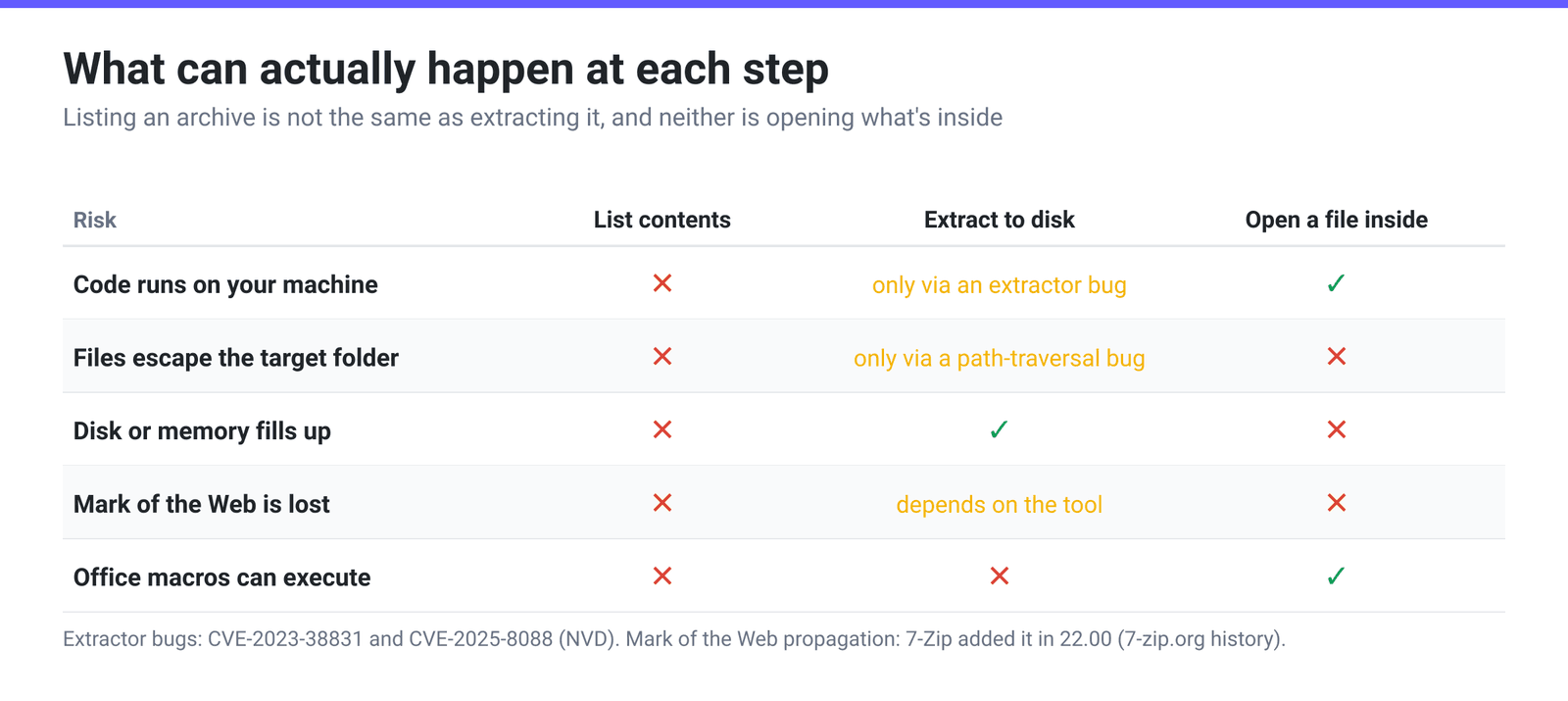
Quick answer: An archive is a container, not a program. Listing what is inside a ZIP, RAR or 7z is close to risk-free, and it is the step most people skip. The real risks are, in order: what you double-click after extracting (that
.exe,.lnk,.jsor macro-enabled document is the payload), bugs in your extractor — WinRAR has had two flaws exploited in the wild, CVE-2023-38831 and CVE-2025-8088, fixed in 6.23 and 7.13 — and the Mark of the Web being stripped, which silently disarms the warnings Windows and Office would otherwise show you. So: look at the listing first, keep the extractor current, and treat “password is in the email” as a red flag rather than a courtesy.
Jump to a section
- An archive is a container, not a program
- The three things that actually go wrong
- How to read an archive before you trust it
- Extract an archive on xconvert
- FAQ
An archive is a container, not a program
A ZIP is a stack of compressed blobs with an index at the end describing them. PKWARE’s APPNOTE.TXT, the format specification, calls that index the Central Directory: every entry’s name, size, timestamp and compression method live there, separate from the compressed bytes. Nothing in it executes, and reading it decompresses nothing — which is why any tool can list a 4 GB archive instantly.
The security consequence is the one most people miss: in an ordinary password-protected ZIP, the file names are not secret. Encrypting the contents does not encrypt the index. The spec offers a separate, rarely-used feature for that — “Central Directory Encryption provides greater protection against information leakage by encrypting the Central Directory structure and by masking key values that are replicated in the unencrypted Local Header” — and where it is used, the spec is equally clear that viewing “any information about the files” needs the password first. Most tools do not produce those archives. So for the overwhelming majority of encrypted ZIPs you can see exactly what you would be extracting before you type anything.
The three things that actually go wrong
| Risk | When it bites | What actually protects you |
|---|---|---|
| The payload inside | Only when you open or run the extracted file | Look at real extensions before double-clicking |
| A bug in the extractor | While unpacking, before you touch anything | Keep WinRAR / 7-Zip / your OS tool updated |
| Losing the Mark of the Web | After extraction, when Windows and Office stop warning you | Use an extractor that propagates the zone tag |
1. The payload. Archives are a delivery mechanism, and the file inside is the malware. The recurring trick is a name that reads as harmless: Invoice_2026.pdf.exe shows as Invoice_2026.pdf on a Windows machine with “hide extensions for known file types” left on. The same logic covers .scr, .js, .vbs, .hta, .cmd, .lnk shortcuts, .msi installers, disk images such as .iso and .img, and macro-enabled Office documents (.docm, .xlsm, and the template extensions .dot, .dotm, .pot, .potm, .xlt, .xltm).
2. The extractor itself. This is the case where merely unpacking is enough, and it is not hypothetical. NIST’s National Vulnerability Database describes CVE-2023-38831 like this: “RARLAB WinRAR before 6.23 allows attackers to execute arbitrary code when a user attempts to view a benign file within a ZIP archive. The issue occurs because a ZIP archive may include a benign file (such as an ordinary .JPG file) and also a folder that has the same name as the benign file, and the contents of the folder (which may include executable content) are processed during an attempt to access only the benign file. This was exploited in the wild in April through October 2023.” Two years later, CVE-2025-8088 — a path-traversal flaw in the Windows build of WinRAR, rated 8.8, fixed in 7.13 and listed in CISA’s Known Exploited Vulnerabilities catalogue — allowed code execution from a crafted archive. Both were implementation bugs, not format flaws, and both were fixed by updating.
3. The Mark of the Web. Windows attaches a hidden Zone.Identifier stream to files that came from the internet, with a zone value where 3 means Internet. That tag is what makes Office refuse macros: Microsoft’s own documentation is titled “Macros from the internet are blocked by default in Office” and describes the block being applied on the basis of that mark. Archives interfere with this, because whether the tag survives extraction is up to the extractor. 7-Zip only gained the ability at all in version 22.00, released 2022-06-15, whose changelog lists a “New -snz switch to propagate Zone.Identifier stream to extracted files (Windows)” and a matching “Propagate Zone.Id stream” option in Tools → Options; a related propagation bug for nested archives was not fixed until 24.09 in November 2024. An old extractor, or a new one with the option off, hands you files that Windows believes you created yourself.
How to read an archive before you trust it
Five checks, in the order that costs you the least effort:
- Turn on file extensions. In Windows File Explorer, View → Show → File name extensions. This single setting defeats the entire double-extension family of tricks, permanently.
- List before you extract. Open the archive and read the tree. You are looking for anything you did not expect: an executable in a folder of photos, a
.lnkin a document bundle, a second copy of a filename, or a suspiciously deep folder path. - Treat a file and a same-named folder as hostile. That exact structure is the CVE-2023-38831 signature. Legitimate archives essentially never contain
report.pdfand a folder calledreport.pdfside by side. - Check the ratio. A 200 KB archive claiming to expand to 40 GB is a decompression bomb, built to exhaust disk or memory rather than to run code. Every archive tool shows both numbers in the listing.
- Be suspicious of “the password is 1234”. Encryption is a legitimate privacy feature, but an unsolicited encrypted archive with the password in the covering message exists for one reason: scanners at the mail gateway cannot read encrypted contents, and you can. That combination is the pattern, not the encryption on its own.
None of these is antivirus. They are the cheap filters that catch the deliveries designed for people who never look.
Extract an archive on xconvert
If you only need to see what is inside, or you cannot install WinRAR or 7-Zip on the machine you are using, unpacking online is a reasonable middle step — the extraction happens on our hardware rather than yours.
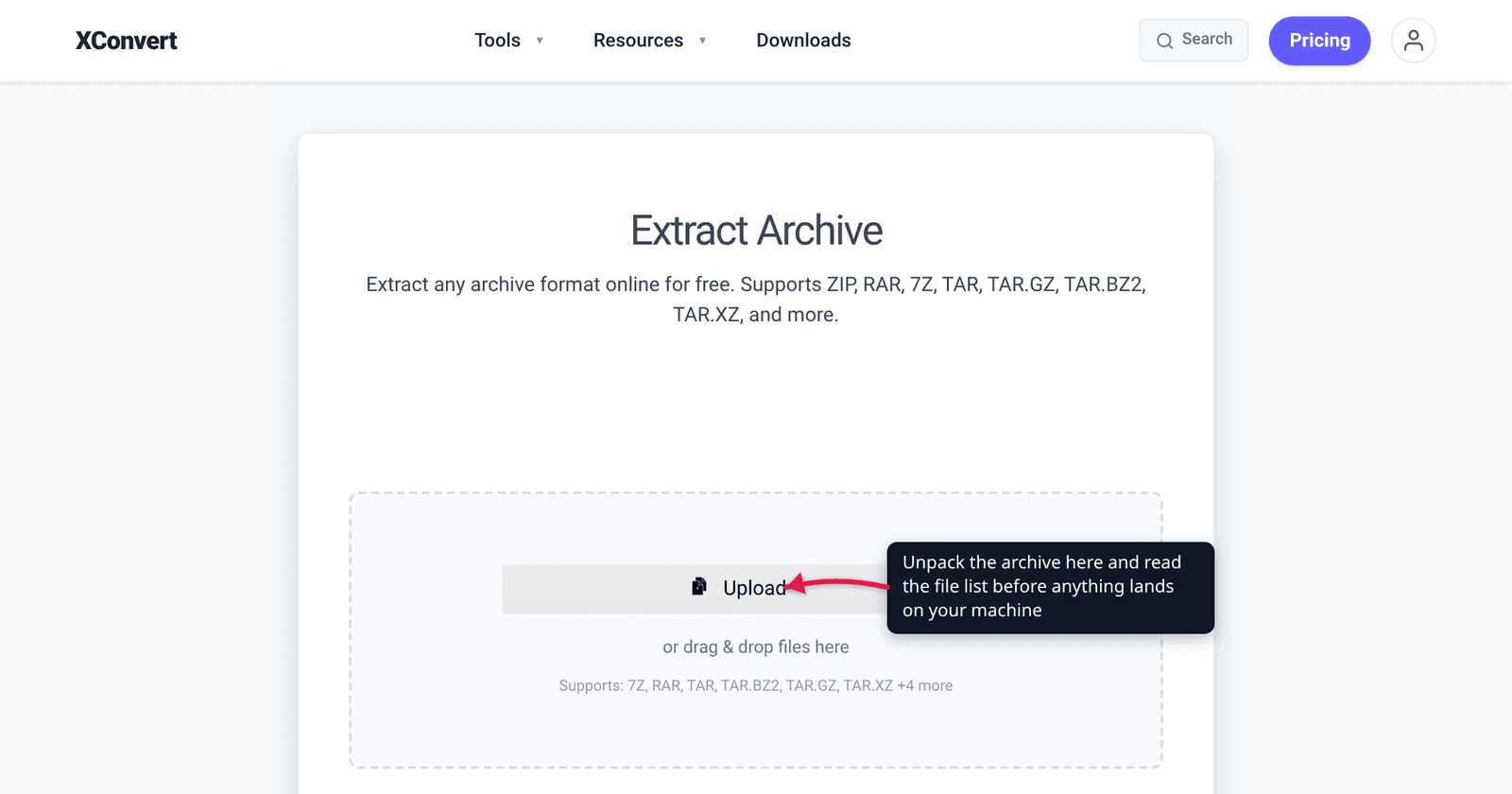
- Open xconvert.com/extract-archive and click Upload — from your computer, Google Drive or Dropbox. The drop area lists 7Z, RAR, TAR, TAR.BZ2, TAR.GZ and more, covering ZIP, TGZ and TAR.XZ too.
- There is nothing to configure: the page has no output settings, because extraction has no quality or format choices to make. The archive type is detected from the file’s own header, so a
.zipthat is really a 7z still unpacks. - Click Extract, then browse the unpacked tree in the result list and download only the files you actually want. That is the useful part of doing it this way — you can read the listing and take one document out of it, instead of dropping a hundred unknown files onto your desktop.
- If the archive is encrypted, it will simply fail. We do not prompt for or accept a password, and there is no bypass for a properly encrypted archive — use a desktop tool for those.
Our extractor validates the unpacked tree before it hands anything back: entries that try to escape their folder are rejected as path traversal, symbolic links and non-regular files such as device nodes and pipes are removed, proc, sys and dev directories are dropped, and a single extraction is capped at 50,000 files and 5 GB of unpacked data, which is what stops a decompression bomb. What it does not do is scan for malware. An extracted .exe is still an .exe; treat what you download exactly as you would treat it from any other source.
Your file uploads over an encrypted connection, is processed on our servers, and is automatically deleted a few hours later. Nothing stays around.
The companion question — whether the service doing the unpacking deserves your file — is covered in Are Online File Converters Safe?. And if you are deciding what to send rather than what to open, ZIP vs RAR vs 7z covers which format to use and why.
FAQ
Can just downloading a ZIP, or opening it to look, infect me?
Downloading, no — the bytes sit on disk doing nothing. Opening it to view the file list is close to risk-free too, because listing reads the Central Directory index and decompresses nothing. The documented exceptions are extractor bugs like CVE-2023-38831, where WinRAR processed the contents of a folder while the user thought they were only previewing a JPG. That is an argument for keeping your extractor updated, not for refusing to look inside.
Is a password-protected archive safer, or more suspicious?
Both, depending on who sent it. Encryption is genuine protection for something you asked for. But an unsolicited archive whose password is printed in the same email is a known way to walk past scanning at the mail gateway, since the scanner cannot decrypt what you can. Useful detail: with ordinary ZIP encryption the file names are still readable, so you can inspect the listing before deciding whether to type the password at all.
Which file types inside an archive should stop me?
Anything that executes: .exe, .msi, .scr, .bat, .cmd, .com, .js, .vbs, .ps1, .hta, .jar, plus .lnk shortcuts, which are just a pointer to a command. Disk images such as .iso and .img deserve suspicion because mounting one has historically been a way to shed file-origin warnings. Macro-enabled Office files are their own category — Microsoft blocks their macros by default when the file carries the internet mark, which is precisely the protection an archive can strip away.
Does xconvert scan the archive for viruses?
No, and it is important to be clear about that. Our extractor unpacks the archive, refuses path traversal, strips symlinks and special files, and enforces a size and file-count cap so a decompression bomb cannot run away — that protects the extraction itself. It makes no judgement about whether the files inside are malicious. Scan what you download with your own antivirus, exactly as you would with a file from anywhere else.
Is RAR more dangerous than ZIP?
Not as a format. Both are containers holding compressed data, and neither runs code by design. The difference is which program opens them: the two in-the-wild flaws cited here were bugs in WinRAR, not in the RAR format, and many people still have a years-old WinRAR install. Same posture for both — an updated extractor, and a look at the listing first.
Sources
Last verified 2026-08-31.
- NVD — CVE-2023-38831 — NIST’s description of the WinRAR before 6.23 flaw, quoted in full, including that it was “exploited in the wild in April through October 2023”.
- NVD — CVE-2025-8088 — the WinRAR path-traversal vulnerability, CVSS 8.8, affecting versions before 7.13, exploited in the wild.
- CISA Known Exploited Vulnerabilities catalogue — the US authority’s list on which CVE-2025-8088 appears.
- PKWARE APPNOTE.TXT, .ZIP File Format Specification 6.3.10 — the Central Directory structure, and clause 7.1.8 on Central Directory Encryption versus ordinary encrypted ZIPs.
- 7-Zip version history — version 22.00 (2022-06-15) added the
-snzswitch and the “Propagate Zone.Id stream” option; 24.09 fixed propagation from nested archives. - Microsoft — Macros from the internet are blocked by default in Office — how the
Zone.Identifiermark drives Office’s macro blocking, and the ZoneId values.