 By Stephanie Taylor
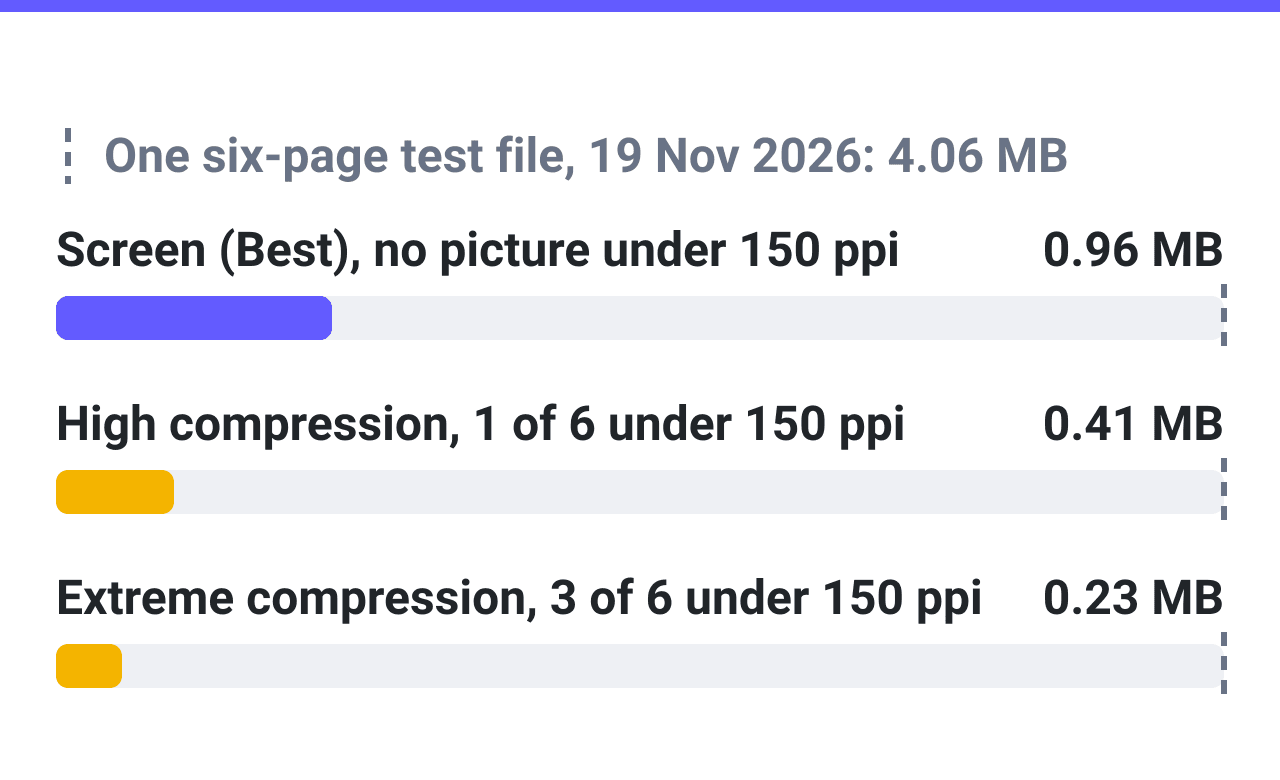
A portfolio PDF is too big because of its pictures: too many, or stored too large. Shrink the pictures: a six-page test portfolio fell from 4.06 to 0.96 MB with no picture under 150 ppi.
Checked on 2026-11-19 on the PDF Compressor and Split PDF. Not tested: a whole portfolio of 20 MB or more, a phone, and whether a portal accepts the result. Sources at the end.
Find your symptom
The order follows the advice in four Archinect threads on portfolio size limits (50 replies, 2010 to 2021).
Fewer pages came up in 15 replies, a lower picture resolution at export in 8, the layout program in 6, drawings in 2 and compressing the finished PDF in 2. That counts forum answers, not files.
| Symptom | Cause | Fix |
|---|---|---|
| Many times over a small limit | More picture pages than the limit holds (cause 1) | Compress, then cut pages or send two files |
| Over the limit, with pages of photographs and renders | Pictures stored at print resolution (cause 2) | Compress at Screen (Best), or export the pictures at 150 ppi |
| The size hardly moves after compressing | The weight is vector drawings (cause 3) | Draw them with fewer strokes |
| Still over, or the pictures lost detail, after compressing | A Compression Type too mild or too strong (cause 4) | Start again from the original, one type up or down |
Cause 1: more picture pages than the limit holds
Find the limit first, on the receiver’s own page.
| Receiver | Size limit | Read |
|---|---|---|
| BMA Architects, a firm: by email | 5 MB | Nov 2026 |
| Rochester Institute of Technology, Architecture M.Arch. | 10 MB | Nov 2026 |
| SlideRoom, documents | under 10 MB, unless its Portfolio step says otherwise | Nov 2026 |
| Illinois Institute of Technology, architecture transfer | 20 MB | Nov 2026 |
| Workable, custom question upload | 20 MB | Nov 2026 |
| University of Texas at Austin, M.Arch | 25 MB | Nov 2026 |
| University of Notre Dame, architecture graduate | 25 MB | Nov 2026 |
| Gehry Partners, a firm | 25 MB | Nov 2026 |
| Gmail, attachments on personal accounts | 25 MB | Nov 2026 |
| Outlook.com, attachments | 25 MB | Nov 2026 |
| Greenhouse, candidate uploads | 100 MB | Nov 2026 |
Firms can ask for less: “some of them will only accept 2MB or even 1MB!” (the asker of an Archinect thread, August 2015). The resume has limits of its own, such as 5 MB in Workable’s resume field: see resume upload limits.
How many pages fit is arithmetic on the test file of cause 2 (one 6 x 4 inch picture a page), not a measurement of a longer file.
| Test file | Pages under 5 MB | Under 10 MB | Under 20 MB |
|---|---|---|---|
| As exported, pictures at 300 ppi | 7 | 14 | 29 |
| After Screen (Best) | 31 | 62 | 124 |
| After High compression | 73 | 146 | 292 |
A picture that fills a US Letter page has about four times that area, so far fewer such pages fit.
Where a form takes two files, use Split PDF:
- Click Upload and choose the file to split.
- Click Pages by multi-range and type the ranges into Page ranges (
1-3, 4-6in the test). - Click Split, then download the two parts from the result card.
Splitting shrinks nothing: the two parts weighed 4.08 MB together, the whole 4.06 MB.
Choosing the pages is a design step, and it comes before any export. Pick the projects this receiver needs to see and give each a page or two laid out for a screen. A short sample is a new layout, not the long portfolio with pages removed.
Cause 2: the pictures are stored at print resolution
Confirm it. Run pdfimages -list portfolio.pdf (Poppler). For each 6 x 4 inch test picture it printed 1800 x 1200 pixels and 300 ppi; 150 ppi needs 900 x 600, a quarter of the pixels.
Fix it on the PDF Compressor (linked at the top).
- Click Upload and choose the PDF.
- Under COMPRESSION TYPE, leave Screen (Best) selected, as the page loads it.
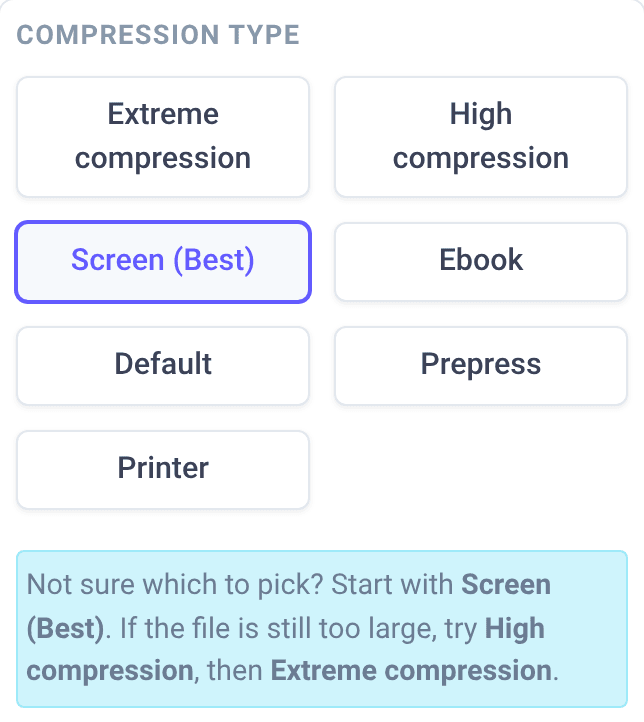
- Click Compress. The downloads page opens, and the finished card reads “New size:” with the share of the original.
- Click Download. The file keeps the name of the upload, so keep the original in another folder.
Fix it at export. If you still have the layout file, export again with the pictures at 150 ppi, and for a small limit compress that export too (last three rows below).
The test file: six US Letter pages, 4.06 MB, each with one picture at 300 ppi (five photographs, one plan stored as a picture) and captions as text. One run per type, 2026-11-19.
| File or Compression Type | Size | Share of 4.06 MB | ppi left | Likeness, lowest photograph |
|---|---|---|---|---|
| The upload | 4.06 MB | 100 % | 300 | 1 |
| Extreme compression | 0.23 MB | 6 % | 72 to 200 | 0.806 |
| High compression | 0.41 MB | 10 % | 96 to 250 | 0.882 |
| Screen (Best), the default | 0.96 MB | 24 % | 150 to 300 | 0.946 |
| Ebook | 1.31 MB | 32 % | 150 to 300 | 0.977 |
| Default | 2.04 MB | 50 % | 300 | 0.990 |
| Prepress | 2.89 MB | 71 % | 300 | 0.994 |
| Printer | 2.43 MB | 60 % | 300 | 0.993 |
| Export at 150 ppi | 1.22 MB | 30 % | 150 | 0.906 |
| Export at 100 ppi | 0.60 MB | 15 % | 100 | 0.812 |
| Export at 150 ppi, then Screen (Best) | 0.36 MB | 9 % | 150 | 0.864 |
Likeness is SSIM (0 to 1) of each photograph in a 150 ppi render against the upload. It ranks these results; nobody judged the pages by eye.
In all seven results the text stayed text, character for character, with the same embedded fonts, and an OCR program read all 106 words of the plan’s 6 point lettering.
Cause 3: the weight is drawings, not pictures
When plans and sections sit in the PDF as vector strokes, there is no picture to shrink.
A six-page test file of vector drawings (about 30,000 strokes a page, no picture inside, 2.74 MB) came back at 88 % of its size at Screen (Best), at Extreme compression and at Default alike.
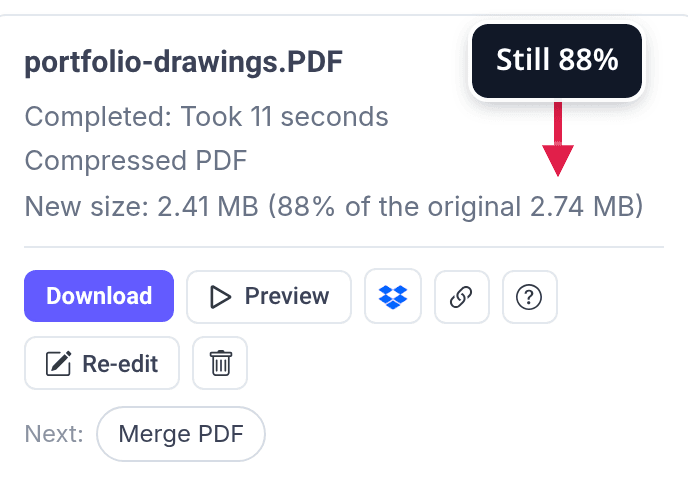
The card looks like any other. The sign is the same share at every type.
Storing the drawings as pictures did not help. As 150 ppi JPEGs the six pages weighed 3.91 MB, as PNGs 9.67 MB. Only that JPEG file at High compression (1.55 MB) was lighter than the compressed drawings, its lettering no longer text.
The weight follows the stroke count: drawn with 6,000 strokes a page, the same file weighed 0.58 MB. So the fix is in the program that drew them: fewer strokes and hatches.
Cause 4: a Compression Type too mild or too strong
Too mild. Default, Printer and Prepress kept every picture at 300 ppi (table of cause 2). RIT asks for that: “approximately 20 pages” at “between 300 and 600 DPI” inside 10 MB.
Twenty pages like the test file’s are 13.5 MB as exported and 6.8 MB after Default, by the same arithmetic.
Too strong. If Screen (Best) is not enough, the page says to try High compression, then Extreme compression. Its warning at High compression: “Images look softer and lose fine detail”.
Pictures under 150 ppi appeared only at those two: one of six at High compression (96 ppi), three of six at Extreme compression (down to 72 ppi).
Upload the original each time, not a compressed copy: at Extreme compression a second pass removes more picture detail.
When a PDF compressor helps and when it does not
It helps when the weight is pictures. PDFs of every kind (what they hold is not recorded) were compressed here from 20 October to 18 November 2026: 1,243 jobs at all types. Those at Screen (Best):
| Upload | Jobs | Came out at or under that mark |
|---|---|---|
| Over 5 MB | 462 | 213 (46 %) |
| Over 10 MB | 303 | 147 (49 %) |
| Over 20 MB | 188 | 107 (57 %) |
It is the wrong tool when:
- You need an exact size. Compression Type is the only setting: no box for a target size, no quality slider. Try a type and read the card.
- You need fewer pages or a smaller page. It changes the pictures and nothing else: see cause 1.
- Nothing may leave your computer. The file is processed on our servers, not in your browser, and uploads and results are deleted about 5 hours after they were written.
Work that exceeds every limit can live online, as 8 of the 50 replies advised: a link to a site, a hosted file or a shared folder, given beside the short PDF. Check that the page opens without a sign-in before the address goes out.
Sources
All read on 2026-11-19.
- Size limits, each on the receiver’s own page: BMA Architects, careers (5 MB by email); RIT, portfolio requirements (Architecture M.Arch.: 10.0MB, approximately 20 pages, 300 to 600 DPI); Liaison, SlideRoom applicant help (documents under 10 MB); Illinois Institute of Technology, architecture portfolio guidelines (20 MB); Workable help (resumes 5MB, custom question 20MB); UT Austin School of Architecture, M.Arch admissions (25 MB); Notre Dame School of Architecture, graduate admissions (25 MB); Gehry Partners, current openings (25MB); Gmail Help (25 MB, personal accounts); Microsoft Support, sending limits in Outlook.com (25 MB); Greenhouse Support (100 MB).
- Archinect forum, the four threads counted: Heavy files (pdf) in portfolio, what to do??? (2018), how to make a 15 MB Portfolio turn 4 MB (2017, replies to 2021), Job applications and PDF size limits (2010) and Why some of the architectural firms only accept a maximum of 1-2 MB resume and portfolio images (2015, the quote). 50 replies, one reader, one pass; a reply that gives more than one piece of advice is counted under each.
- Tests of 2026-11-19 on the PDF Compressor (/compress-pdf) and Split PDF (/split-pdf): fifteen jobs, one at a time and one run each, thirteen on the PDF Compressor and two on Split PDF, with generated PDFs of 1.2 to 4.1 MB. The photographs in the picture file are five CC0 files from Wikimedia Commons; the plan and the vector drawings were drawn by script. Read out with pdfimages, pdffonts and pdftotext (Poppler), scikit-image 0.26.0 for SSIM and tesseract for the lettering. MB means 1,000,000 bytes.
- Job counts from our own records: 1,243 finished jobs of the PDF Compressor with one upload and one result, 20 October to 18 November 2026; file sizes and the Compression Type only.