 By Stephanie Taylor
You ripped your CD collection to FLAC, and now your phone, your car stereo, or that old Bluetooth speaker won’t play the files — or they’re eating storage two to three times faster than MP3s would. Converting FLAC to MP3 fixes both problems, but it raises the question every careful listener asks: how much quality am I actually giving up? The honest answer is “some, permanently — but at a high bitrate, almost certainly less than you can hear.” This guide explains why, what bitrate to pick, and the one rule that makes the trade-off safe. We verified the transparency thresholds against Hydrogenaudio’s LAME recommendations and the lossless claim against the FLAC project itself.
Quick answer: FLAC is lossless (a perfect copy of the source); MP3 is lossy (it discards data to shrink the file). Converting throws away some audio data permanently — you can’t get it back. But at 320 kbps CBR or VBR -V0 (~245 kbps), the result is transparent for the vast majority of listeners and music, meaning you can’t tell it from the original in a blind test. Pick V0 or 320, keep your FLAC originals, and the conversion costs you nothing you’ll notice.
Jump to a section
- Why convert FLAC to MP3 at all?
- Lossless vs lossy: what you actually lose
- What bitrate should you pick?
- Keep your FLAC originals — always
- Convert FLAC to MP3 on xconvert
- FAQ
Why convert FLAC to MP3 at all?
If FLAC is the higher-quality format, why move to MP3? Three practical reasons:
- Compatibility. MP3 plays on essentially anything with a speaker — every phone, car head unit, cheap Bluetooth speaker, web browser, decade-old player. FLAC support is far patchier: many car stereos, older players, fitness watches, and budget devices still won’t open a
.flacfile. MP3 is the format that just works. - File size. FLAC compresses CD audio losslessly to roughly half the size of WAV (commonly 50–70% of the original, content-dependent), but it’s still much larger than MP3. A 3-minute track that’s ~30 MB as WAV and ~15–20 MB as FLAC drops to about 7 MB at 320 kbps MP3 — far less at lower bitrates. On a 32 GB player, that’s the difference between a few hundred and a few thousand songs.
- Sharing and uploading. Smaller files attach to email, upload to forums and Discord, and sync faster. MP3 is the lingua franca for sending someone a track.
So the conversion isn’t about quality at all — it’s about reach and size. The goal is to get those benefits while giving up as little fidelity as possible.
Lossless vs lossy: what you actually lose
This is the part to be honest about. The two formats work in fundamentally different ways:
- FLAC is lossless. Per the FLAC project, “audio is compressed in FLAC without any loss in quality” — it shrinks the file the way a ZIP shrinks a document, and decoding restores a bit-for-bit perfect copy of the original. Nothing is thrown away.
- MP3 is lossy. It achieves much smaller files by removing audio information — using a psychoacoustic model to discard sounds that are hardest for the human ear to perceive (masked frequencies, very quiet detail near louder sounds). That removed data is gone. Decoding an MP3 reconstructs an approximation of the original, not the original.
The critical consequence: converting FLAC to MP3 is a one-way street. You can convert an MP3 back into a FLAC container, but it only ever contains the already-degraded MP3 audio — the lost detail does not come back. Always convert from your lossless FLAC source. The good news is how little you lose at a sensible bitrate.
What bitrate should you pick?
The key concept is transparency: a lossy file is “transparent” when listeners can’t reliably distinguish it from the lossless source in a blind ABX test. The reference here is Hydrogenaudio, the community behind the tuning of the LAME MP3 encoder, whose recommended settings are the de-facto standard.
For FLAC → MP3, two settings give you transparent results for the vast majority of music:
| Setting | Typical bitrate | Use it when |
|---|---|---|
| VBR -V0 | ~245 kbps (range ~220–260) | The recommended high-quality default — transparent, smaller files |
| CBR 320 kbps | Fixed 320 kbps | You want the largest quality margin / a constant bitrate for strict players |
| VBR -V2 | ~190 kbps (range ~170–210) | Smaller files, still “normally transparent” per Hydrogenaudio |
Hydrogenaudio’s guidance is blunt: the high-quality VBR presets “will normally produce transparent results,” and all modes generally reach transparency well below their maximum settings. In other words, 320 kbps is not magic — V0 at ~245 kbps is already transparent for almost everyone, and even V2 (~190 kbps) is transparent for most music. The reason to pick 320 CBR is a safety margin and broad compatibility with players that prefer a constant bitrate, not an audible improvement you’ll hear.
Practical recommendation:
- Pick 320 kbps CBR if you want the simplest “best MP3” answer and don’t mind the file being a little larger. This is what most people mean by “FLAC to MP3 320kbps,” and it’s a safe choice.
- Pick V0 VBR if you’d rather have smaller files with quality that’s still transparent — the audiophile-favoured efficient option.
- Go below ~190 kbps only for spoken-word, podcasts, or noisy-environment listening where the size saving matters more than headroom.
One caveat Hydrogenaudio is explicit about: for archiving, no MP3 setting is good enough — “lossy formats like MP3 are designed to save space by changing the audio in subtle, often imperceptible ways, even at the encoder’s maximum settings.” Which leads directly to the one rule that makes all of this safe.
Keep your FLAC originals — always
The single most important habit: never delete your FLAC files after converting. Make the MP3s for your phone, your car, sharing, or uploading — but keep the lossless originals as your master archive.
Why it matters:
- You can always make a fresh MP3 at any bitrate from a lossless source, with no generational loss. Delete the FLACs and you’re stuck re-encoding lossy-from-lossy if you ever need a different format or bitrate.
- Standards change, and from FLAC you can re-encode to any future codec, losslessly or not. From a discarded original, you can’t.
- Storage is cheap; the originals aren’t replaceable unless you still own the CD or download.
The clean workflow is archive in FLAC, distribute in MP3 — keep the perfect copy, hand out the convenient one. If you’re wondering how small your FLACs already are, see is FLAC already compressed?; for the bigger-picture format trade-offs, MP3 vs WAV vs FLAC compares all three.
Convert FLAC to MP3 on xconvert
The xconvert FLAC to MP3 converter lets you set the bitrate directly so you can apply everything above:
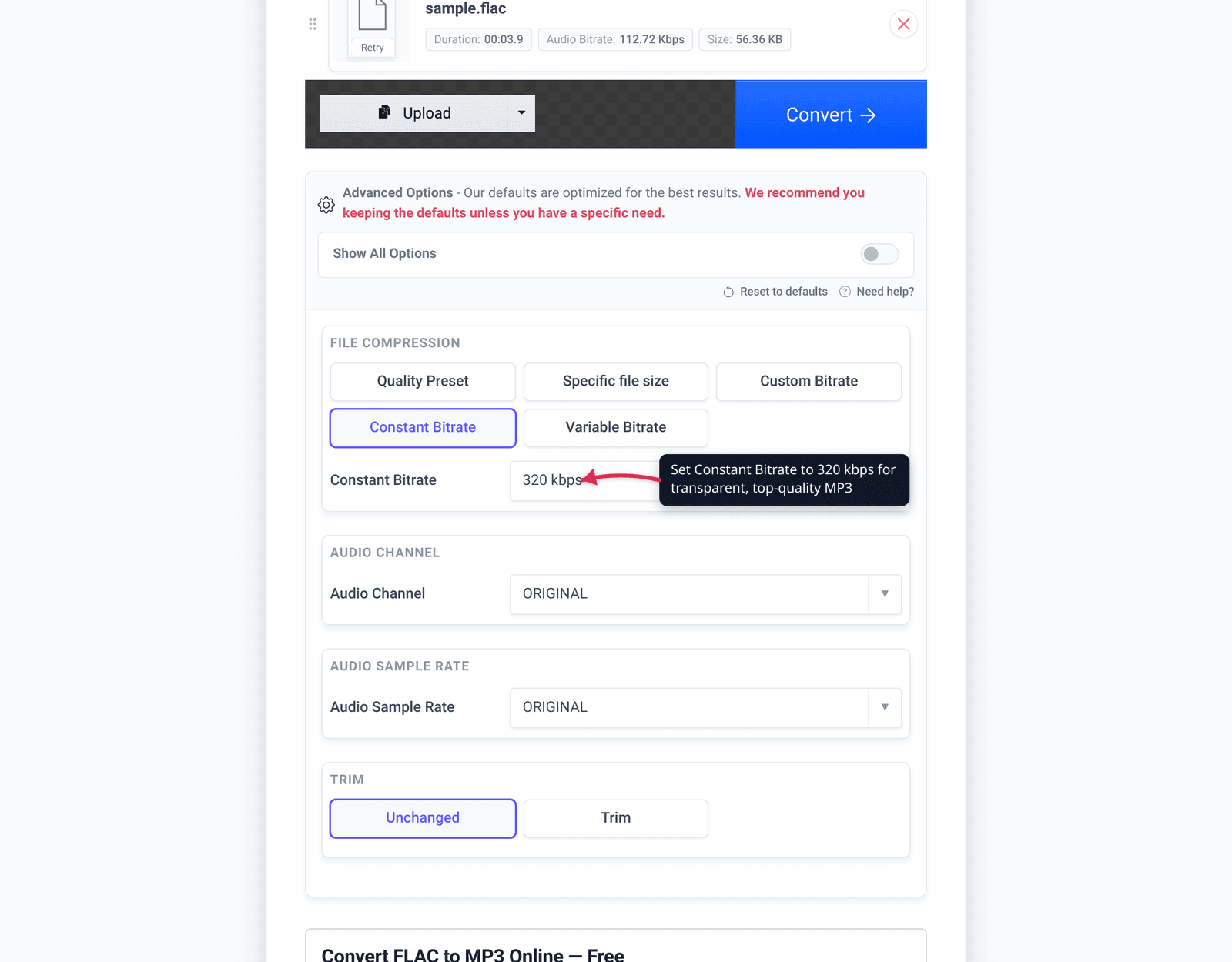
- Open xconvert.com/convert-flac-to-mp3 and click Upload to add your FLAC file (From my Computer, From Google Drive, or From Dropbox) — or drag and drop it onto the page.
- Open Advanced Options (the gear icon) to control the output quality.
- Choose your bitrate. Use the Quality Preset dropdown for a one-click “Highest” setting, or select Custom Bitrate and set Constant Bitrate to 320 for the safe top-quality option (or pick Variable Bitrate for the smaller V0-style result).
- Leave Audio Channel and Audio Sample Rate on ORIGINAL to preserve the source’s stereo and sample rate — there’s no benefit to changing them for a straight conversion.
- Click Convert, then download your MP3. To batch a whole album, upload all the tracks before converting.
Your file uploads over an encrypted connection, is processed on our servers, and is deleted automatically a few hours later. Nothing stays around.
Keep your FLAC originals on your drive — this just makes the portable, share-anywhere copy.
FAQ
Do you lose quality converting FLAC to MP3?
Yes — some audio data is discarded permanently, because MP3 is a lossy format and FLAC is lossless. But at 320 kbps CBR or VBR -V0 (~245 kbps), the result is transparent for the vast majority of listeners and music — you won’t be able to tell it from the original in a blind test. The loss is real but, at a high bitrate, inaudible.
What bitrate is best for FLAC to MP3?
320 kbps CBR is the safe “best quality” MP3 and the most common choice. VBR -V0 (~245 kbps) is the audiophile-favoured option — transparent quality at a smaller size. Hydrogenaudio notes MP3 reaches transparency well below maximum, so even V2 (~190 kbps) is transparent for most music. Use 320 if you want the biggest margin; V0 if you want smaller files.
Is 320 kbps MP3 as good as FLAC?
For listening, practically yes for most people — at 320 kbps the differences are inaudible to the vast majority of listeners on the vast majority of music. Technically no: the MP3 still contains less data than the lossless FLAC. That difference is why MP3 isn’t suitable for archiving, but it’s not something you’ll hear at 320.
Can I convert MP3 back to FLAC and recover the quality?
No. You can put MP3 audio into a FLAC container, but the data MP3 discarded is gone — the result is a larger file containing the same already-degraded audio, not a restored original. Always convert from your FLAC source, and keep that source.
Why won’t my device play FLAC, but it plays MP3?
MP3 is supported almost universally, while FLAC support is patchier — many car stereos, older players, fitness watches, and some apps don’t decode it. Converting to MP3 (320 kbps for top quality) gets a file that plays essentially everywhere without giving up audible fidelity.
Should I delete my FLAC files after converting?
No — keep them as your archive. From a lossless FLAC you can always make a fresh MP3 at any bitrate with no extra loss. Delete the originals and you can never re-encode without compounding the loss. The rule is: archive in FLAC, distribute in MP3.
Sources
Last verified 2026-06-25.
- FLAC — What is FLAC? (xiph.org) — “audio is compressed in FLAC without any loss in quality”; FLAC is lossless.
- Hydrogenaudio — LAME recommended settings — recommended VBR presets (-V0 ~245 kbps, -V2 ~190 kbps), 320 CBR, and the statement that these “normally produce transparent results” and reach transparency well below maximum.
- Hydrogenaudio — Recommended LAME / archiving guidance — lossy formats (even at max settings) aren’t suitable for archiving; use FLAC for that.
- FLAC — comparison/about (xiph.org) — FLAC positioned as lossless audio-optimized compression (no current size-ratio table published).