 By Stephanie Taylor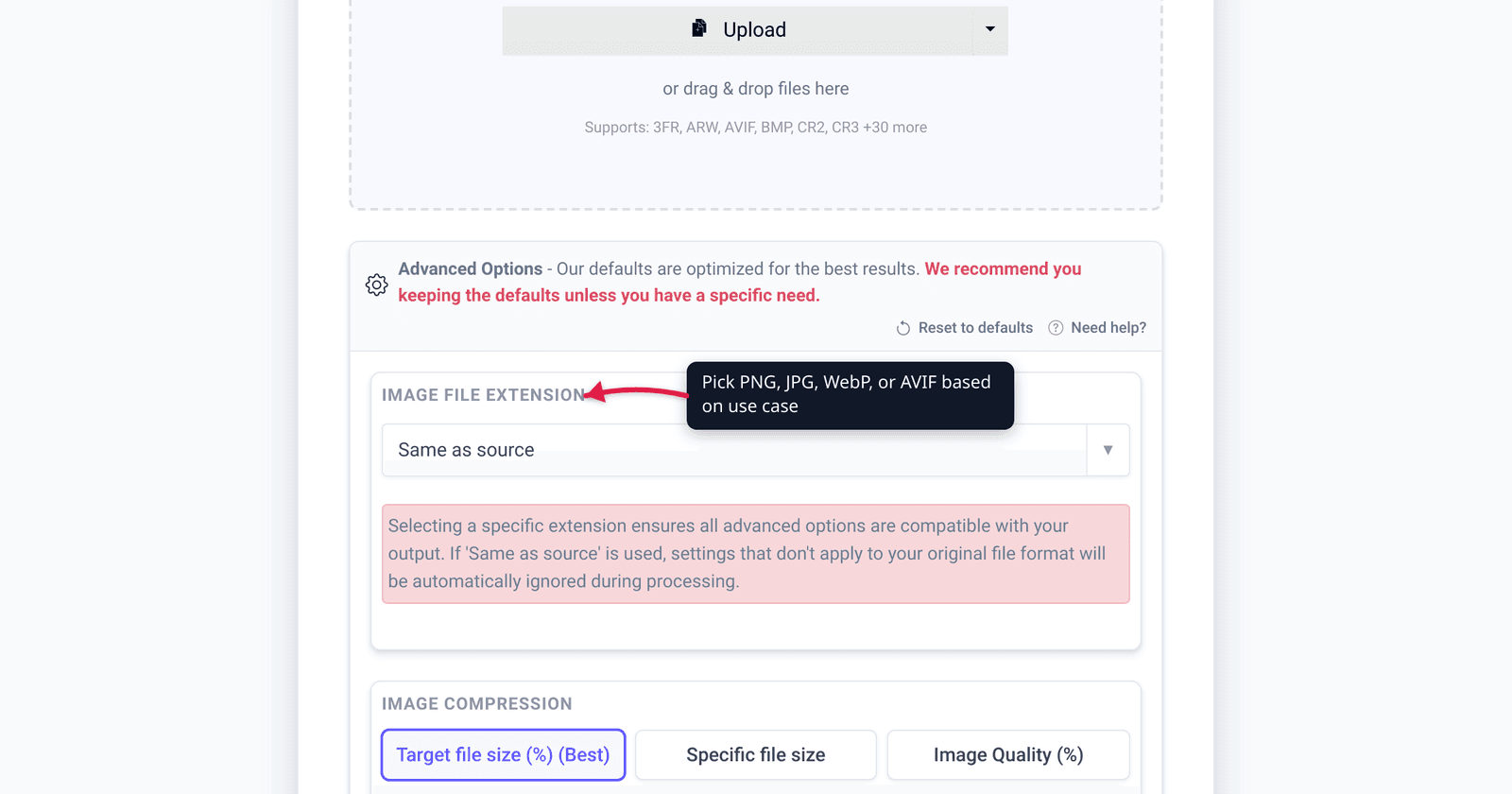
You AirDrop a photo from your iPhone, open it on a Windows laptop, and the file ends in .heic — and nothing will display it. That extension isn’t a bug or a corrupted download. It’s HEIC, the format your iPhone has saved photos in by default since 2017, and the reason your pictures look fine on Apple devices but break everywhere else. This guide explains what HEIC is, why Apple uses it, where it works and where it doesn’t, and how to turn one into a universal JPG. We verified the standard names, dates, and browser-support state against ISO/IEC, Apple, and caniuse.
Quick answer: HEIC is Apple’s version of HEIF (High Efficiency Image File Format, the ISO standard ISO/IEC 23008-12 / MPEG-H Part 12). A .heic file is a HEIF container holding a still image compressed with HEVC (H.265) — the same efficient codec used for 4K video. It’s been the iPhone default since iOS 11 / macOS High Sierra (2017) because it stores photos at roughly half the size of JPEG at the same quality, with bonuses like 16-bit color, transparency, and Live Photos. The catch: outside Apple, support is thin — only Safari 17+ opens HEIC in a browser, and Windows needs an extra codec. When you need a photo to open anywhere, convert it to JPG.
Jump to a section
- What HEIC actually is
- HEIC vs HEIF vs HEVC — untangling the names
- Why Apple uses it: the benefits
- The drawbacks: where HEIC breaks
- When (and when not) to convert to JPG
- Convert HEIC to JPG on xconvert
- FAQ
What HEIC actually is
HEIC is an image file format — the same job as JPEG or PNG, just newer and more efficient. The extension stands for High Efficiency Image Container (sometimes written High Efficiency Image Codec), and it’s the file type your iPhone, iPad, and Mac save photos in by default.
Underneath the brand name, HEIC is one specific flavour of a published international standard:
- The container is HEIF — the High Efficiency Image File Format, standardized as ISO/IEC 23008-12, also known as MPEG-H Part 12, finalized in 2015. It’s built on the same ISO Base Media File Format that underpins
.mp4, so it’s a flexible box that can hold one image, a whole burst of them, metadata, and depth maps. - The image data inside is compressed with HEVC (High Efficiency Video Coding), better known as H.265 — the standards body’s modern video codec, designed to pack roughly the same quality as the old standard into about half the bits.
So a .heic file is literally “a HEIF container holding HEVC-compressed image(s).” That’s why a single still photo from your phone uses the same compression engine that streams 4K video.
HEIC vs HEIF vs HEVC — untangling the names
These three acronyms get used interchangeably, but they refer to different layers. Getting them straight makes everything else click into place:
| Term | What it is | Analogy |
|---|---|---|
| HEIF | The container format (ISO/IEC 23008-12 / MPEG-H Part 12). Can theoretically hold images from any codec. | The box / wrapper — like the .mp4 of images |
| HEVC (H.265) | The compression codec (ISO/IEC 23008-2 / MPEG-H Part 2, ratified 2013) that shrinks the actual pixels. | The algorithm that squeezes the contents |
| HEIC | A HEIF file whose images are encoded with HEVC — Apple’s chosen combination, with the .heic extension. | The specific box-plus-algorithm Apple ships |
In short: HEIC = HEIF (container) + HEVC (codec). A file could be HEIF without being HEIC (a HEIF holding a different codec might use the generic .heif extension), but on an iPhone, “HEIF photo” and “HEIC file” mean the same thing in practice. For a deeper side-by-side, see HEIC vs HEIF vs HEVC.
Why Apple uses it: the benefits
Apple switched the camera default to HEIC in iOS 11 and macOS High Sierra in 2017, calling the setting High Efficiency (the alternative, Most Compatible, reverts to JPEG + H.264). The reasons are concrete:
- About half the file size at the same quality. This is the headline win. Apple states the format offers “better compression than JPEG… so [it uses] less storage space,” and the widely-cited figure is that a HEIC photo takes up roughly half the space of an equivalent-quality JPEG.
- Better quality at small sizes. Because HEVC is a more modern codec, HEIC holds detail better at low file sizes, where JPEG starts showing blocky artifacts.
- 16-bit color depth. HEIF supports up to 16 bits per sample, versus JPEG’s 8 bits — room for smoother gradients and HDR without banding.
- Transparency (alpha) and multiple images per file. Unlike JPEG, HEIF can store an alpha channel, plus image sequences — burst photos and the frames behind Live Photos — and auxiliary data like depth maps (used for Portrait mode). JPEG is one flat image; HEIC is a small bundle.
The HEIC capture setting is available on iPhone 7 and later, iPad (6th gen) and later, and newer iPads.
The drawbacks: where HEIC breaks
The efficiency comes at the cost of compatibility, and this is the entire reason most people first hear the word “HEIC” — because something refused to open one.
| Environment | HEIC support |
|---|---|
| iPhone / iPad / modern Mac | Native — opens everywhere |
| Safari (desktop & iOS) | Supported from Safari 17.0+ |
| Chrome / Firefox / Edge / Opera | Not supported — won’t display a .heic in the browser |
| Windows 10 / 11 (Photos app) | Needs the HEVC and HEIF codecs from the Microsoft Store |
| Android | HEIC viewing supported on Android 10+ (varies by device/app) |
| Older apps, websites, email previews, web upload forms | Often reject or fail to render .heic |
So while HEIC is native across Apple’s ecosystem, in a web browser it’s effectively Safari-only — on caniuse, support sits around 14% globally, almost entirely from Safari’s user base. Two factors keep adoption low: HEVC is complex and expensive to license, which is why browser vendors stayed away, and royalty-free alternatives like AVIF and JPEG XL were designed to supersede it. The upshot: a .heic you send to a Windows or Android user, post to a website, or attach to a form may simply fail to open. That’s when you convert.
When (and when not) to convert to JPG
You don’t need to convert every HEIC — on your own Apple devices they work perfectly and save space. Convert to JPG when the photo has to leave the Apple ecosystem:
Convert HEIC → JPG when:
- You’re sending photos to a Windows or Android user who can’t open
.heic. - You’re uploading to a website, web form, marketplace, or printing service that rejects HEIC.
- You’re attaching to an email and want recipients to see a preview, not a broken file.
- You want a file that “opens anywhere” — JPG is the universal default.
Keep HEIC when:
- The photos stay on your iPhone, iPad, or Mac.
- You’re storing your own library and want to save space (HEIC is about half the size).
- You want to preserve depth maps, Live Photo frames, or 16-bit color that JPG would flatten.
One thing to know: converting HEIC to JPG moves to the less efficient codec, so the JPG will usually be larger than the HEIC, and it drops the alpha channel and extra frames. You’re trading size and features for universal compatibility — the right call when someone can’t open the file at all. (To choose between the two formats up front, see HEIC vs JPG for iPhone photos.)
Convert HEIC to JPG on xconvert
The xconvert HEIC to JPG converter turns iPhone photos into universal JPGs in a few steps — no Apple device or codec install required:
- Open xconvert.com/convert-heic-to-jpg and click Upload (Add files) to add your photos — From my Computer, From Google Drive, or From Dropbox. You can add several at once.
- (Optional) Open Advanced Options (the gear icon) to fine-tune the output.
- Under Image Compression, set the Quality Preset — it defaults to Very High (Recommended), which keeps the photo looking sharp.
- (Optional) Use the Image resolution controls (Keep original, Resolution Percentage, or Preset Resolutions) to resize, and the File extension toggle to pick JPEG or JPG.
- Click Convert, then download each photo — or grab everything as a ZIP if you converted a batch.
Your files upload over an encrypted connection, are processed on our servers, and are automatically deleted a few hours later. Nothing is kept.
For the format decision behind the conversion, see HEIC vs JPG for iPhone photos; to untangle the underlying standards, see HEIC vs HEIF vs HEVC.
FAQ
What is a HEIC file?
A HEIC file is an image saved in Apple’s High Efficiency Image format. Technically it’s a HEIF container (ISO/IEC 23008-12) holding a still photo compressed with the HEVC (H.265) codec. iPhones, iPads, and Macs save photos as .heic by default to take up about half the space of JPEG at the same quality.
What does HEIC stand for?
HEIC stands for High Efficiency Image Container (also written High Efficiency Image Codec). It’s Apple’s name for HEIF files that use HEVC compression — the .heic extension signals that specific combination.
Why won’t my HEIC file open on Windows or Android?
Because HEIC support is mostly confined to Apple’s ecosystem. In a browser, only Safari 17+ displays it; Chrome, Firefox, and Edge don’t. On Windows, the Photos app needs the HEVC and HEIF codecs from the Microsoft Store; Android added HEIC viewing in version 10, but it varies by app. The simplest fix is to convert the file to JPG, which opens anywhere.
Is HEIC better than JPG?
For quality-per-byte, yes — HEIC stores roughly the same quality as JPEG in about half the file size, with extras like 16-bit color, transparency, and Live Photos. For compatibility, no — JPEG opens on essentially every device, while HEIC is Apple-centric. Keep HEIC on your own devices; convert to JPG to share widely.
Does converting HEIC to JPG lose quality?
Converting re-encodes the image, so there’s some quality loss in theory, but at a high quality preset (like Very High) the difference is usually invisible. The bigger change is size: because JPEG is less efficient than HEVC, the resulting JPG is typically larger than the original HEIC.
How do I stop my iPhone from taking HEIC photos?
Open Settings → Camera → Formats and choose Most Compatible instead of High Efficiency. Your iPhone will then capture new photos as JPEG (and video as H.264). This doesn’t convert existing HEIC photos — for those, use a converter like xconvert’s HEIC to JPG tool.
Sources
Last verified 2026-06-25.
- Nokia Technologies — HEIF Technical Information — HEIF defined by ISO/IEC 23008-12, built on ISOBMFF, stores HEVC images/sequences; supports 16-bit color, alpha, image sequences, and derived images.
- Apple Support — About High Efficiency image and video formats — HEIF/HEVC introduced in iOS 11 / macOS High Sierra; “High Efficiency” (default) vs “Most Compatible” capture settings; supported devices (iPhone 7+).
- Wikipedia — High Efficiency Image File Format — ISO/IEC 23008-12 / MPEG-H Part 12, finalized 2015; HEIC = HEVC-encoded HEIF; Apple first major adopter (2017); “about half the space of an equivalent-quality JPEG”; Windows/Android support.
- caniuse — HEIF/HEIC image format — browser support: Safari 17.0+ only; Chrome/Firefox/Edge/Opera unsupported; licensing complexity; AVIF/JPEG XL as royalty-free successors.
- Wikipedia — High Efficiency Video Coding (HEVC/H.265) — HEVC = ISO/IEC 23008-2 / MPEG-H Part 2, ratified 2013; the codec used to compress images inside HEIC.