 By James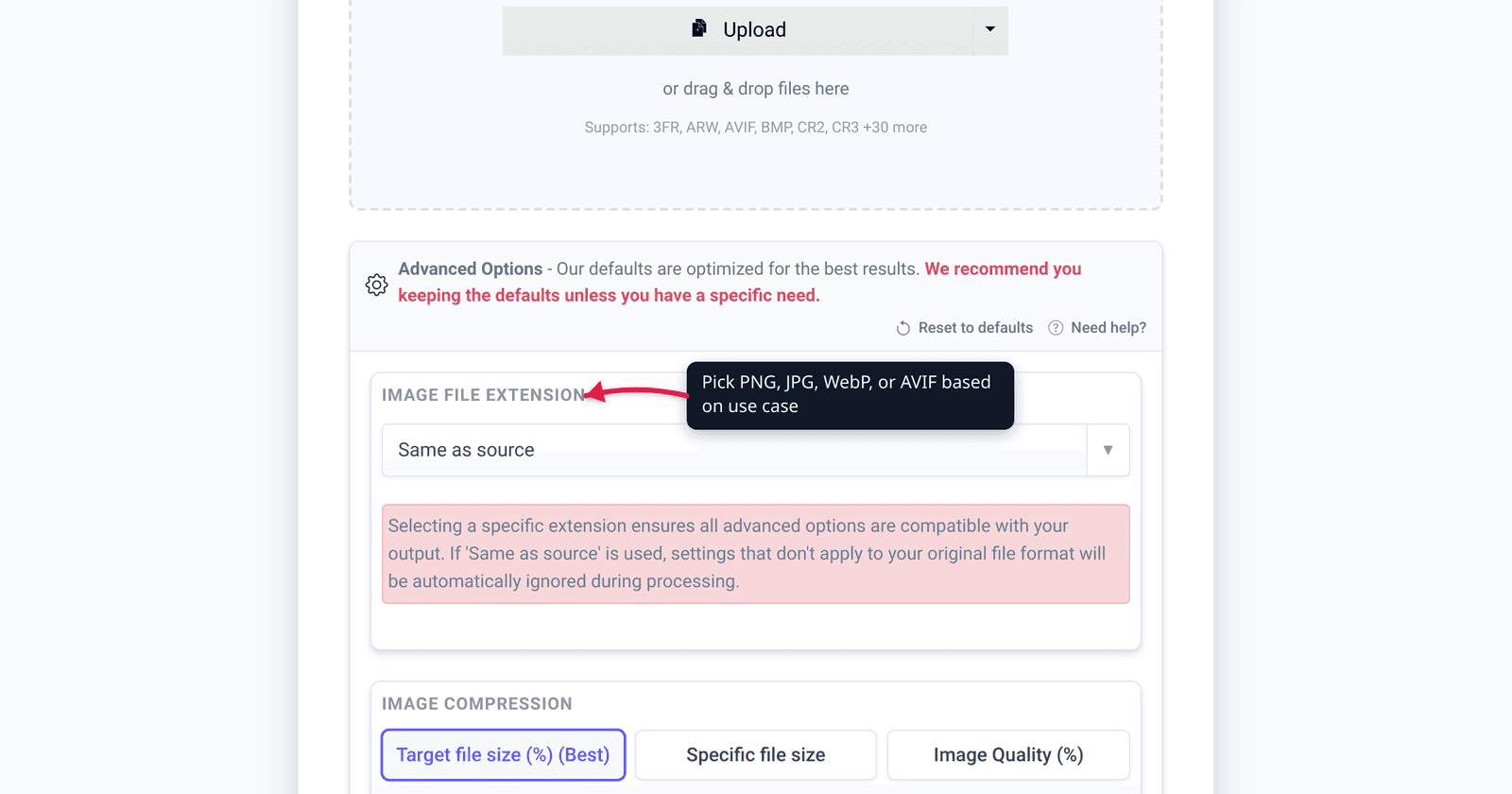
You downloaded a photo as vacation.jpg, but the upload form on a form or job site insists on a .jpeg. Or a tutorial says “save as JPEG” and your editor only offers “JPG.” It feels like there’s a hidden difference you’re about to get wrong. There isn’t. JPG and JPEG are the same image format — byte-for-byte identical, same compression, same quality. The only thing that ever differed was the file extension, and that quirk traces back to a 1980s filename limit on MS-DOS. We verified that against the JPEG standards group and Microsoft’s own file-naming docs, so you can stop worrying about which spelling to use.
Quick answer: JPG and JPEG are identical. Both refer to the JPEG image format (ISO/IEC 10918, the Joint Photographic Experts Group standard). There is no quality, size, or technical difference — the same file can be named .jpg or .jpeg and it behaves exactly the same. The three-letter .jpg exists only because old MS-DOS / Windows FAT systems limited extensions to three characters; Mac and Unix kept the full .jpeg. You can rename one to the other freely, and it stays bit-for-bit the same file.
Jump to a section
- Are JPG and JPEG the same file?
- Why two extensions exist: the 8.3 filename rule
- Does renaming .jpeg to .jpg change anything?
- When the choice actually matters
- Convert or rename images on xconvert
- FAQ
Are JPG and JPEG the same file?
Yes — completely. JPEG stands for the Joint Photographic Experts Group, the committee that created the format, and per MDN it is “a commonly used method of lossy compression for digital images.” The format itself is defined by the international standard ISO/IEC 10918 (also published as ITU-T Recommendation T.81), originally created in 1992. JPG and JPEG are just two file-extension spellings for that one format.
What this means concretely:
- The bytes inside the file are identical. A
.jpgand a.jpegsaved from the same source at the same settings are the exact same data. The extension is a label on the filename, not part of the image. - The compression is identical. Both are the JPEG lossy DCT compression. There is no “JPG compression” versus “JPEG compression.”
- Quality is identical. Neither extension is sharper, smaller, or higher quality than the other. Anyone who tells you
.jpegis “better quality” is mistaken.
If you’re comparing JPEG against other formats — where there are real, meaningful differences — see PNG vs WebP vs JPG. That’s a genuine format comparison. JPG-vs-JPEG is not.
Why two extensions exist: the 8.3 filename rule
If they’re the same format, why two names? Blame a 1980s filesystem limit.
Early Microsoft operating systems used the MS-DOS FAT file system, which capped filenames at the famous “8.3” format. Microsoft’s own documentation states it plainly: “the older MS-DOS FAT file system supports a maximum of 8 characters for the base file name and 3 characters for the extension, for a total of 12 characters including the dot separator. This is commonly known as an 8.3 file name.”
The format’s natural extension, .jpeg, is four characters — one too many for that three-character limit. So on DOS and early Windows, it was truncated to .jpg. Meanwhile, macOS and Unix-like systems had no such limit, so they kept the full .jpeg. (The same truncation gave us .tif alongside .tiff and .htm alongside .html.)
Modern Windows hasn’t had the 8.3 restriction for decades — today’s FAT and NTFS file systems fully support long names. But by then .jpg was already entrenched as the common spelling on Windows, and it stuck. So in 2026 you see both: .jpg mostly from Windows-origin tools and cameras, .jpeg more often from Apple and web-export workflows. Same format, two historical spellings.
A couple of rarer cousins exist for the same format too: .jpe, and .jfif (JPEG File Interchange Format). They’re uncommon, but if you run into them, they’re still the same underlying JPEG image — just unusual extension labels.
Does renaming .jpeg to .jpg change anything?
No. Renaming photo.jpeg to photo.jpg (or vice versa) changes only the filename. It does not re-encode the image, doesn’t touch the pixels, doesn’t recompress anything, and doesn’t lose a single bit of quality. The file is identical before and after — you’ve only edited its label.
This is the key distinction that trips people up:
- Renaming the extension (
.jpeg→.jpg) = lossless. Nothing about the image data changes. - Re-saving / re-exporting the image = potentially lossy. JPEG is a lossy format, so every time you actually re-encode and save it, some data is discarded. That quality loss comes from the re-save, never from the extension.
So if a website demands .jpg but your file is .jpeg, you can simply rename it — no conversion tool required, no quality cost. The confusion between “renaming” and “re-saving” is exactly why some people think changing the extension degrades the image. It doesn’t; repeatedly re-saving a JPEG does. (If your JPEGs are getting soft after editing, that re-encoding effect is the culprit — see why is my JPEG blurry after saving.)
When the choice actually matters
Since the format is identical, the only time .jpg vs .jpeg matters is cosmetic and compatibility-of-the-label, never image quality:
- A form or uploader that hard-checks the extension string. Some upload validators are picky and only accept
.jpg(or only.jpeg) by literal string match. If you hit one, just rename the file to the spelling it wants — that’s the whole fix. - Consistency in a folder or project. If you’re batch-organizing files, you may prefer one spelling everywhere. Pick whichever you like; they’re interchangeable.
- Lowercase vs uppercase.
.JPGand.jpgare the same on Windows and macOS (case-insensitive), but on Linux they can be treated as different strings. If a Linux server or script expects lowercase, normalize the case.
What does not matter: opening, viewing, editing, printing, or sharing. Every modern operating system, browser, phone, and image editor treats .jpg and .jpeg identically. There is no scenario where choosing one extension over the other gives you a better-looking image.
Convert or rename images on xconvert
If you need to rename the extension, that’s a file-rename on your own computer — no tool needed. But if you actually need to convert a different format into JPEG (say a PNG, HEIC, or WebP into a .jpg), or want to choose the exact extension spelling and control quality, the xconvert image converter does it:
- Open xconvert.com/image-converter and click Upload to add your image (from your computer, Google Drive, or Dropbox).
- In the Image File Extension dropdown, pick your output — you’ll see both JPG and JPEG listed (they produce the same format; choose whichever spelling you need for your destination).
- Open Advanced Options (the gear icon) if you want to tune the output — for example set the Quality Preset (defaults to Very High (Recommended)) or adjust Resolution Percentage / width and height.
- Click Convert, then download your file.
Your image uploads over an encrypted connection, is processed on our servers, and is automatically deleted a few hours later. Nothing lingers.
For choosing between JPEG and other formats entirely, PNG vs WebP vs JPG covers when each one is the right call.
FAQ
Is JPG the same as JPEG?
Yes — they are the same image format. JPG and JPEG both refer to the JPEG standard (ISO/IEC 10918, from the Joint Photographic Experts Group). The files are byte-for-byte identical; only the extension spelling differs, for historical reasons. There is no quality or technical difference between them.
Why are there two extensions, .jpg and .jpeg?
Because older MS-DOS and Windows FAT file systems limited extensions to three characters (the “8.3” filename rule), the four-letter .jpeg was shortened to .jpg. Mac and Unix systems had no such limit and kept the full .jpeg. Modern Windows no longer has the restriction, but .jpg had already become the common Windows spelling.
Does converting .jpeg to .jpg reduce quality?
No. Renaming the extension only changes the filename — it doesn’t re-encode the image or lose any data, so quality is unchanged. Quality loss in JPEG only happens when you re-save / re-export the image (because JPEG is a lossy format), never from changing the extension.
Should I use JPG or JPEG?
Use whichever your destination expects — they’re interchangeable. .jpg is the more common spelling on Windows and most cameras and tools; .jpeg is common on Apple and some web exports. For a strict uploader that only accepts one spelling, just rename the file to match. Neither produces a better image.
Can I just rename a .jpeg file to .jpg?
Yes. Renaming photo.jpeg to photo.jpg (or the reverse) is completely safe and lossless — the file’s contents don’t change at all. The only caveat is on case-sensitive systems like Linux, where .JPG and .jpg may be treated as different strings, so match the exact case the destination expects.
What about .jpe or .jfif files — are those JPEGs too?
Yes. .jpe and .jfif (JPEG File Interchange Format) are less common extensions for the same underlying JPEG image. They’re rare in everyday use, but they decode to a normal JPEG. If a program won’t open one, renaming it to .jpg usually works.
Sources
Last verified 2026-06-25.
- MDN — JPEG (glossary) — JPEG = “Joint Photographic Experts Group,” a lossy compression method for digital images.
- JPEG.org — JPEG 1 / ISO/IEC 10918 — the format is defined by ISO/IEC 10918, “created in 1992,” also published as ITU-T Rec. T.81.
- Microsoft Learn — Naming Files, Paths, and Namespaces — the MS-DOS FAT “8.3” rule: 8 characters for the base name, 3 for the extension. This is why
.jpegwas truncated to.jpgon early Windows. - KeyCDN — Difference Between JPG and JPEG — corroborates that the extensions are interchangeable and the difference is purely the three-character DOS extension limit.