 By James
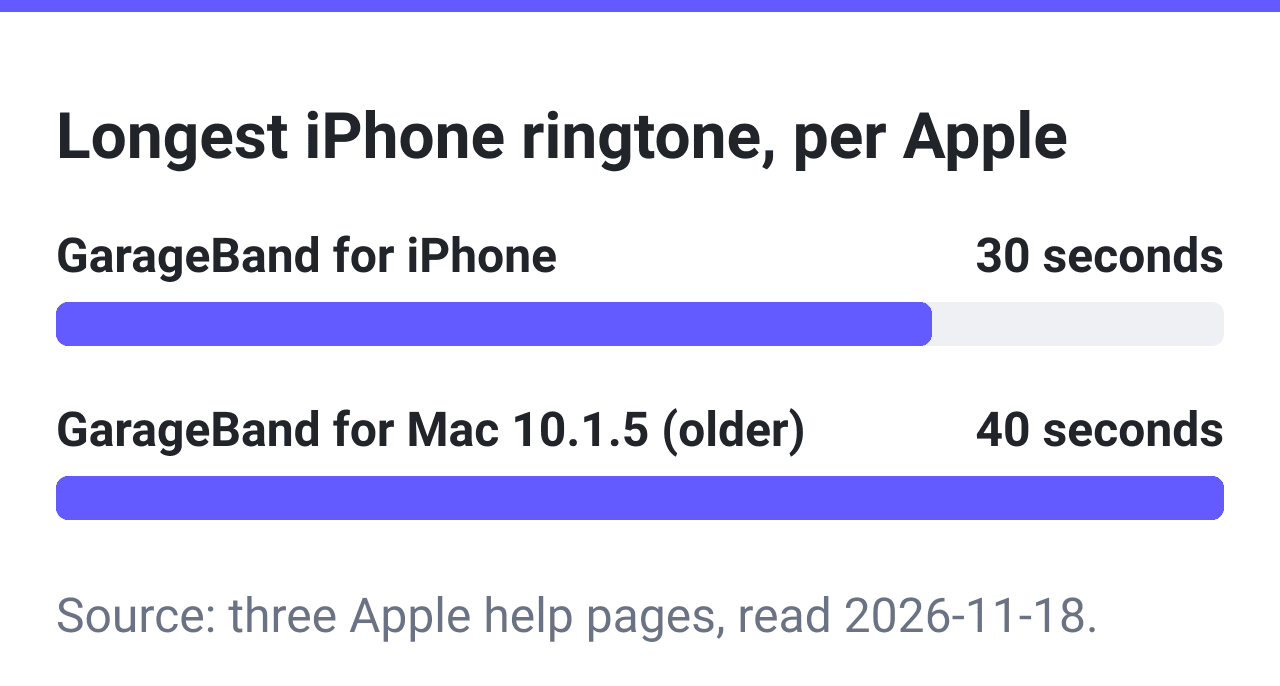
As of November 2026, Apple gives 30 seconds for a ringtone made in GarageBand on the iPhone; its older GarageBand for Mac help says 40. Google and Samsung name no length for Android. Too long? Trim an .m4r file to 30 seconds or less.
Checked on 2026-11-18 on xconvert.com/trim-m4r and xconvert.com/convert-mp3-to-m4r. No iPhone or Android phone was used. Sources at the end.
How long can a ringtone be on iPhone, Android and Samsung?
| Phone and route | Limit stated | Who says it | Read |
|---|---|---|---|
| iPhone: ringtone or text tone made in GarageBand for iPhone | Up to 30 seconds | Apple Support, GarageBand for iPhone guide | November 2026 |
| iPhone: ringtone shared from GarageBand for Mac | Up to 40 seconds | GarageBand for Mac help, version 10.1.5 | November 2026 |
| iPhone: Files app, Use as Ringtone (reported for iOS 26) | Under 30 seconds in press reports; no Apple page found | See “What we could not confirm” | November 2026 |
| iPhone: an .m4r synced from a computer; a text tone made any other way | No Apple page found | See “What we could not confirm” | November 2026 |
| Android | No length stated | Android Help | November 2026 |
| Samsung Galaxy | No length stated | Samsung | November 2026 |
| Any phone: ring time before voicemail | A network setting; on Telstra (Australia) 15, 20, 25 or 30 seconds | Telstra | November 2026 |
Is it 30 or 40 seconds on iPhone?
Both numbers are Apple’s, for different routes.
Apple’s support article on making a ringtone with GarageBand on the iPhone says “ringtones can be up to 30 seconds long”. The GarageBand for iPhone guide says “The maximum length for exported ringtones is 30 seconds.”
The 40 comes from the help for GarageBand for Mac 10.1.5: “A ringtone can be up to 40 seconds long”, for a project shared to iTunes and synced to the phone.
That is an old version: the current GarageBand for Mac User Guide lists no ringtone page among its sharing topics. If you make the tone on the phone, plan for 30.
Ringtones that are too long or start quietly
GarageBand offers to cut it. On the iPhone, a ringtone longer than 30 seconds brings up a dialog: tap Continue “to have GarageBand shorten the ringtone automatically”, or Cancel to shorten it yourself.
GarageBand for Mac 10.1.5 offers the same choice at 40 seconds. If you are already in GarageBand, you do not need another tool.
On Android, neither Google’s help page nor Samsung’s Galaxy page names a length.
Samsung adds a switch, Play selected highlights only: off, “the song will play from the beginning”; on, “only certain parts of the song will play.”
Length is not the only thing to check. A clip with a quiet intro wastes the start of the ring; an audio editor that shows the waveform finds the loud part. That is an editing step, and it comes before the cut to length.
Why does my ringtone stop after about 20 seconds?
One cause is documented: the call went to voicemail before the tone ended. On mobile networks the ring time before an unanswered call is forwarded is set in the network, separate from the length of the file.
The 3GPP standard for call forwarding on no reply puts it “between 5 and 30 seconds, in steps of 5 seconds”, with “a default value set by the service provider”.
Telstra in Australia, on a page dated 27 November 2021, says “By default, ring time on the iPhone is set to 20 seconds.”
On such a line a 30-second tone is never heard to the end. Check your own carrier’s help page for its numbers.
Lengths that fit (measured)
A 45.000-second .m4r (AAC, 687,818 bytes) was trimmed three times on the trimmer on 2026-11-18, with Start Time (s) at 0.
| Typed in End Time (s) | Length of the file that came back | Size |
|---|---|---|
| 30 | 30.000 seconds | 459,568 bytes |
| 29.5 | 29.500 seconds | 452,081 bytes |
| 29 | 29.000 seconds | 444,318 bytes |
Each file came back as long as the number typed, to the millisecond. Typing 29.5 stays inside every iPhone length in the table at the top of the page, including the row that says under 30 seconds.
Shorten a tone in three steps
- On xconvert.com/trim-m4r, click Select File and pick the tone. It must be an .m4r file: an MP3 picked there in our test was not loaded, and the page showed no error.
- Under Precision Trim, leave Start Time (s) at 0. Wait until End Time (s) shows the full length of the file (it stayed empty for 9.1 and 9.6 seconds in two runs), then type 29.5 there. Leave Output Setting on Same As Input (Audio only).
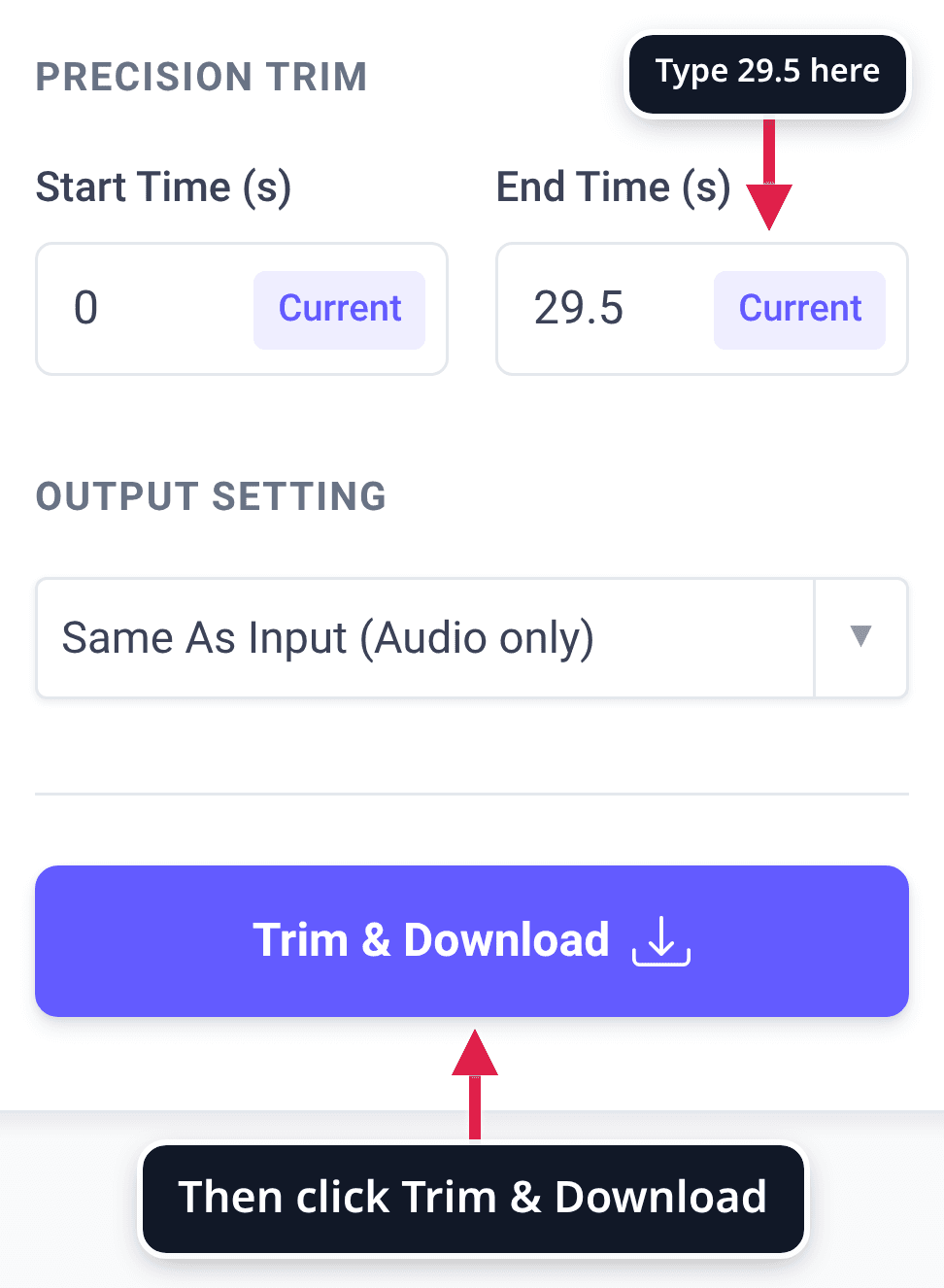
- Click Trim & Download. When the card under Processed Files reads “Completed”, click Download on it. In the test the file did not arrive until Download was clicked; the job took 5 seconds.
Files are processed on our servers, not in your browser. The trimmer does not put the tone on your phone; on an iPhone, Apple’s route is GarageBand.
The trimmed file holds AAC audio in MPEG-4, the same kind of file as an .m4a: MP3 to M4A covers that pair, AAC vs MP3 the codec, and cutting audio online how to pick a section.
Starting from an MP3
Use the MP3 to M4R converter, choose Trim and type your length in Duration. The group opens on Start time 0 and Duration 10, with a note that quotes Apple’s 30 seconds.
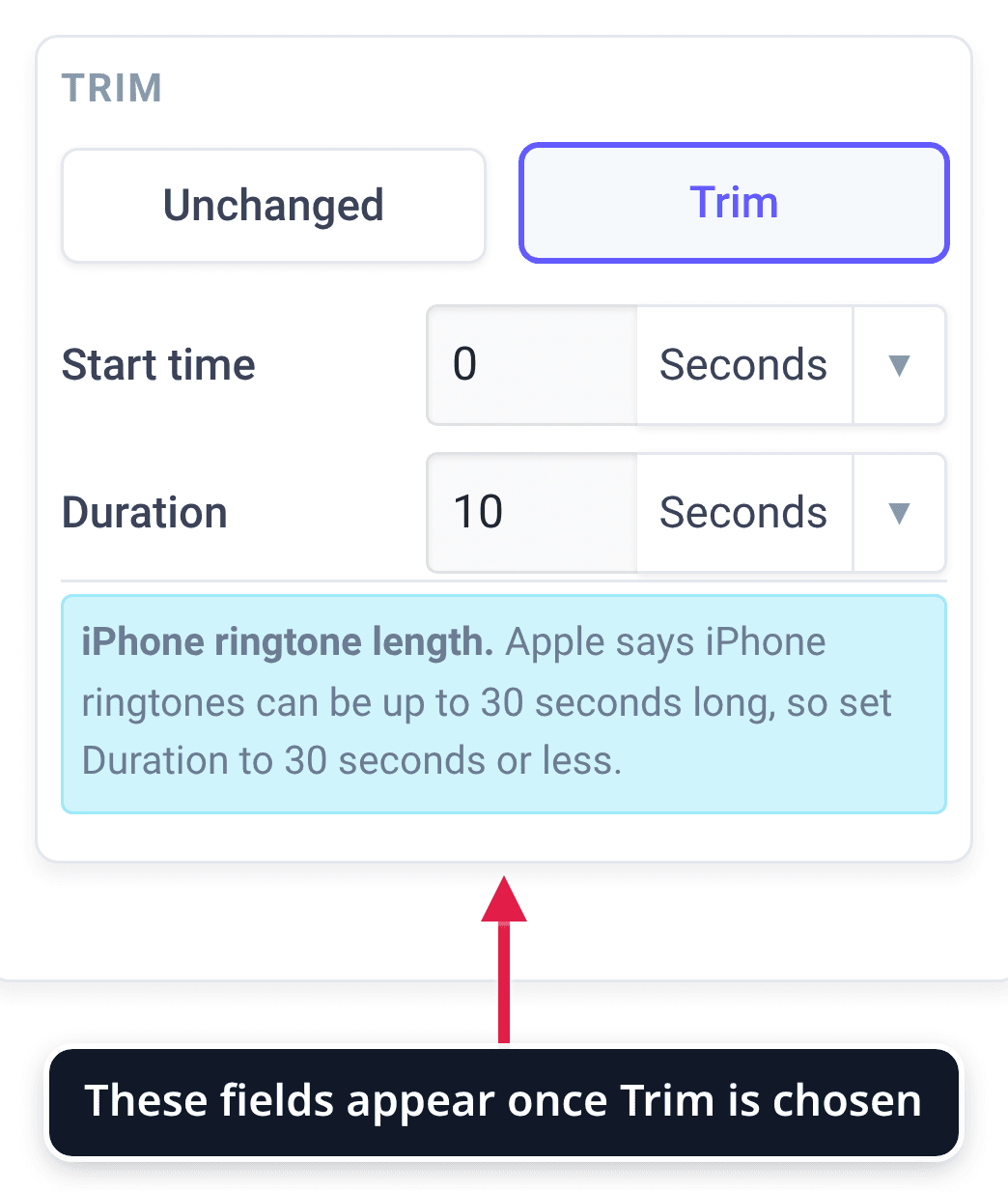
The convert pages shorten nothing by themselves. With Trim left on Unchanged, a 60-second MP3 came back as a 60.000-second .m4r; with Duration 30 it came back at 30.000 seconds.
Of 187 jobs asking for an .m4r on our M4R convert and compress pages from 2026-08-20 to 2026-11-17, 162 left Trim on Unchanged.
What we could not confirm
- The Files route in iOS 26. MacRumors reported on 17 June 2025, when iOS 26 was in beta, that an MP3 or M4A “less than 30 seconds long” can be set with Use as Ringtone, and iClarified (posted 17 November 2026) describes an alert that reads “Choose a ringtone under 30 seconds.” We found no Apple page that states it.
- A longer .m4r synced from a computer. We found no Apple page that says what iOS does with a file of 31 or 41 seconds.
- Whether a phone accepts the trimmed file. Setting the file as a ringtone on an iPhone or an Android phone was not tested.
- Text tones. Apple’s two GarageBand for iPhone pages let the exported tone, 30 seconds at most, be set as the standard text tone. We found no Apple page that gives a separate length for text tones.
Sources
- Apple Support: Create a custom ringtone on your iPhone, published 22 May 2025: “ringtones can be up to 30 seconds long”; the Continue and Cancel dialog. Read 2026-11-18.
- Apple: GarageBand for iPhone User Guide, Share songs: “The maximum length for exported ringtones is 30 seconds.” Read 2026-11-18.
- Apple: GarageBand for Mac help, version 10.1.5, Share songs as ringtones: “A ringtone can be up to 40 seconds long”; the Adjust dialog. Read 2026-11-18.
- Apple: GarageBand for Mac User Guide: contents of the current guide; no ringtone page among the sharing topics. Read 2026-11-18.
- Android Help: Change volume, sound, & vibrate settings: steps to change a ringtone; no length named. Read 2026-11-18.
- Samsung: Set a ringtone on your Galaxy phone or tablet: Play selected highlights only; no length named. Read 2026-11-18.
- Telstra: How to extend your iPhone or Android ring time, dated 27 November 2021: ring time of 15, 20, 25 or 30 seconds; default 20 on the iPhone. Read 2026-11-18.
- 3GPP TS 22.082, Call Forwarding (CF) Supplementary Services, Stage 1 (ETSI TS 122 082 V19.0.0, October 2025), clause 3.3.3: the no reply timer is “between 5 and 30 seconds, in steps of 5 seconds”; the default is set by the service provider. Read 2026-11-18.
- Reports, not Apple pages: MacRumors, 17 June 2025 and iClarified, posted 17 November 2026. Read 2026-11-18.
- Our measurements: seven jobs on xconvert.com/trim-m4r and xconvert.com/convert-mp3-to-m4r on 2026-11-18 with a 45-second .m4r and a 60-second MP3 made for the test, the six files saved each measured with ffprobe and by decoding the file and counting its samples; the wait in step 2 from two more trims of a 37.4-second .m4r the same day; job counts from 187 jobs, 2026-08-20 to 2026-11-17.