 By James
Someone sent you a 24-bit WAV and your project is 16-bit. Or a studio asked for “24-bit/48k” and your recorder was set to something else. Or you opened a WAV converter looking for the bitrate slider you get on MP3 pages and there isn’t one — just a codec list reading PCM 16-bit, PCM 24-bit, PCM 32-bit, plus two odd telephony entries. That absence is the clue: with uncompressed audio there is nothing to negotiate. Sample rate, channel count and bit depth are the bitrate, and every byte is predictable before you convert.
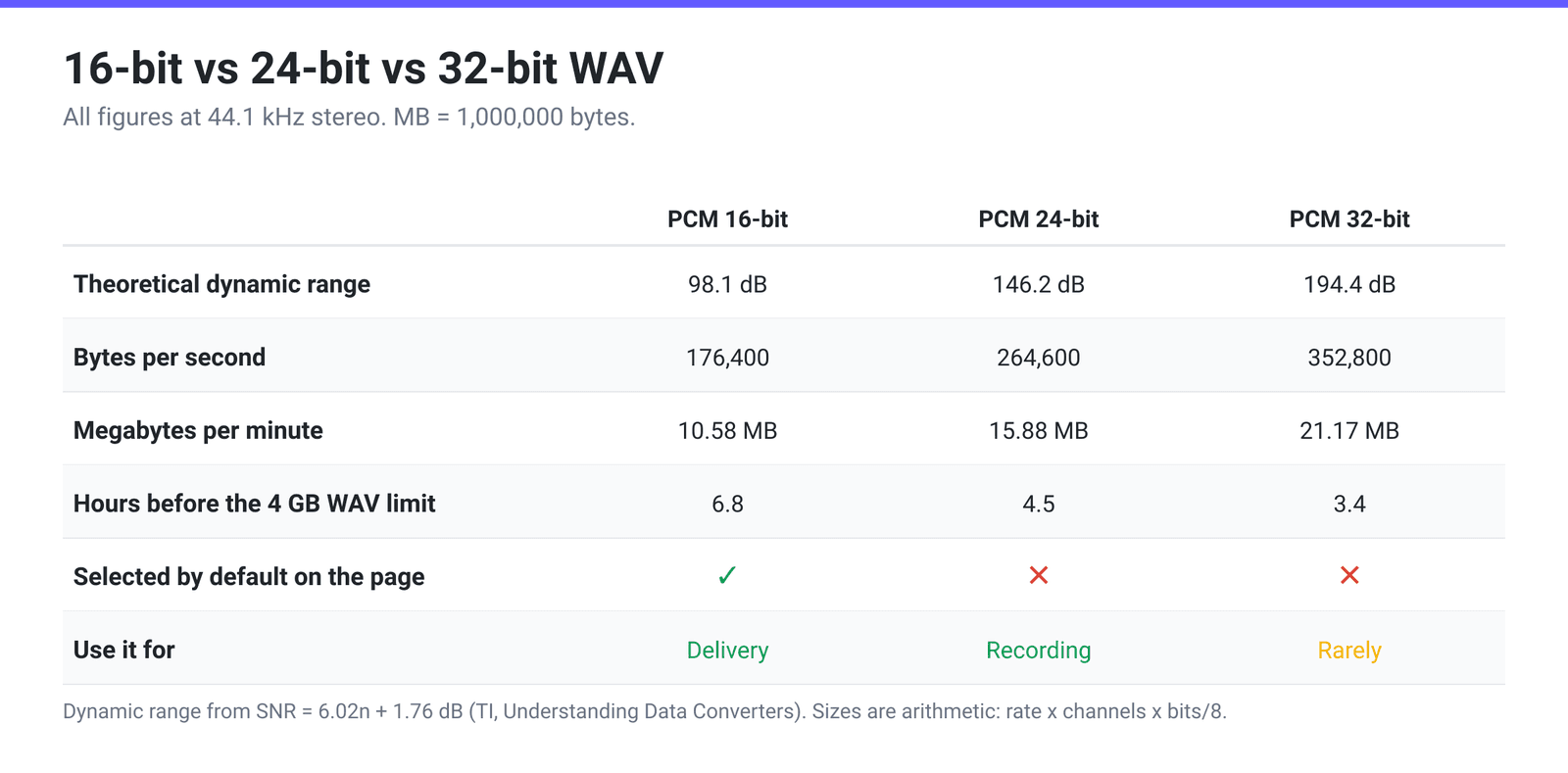
Quick answer: Bit depth sets the dynamic range and the file size, and nothing else. Each bit adds about 6 dB, so 16-bit gives a theoretical 98 dB and 24-bit about 146 dB. Size scales exactly in proportion: at 44.1 kHz stereo, 16-bit is 10.58 MB per minute, 24-bit is 15.88 MB and 32-bit is 21.17 MB. Record and edit at 24-bit so you can set conservative levels; deliver at 16-bit, which is the CD standard and what most distribution wants. Converting 16-bit up to 24-bit adds nothing but bytes. On xconvert’s WAV compressor the Audio Codec control is where you set this — turn on the Show All Options toggle at the top of Advanced Options to reveal it; there is no bitrate control on a WAV output at all.
Jump to a section
- What bit depth is, and why there’s no bitrate box
- The size arithmetic, worked out
- What eight more bits actually buys
- The 32-bit trap: integer is not float
- Set the bit depth on xconvert
- FAQ
What bit depth is, and why there’s no bitrate box
Digital audio samples the waveform thousands of times a second and stores each sample as a number. Three things describe that completely:
- Sample rate — how many samples per second (44,100 or 48,000 for most work).
- Channels — 1 for mono, 2 for stereo.
- Bit depth — how many bits each sample is stored in. More bits means finer steps between the loudest and quietest values a sample can represent.
Multiply them and you have the data rate. There is no encoder making decisions and no quality-versus-size trade to tune, which is exactly why the WAV output page has no bitrate control. Every setting it does have — Audio Sample Rate, Audio Channel and, behind the Show All Options toggle, Audio Codec — changes the size directly and arithmetically.
bytes per second = sample rate × channels × (bit depth ÷ 8)
The Audio Codec control on xconvert’s WAV output has five entries — a row of selectable buttons rather than a dropdown, and one you only see after switching on Show All Options — and only three of them are conventional bit depths:
- PCM 16-bit Little Endian — the default, and the CD standard.
- PCM 24-bit Little Endian — the studio recording and mastering standard.
- PCM 32-bit Little Endian — 32-bit integer. See the section below before choosing it.
- PCM A-law and PCM mu-law — 8 bits per sample, companded rather than linear. These are the telephony formats (the G.711 pair), and they are lossy: the companding curve deliberately spends its resolution where speech lives. They belong with Audio Sample Rate set to 8000 HZ and Audio Channel set to MONO, which is the classic 64 kbit/s phone-system format. Choosing them at 44.1 kHz stereo produces a half-size file that sounds like a phone call.
There is no 8-bit linear option in that list, and no 96 kHz in the sample-rate list — the rates offered are 8000, 12000, 16000, 24000, 44100 and 48000 Hz.
The size arithmetic, worked out
Every figure below comes from the formula above; nothing here is estimated. MB means 1,000,000 bytes.
| Setting | Data rate | Per minute | 3-minute track | Per hour |
|---|---|---|---|---|
| PCM 16-bit, 44.1 kHz stereo | 1,411 kbit/s | 10.58 MB | 31.8 MB | 0.64 GB |
| PCM 24-bit, 44.1 kHz stereo | 2,117 kbit/s | 15.88 MB | 47.6 MB | 0.95 GB |
| PCM 32-bit, 44.1 kHz stereo | 2,822 kbit/s | 21.17 MB | 63.5 MB | 1.27 GB |
| PCM 16-bit, 48 kHz stereo | 1,536 kbit/s | 11.52 MB | 34.6 MB | 0.69 GB |
| PCM 24-bit, 48 kHz stereo | 2,304 kbit/s | 17.28 MB | 51.8 MB | 1.04 GB |
| PCM 32-bit, 48 kHz stereo | 3,072 kbit/s | 23.04 MB | 69.1 MB | 1.38 GB |
| PCM 16-bit, 44.1 kHz mono | 706 kbit/s | 5.29 MB | 15.9 MB | 0.32 GB |
| A-law / mu-law, 8 kHz mono | 64 kbit/s | 0.48 MB | 1.4 MB | 0.03 GB |
Two things fall straight out of that table.
Switching to mono halves the file, and it is usually the bigger win. Going 24-bit → 16-bit saves a third; going stereo → mono saves half. For a mono source — one voice, one instrument, a phone recording, an interview — a stereo file is storing two identical channels. Set Audio Channel to MONO first, then think about bit depth.
Long recordings hit a hard ceiling. WAV is a RIFF file, and RIFF stores chunk sizes in a 32-bit field, which caps a WAV at about 4 GB. The EBU built the RF64 format specifically to get past it, describing it as a format “enabling file sizes in excess of 4 Gbyte” that switches “from the BWF RIFF size field to the 64-bit riffSize value” when a recording passes that point. In practice, at 44.1 kHz stereo you get roughly 6.8 hours at 16-bit, 4.5 hours at 24-bit and 3.4 hours at 32-bit before you are in that territory. Long-form recording at high bit depths runs out of format before it runs out of disk.
If the file is simply too big and quality has to survive intact, bit depth is the wrong lever — convert it to FLAC, which is lossless and typically much smaller than the WAV it came from.
What eight more bits actually buys
Bit depth controls dynamic range — the distance between the loudest signal the format can hold and the quantisation noise floor beneath it. The standard result for an ideal converter, as Texas Instruments states it in Understanding Data Converters, is:
SNR = 6.02n + 1.76 dB
Run the numbers and the picture is clear:
- 16-bit → 6.02 × 16 + 1.76 = 98.1 dB
- 24-bit → 146.2 dB
- 32-bit → 194.4 dB
98 dB is already more range than most listening situations can use — a domestic room’s own noise floor sits tens of decibels above silence, and so does the analogue electronics in a typical playback chain. So the reason professionals record at 24-bit is not that they can hear the difference at playback. It is headroom during capture.
At 16-bit you have to track close to the top of the scale to stay comfortably above the noise floor, so an unexpected loud moment clips and is gone. At 24-bit you can set levels 15 or 20 dB conservatively, never risk clipping, and still have more resolution under the signal than a 16-bit file would have had at full scale. Editing benefits for the same reason: every gain change, fade and mix sum is arithmetic on those samples, and starting with more of them leaves rounding further below anything audible.
That logic runs one way only. Converting a 16-bit file to 24-bit does not recover range that was never captured — it pads each sample with zeros and makes the file 50% larger. It is worth doing only when a piece of software or a delivery spec refuses anything but 24-bit.
The reverse — 24-bit down to 16-bit for delivery — is a real conversion and the normal last step. 16-bit/44.1 kHz stereo is the Red Book CD specification and remains what most distribution and playback expects; there is a dedicated walk-through in convert audio to 16-bit / 44.1 kHz WAV.
The 32-bit trap: integer is not float
This is the one that catches people out. The entry is labelled PCM 32-bit Little Endian, and that is 32-bit signed integer — not 32-bit float.
They are different formats. 32-bit float stores each sample with an exponent, which is what gives float recorders their trick: a signal that goes “over 0 dBFS” is not clipped, because the exponent simply moves and you can pull it back afterwards. 32-bit integer has no exponent — it is a linear scale like 16- and 24-bit with a finer step, and it clips at full scale exactly as they do.
So if you bought a 32-bit-float field recorder and expect this option to behave the same way, it will not. And as a general choice it is hard to justify: it costs a third more than 24-bit for a theoretical 194 dB of range that no microphone, preamp or converter in existence comes close to producing. Pick 24-bit for work and 16-bit for delivery; reach for 32-bit integer only when a specific application demands that exact format.
Set the bit depth on xconvert
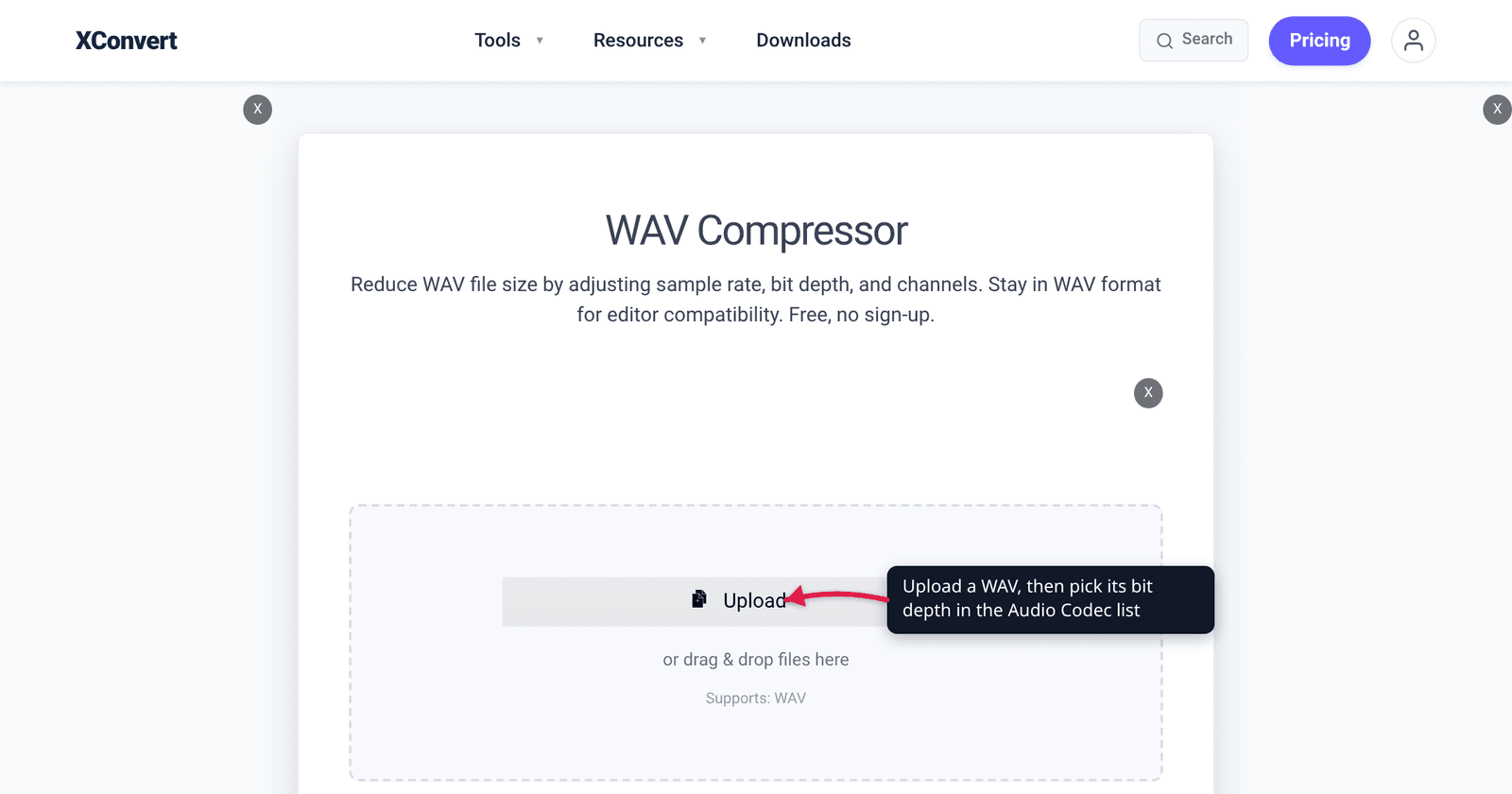
- Open the WAV compressor and click Upload to add your audio. You can queue several files.
- Open Advanced Options, then switch on the Show All Options toggle at the top of that panel. Audio Codec is an advanced control and does not appear until you do.
- Under Audio Codec, pick your depth: PCM 16-bit Little Endian (the default, and the delivery standard), PCM 24-bit Little Endian for recording and editing masters, or PCM 32-bit Little Endian only if something specifically requires it.
- Under Audio Channel, choose MONO for single-source material — it halves the file on its own. ORIGINAL and STEREO are the alternatives.
- Under Audio Sample Rate, leave ORIGINAL unless you have a reason. Downsampling to 44100 HZ is the standard delivery move; 8000 HZ exists for telephony and pairs with the A-law and mu-law codecs.
- If you only need part of the file, open Trim, switch from Unchanged to Trim, and set Start time and Duration.
- Click Compress and download.
Your file uploads over an encrypted connection, is processed on our servers, and is deleted automatically a few hours later. No sign-up, no watermark.
FAQ
Is 24-bit WAV better than 16-bit?
For recording and editing, yes — meaningfully. For listening, almost never. The extra eight bits buy about 48 dB of additional theoretical dynamic range, which you spend as headroom while capturing: you can set levels well below clipping and still keep an enormous margin above the noise floor. At playback, 16-bit’s ~98 dB already exceeds what a normal room and normal electronics can resolve. Work in 24-bit, deliver in 16-bit.
If I convert a 16-bit WAV to 24-bit, does the quality improve?
No. The conversion pads each 16-bit sample out to 24 bits; the information content is identical and the file becomes 50% larger. Nothing about the original recording’s noise floor or dynamic range changes. Do it only when a piece of software, a mastering house or a submission spec insists on 24-bit input.
Why is there no bitrate setting for WAV?
Because WAV is uncompressed, so the bitrate is not a choice — it is the product of sample rate, channel count and bit depth. Change any of those three and the bitrate follows automatically. A bitrate control only makes sense for a codec that decides how many bits to spend, which is why MP3, AAC and Opus pages have one and WAV pages do not.
How big is a 24-bit 48 kHz stereo WAV?
48,000 × 2 × 3 bytes = 288,000 bytes per second, which is 17.28 MB per minute, about 1.04 GB per hour. At 44.1 kHz the same depth is 15.88 MB per minute. You can compute any combination the same way: sample rate × channels × (bit depth ÷ 8).
Is the 32-bit option the same as 32-bit float?
No. PCM 32-bit Little Endian is 32-bit signed integer — a linear scale like 16- and 24-bit, with finer steps but the same hard clipping ceiling. 32-bit float, the format that modern field recorders use, stores an exponent per sample, which is what lets an over-level signal be recovered rather than clipped. If you specifically need float, this is not it.
What are the A-law and mu-law options for?
Telephony. They are the two G.711 companding schemes: 8 bits per sample on a non-linear curve tuned for speech, used by phone systems, PBXs and IVR prompts. Paired with 8000 HZ and MONO they produce the 64 kbit/s format those systems expect. They are lossy, so they are the wrong choice for music or anything you intend to edit further.
Why does my long recording stop around 4 GB?
Because WAV’s RIFF container stores sizes in a 32-bit field, capping the file at roughly 4 GB. The EBU created RF64 specifically to extend this, switching to a 64-bit size value when a recording passes that point. At 44.1 kHz stereo the practical limits are roughly 6.8 hours at 16-bit, 4.5 at 24-bit and 3.4 at 32-bit — so if you record long-form, either split the session or lower the depth and channel count.
Sources
Last verified 2026-08-31.
- Texas Instruments — Understanding Data Converters (SLAA013) — the ideal-quantiser result SNR = 6.02n + 1.76 dB, from which the 98.1 dB / 146.2 dB / 194.4 dB figures are calculated.
- EBU Tech 3306 v2 — RF64: An Extended File Format for Audio Data — “a 64-bit BWF-compatible file format enabling file sizes in excess of 4 Gbyte” (the cover renders it in capitals as 4 GBYTE; the body text uses “4 Gbyte”), switching “from the BWF RIFF size field to the 64-bit riffSize value… when a recording application passes the 4 Gbyte file size.” Backs the WAV size ceiling.
- xconvert WAV compressor — the live Audio Codec list (PCM A-law, PCM mu-law, PCM 16-bit / 24-bit / 32-bit Little Endian, with 16-bit selected), which renders as five buttons behind the Show All Options toggle, Audio Channel, Audio Sample Rate (8000 / 12000 / 16000 / 24000 / 44100 / 48000 Hz) and Trim controls, and the absence of any bitrate control, read from the page on 2026-08-31.
- All file sizes are arithmetic, not measurements: bytes per second = sample rate × channels × (bit depth ÷ 8), with MB = 1,000,000 bytes. Recompute any row yourself.