 By James
You chose TIFF because someone told you TIFF is lossless. Then you opened the converter’s Compression Type list and found ten entries — LZW, Lossy, Deflate, PackBits, CCITT Fax 4, None, JPEG, WebP, ZSTD, JP2K — with one already selected for you. That selection matters more than the format did. TIFF is not a compression scheme; it is a wrapper that can hold a dozen of them, some lossless and some not, and two on that list will refuse a colour image outright.
Quick answer: TIFF is a container, so “TIFF” tells you nothing about whether your pixels survive. The Compression Type list defaults to JPEG (Best compression), which is genuinely lossy and cannot carry an alpha channel. For a master, a scan, or anything going to a printer, switch it to LZW — lossless, keeps transparency, and read by essentially every TIFF reader since the 1990s. Deflate is the other good lossless pick and is usually smaller than LZW on photographs. Never pick CCITT Fax 4 (bi-level images only) or JP2K on colour input; both fail rather than converting.
Jump to a section
- “TIFF” says nothing about compression
- All ten options, compared
- The default is lossy — and two entries are the same setting
- The two that fail on colour
- Pick by what you are making
- Set the compression on xconvert
- FAQ
“TIFF” says nothing about compression
Inside every TIFF is a tag numbered 259, Compression, and its value decides everything. TIFF 6.0 defines a handful of values; libtiff — the reference implementation nearly every imaging tool builds on — carries the full registry in its public header, which is where the numbers in the table below come from.
That registry is why “is TIFF lossless?” has no single answer. A TIFF with Compression = 5 is bit-for-bit identical to its source; one with Compression = 7 has been through a DCT and thrown detail away. Same extension, same icon, completely different guarantee.
It also explains the compatibility gradient. TIFF 6.0 splits the format into Baseline (what every reader must support) and Extensions. For bilevel images Baseline defines Compression 1 (none), 2 (CCITT Group 3 one-dimensional) and 32773 (PackBits) — “Baseline TIFF readers must handle all three compression schemes” — and for greyscale, palette-colour and RGB it allows only 1 or 32773. Everything else on the dropdown, including LZW, is technically an extension. In practice LZW long ago became universal; ZSTD and WebP have not, and libtiff’s own header flags both: “WARNING not registered in Adobe-maintained registry.”
All ten options, compared
The whole list as it appears on the page, with the tag value each writes and what it costs you.
| Option on the page | Compression tag | Lossless? | Keeps transparency? | Reader support | What it is for |
|---|---|---|---|---|---|
| LZW | 5 | Yes | Yes | Universal in practice | The default you should choose. Masters, scans, print, archives |
| Deflate | 8 (Adobe) or 32946 (legacy) | Yes | Yes | Very good | Lossless photos — usually smaller than LZW on noisy detail |
| PackBits | 32773 | Yes | Yes | Baseline — every reader | Flat graphics and line art; the spec warns it is “often ineffective on continuous tone images” |
| None | 1 | Yes (nothing applied) | Yes | Baseline — every reader | Pipelines that demand raw data; largest possible file |
| ZSTD | 50000 | Yes | Yes | Modern libtiff-based tools only | Fast lossless when you control both ends |
| JPEG (Best compression) | 7 | No — lossy | No | Good, but some print workflows refuse it | Smallest photographic TIFF when loss is acceptable |
| Lossy | 7 — identical to JPEG | No — lossy | No | Same as JPEG | Nothing. It is the same encoder setting under another name |
| WebP | 50001 | Depends on mode | Depends on mode | Poor outside recent libtiff builds | Rarely the right answer inside a TIFF |
| JP2K (JPEG 2000) | 34712 | Depends on mode | — | Poor | Avoid — fails on colour input here |
| CCITT Fax 4 | 4 | Yes | Not applicable | Universal, for bilevel only | True 1-bit black-and-white only; fails on colour |
Two entries in that table deserve their own explanation.
Deflate is ZIP. It is the algorithm specified in RFC 1951 — the same one behind ZIP archives, gzip and PNG. libtiff carries it under two numbers, 32946 (its header calls this the “legacy tag”) and 8 (“as recognized by Adobe”); readers handle both. On photographs Deflate typically edges out LZW, whose dictionary approach thrives on long repeated runs that photographic detail simply does not contain.
ZSTD is a modern codec in an old container. Zstandard is defined in RFC 8878, which describes it as “a lossless data compression mechanism,” and it is designed for fast compression and decompression. The catch is the one libtiff spells out: tag 50000 is not in Adobe’s registry, so a TIFF written this way opens only in recent libtiff-derived software. Good inside your own pipeline; bad as something you hand to a stranger.
The default is lossy — and two entries are the same setting
Two facts about this list that nobody tells you.
The pre-selected option is JPEG (Best compression), and it is not lossless. TIFF 6.0 is unambiguous: “The JPEG baseline process is an algorithm which inherently introduces error into the reconstructed image and cannot be utilized for lossless compression.” If you are making a TIFF because it is meant to be the authoritative copy, leaving the default in place quietly defeats the purpose. xconvert’s own on-page warning says as much: “LZW is the standard for TIFF files and offers the best compatibility. While JPEG or WebP compression can create smaller files, they are often not supported by standard image viewers and professional printing software.”
JPEG compression also drops the alpha channel. TIFF stores opacity in a separate sample described by the ExtraSamples tag (338); JPEG’s baseline process is a three-component photographic codec with nowhere to put a fourth. We converted a transparent source at the default and got back a three-band TIFF with the previously transparent pixels matted to black. If transparency matters, you need LZW, Deflate, PackBits or None. (Coming from a JPEG this is moot — JPEG has no alpha to lose — but it bites hard from a PNG or a layered export.)
“Lossy” and “JPEG (Best compression)” are the same setting. They are separate entries in the list, but both resolve to the same encoder instruction in our conversion pipeline: compression=jpeg. Picking “Lossy” expecting something gentler than “Best compression” gets you an identical file. Treat the list as nine distinct choices, not ten.
The two that fail on colour
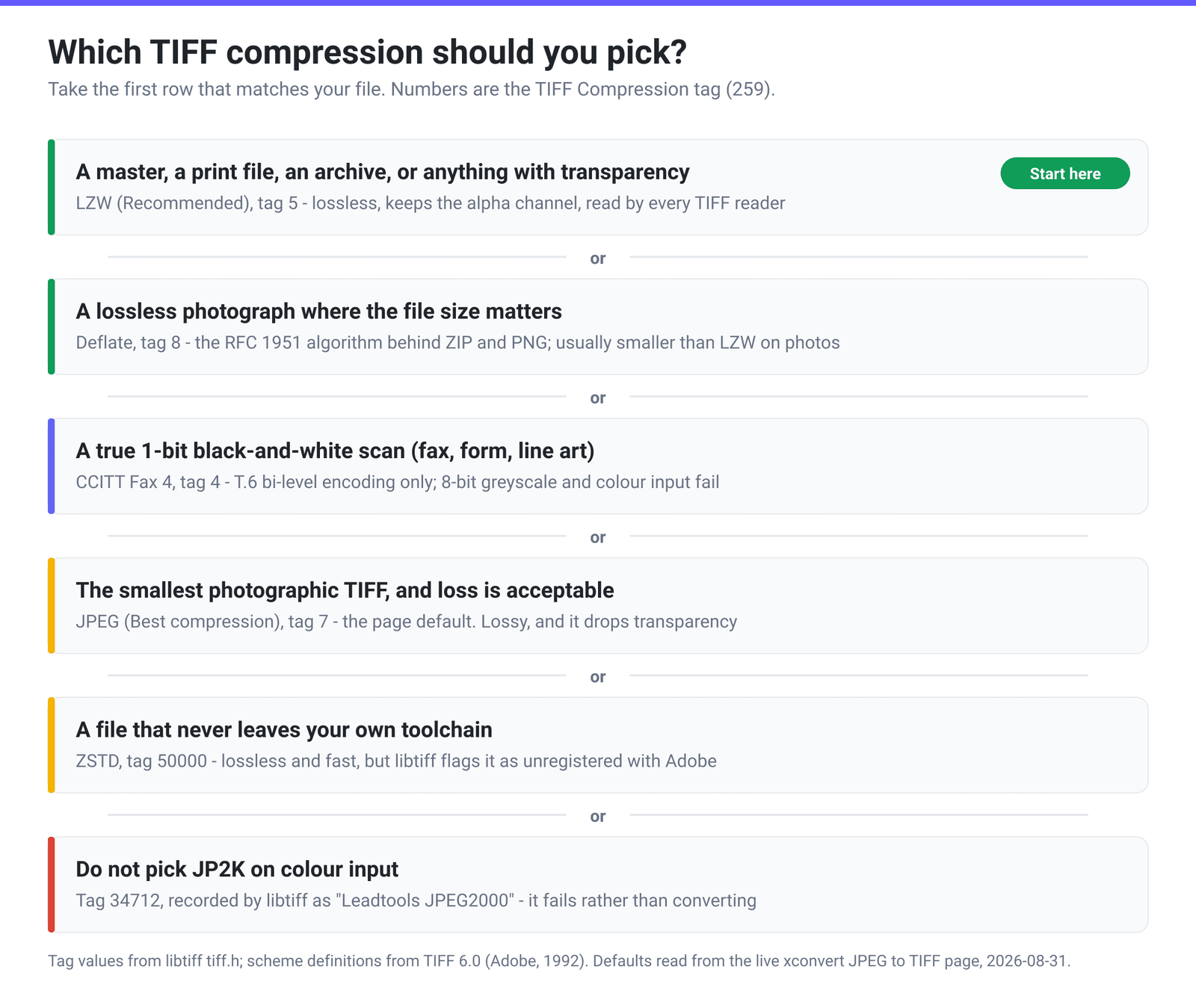
CCITT Fax 4 is not a general-purpose compressor. TIFF 6.0 defines value 4 as “T6-encoding: CCITT T.6 bi-level encoding,” referencing the ITU fax standard. Bi-level means one bit per pixel — pure black or pure white, no greys. A colour or greyscale image has nothing that scheme can legally encode, so choosing it fails the conversion rather than producing a file. It is the right answer for exactly one thing: an already-1-bit fax, form or line-art scan, where it beats everything else on the list.
JP2K (JPEG 2000) is a different problem. Inside TIFF it sits well outside anything Baseline — libtiff records tag 34712 as “Leadtools JPEG2000,” a vendor-registered code rather than a broadly implemented standard — and on colour input through this converter it fails outright. If you genuinely need JPEG 2000, make a .jp2 file rather than burying it inside a TIFF.
Pick by what you are making
- A print or pre-press master — LZW. Lossless, and what pre-press software expects. If the spec says “uncompressed TIFF,” give them None; do not substitute.
- An archival scan — LZW, or Deflate if the scan is photographic and size matters. More on why in What is LZW compression for TIFF?.
- A 1-bit black-and-white scan — CCITT Fax 4, and only if it is truly 1-bit. A “black and white” phone photo is 8-bit greyscale and will fail.
- Anything with a transparent background — LZW, Deflate, PackBits or None. Never the JPEG default.
- The smallest photographic TIFF, loss acceptable — the JPEG default. Reasonable when the recipient has said lossy TIFF is fine.
- Files staying inside your own toolchain — ZSTD. Do not send it outside.
- Maximum compatibility with very old software — PackBits or None, the two schemes Baseline TIFF requires every reader to support.
No compression choice fixes a weak source: a lossless scheme preserves a heavily compressed JPEG’s artefacts perfectly. How to convert JPG to TIFF covers what that conversion can and cannot do for you.
Set the compression on xconvert
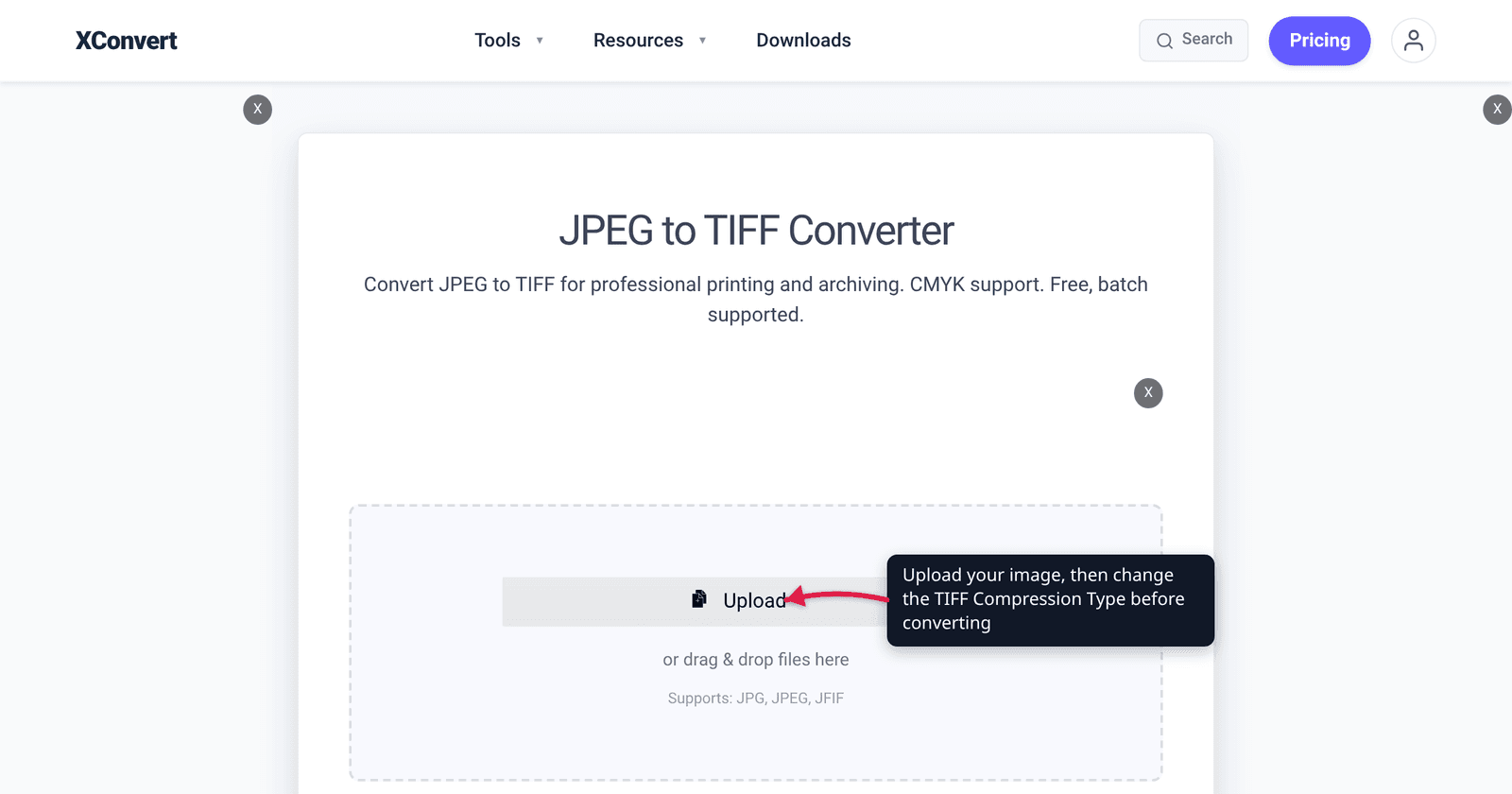
- Open the JPEG to TIFF converter and click Upload to add your images. You can queue a batch.
- Look at Advanced Options — the panel is already open on the page, and every control named below is in it.
- Under Compression Type, change the default JPEG (Best compression) to LZW — or Deflate if the source is photographic and size is tight. This one setting decides whether your TIFF is a master or a lossy copy.
- Under Image Compression, leave Quality Preset on Very High (Recommended) — it only applies to the lossy schemes, so with LZW or Deflate there is nothing for it to trade away. Specific file size is here too, but hitting a byte target means accepting a lossy scheme.
- Under Image resolution, leave Keep original unless you want a different pixel grid, and under File extension pick TIFF or TIF — the same file with a different suffix. Some older pre-press systems only accept
.tif. - Click Convert and download.
Your file uploads over an encrypted connection, is processed on our servers, and is deleted automatically a few hours later. No sign-up, no watermark.
FAQ
Is TIFF lossless?
Not inherently. TIFF is a container, and the Compression tag inside decides. A TIFF written with LZW, Deflate, PackBits, ZSTD or no compression is lossless; one written with JPEG compression is not — TIFF 6.0 says the baseline JPEG process “inherently introduces error into the reconstructed image and cannot be utilized for lossless compression.” Since JPEG is pre-selected, “I saved it as TIFF so it must be lossless” is the most common mistake with this format.
What is the difference between LZW and Deflate for a TIFF?
Both are lossless and both keep transparency. LZW (tag 5) has been in TIFF since Revision 5.0 and is read by essentially every TIFF reader ever written. Deflate (tag 8, the RFC 1951 algorithm behind ZIP and PNG) usually produces a slightly smaller file on photographic content, but is marginally less universal in very old software. For anything leaving your machine, LZW; for storage where you control the readers, Deflate.
Why did my TIFF get enormous when I switched away from JPEG compression?
Because you stopped throwing pixels away. Lossy JPEG routinely reaches 10:1 or better on photographs; lossless schemes preserve every sample and typically manage far less on the same image, though much more on flat graphics and text scans. A several-fold size increase when moving from the JPEG default to LZW is expected, not a fault — it is the cost of the file being a true master.
Will a transparent background survive a conversion to TIFF?
Only with a lossless compression type. TIFF carries opacity through the separate ExtraSamples tag, and JPEG-compressed strips have no place to store it — a transparent source converted at the default comes back three-band, with the transparent areas matted to a solid colour. Choose LZW, Deflate, PackBits or None.
The list has both “Lossy” and “JPEG (Best compression)”. Which is gentler?
Neither — they are the same thing. Both entries resolve to the identical JPEG instruction in the conversion pipeline and produce the same output. If you want something gentler than the JPEG default, the answer is a different scheme entirely (LZW or Deflate), not the other label.
Can I use CCITT Fax 4 on a scanned colour document?
No. CCITT Fax 4 is the T.6 bi-level encoding: strictly one bit per pixel, black or white. Colour and greyscale sources fail rather than converting. It is superb on genuinely bitonal material — a fax, a filled form, a line drawing — and useless otherwise. If your scan looks black and white but is stored as 8-bit greyscale, convert it to true 1-bit in an image editor first.
Which TIFF compression should I send to a print shop or an archive?
Ask them, and take the answer literally — “uncompressed” means the None option, not “lossless.” With no instruction, LZW is the safest assumption: lossless, and what pre-press and document-management software has read for three decades. Avoid ZSTD and WebP for anything you hand over, since libtiff flags both as unregistered in Adobe’s registry, and avoid the JPEG default unless the recipient has said lossy is fine.
Sources
Last verified 2026-08-31.
- TIFF Revision 6.0 Final, Adobe Developers Association, 3 June 1992 — the
Compressiontag (259) and its Baseline values; “Baseline TIFF readers must handle all three compression schemes”; PackBits as “a simple byte-oriented run-length scheme”; value 4 = “T6-encoding: CCITT T.6 bi-level encoding”; “LZW is lossless. All information is preserved”; the baseline JPEG process “inherently introduces error… and cannot be utilized for lossless compression”;ExtraSamples(338) for opacity. - libtiff —
tiff.hcompression constants — the tag values used in the table (NONE 1, CCITTFAX4 4, LZW 5, JPEG 7, ADOBE_DEFLATE 8, PACKBITS 32773, DEFLATE 32946, JP2000 34712 “Leadtools JPEG2000”, ZSTD 50000 and WEBP 50001, both marked “WARNING not registered in Adobe-maintained registry”). - RFC 1951 — DEFLATE Compressed Data Format Specification version 1.3 — the algorithm TIFF’s Deflate option writes, shared with ZIP, gzip and PNG.
- RFC 8878 — Zstandard Compression and the ‘application/zstd’ Media Type — “Zstandard, or ‘zstd’… is a lossless data compression mechanism.”
- xconvert JPEG to TIFF converter — the live Compression Type list, its JPEG default, the on-page compatibility warning, and the Quality Preset / Image resolution / File extension controls, read from the page on 2026-08-31.