 By Stephanie Taylor
You have a subtitle file and a destination, and they disagree. The web player shows nothing. YouTube’s uploader greys out the file. The anime you downloaded has beautiful typesetting that vanishes the moment you convert it for your TV. All four of the common subtitle formats hold the same words and roughly the same timings — but they store very different amounts of everything else, and the destination decides which of those extras survive. This is the short version of which file each place actually needs, and what you lose crossing between them.
Quick answer: SRT is the universal fallback: text and timings, nothing else, accepted almost everywhere. VTT (WebVTT) is the one the web needs — the HTML
<track>element takes WebVTT files. ASS is a full styling system (fonts, outlines, positioning, karaoke) and is what anime and typeset subtitles use; SSA is its older version — ASS is SubStation Alpha v4.00+. Rule of thumb: sending it to a browser → VTT; sending it to YouTube, a phone, a TV or a social platform → SRT; keeping typesetting or karaoke → ASS. Convert between all of them on the xconvert SRT converter.
Jump to a section
- What each format actually stores
- Four differences that decide it for you
- SSA and ASS: what the plus sign means
- Pick by destination — and the failure mode if you get it wrong
- Convert between subtitle formats on xconvert
- FAQ
What each format actually stores
| SRT | VTT (WebVTT) | ASS | SSA | |
|---|---|---|---|---|
| Extension | .srt | .vtt | .ass | .ssa |
| MIME type | application/x-subrip | text/vtt | text/x-ass | text/x-ass |
| Header | none | WEBVTT line, required | [Script Info] + [V4+ Styles] + [Events] | [Script Info] + [V4 Styles] + [Events] |
| Timecode | 00:00:01,000 (comma) | 00:00:01.000 (period) | 0:00:01.00 | 0:00:01.00 |
| Timing precision | milliseconds | milliseconds | centiseconds | centiseconds |
| Positioning | no | cue settings (line, position, align) | per-line alignment and margins | per-line alignment and margins |
| Styling | unofficial <b> <i> <u> <font> some players honour | CSS via ::cue, plus <c> classes | named style table + inline override tags | named style table + inline override tags |
| Karaoke | no | no | yes (\k timing tags) | yes |
| Fonts travel with it | no | no | only as container attachments | only as container attachments |
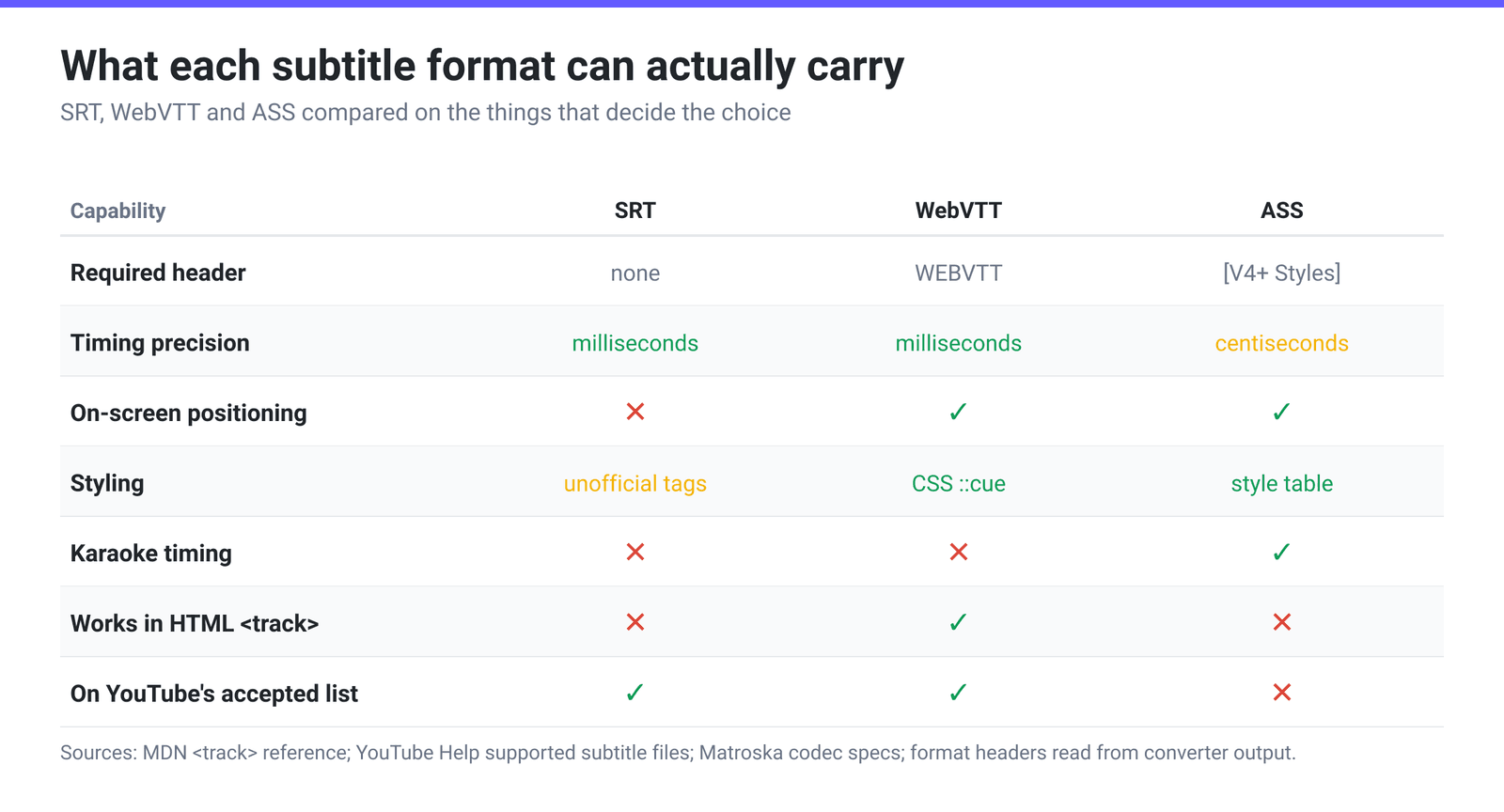
The differences are not decoration. SRT has no header at all — the file starts with the number 1 — which is exactly why it is so portable and exactly why it cannot carry anything but text and times. WebVTT adds a required WEBVTT first line, cue settings for where a caption sits on screen, and CSS hooks. ASS adds an entire style table, and every event line names a style from it.
Four differences that decide it for you
1. The web takes WebVTT. The HTML <track> element used to attach captions to <video> and <audio> expects WebVTT — MDN’s reference describes the tracks as “formatted in WebVTT format (.vtt files)” and the src attribute as the “address of the track (.vtt file)”. If your captions are not appearing on a web page, the file being an .srt is the first thing to check. Converting is a one-step job; converting SRT to VTT for HTML5 video covers the whole path.
2. YouTube’s published list has no ASS or SSA in it. Google documents the subtitle and closed-caption formats YouTube accepts in three groups: basic (SubRip .srt, SubViewer .sbv/.sub, MPsub, LRC, Videotron Lambda .cap), advanced (SAMI, RealText, WebVTT, TTML, DFXP) and broadcast (SCC, EBU-STL and several CEA-608 formats). Advanced SubStation Alpha appears in none of them. If you have an .ass file and a YouTube video, converting to SRT is not optional. Google also warns that for SRT, “no style info (markup) is recognized” and “the file must be in plain UTF-8” — so the styling would be dropped even if the upload went through.
3. ASS timing is coarser than SRT’s, and it truncates. SRT and WebVTT both write milliseconds. ASS writes centiseconds — 0:00:01.00. The extra digit is not rounded, it is thrown away: our converter computes the centisecond field as floor((ms % 1000) / 10), so a cue starting at 00:00:01,237 in SRT becomes 0:00:01.23 in ASS and comes back as 00:00:01,230. The error is therefore always in the same direction — the cue lands early, by up to 9 milliseconds, never late. Nobody sees 9 ms in dialogue, but it means an SRT → ASS → SRT round trip is not byte-identical, and it is one reason karaoke timing is authored in ASS directly rather than converted into it.
4. ASS styling is a system, not an attribute. In ASS, [V4+ Styles] defines named styles — font, size, primary/outline/shadow colours, bold, margins, alignment — and each Dialogue: line picks one, optionally overriding it inline. Converting away from ASS discards that table, because SRT and VTT have nowhere to put it. Converting into ASS cannot invent it: any converter reading an SRT only has start time, end time and text to work with, so it writes a single default style and attaches every line to it. Matroska’s specification notes the other half of the problem — an ASS track “MAY use embedded fonts from attachments”, so a .ass file pulled out of an MKV can reference a font that is sitting in the container rather than on your system.
SSA and ASS: what the plus sign means
They are the same lineage, two versions apart. SubStation Alpha reached script version v4.00; Advanced SubStation Alpha is v4.00+, and the practical marker is the styles section header: [V4 Styles] for SSA, [V4+ Styles] for ASS.
The Matroska specification turns that into a hard rule for anyone muxing subtitles, and it is the cleanest definition available: the codec ID S_TEXT/ASS “MUST be used when ‘ScriptType: v4.00+’ or ‘[V4+ Styles]’ sections are found in the original SSA script”, while S_TEXT/SSA “MUST NOT be used” in that case. Same family, decided by one line in the header.
In practice: choose ASS unless something specifically demands SSA. ASS’s style table has more fields (outline and shadow colours, scaling, rotation, border style), the override-tag vocabulary is wider, and every current renderer built on libass — VLC, mpv, ffmpeg and the players that embed them — treats it as the native format. SSA survives mainly for older editors and hardware players that predate the v4.00+ header.
Pick by destination — and the failure mode if you get it wrong
| Where it’s going | Send | What happens if you send the wrong one |
|---|---|---|
HTML5 <video> on your own page | VTT | An .srt in a <track> element simply produces no captions — no error, nothing on screen |
| YouTube | SRT (or VTT for positioning) | .ass/.ssa are not on Google’s accepted list; styling in an SRT is stripped anyway |
| Facebook, Instagram, most social uploaders | SRT | Uploaders that only document SRT tend to reject the rest outright |
| VLC, mpv, Plex, Jellyfin | SRT or ASS | Both play; an SRT just looks plain where the ASS would have been typeset |
| Anime / fansub / typesetting work | ASS | Convert to SRT and every sign, position and karaoke effect is gone permanently |
| Broadcast or OTT delivery | TTML / DFXP | Ingest systems that specify TTML reject SRT at validation — see TTML and DFXP subtitles |
| Music players, synced lyrics | LRC | A subtitle file with end times carries data an LRC player has no field for |
The asymmetry worth internalising: converting down is lossless for the words and lossy for everything else; converting up adds nothing. SRT → ASS gives you an ASS file, not a typeset one. So if styled subtitles matter, keep the ASS as your master and export SRT copies, never the reverse.
Convert between subtitle formats on xconvert
The xconvert SRT converter handles all of these in one place, and the conversion runs on your own device — the subtitle text is never sent anywhere:
- Open xconvert.com/srt-converter. Click Upload .srt to pick a file, or paste the cues straight into the input box if you are converting a snippet.
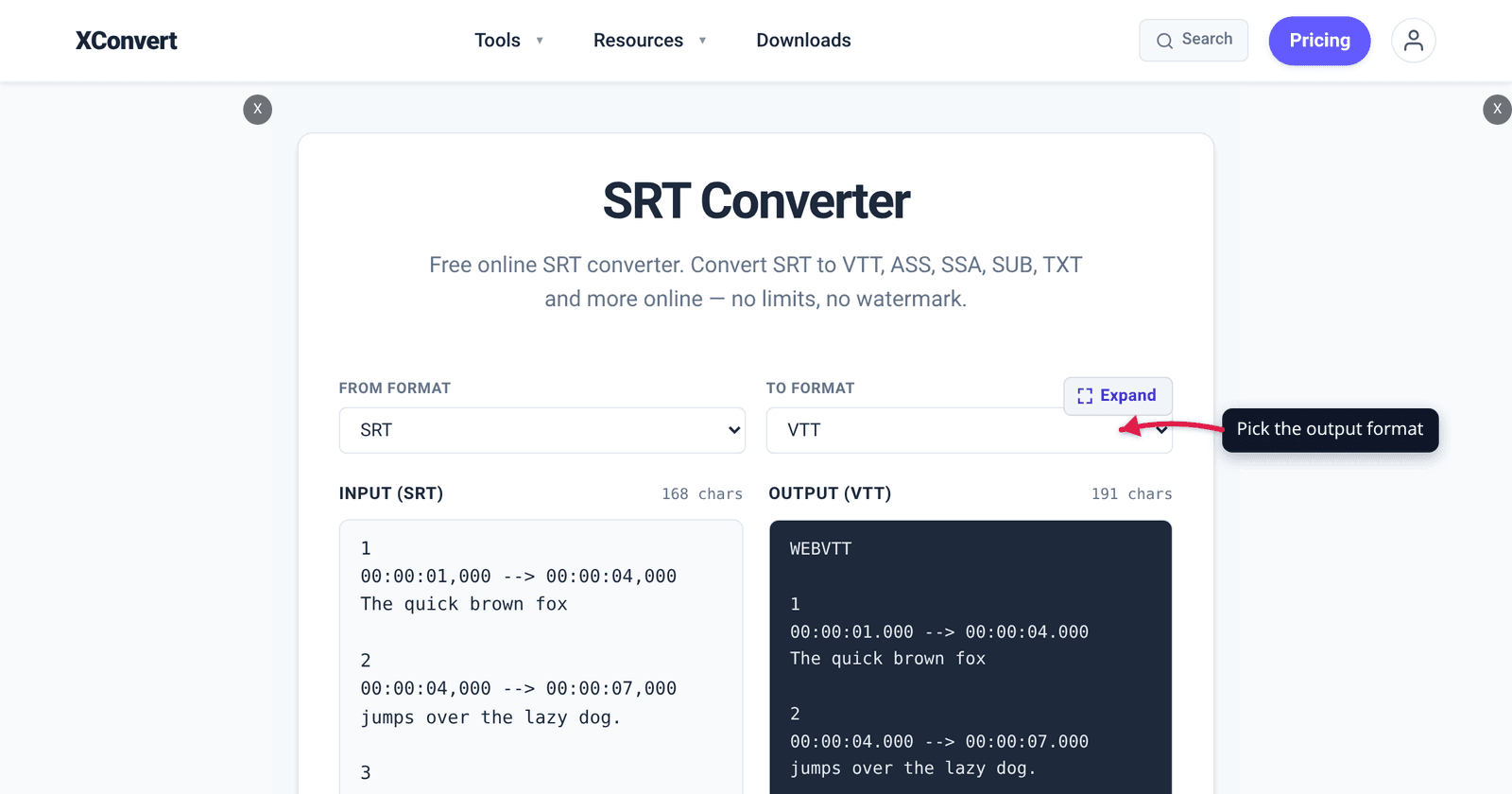
- Set From format to what you have and To format to what you need. Both dropdowns list SRT, VTT, ASS, SSA, SBV, SUB, LRC, SMI, TTML, STL, DFXP, TXT and CSV; the page opens on SRT → VTT.
- Press Convert →. The output pane shows the rewritten cues, so you can check the timecode style changed the way you expect — a comma before the milliseconds in SRT, a period in VTT, two decimal places in ASS.
- Click Download to save the file, or Copy to take the text. No sign-up, no watermark.
One honest caveat, because it follows directly from the section above: converting to ASS produces a valid script with a ScriptType: v4.00+ header, a [V4+ Styles] block and one default style that every Dialogue: line uses. Choose SSA instead and you get the older pair — ScriptType: v4.00 and a [V4 Styles] block with the shorter style field list. Either is a correct file and a good starting point for Aegisub — neither is a reconstruction of typesetting that was never in the source.
FAQ
Why don’t my SRT captions show up on my website?
Because the HTML <track> element wants WebVTT. Point src at a .vtt file instead and the captions appear. Watch for two other web-only gotchas while you are there: the .vtt must be served as text/vtt, and <track> enforces same-origin unless the parent <video> carries a crossorigin attribute — so a caption file on a different CDN host can fail even when the path is right.
Can I convert ASS to SRT without losing the styling?
No, and no tool can. SRT has no field for a font, a colour, a screen position or a karaoke timing — the only markup any player reliably honours is <i>. Converting ASS to SRT keeps every line of dialogue and its timing and discards the rest. If both are needed, ship two files: the ASS for players that render it, the SRT for everything else.
Is ASS the same as SSA?
They are two versions of the same format. SSA is script version v4.00 with a [V4 Styles] section; ASS is v4.00+ with [V4+ Styles] and a longer list of style fields and override tags. Matroska’s codec spec makes the split explicit — a script containing ScriptType: v4.00+ or [V4+ Styles] must be stored as ASS, not SSA. Unless a specific old player has asked you for SSA, pick ASS.
Which format should I use for a Plex or Jellyfin library?
SRT for maximum compatibility, ASS when the release was typeset and you want it to look the way it was made. There is a real cost to guessing wrong: Plex documents that even when a file’s audio, video and container are all compatible with the client app, “if a subtitle stream is selected and is not compatible with the Plex App, then the Server will ‘burn in’ the subtitle text within the video. This requires a full transcode of the video stream.” Keeping an SRT sidecar next to the ASS is a cheap way to give a fussy client something it can render on its own.
Does converting SRT to VTT change the timing?
No. The cue times are carried across unchanged; only their notation changes — SRT writes 00:00:01,000 with a comma, WebVTT writes 00:00:01.000 with a period, and WebVTT adds its required header line. Both formats store milliseconds, so nothing is rounded in either direction.
My subtitles are in ASS and my TV shows squares instead of letters. Why?
Almost certainly a font problem rather than a format one. An ASS script names fonts by string; if the player does not have that font installed it substitutes, and if the substitute lacks the characters you get boxes. When the subtitles came from an MKV, the font is often an attachment inside the container rather than a file on the device. Converting the track to SRT sidesteps it entirely by letting the player use its own caption font.
Sources
Last verified 2026-08-31.
- MDN —
<track>: The Embed Text Track element — “The tracks are formatted in WebVTT format (.vtt files) — Web Video Text Tracks”;srcis the “Address of the track (.vtt file)” and must be same-origin unless the media element hascrossorigin. - YouTube Help — Supported subtitle and closed caption files — the full accepted list (SubRip, SubViewer, MPsub, LRC, Videotron Lambda; SAMI, RealText, WebVTT, TTML, DFXP; SCC, EBU-STL, TDS, CIN, ASC, CAP) with no SubStation Alpha entry, plus “No style info (markup) is recognized. The file must be in plain UTF-8” for SRT.
- Matroska — Codec Specs —
S_TEXT/ASS“MUST be used when ‘ScriptType: v4.00+’ or ‘[V4+ Styles]’ sections are found in the original SSA script”;S_TEXT/SSA“MUST NOT” be used in that case; both “MAY use embedded fonts from attachments”;S_TEXT/UTF8is plain-text subtitles andS_TEXT/WEBVTTis WebVTT. - Plex Support — Streaming media: direct play and direct stream — “if a subtitle stream is selected and is not compatible with the Plex App, then the Server will ‘burn in’ the subtitle text within the video. This requires a full transcode of the video stream.”
- FFmpeg — muxer metadata read from the local build: SubRip is
application/x-subrip(.srt), WebVTT istext/vtt(.vtt), and the ASS muxer covers both.assand.ssawith MIMEtext/x-ass. - xconvert SRT converter — live tool; the From format / To format dropdowns and their 13 entries, the Upload .srt, Convert →, Copy and Download controls, the SRT → VTT default, and the shape of the emitted scripts (ASS:
ScriptType: v4.00+with a[V4+ Styles]block; SSA:ScriptType: v4.00with[V4 Styles]; both with one default style and centisecondDialogue:timings, the centisecond field truncated rather than rounded) were read from the tool itself.