 By James
Your tab still shows the old logo three days after you replaced it. Or it shows the new one as an unreadable smudge. Favicons fail in a small, predictable set of ways, and almost none of them are “you exported the PNG wrong” — the file is usually fine, and something between the file and the pixel is choosing badly. Here is the triage order, and the two ICO traps that quietly hand you the wrong image.
Quick answer: Open the icon’s own URL in a tab —
https://yoursite.com/favicon.ico. If the image appears, the file is fine and you have a cache or markup problem; confirm in a private window before changing anything. If it 404s or renders your HTML error page, it was never deployed at that path. Blurry almost always means the largest layer you shipped is 16×16 while the surface is painting at 32 or 48 device pixels — Google recommends a favicon “larger than 48x48px”. And if you rebuilt from an existing.ico, know that single-image decoders read the first entry in the directory, which is usually the 16×16 and never the biggest. Rebuild from one square master with xconvert’s favicon generator.
Jump to a section
- Start with the file, not the browser
- Why the cache wins, and the fix that doesn’t backfire
- Blurry means something upscaled it
- The two ICO traps
- Shape, margin, and the background you didn’t set
- Rebuild the set on xconvert
- FAQ
Start with the file, not the browser
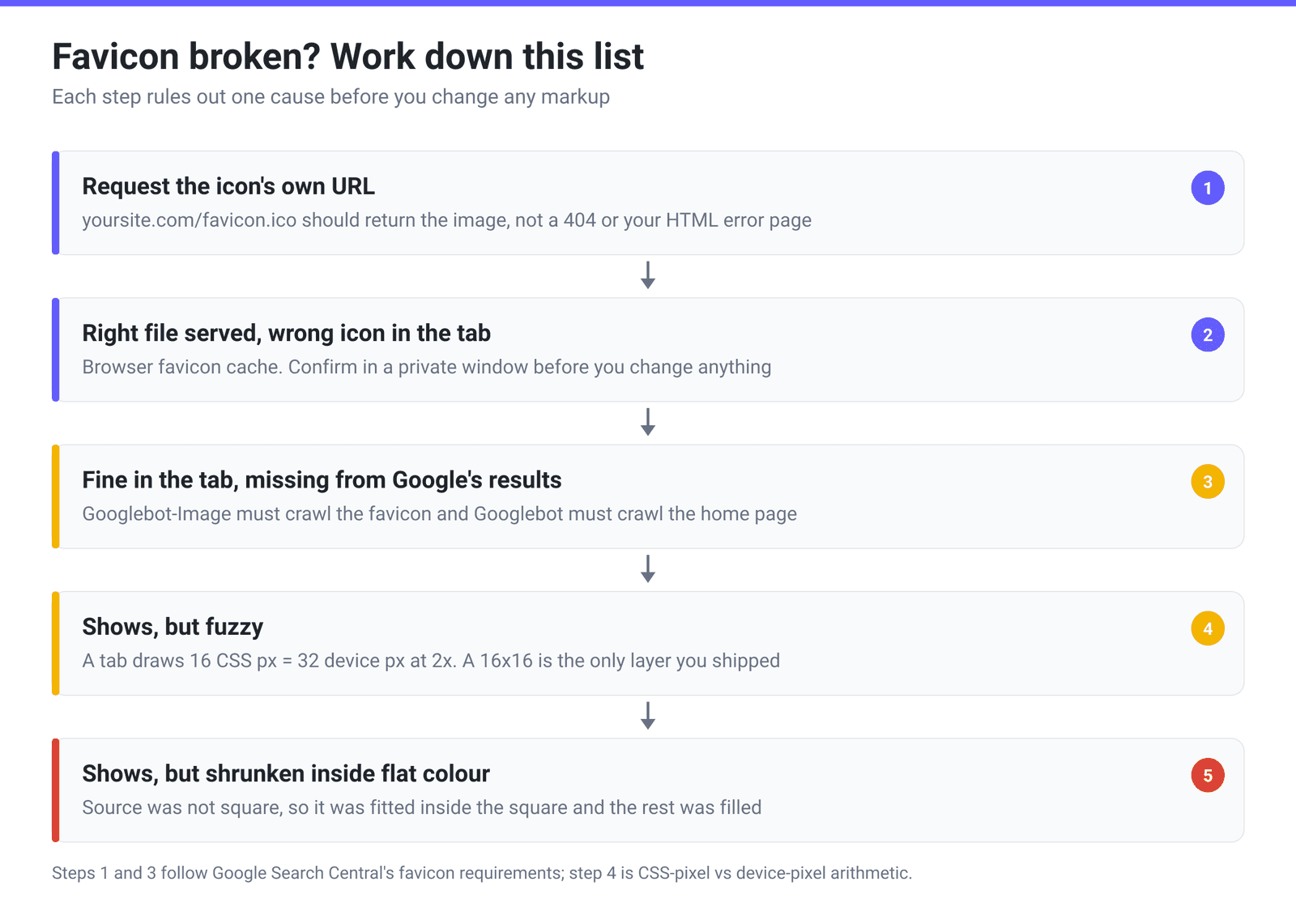
Before you touch a <link> tag, request the icon directly: type the full URL of the file into the address bar and look at what comes back.
- The image renders. The bytes are where you think they are — skip to the cache section.
- A 404, or your styled “page not found” page. It was never deployed to that path. A build step that hashes asset filenames produces
/assets/favicon.a3f9c1.ico, which nothing probing/favicon.icowill ever find. - The HTML of your home page. A catch-all route is swallowing the request — common with SPA routers that serve
index.htmlfor anything not matched as a static file.
Four more failure modes live at this level, and all of them are invisible from your own browser:
| Symptom | Most likely cause | Fix |
|---|---|---|
Shows on example.com, not on www.example.com | Google treats favicons as one per hostname, and browsers probe the host they’re on | Serve the icon from every hostname you use, or redirect one to the other |
| Missing from Google’s results, fine in the tab | The file or its directory is disallowed in robots.txt | Google requires that Googlebot-Image can crawl the favicon and Googlebot can crawl the home page |
| Works in Chrome, blank in Safari | Your only icon is an SVG | Ship raster fallbacks — see the table below |
| Works everywhere except the iOS Home Screen | iOS does not read rel="icon" | Add an apple-touch-icon; Apple’s Retina iPhone size is 180×180 |
That third row deserves its own numbers. Global SVG-favicon support is around 90% per caniuse, and the missing tenth is concentrated in Apple’s browser:
| Browser | SVG favicon from | Note |
|---|---|---|
| Chrome / Edge | 80 | Desktop and Android |
| Firefox | 41 | Earliest of the majors |
| Safari (macOS and iOS) | 26.0 | Versions 3.1–18.7 have no support at all |
| IE, Opera Mini, Android Browser | Never | — |
Declare an SVG favicon in front of a PNG, never instead of one.
Why the cache wins, and the fix that doesn’t backfire
If the file renders at its own URL but the tab still shows the old icon, you are fighting a cache — and favicons are cached far more stubbornly than page assets. A hard reload (Ctrl+Shift+R / Cmd+Shift+R) reloads the document; it does not reliably force a browser to re-evaluate the icon it has already associated with a site.
- Confirm it really is a cache. Open the site in a private window, or a browser you have never visited it in. If the new icon appears there, your deployment is correct and you can stop debugging.
- Only then cache-bust. Changing the URL works —
<link rel="icon" href="/favicon.ico?v=2">— but it collides with Google’s guidance that “the favicon URL must be stable (don’t change the URL frequently)”. A one-off?v=2after a rebrand is fine; rotating a hash in on every deploy is not.
For the icon in Google’s search results there is no cache to clear at all. You are waiting on a recrawl, which Google says “can take anywhere from several days to several weeks”.
Blurry means something upscaled it
A favicon is drawn into a fixed box; the browser takes the closest layer it has and scales it. Blur is what scaling up looks like.
The arithmetic that catches most people: a browser tab reserves roughly 16 CSS pixels for the icon. On a 2× display that is 32 device pixels, and on the 3× displays common on phones, 48. If the only image you shipped is a 16×16, every one of those surfaces is enlarging a 256-pixel bitmap.
Other surfaces ask for much more. Google recommends “using a favicon that’s larger than 48x48px so that it looks good on various surfaces,” with a floor of 8×8 and a hard square requirement. Apple’s web-clip documentation lists 180×180 for Retina iPhones, 167×167 for iPad Pro and 152×152 for iPad — and if iOS finds no match it takes “the smallest icon larger than the recommended size,” falling back to the largest available, so a 32×32 can end up stretched across a Home Screen tile.
Two causes of “fuzzy” aren’t about pixel counts at all. Your logo may be too complicated for 16 pixels — if you can’t identify the mark squinting at a thumbnail, that’s a design problem; use the symbol, the monogram or a single letter. And starting from a JPEG puts blocking artifacts on exactly the hard edges a small icon is made of, with no alpha channel available.
The two ICO traps
ICO is not an image format, it is a directory of images — one file holding several sizes. That container shape causes two problems people hit while trying to fix a favicon.
Trap 1: a multi-size .ico decodes to its first entry, not its biggest. You have an old favicon.ico holding 16, 32 and 48 pixel layers and you want a PNG of the logo back out of it. Feed it to an image converter and you get the 16×16 — a single-image decoder reads directory entry 0, and generators conventionally write smallest-first. If the pipeline then scales that up to the size you asked for, you get a blurry blowup of the smallest layer and no error anywhere. This is not specific to one converter; it is how most single-image pipelines treat a multi-image container, and xconvert’s ICO to PNG converter behaves the same way. (That one is server-side: the file uploads over an encrypted connection, converts on our servers, and is deleted automatically a few hours later.) The rule: never treat an old .ico as your master.
Trap 2: the ICO size presets set the height, not the longest side. Every “p” preset in xconvert’s image pipeline — 256P, 192P, 180P, 128P and down — sets the output height and lets width follow the aspect ratio. For ICO that’s a trap: each directory entry stores width and height as single-byte fields (BYTE bWidth / BYTE bHeight in Microsoft’s format documentation), capping a declarable dimension at 256, so a landscape source at 256P lands past that ceiling. With a non-square source, 128P is the practical maximum — fuller explanation in Favicon sizes in 2026: the five files you actually need.
Shape, margin, and the background you didn’t set
Every surface that shows a favicon shows it square; Google states it outright — “Your favicon must be a square (1:1 aspect ratio).” So a non-square source has to be squared by somebody, and if you don’t decide how, the tool decides for you.
xconvert’s favicon generator fits your image inside the square and paints the remainder with the Background colour. A 3:1 wordmark becomes a thin band across the middle with two-thirds of the canvas as flat colour — technically correct, visually tiny. Crop to square first, and leave the mark a small margin inside that square so rounded masks don’t clip it. Two related surprises:
- There is no “transparent” background. Background is a colour swatch defaulting to white, and the fill is always painted, so a transparent PNG comes out on a solid square. That is usually right for a tab icon — a dark transparent logo disappears into a dark tab strip — but pick the colour deliberately instead of inheriting white.
- Rounded corners are baked in, and iOS rounds again. Rounded corners (iOS-style) masks every generated size with a rounded rectangle. iOS also masks Home Screen icons itself, so a pre-rounded 180×180 can end up double-rounded, with background colour showing as wedges at the corners. Leave it off when the Home Screen is the priority.
Rebuild the set on xconvert
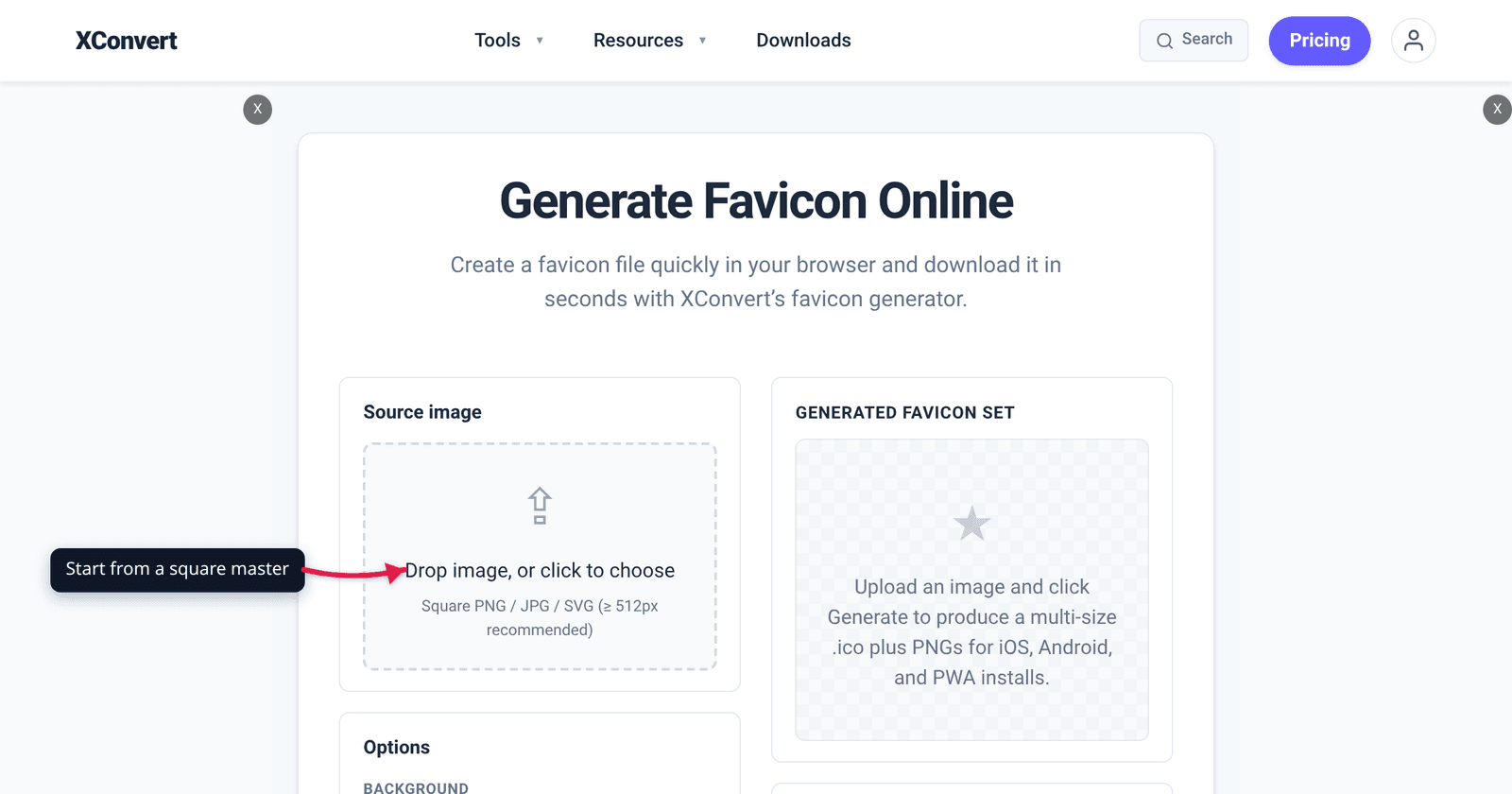
- Open xconvert.com/favicon-generator and use Drop image, or click to choose. The page asks for a square PNG / JPG / SVG (≥ 512px recommended) — start from your largest square master, not the old
.ico. - Set Background to a colour that works against both a light and a dark tab strip.
- Tick Rounded corners (iOS-style) only if you want that shape baked into every size.
- Click ⚙ Generate favicon set, then download the results: a multi-size
favicon.icoplus PNGs at 16, 32, 48, 180, 192 and 512 pixels. - Use 📋 Copy HTML for the matching
<link>tags and upload the files to your site root. The snippet also references asite.webmanifest— that small JSON file you write yourself; the generator produces the images, not the manifest.
The generator runs entirely on your device — the image is decoded, resized and encoded to ICO inside the page, so nothing is uploaded and there is no file on any server to delete. If you only need a single ICO rather than the whole set, how to convert an image to ICO covers that narrower job.
FAQ
Why won’t my favicon update, even after a hard refresh?
A hard refresh reloads the document, not the browser’s stored association between your site and its icon. Verify in order: open the icon’s URL directly to confirm the new file is served, then open the site in a private window. If the new icon shows there, your deployment is fine and you are only waiting on your own browser. A single ?v=2 on the href forces the issue — but don’t make URL-versioning a per-deploy habit, because Google asks that the favicon URL stay stable.
How long until the new favicon appears in Google search results?
There is no cache to clear and no button to press; it appears after Google recrawls, which Google describes as taking “anywhere from several days to several weeks.” What is in your control: Googlebot-Image must be able to crawl the favicon file, Googlebot must be able to crawl the home page, and the icon must be square and at least 8×8. Check robots.txt first — a blanket disallow on an assets directory is the usual culprit.
Why does my favicon look blurry on a Retina or 4K screen?
The browser is upscaling. A tab reserves about 16 CSS pixels for the icon, which is 32 device pixels at 2× and 48 at 3×. If your largest layer is a 16×16, all of those are enlargements. Ship a 32×32 PNG, put a 48×48 layer inside the .ico, and add a 180×180 — Google’s “larger than 48x48px” is a sensible floor to design to.
I converted my old favicon.ico to PNG and got a tiny 16×16 image. Why?
Because an .ico holds several images and a single-image decoder reads directory entry 0 — for almost every generator the 16×16, since they write smallest-first. Nothing warns you; you get the smallest layer, scaled up to whatever you asked for. Don’t use an old .ico as your source of truth: find the vector or large PNG it was made from and regenerate from that.
My logo is wide, not square. What’s the least-bad favicon?
Crop to a square element rather than shrinking the whole wordmark. A generator fits a wide image inside the square and fills the rest with the background colour, so a 3:1 logo occupies a third of the icon’s height and reads as a smear at 16 pixels. Use the symbol, the monogram or one letter — and if you convert a wide image straight to ICO, the size presets set the height, so 128P is the safe ceiling.
Why does the icon show in Chrome but not in Safari?
Usually because the only icon is an SVG. Per caniuse, SVG favicon support landed in Chrome and Edge at 80 and Firefox at 41 — but Safari only from 26.0, with none at all in versions 3.1 through 18.7 on macOS or iOS. Keep the SVG if you like it, but declare it in front of a PNG so older Safari falls through to a raster file.
Sources
Last verified 2026-08-31.
- Google Search Central — Define a favicon to show in search results — square 1:1 requirement, “at least 8x8px,” the “larger than 48x48px” recommendation, one favicon per hostname, stable-URL guidance, the Googlebot-Image / Googlebot crawl requirement, and “several days to several weeks” for recrawl.
- Microsoft — Icons (ICO file format) — the
ICONDIRENTRYstructure withBYTE bWidthandBYTE bHeight, and the fact that one ICO file is a directory of several images. - caniuse — SVG favicons — support from Chrome/Edge 80, Firefox 41, Safari 26.0 (none in 3.1–18.7 on desktop or iOS), ~90% global.
- Apple — Configuring Web Applications — apple-touch-icon sizes (180×180 Retina iPhone, 167×167 iPad Pro, 152×152 iPad) and the “smallest icon larger than the recommended size, otherwise the largest available” selection rule.