 By Stephanie Taylor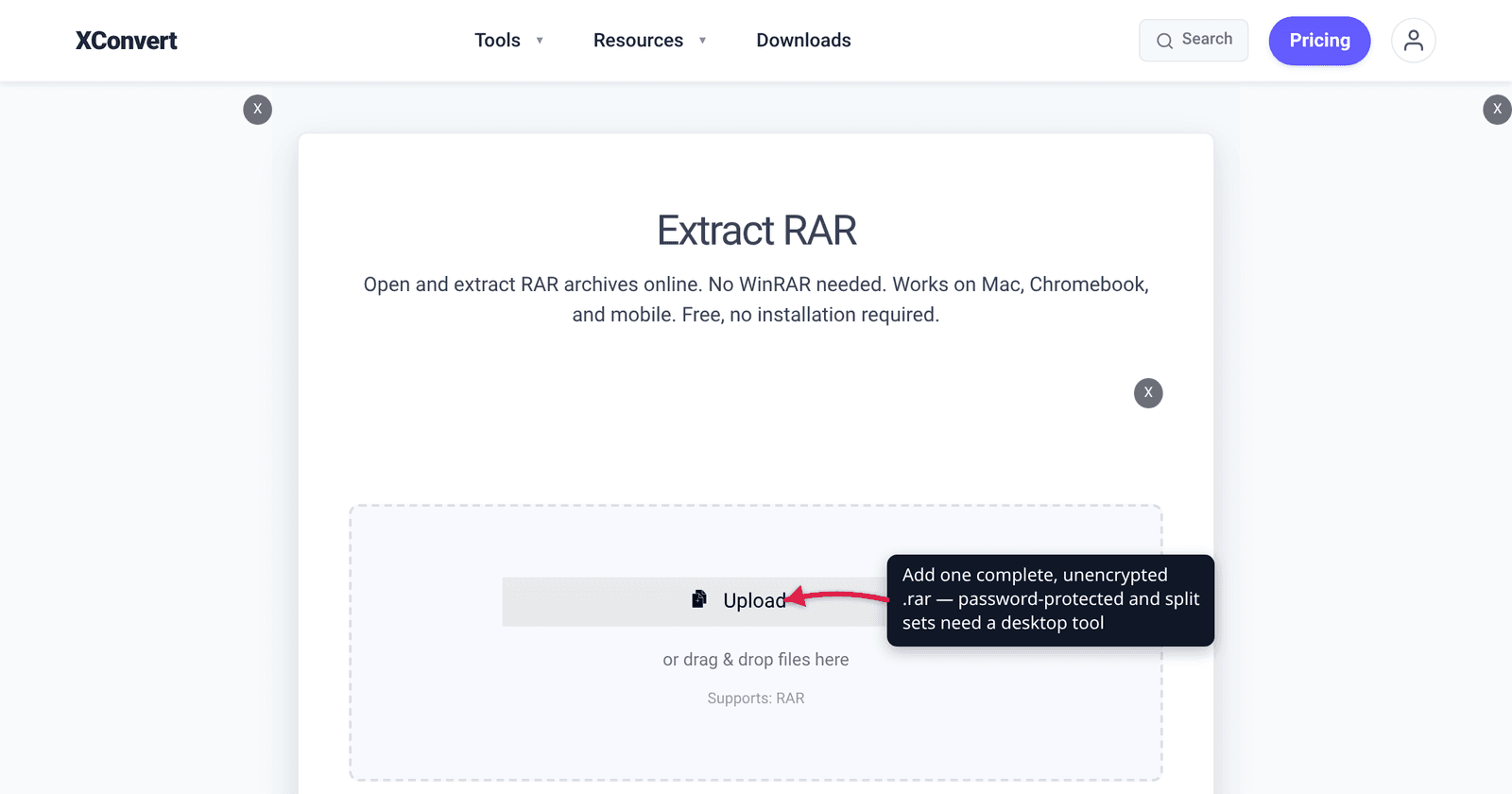
You double-click a .rar and instead of files you get a shrug: “Windows can’t open this file”, a password box you never expected, an “unexpected end of archive” error, or a demand for name.part2.rar that you don’t have. Those are four different problems with four different fixes, and the internet’s stock advice — “install WinRAR” — only solves one of them. Here’s how to read the symptom, plus an honest account of which cases an online extractor can handle and which need software on your machine.
Quick answer: Read the error, not the file. “No app to open this” = you need a RAR reader (Windows 11 24H2 has one; Mac never has). A password prompt = the archive is genuinely encrypted, and only the password opens it. “Cannot find volume” = it’s a split set, so put every part in one folder and start from the first. “Unexpected end of archive” / CRC failed = truncated or corrupt, so re-download. Nothing recognises it = it may not be a RAR at all. An online extractor like xconvert handles a single, complete, unencrypted
.rar; password-protected and multi-part sets need a desktop tool.
Jump to a section
- Match the error message to the cause
- Reason 1: nothing on your device can read RAR
- Reason 2: the archive is encrypted
- Reason 3: it’s one volume of a split set
- Reason 4: the file is truncated or corrupt
- Reason 5: it isn’t actually a RAR
- Extract a single complete RAR on xconvert
- FAQ
Match the error message to the cause
RAR failures are unusually well-signposted — the wording of the error narrows it down almost every time.
| What you see | What’s actually wrong | The fix |
|---|---|---|
| “Windows can’t open this file” / “Search the Microsoft Store” / nothing happens | No RAR reader on the device | Update to Windows 11 24H2, install 7-Zip or The Unarchiver, or extract online |
| A password box appears | The archive is AES-encrypted | Enter the password in a desktop tool; there is no bypass |
| The archive looks empty, or every filename is gibberish | Encrypted headers — the file list itself is encrypted | Same password, but the list only appears once it’s accepted |
“Cannot find name.part2.rar” | Split multi-volume set with a missing or wrong starting part | Put all parts in one folder, open .part1.rar (or .rar) |
| “Unexpected end of archive” | Truncated — the trailing index never arrived | Re-download; try Repair if it has a recovery record |
| “CRC failed” / “Checksum error” on one file | Bytes changed in transit or on disk | Re-download; extract the rest and replace the bad file |
| Every tool says “unknown format” | It probably isn’t a RAR at all | Check the file signature |
Reason 1: nothing on your device can read RAR
By far the most common cause, and not a fault in your file. RAR is proprietary, so for most of computing history no operating system shipped a reader for it.
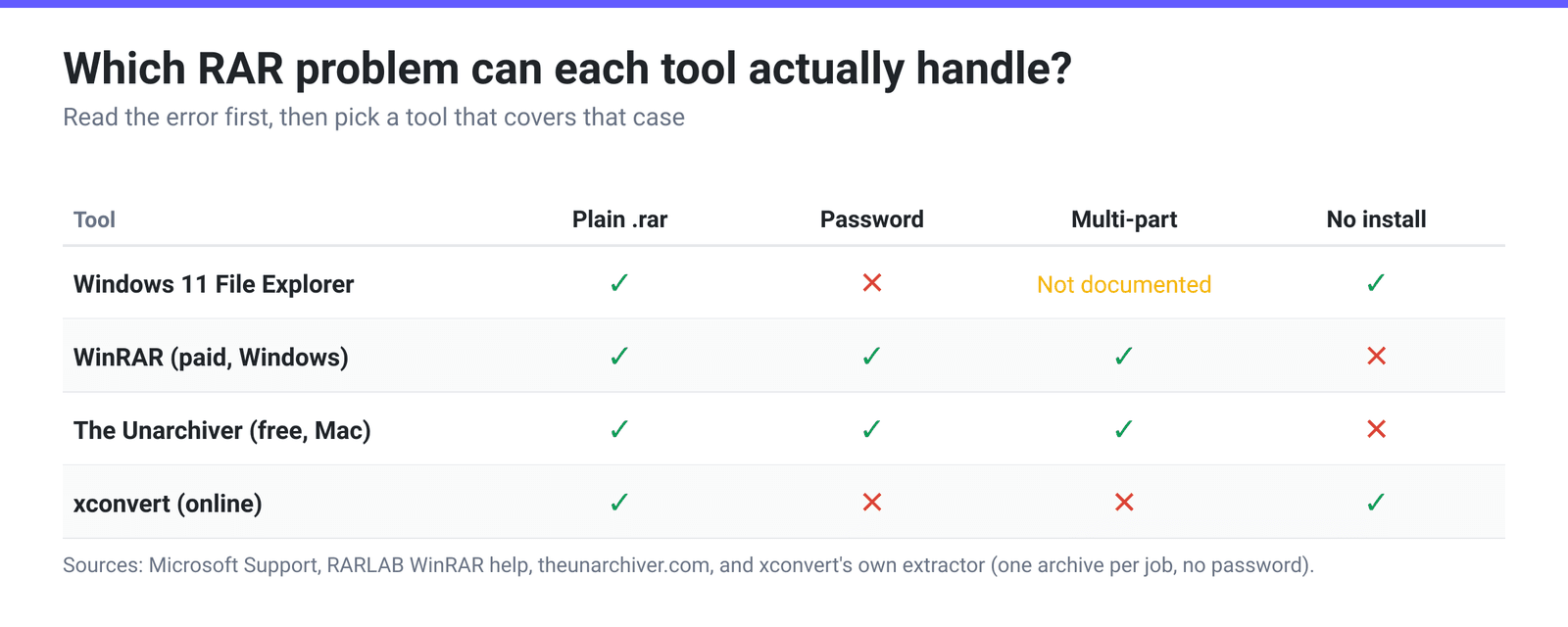
Windows. Microsoft’s support page states that “Windows 11, version 24H2 supports ZIP, RAR. 7z and TAR archive formats” — File Explorer’s Extract All… works on a .rar with nothing installed. Windows 10 and earlier never got this, so there a double-click keeps doing nothing until you install something. The free option is 7-Zip, which lists RAR among the formats it can unpack (it reads RAR but cannot create one — that’s RARLAB’s licence, not a 7-Zip limitation).
Mac. Apple’s Mac User Guide for compressing and uncompressing files describes exactly one format: .zip. There’s no built-in RAR handler and never has been, which is why Finder gives you nothing. The standard free fix is The Unarchiver, whose format list claims full RAR support “Including encryption and multiple volumes” — that phrase matters for reasons 2 and 3. Keka is the other common choice and also creates archives.
Chromebook, phone, locked-down work PC. When you can’t install anything, extract it online — as long as the archive is a single, complete, unencrypted file.
Reason 2: the archive is encrypted
If a password box appears, the archive was encrypted when it was created. RAR 5.0 uses AES-256; RARLAB’s format note says of the encryption algorithm version, “Now only 0 version (AES-256) is supported.” That’s real cryptography, not a soft lock, with three consequences people get wrong:
- There is no bypass. No extractor, converter, or online tool opens an encrypted RAR without the password. Anything claiming otherwise is brute-forcing — quick against
1234, hopeless against a decent password. - Windows’ built-in extractor won’t do it at all. Microsoft is explicit that Windows 11 24H2 “does not support operations on encrypted archive files”, so even on a fully updated Windows 11 an encrypted
.rarneeds a third-party tool. - Encrypted headers hide the file list too. RAR’s
-hpmode encrypts names, sizes and comments as well as data: “Without a password it is impossible to view even the list of files.” An archive that shows as empty, or with gibberish names, is usually this — not corruption.
And to be clear about xconvert: our RAR extractor runs unrar with no password argument, so an encrypted archive simply fails — we never prompt for one. Use a desktop tool that does: WinRAR or 7-Zip on Windows, The Unarchiver or Keka on Mac. Type the password exactly, capitalisation included.
One gotcha: a wrong password and a damaged archive produce a single combined error message. If you’re sure the password is right and it still fails, you’re probably in reason 4.
Reason 3: it’s one volume of a split set
Big RARs are routinely split so they’re easier to move. RARLAB’s own manual documents both naming schemes: “RAR volumes have names like ‘volname.partNNN.rar’, where NNN is the volume number”, and older versions “could use the another naming scheme, where the first volume file in a multi-volume set had .rar extension, followed by volumes with extensions from .r00 to .r99.”
| RAR version | First part | Following parts |
|---|---|---|
| RAR 5.0 (modern) | name.part1.rar / name.part01.rar | name.part2.rar, name.part3.rar, … |
| RAR 4.x (legacy) | name.rar | name.r00, name.r01, … |
The rule is equally blunt: “When extracting or testing a multi-volume archive you must use only the first volume name.” And the symptom is documented too — if a volume is missing from a hard disk, “RAR will abort with the error message: Cannot find <volume name>.”
So the fix is mechanical: gather every part into one folder, open only the first volume, and let the tool pull in the rest. Never start from .part2.rar or .r00 — a .r05 isn’t a standalone file, it’s the middle of a stream, and files routinely straddle the boundary between volumes.
This one genuinely cannot be done online with xconvert. Our extractor processes one archive per job: each file you add is unpacked on its own, so it can’t reach across to the sibling volumes it would need. Use WinRAR on Windows or The Unarchiver / Keka on Mac, both of which document multi-volume support.
Reason 4: the file is truncated or corrupt
“Unexpected end of archive” has a precise meaning: the archive’s trailing structure — the part indexing what’s inside — isn’t there. Almost always the download stopped early, a transfer was interrupted, or the file came off failing storage. “CRC failed” is the neighbouring case: the whole file arrived, but some bytes are wrong, so the checksum RAR stored at pack time no longer matches.
What to do, in order:
- Compare the byte count with the source page or the person who sent it. A short file is a truncated download, and nothing repairs data that never arrived. Most productive check, most often skipped.
- Re-download over a stable connection, ideally from a different mirror. Broken resumes and flaky Wi-Fi cause most of these.
- Try WinRAR’s Repair command, which runs in two stages. RARLAB: with a recovery record, “if damaged data area is continuous and smaller than error correction code size in recovery record, chance of successful archive reconstruction is high.” Without one, the fallback stage means “it is impossible to recover files which fail checksum validation, it is still possible, however, to recover undamaged files, which were inaccessible due to the broken archive structure.” Repair rescues good files trapped behind a broken index; it can’t invent missing bytes.
- Know the dead end. The fallback stage “is never efficient for archives with encrypted file headers, which can be repaired only if recovery record is present.” Encrypted headers plus no recovery record means get a fresh copy.
Recovery records are optional and have to be added by whoever built the archive, so most RARs you download don’t have one. That’s not a defect in your extractor.
Reason 5: it isn’t actually a RAR
Occasionally the extension is simply wrong — a file gets renamed, a download is served under the wrong name, or a .zip / .7z / .exe self-extractor is passed off as a .rar. Every tool then reports “unknown format”, which reads like corruption but isn’t.
You can settle it in seconds, because the format is self-identifying. RARLAB’s format note gives the signature: “RAR 5.0 signature consists of 8 bytes: 0x52 0x61 0x72 0x21 0x1A 0x07 0x01 0x00”, and “this is RAR 4.x 7 byte length signature: 0x52 0x61 0x72 0x21 0x1A 0x07 0x00”. Those first four bytes are ASCII for Rar!. Run head -c 8 file.rar | xxd on Mac or Linux, or Format-Hex -Path file.rar -Count 8 in PowerShell. Starts with 50 4B (PK)? It’s a ZIP. 37 7A (7z) is a 7z; 4D 5A (MZ) is a Windows executable.
If it’s really a ZIP, rename the extension and it opens everywhere — see how to unzip files online. And if an unsolicited file turns out to be an .exe wearing a .rar name, don’t run it: archive-shaped bait is a long-running malware delivery pattern.
Extract a single complete RAR on xconvert
If your archive is one file, complete, and not password-protected — most everyday RARs — the xconvert RAR extractor opens it without installing anything, which is the point on a Chromebook, a phone, or a work laptop you don’t have admin rights on.
- Open xconvert.com/extract-rar and click Upload, then choose From my Computer, From Google Drive, or From Dropbox. (The page’s own step-by-step text still calls the button “+ Add Files”; the button itself says Upload.)
- Add one
.rar. Every file you add is unpacked as its own separate job, so this isn’t the place for a.part1/.part2set — see reason 3. - Ignore Advanced Options. The panel is on the page, but on this one it is empty — a RAR extraction exposes no settings at all, so there is genuinely nothing in there to get wrong.
- Click Extract.
- Download the contents — individual files, or everything at once as a single ZIP.
Your file is uploaded over an encrypted connection, processed on our servers, and deleted automatically a few hours later. We can’t recover, guess, or bypass an archive password, and we can’t join split volumes — for either of those the desktop tools above are the right answer, and we’d rather say so than waste your upload.
Deciding what to archive into next time? ZIP vs RAR vs 7z covers which format to pick, and how to open and extract a RAR file is the plain step-by-step for when nothing has gone wrong.
FAQ
Why does my RAR say “the archive is corrupt or the password is wrong”?
Because the tool genuinely can’t tell those apart from the outside — a wrong password produces garbage that fails the checksum, which looks identical to damaged data. Test it this way: if the archive holds several files and all of them fail, suspect the password; if one file fails while the rest extract fine, suspect corruption in that region. Then re-check the byte size against the source.
Can I extract a .part2.rar on its own?
No. A .part2.rar (or .r00) is a slice of a continuous stream, not an independent archive. Put every part in one folder and start from .part1.rar or .rar. If a middle part is missing you can sometimes recover files that sit entirely inside the parts you have, but anything spanning the gap is gone.
Windows 11 opens my other RARs but not this one — why?
Almost certainly because this one is encrypted. Microsoft states that Windows 11 24H2’s built-in archive support “does not support operations on encrypted archive files”, so a password-protected .rar fails in File Explorer while ordinary ones extract fine. Install 7-Zip or WinRAR for that file. A multi-volume set is the other possibility — the built-in handler isn’t documented to support those either.
My archive extracted but one file is missing or 0 bytes. What happened?
Usually a CRC failure the extractor skipped rather than aborted on: the structure was intact enough to list everything, but the bytes for that file were damaged. Extract again from a fresh download; if it fails at the same file every time, the copy at the source is itself damaged.
Can an online extractor handle any RAR?
Any single, complete, unencrypted one — which is most of them. What no online extractor can sensibly do is prompt you for a password mid-job or reach across the volumes of a split set. xconvert’s extractor processes one archive per job and passes no password, so those two cases belong on your desktop. Judge any online tool by whether it admits that.
Sources
Last verified 2026-08-31.
- Microsoft Support — Zip and unzip files — “Windows 11, version 24H2 supports ZIP, RAR. 7z and TAR archive formats” and “it does not support operations on encrypted archive files”.
- RARLAB — RAR 5.0 archive format technote — AES-256 as the only supported encryption version, and the RAR 5.0 (8-byte) / RAR 4.x (7-byte) file signatures.
- RARLAB — RAR for Linux download — the
rar.txtmanual bundled withrarlinux-x64-723.tar.gzis the source for the volume naming schemes, “you must use only the first volume name”, the “Cannot find <volume name>” error, the two-stager(repair) command and its recovery-record behaviour, and the-hpnote that “without a password it is impossible to view even the list of files”. - 7-Zip — supported formats — RAR appears in the “Unpacking only” list.
- The Unarchiver — format support — “RAR Full … Including encryption and multiple volumes.”
- Apple — Zip and unzip files and folders on Mac — Apple’s guide documents
.ziponly; there is no built-in RAR handler.