 By Stephanie Taylor
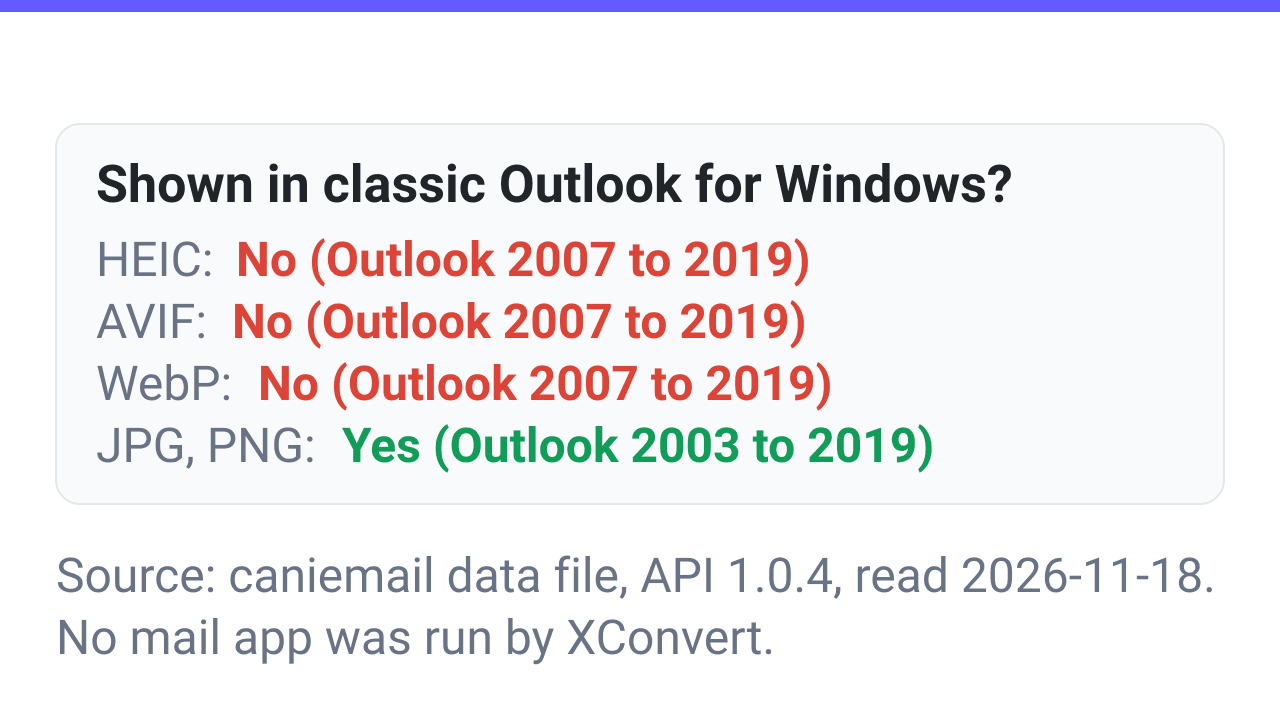
AVIF did not show in classic Outlook for Windows in caniemail’s tests up to Outlook 2019, and a Microsoft Community moderator’s answer of May 2024 agrees. Convert the AVIF to JPG, or to PNG if parts are transparent. The JPG is usually larger.
Checked on 2026-11-18 on six converter pages and in Chromium 147. No mail app was run: Outlook, Gmail and Apple Mail are reported from dated sources. Sources at the end.
Find your symptom
Ordered by the “does not show” cells of six mail apps in caniemail’s data file, read 2026-11-18: HEIC 8 of 18, AVIF 2 of 17, WebP 1 of 18, SVG 0 of 18. Cells, not users.
| Symptom | Cause | Fix |
|---|---|---|
| iPhone photo arrives as a .heic file and does not show | The recipient’s app does not show HEIC (cause 1) | Convert the HEIC to JPG, or change the iPhone setting |
| AVIF picture missing in Outlook on Windows | Classic Outlook showed no AVIF in the tests on file (cause 1) | Send a JPG, or a PNG made from the AVIF to keep transparent parts |
| WebP picture missing in Outlook on Windows | Classic Outlook up to 2019 showed no WebP (cause 1) | Photo: convert the WebP to JPG. Logo with transparent parts: to PNG |
| SVG logo blank in Outlook on the web or new Outlook | Microsoft switched inline SVG off (cause 2) | Convert the SVG to PNG |
| Every picture missing, whatever its format | Not the format: picture downloads are held back, or classic Outlook still has the bug of its 12 May 2026 updates, fixed in later builds | Gmail’s help page on images; Microsoft’s known-issue page |
| Shows for you, not for the recipient | You see your mail app, they see theirs | Send JPG or PNG |
Which formats display in which mail app
Each cell, except SVG in the two Outlook columns, is the newest test in caniemail’s data file, a community test database, with its test month or version label.
| Format | Classic Outlook for Windows | Outlook on the web | Gmail | Apple Mail |
|---|---|---|---|---|
| HEIC | No (2007 to 2019) | No (2024-02) | Turned into JPG (2024-02) | Yes (16, 17) |
| AVIF | No (2007 to 2019) | Yes (2024-01) | Turned into JPG (2023-01) | Yes (13.3, 16.4) |
| WebP | No (2007 to 2019) | Yes (2024-01) | Turned into JPG (2020-02, iOS 2021-02) | Yes (14) |
| SVG | Not confirmed | Inline SVG blank since September 2025 (cause 2) | Shown as a PNG (2026-09) | Yes (14, 26) |
| JPG, PNG | Yes (2003 to 2019) | Yes (2024-01) | Yes (2020-02) | Yes (13) |
JPG and PNG are marked as shown in every test in the file: 50 tests each, in 17 families of mail app.
New Outlook for Windows has no column. Microsoft says its “experience is provided by Outlook on the web”, so that column is the nearest guide, not a test.
To tell classic from new Outlook, use Microsoft’s rule: “If the Settings button is missing, you’re using classic Outlook.”
Cause 1: the mail app has no decoder for the format
Microsoft documents that Outlook 2007 displays HTML mail with Word’s rendering engine, not a browser’s.
In a Microsoft Q&A answer of 15 May 2024, a moderator lists JPEG, PNG, GIF, BMP and TIFF as formats Outlook supports, after “research and testing”.
The answer goes on: “Unfortunately, AVIF images are not natively supported in Outlook for displaying in email bodies.” And: “I have not found an official documentation”.
The HEIC failure could be reproduced here, in a browser engine, not in Outlook. Chromium 147 opened the test pictures from disk on 2026-11-18:
HEIC photo, as sent                      0 x 0         not decoded
JPG made from it (HEIC to JPG page)      1200 x 800    decoded
The AVIF, WebP and SVG test pictures decoded in Chromium, so their Outlook failure was not reproduced by us.
iPhone photos. Apple says a photo shared by email “might automatically be shared in a more compatible format, such as JPEG”. Which sending route keeps the HEIC was not tested here.
For new photos the same page gives a setting, “Tap Formats, then tap Most Compatible”, and no converter is needed after that. To shrink photos as well, see compress photos for email.
Cause 2: the mail service converts or blanks the picture; replacing a linked one
Gmail shows HEIC, AVIF, WebP and SVG, but not as sent: by caniemail’s notes it converts them (dates in the table).
Google’s help page on images in Gmail, read 2026-11-18, has no sentence on conversion, so this rests on caniemail’s notes alone. To decide yourself what arrives, send a JPG or a PNG.
For SVG, Microsoft 365 notice MC1130385 (published 6 August 2025, updated 30 September 2025) says:
“Inline SVG images will no longer be displayed in Outlook for Web or the new Outlook for Windows.”
It was read in a third-party archive, because the message center needs an admin sign-in. SVG files “sent as classic attachments will continue to be supported”; inside the message, send a PNG.
A picture is carried inside the message or linked from a web server. For a linked picture, the file on the server is the one to replace. That is a hosting step, and it comes after the conversion.
When a converter helps and when it does not
It helps when you are the sender and hold the file. The steps on all six converter pages linked above:
- Click Upload and choose the picture.
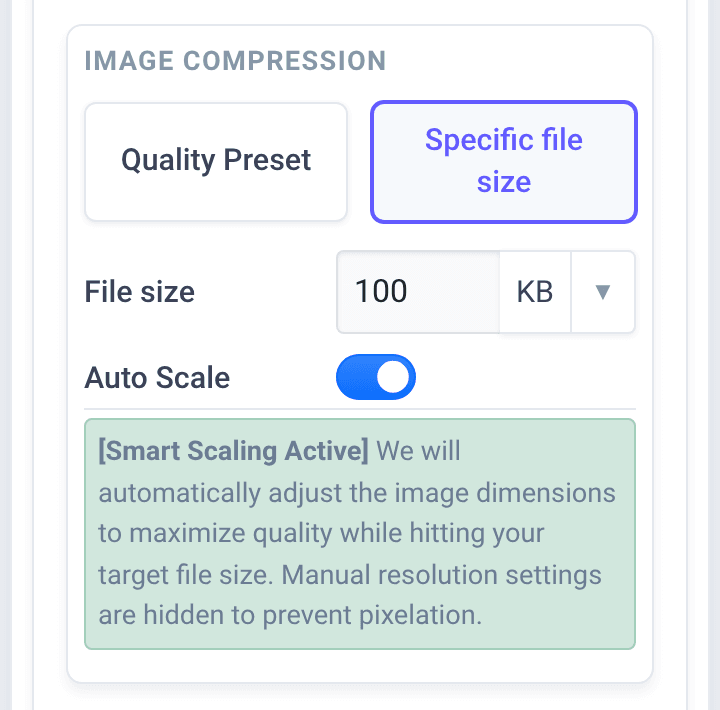
- To cap the size of a JPG, choose Specific file size, type a number in File size and change MB to KB if needed. Auto Scale, ticked, may change the pixel size to get there. Otherwise leave the options alone.
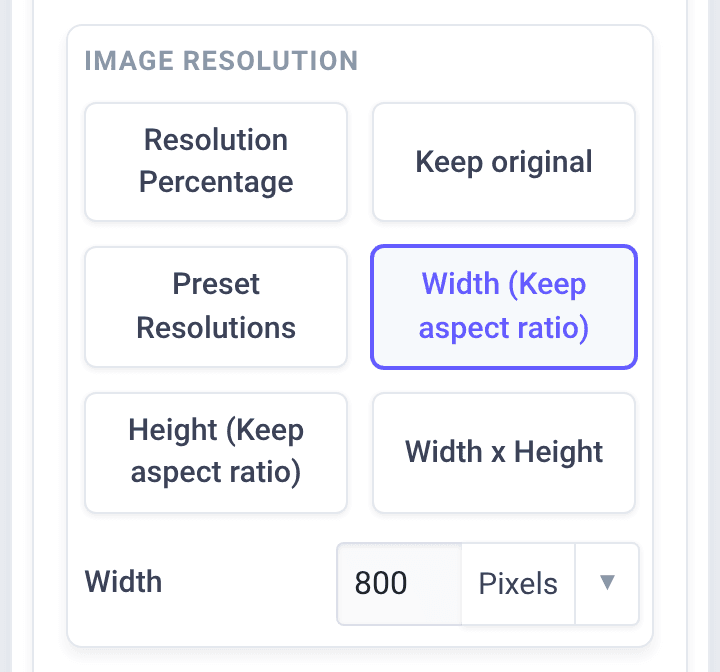
- For a larger PNG from an SVG, choose Width (Keep aspect ratio), change Percent (%) to Pixels and type the width.
- Click Convert. When the card says Completed, click Download.
Measured on 2026-11-18 with generated files, one job each; photos are 1200 x 800, logos 400 x 400:
| Sent in | Page and setting | Bytes, in to out | Result |
|---|---|---|---|
| AVIF photo | AVIF to JPG, defaults | 17,871 to 230,296 | JPG, 12.89 times the AVIF |
| Same photo | AVIF to JPG, Specific file size 100 KB | 17,871 to 99,468 | Under the cap, pixel size unchanged |
| HEIC photo | HEIC to JPG, defaults | 77,844 to 321,595 | JPG, 4.13 times the HEIC |
| AVIF logo, transparent corners | AVIF to JPG, defaults | 3,861 to 27,037 | Corners turned white |
| Same logo | AVIF to PNG, defaults | 3,861 to 10,877 | Transparency kept |
| WebP logo, transparent corners | WebP to PNG, defaults | 5,588 to 3,464 | Transparency kept; 29 of 508 colors left |
| Same logo | WebP to PNG, Quality preset Highest | 5,588 to 9,681 | Pixel-identical |
| SVG logo | SVG to PNG, Width 800 Pixels | 422 to 6,550 | 800 x 800, drawn from the shapes |
The ratios belong to these test files. On real uploads the JPG came back larger than the AVIF in 789 of 823 default jobs with an AVIF upload on the AVIF to JPG page (30 days to 2026-11-17), at a median of 3.67 times.
Five visitors ran 53.2 % of that window’s 859 jobs, so read it as a size ratio, not a usage figure.
Inside a mail a picture grows again: in 17 test messages (built, none sent) the encoded picture was 1.368 to 1.374 times its file. The default JPG above travels as 315,146 bytes. The caps are in email attachment limits.
What the pages do not do:
- Transparency. In a JPG, transparent parts take the Background Color, White unless changed. Use a PNG page.
- Location data. Camera, date and GPS details in an AVIF or HEIC stay in the JPG, and no option removes them.
- Untested SVGs. An SVG with text, linked pictures or no width and height was not tested. Export those as PNG from the program that drew them.
- Received mail. Converting cannot fix a newsletter you received; only its sender can replace the pictures.
- Private pictures. Files are processed on our servers, not in your browser.
What we could not confirm
- Classic Outlook after 2019. caniemail’s Windows column ends at Outlook 2019 and records no test month. Of the 71 cells counted above, 5 carry a test month within 24 months, all for SVG (2026-09).
- WebP in today’s classic Outlook. A question of August 2023 marked “Same question (20+)” reports WebP pictures “not showing up in the mail on desktop”. Microsoft’s 2021 announcement of WebP in Office is about inserting pictures into files.
- SVG in classic Outlook. caniemail has Outlook 2019 showing it and 2007 to 2016 not. A question of February 2025 marked “Same question (20+)” says SVGs “are not rendering in Outlook Classic”.
Sources
- caniemail data file, API 1.0.4, last update 2026-09-16: every cell of the support table and the counts (Outlook on six platforms, Gmail on four, Apple Mail on two, Yahoo Mail on three, Thunderbird on two, Samsung Email); read 2026-11-18.
- Microsoft Q&A 4635794, answer of 15 May 2024: the formats a moderator lists as supported, AVIF not among them, no official list found; read 2026-11-18.
- Microsoft Q&A 4605624, 7 August 2023: WebP missing in Outlook on the desktop; read 2026-11-18.
- Microsoft Q&A 4737293, 4 February 2025: SVG in classic Outlook; read 2026-11-18.
- Microsoft 365 message MC1130385, read in a third-party archive: inline SVG retired in Outlook on the web and new Outlook; read 2026-11-18.
- Microsoft Learn, Word 2007 HTML and CSS rendering in Outlook 2007: Word’s engine displays HTML mail; read 2026-11-18.
- Microsoft Learn, overview of the new Outlook for Windows: how new Outlook is built; read 2026-11-18.
- Microsoft Support, What version of Outlook do I have?: telling classic from new Outlook; read 2026-11-18.
- Microsoft Support, known issue, last updated 5 June 2026: pictures missing in classic Outlook after the updates of 12 May 2026; read 2026-11-18.
- Microsoft 365 Insider announcement, 9 August 2021: WebP in Office files; read 2026-11-18.
- Apple Support 116944, published 5 December 2025: HEIC shared by email, the Most Compatible setting; read 2026-11-18.
- Gmail Help, images: no sentence on conversion; read 2026-11-18.
- Our measurements of 2026-11-18: nine jobs on five XConvert converter pages and a WebP photo on a sixth, with generated files, 17 test messages built and none sent, a decode test in Chromium 147.0.7727.15, and the sizes of 859 jobs on the AVIF to JPG page from 19 October to 17 November 2026.