 By Stephanie Taylor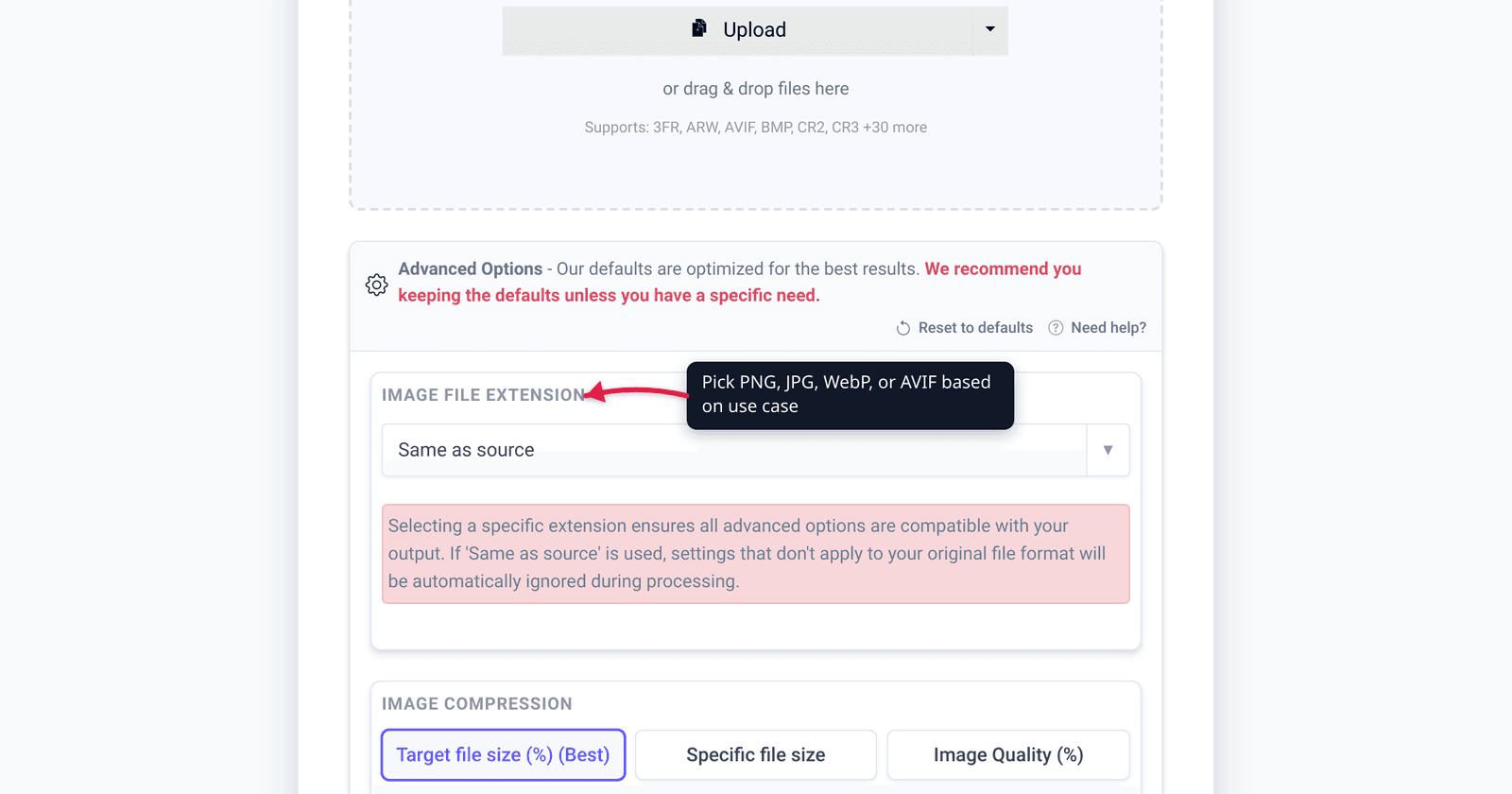
You exported a logo as a JPEG and the edges came out fuzzy with a grey halo. You saved a screenshot as a JPEG and the text turned blotchy. You shipped a 4 MB photo as a PNG and wondered why the page crawled. Each of those is the right file in the wrong format. There is no single “best” image format — there’s a best format for this job. This guide is the decision layer over the eight formats that matter, with a “use X when Y” table and a one-line pick per use case. We verified every support figure and compression claim against caniuse, MDN, Google’s WebP docs, and Apple’s own support pages.
Quick answer: Photos → JPEG (universal) or WebP/AVIF (smaller, modern web). Logos, icons, line art → SVG (infinitely scalable vector). Screenshots, graphics with text, anything needing transparency → PNG (lossless) or lossless WebP (smaller). Modern website images → WebP today (~96% browser support), AVIF when you want the smallest files and can supply a fallback. Simple animation → use a video (MP4/WebM), not GIF. iPhone storage → HEIC. Print/archival masters → TIFF. When in doubt for a photo you’ll share with anyone: JPEG.
Jump to a section
- The two big questions
- The formats, one by one
- The decision table
- Best format per use case
- Convert to any format on xconvert
- FAQ
The two big questions
Almost every format choice falls out of two questions.
1. Is it a photograph or a graphic? A photograph is continuous-tone — millions of subtly different colours, no hard edges (a person, a landscape, a product shot). A graphic is flat regions and sharp edges — a logo, a screenshot, a chart, text on a solid background. Photo compressors (JPEG, lossy WebP/AVIF) are tuned for the former and smear the latter; graphic-friendly formats (PNG, SVG, lossless WebP) keep edges crisp but bloat on photos.
2. Where will it live? A file destined for a public web page wants small size and broad browser support. A file headed for print or an archive wants maximum fidelity and lossless storage. A file staying inside one ecosystem (your iPhone, your design tool) can use whatever is most efficient there. Same photo, three different best answers.
Hold those two questions in mind and the table at the bottom mostly writes itself.
The formats, one by one
JPEG (.jpg) — The default for photos for 30 years. Lossy compression (it discards detail you’re unlikely to notice), no transparency, near-universal support on every device and app ever made. Great for photographs; poor for sharp edges and text, where its blocky artifacts show. If your photo must open anywhere with zero risk, JPEG is still the safe answer.
PNG (.png) — Lossless (no quality loss on save) with full alpha transparency. The right tool for screenshots, logos with transparent backgrounds, line art, and any graphic with crisp text. The cost is size: a photo saved as PNG is typically several times larger than the same photo as JPEG. Use PNG for graphics, not photographs.
WebP (.webp) — Google’s modern web format. Does both lossy and lossless, supports alpha transparency and animation, and is widely supported now — about 96% of global browsers per caniuse, including Safari 16+, Chrome 32+, Firefox 65+, and Edge 18+. Google reports lossy WebP is 25–34% smaller than JPEG at equivalent quality and lossless WebP is ~26% smaller than PNG. For most website images in 2026, WebP is the sweet spot of size and compatibility. See PNG vs WebP vs JPG for the head-to-head.
AVIF (.avif) — The next-gen format (based on the AV1 video codec), royalty-free, lossy + lossless + alpha. MDN puts its compression at a median ~50% vs ~30% for WebP — meaningfully smaller files. Support has grown fast: ~93% globally per caniuse (Chrome 85+, Firefox 93+, Safari 16.4+, Edge 121+). The catch: it doesn’t render progressively (the file must download fully before it shows), and older clients still need a fallback. Use AVIF for the smallest modern-web images, with a WebP or JPEG fallback. See AVIF vs WebP.
GIF (.gif) — Limited to 256 colours and lossless LZW compression. Its one remaining job is simple animation, and even there it’s the wrong tool: an animated GIF is far larger than the same clip as video. web.dev’s own example shows a 3.7 MB GIF becoming a 551 KB MP4 and a 341 KB WebM — roughly a 7–10× saving. The honest advice in 2026: don’t ship animated GIFs — use a muted, looping <video> (MP4/WebM) instead. For static images, GIF is beaten by PNG (better colour) or WebP (smaller).
SVG (.svg) — Not a pixel format at all; it’s vector — math that describes shapes, so it scales to any size with zero quality loss and stays razor-sharp on Retina and 8K screens alike. Tiny for simple art, editable as text, and ~96% supported per caniuse. The right choice for logos, icons, diagrams, and UI graphics. It cannot represent photographs — there are no “shapes” in a photo to describe.
HEIC / HEIF (.heic) — Apple’s high-efficiency photo format (HEIF container + HEVC compression), the iPhone default since iOS 11. Apple states it offers “better compression than JPEG … so they use less storage space … while preserving the same visual quality” — in practice roughly half the size of an equivalent JPEG. Brilliant for storage inside the Apple ecosystem; poor for sharing, because non-Apple platforms and many websites can’t open it. Convert HEIC to JPEG before sending — see HEIC vs JPG.
TIFF (.tiff) — The print and archival workhorse. Lossless, supports very high bit depths and multiple pages/layers, and is the standard hand-off to professional printers and document archives. Files are large by design; it’s a master/archive format, not a delivery format. For scanned documents specifically, the PNG-vs-TIFF tradeoff is its own decision — see TIFF vs PNG for scanned documents.
The decision table
| Use X | When Y | Why |
|---|---|---|
| JPEG | A photo that must open anywhere — email, uploads, “send to anyone” | Universal support, small, tuned for photos. No transparency. |
| PNG | Screenshots, logos/graphics, transparency, anything with crisp text | Lossless, full alpha. Larger than JPEG on photos. |
| WebP | Most modern website images (photos or graphics) | ~96% support; 25–34% smaller than JPEG, ~26% smaller than PNG. |
| AVIF | The smallest modern-web images, with a fallback | ~50% better compression than WebP; ~93% support, no progressive render. |
| SVG | Logos, icons, diagrams, line art, UI graphics | Vector — infinitely scalable, tiny, sharp at any size. Not for photos. |
| GIF → video | Simple animation | A GIF is 7–10× larger than the same MP4/WebM. Use a looping <video>. |
| HEIC | iPhone storage you’ll keep on Apple devices | ~50% smaller than JPEG. Convert to JPEG before sharing. |
| TIFF | Print masters and archival originals | Lossless, high bit depth, multi-page. Large — a master, not a delivery file. |
Best format per use case
- Product photos / portraits / landscapes for the web → WebP (JPEG fallback for the broadest reach, AVIF if you want the absolute smallest and can supply a fallback).
- Photo you’re emailing or uploading to a form → JPEG. Maximum compatibility, no transparency needed.
- Logo or icon → SVG. Scales everywhere, stays crisp, tiny. PNG only if you specifically need a raster.
- Screenshot (especially with text or UI) → PNG or lossless WebP. JPEG will smear the text.
- Graphic that needs a transparent background → PNG or WebP (both do full alpha); never JPEG.
- A short looping animation → MP4 + WebM video, not GIF. Far smaller, smoother, broadly supported.
- iPhone photos for personal storage → HEIC (half the size); convert to JPEG the moment you share off-Apple.
- Print or long-term archive → TIFF (lossless master); export JPEG/WebP copies for everyday use.
- Old
.bmpor uncompressed file taking up space → convert to PNG (lossless) or JPEG/WebP (smaller) depending on whether it’s a graphic or a photo.
Convert to any format on xconvert
The xconvert image converter handles all of the above — JPG, PNG, WebP, AVIF, HEIC, TIFF, SVG, GIF, and more — so you can apply this guide in one place:
- Open xconvert.com/image-converter and click + Add Files to upload your image (or drag and drop it onto the page).
- Set the Image File Extension dropdown to your target format — e.g. WebP for the web, JPG to share a HEIC photo, PNG for a transparent graphic, or AVIF for the smallest file.
- (Optional) Open Advanced Options (the gear icon) to set the Quality Preset (defaults to Very High (Recommended)) or change the Image resolution — Keep original, a preset, or a custom Width × Height.
- Click the convert button and download your file. The defaults are tuned for good results, so for most jobs steps 1–2 are all you need.
Your file is uploaded over an encrypted connection, processed on our servers, and deleted automatically a few hours later. Nothing is kept.
For the deeper comparisons behind this guide: PNG vs WebP vs JPG, AVIF vs WebP, HEIC vs JPG for iPhone photos, and TIFF vs PNG for scanned documents.
FAQ
What is the best image format overall?
There isn’t one — it depends on the job. For photos shared anywhere, JPEG. For modern websites, WebP. For logos and icons, SVG. For screenshots and transparency, PNG. The right question is “best for this image,” and that comes down to photo-vs-graphic and where the file will live.
Which is better, JPEG or PNG?
JPEG for photographs, PNG for graphics. JPEG’s lossy compression makes small photo files but smears sharp edges and text. PNG is lossless with transparency, ideal for screenshots, logos, and line art, but produces much larger files on photos. They solve different problems.
Should I use WebP or AVIF for my website?
WebP is the safer default today at ~96% browser support, and it’s 25–34% smaller than JPEG. AVIF compresses better still (MDN: ~50% vs ~30% for WebP) and has ~93% support, but it doesn’t render progressively and older clients need a fallback. A common pattern: serve AVIF with a WebP (and JPEG) fallback via the <picture> element.
Is WebP better than JPEG?
For the web, usually yes. Google reports lossy WebP is 25–34% smaller than JPEG at the same quality, and unlike JPEG it also supports transparency and lossless mode. JPEG still wins on one thing: universal compatibility with every app and device, which is why it’s the safe pick for files you email or hand to unknown software.
Should I still use GIF for animation?
No — use a video instead. A GIF is capped at 256 colours and is far larger than the same clip as MP4 or WebM (web.dev shows a 3.7 MB GIF dropping to ~341 KB as WebM). For a looping animation on a page, a muted, autoplay <video> is smaller, smoother, and broadly supported.
What format should I use for a logo?
SVG. It’s a vector format, so it scales to any size — favicon to billboard — with zero quality loss and a tiny file, and it’s ~96% supported in browsers. Keep a PNG version only for the occasional tool that needs a raster image. Never save a logo as JPEG; its lossy compression adds halos around the edges.
Why can’t I open my iPhone’s HEIC photos on Windows or other apps?
HEIC is Apple’s high-efficiency format (the iPhone default since iOS 11), great for storage — roughly half the size of JPEG — but not universally supported off Apple devices. Convert HEIC to JPEG before sharing, or set the iPhone camera to Most Compatible (Settings → Camera → Formats) to shoot JPEG in the first place.
Sources
Last verified 2026-06-25.
- caniuse — WebP image format — global support ~96%; Chrome 32+, Firefox 65+, Edge 18+, Safari 16+.
- caniuse — AVIF image format — global support ~93%; Chrome 85+, Firefox 93+, Safari 16.4+, Edge 121+.
- caniuse — SVG (basic support) — ~96% support; universal in modern browsers.
- Google — WebP, A new image format for the Web — lossy WebP 25–34% smaller than JPEG; lossless ~26% smaller than PNG; supports alpha and animation.
- MDN — Image file type and format guide — per-format characteristics; AVIF median ~50% compression vs ~30% for WebP; SVG for icons/diagrams; GIF 256-colour limit.
- web.dev — Replace animated GIFs with video — 3.7 MB GIF → 551 KB MP4 / 341 KB WebM; use
<video>for animation. - Apple Support — Using HEIF or HEVC media on Apple devices — HEIF offers better compression than JPEG, less storage at the same quality; iOS 11 / macOS High Sierra 10.13+; High Efficiency vs Most Compatible camera setting.