 By James
You shot one set of product photos and you sell the same item on four channels. Amazon tells you to submit images with “minimal or no compression.” Etsy warns that anything over 1 MB “may not finish uploading.” eBay caps you at 12 MB, Shopify at 20 MB. Those instructions genuinely pull in opposite directions, which is why one exported file usually satisfies three marketplaces and quietly fails the fourth. Here are the current numbers, taken from each marketplace’s own seller documentation rather than from a listicle, and the export recipe that clears all four.
Quick answer: Export a square 2000 × 2000 px sRGB JPEG on a pure white background, with no text, logo or watermark. That clears Etsy’s 2000 px recommendation, Shopify’s 2048 px sweet spot, eBay’s 1600 px recommendation and Amazon’s 1000 px zoom threshold in one file. Keep the master high-quality for Amazon (it explicitly asks for minimal compression) and save a second, more compressed copy under 1 MB for Etsy. Hard limits: eBay 12 MB, Shopify 20 MB / 25 MP, Amazon 500–10,000 px on the longest side. Amazon does not publish a byte cap.
Jump to a section
- The four specs, side by side
- The contradiction: Etsy wants small, Amazon wants big
- Backgrounds, transparency and colour
- What actually gets your photo rejected
- One master, two exports
- Resize product photos on xconvert
- FAQ
The four specs, side by side
Every figure below comes from the marketplace’s own help documentation, verified on 31 August 2026. Where a marketplace does not publish a number, this table says so rather than borrowing one from somewhere else.
| Shopify | Etsy | eBay | Amazon | |
|---|---|---|---|---|
| Max file size | Under 20 MB | No hard cap stated; over 1 MB “may not finish uploading” | 12 MB each | Not published in the image guide |
| Max dimensions | 5000 × 5000 px, or 25 MP | Not stated | Not stated | 10,000 px on the longest side |
| Minimum | Not stated | First photo 635 px wide and tall | 500 × 500 px | 500 px on the longest side (below this cannot be uploaded) |
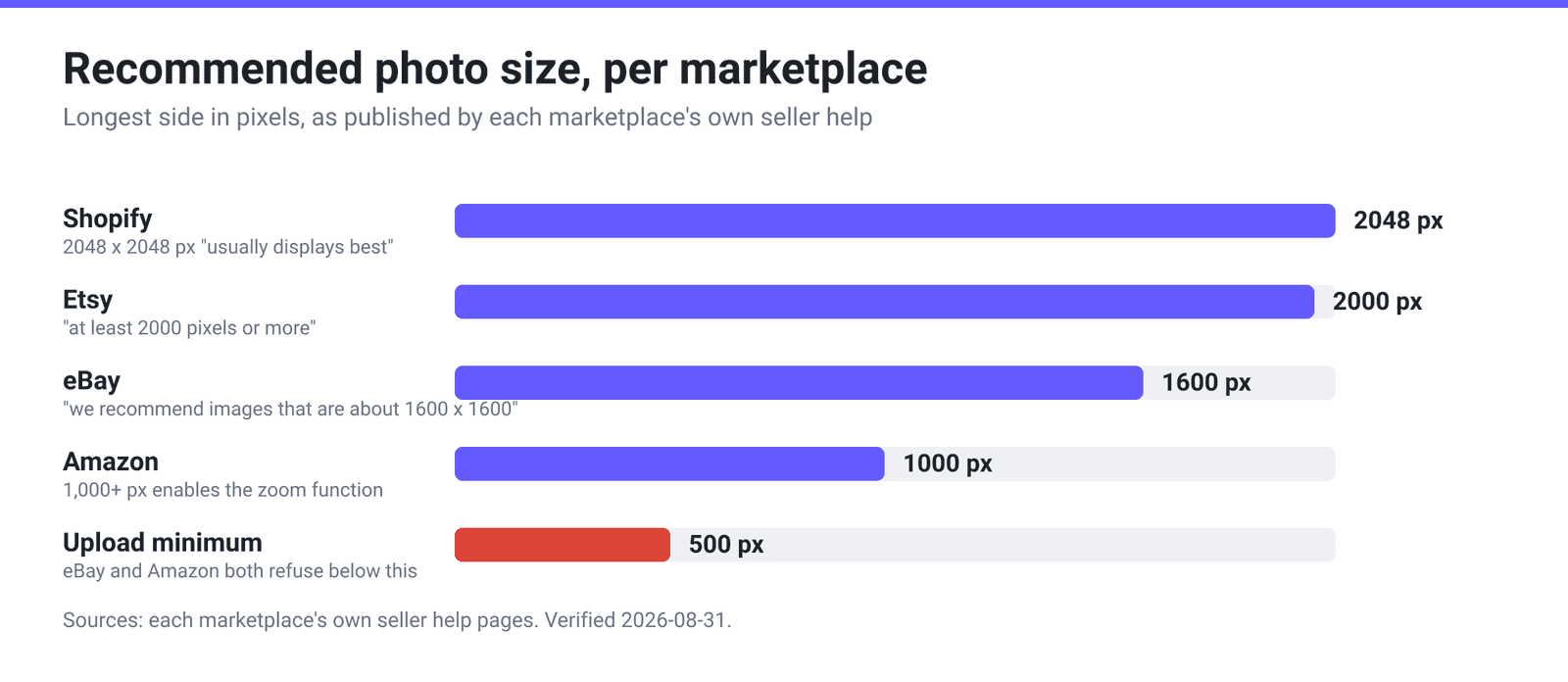
| Recommended | 2048 × 2048 px for square images | 2000 px or more on width and height | About 1600 × 1600 px | 1,000+ px on the longest side (enables zoom) |
| Accepted formats | PNG, JPEG, PSD, TIFF, BMP, GIF, SVG, HEIC, WebP | JPG, GIF, PNG, SVG, HEIC only | JPEG, PNG, GIF, TIFF, BMP, WebP, HEIC, AVIF | JPEG, TIFF, PNG, non-animated GIF (JPEG recommended) |
| Animated files | Animated GIF and WebP supported | Not supported | — | GIF must be non-animated |
| Transparency | Supported | Not supported — transparent areas render black | — | Main image must be pure white anyway |
| Colour | — | Convert to sRGB; Etsy converts on upload | — | RGB preferred; CMYK “not preferred”; don’t rely on ICC profiles |
| Photos per listing | — | 20 photos + 2 videos (5–15 s) | 24 pictures | 1 main + “at least six additional” recommended |
| Aspect ratio advice | Consistent ratio across products | First photo landscape or square | 1:1 or 16:9 look best | Product should fill 85% of the frame |
Two rows are the ones most guides get wrong. Amazon’s Product image guide sets a pixel range and a format list but publishes no per-file byte limit — if you have seen “Amazon: 10 MB” quoted somewhere, that number is not on Amazon’s own specification page. And Etsy’s 1 MB is not a rejection threshold: the wording is that larger images “may not finish uploading, especially on a slower internet connection,” which is an upload-reliability warning, not a validator.
The contradiction: Etsy wants small, Amazon wants big
Read the two documents side by side and the conflict is explicit.
Amazon says: “Submit images with minimal or no compression,” and for JPEG, “save at the highest possible quality level. Avoid saving multiple times in JPEG format during editing, as each save reduces image quality.” It wants the cleanest file you can produce, because it re-derives its own display sizes and zoom only turns on at 1,000+ px.
Etsy effectively asks for the opposite: stay under 1 MB, while also recommending 2000 px on both sides. A 2000 × 2000 photo saved at maximum JPEG quality is routinely several megabytes, so Etsy is asking for a large pixel count and a small byte count at once.
You don’t resolve that by picking a middle setting. You resolve it by exporting twice from the same master, which is the recipe below.
Pixel dimensions, at least, are easy. A single square export at 2000 px satisfies all four recommendations simultaneously: it exceeds eBay’s 1600 px and Amazon’s 1000 px advice, matches Etsy’s 2000 px, and sits 48 px short of Shopify’s 2048 px suggestion, which is a display preference rather than a requirement. Going bigger buys you nothing on Etsy or eBay and costs you bytes.
Backgrounds, transparency and colour
This is where sellers lose the most time, because the failure is silent — the upload succeeds and the photo just looks wrong.
Etsy renders transparency as black. Its wording: “Animated .gif files & transparent .png files are not supported. If a file contains transparency, the transparent parts of the image will appear black on Etsy.” Cut your product out onto a transparent background and Etsy will show it on black. Flatten to white before uploading. (For which format carries transparency at all, see best image format: photos vs graphics vs web.)
Amazon requires pure white on the main image — specifically RGB 255, 255, 255 — with the product filling 85% of the frame. A near-white studio backdrop reading 250, 250, 248 is not pure white, and Amazon’s stated remedy is blunt: “If there is no main image that meets the requirements, we may temporarily remove the product listing from search.”
Colour profiles. Etsy converts uploads to sRGB and asks sellers to convert first so colours match. Amazon prefers RGB, calls CMYK “not preferred,” and adds a warning worth quoting: “Do not rely on ICC color profiles for accurate color display on Amazon.” If your photo came out of a print workflow in Adobe RGB or CMYK, convert to sRGB before listing anywhere. Grayscale is a special case on Amazon — acceptable only for images that “accurately depict gray or silver metal products,” so a black-and-white shot of a colourful item is out.
What actually gets your photo rejected
Both eBay and Amazon tie image compliance directly to search visibility, which makes these rules more consequential than they look.
- No watermarks, badges or added graphics. eBay: “Do not add graphics to images such as badges, logos, copyright notices or watermarks as they can affect your listing’s placement in search results.” Amazon bans text and pricing on images, its own logos and trademarks, and anything resembling badges like “Amazon’s Choice” or “Best seller.”
- No placeholders on Amazon. The first image uploaded defines the product identity, and Amazon warns that “using a temporary placeholder can cause your intended image to be blocked from upload.”
- No stock photos for used items on eBay — you cannot use a catalog or stock photo when listing an item as used.
- Under-500 px files will not upload to Amazon, which also says “do not artificially enlarge small images.” Upscaling a 400 px photo to squeak past the check produces exactly the soft, jagged result the image-quality rule catches.
- eBay stores pictures for 90 days, so photos in completed listings expire and relisting from an old draft may need fresh uploads.
One master, two exports
Keep one high-resolution original per shot and derive listing files from it. Never edit and re-save the same JPEG repeatedly — generational loss is cumulative, which is exactly what Amazon’s warning about repeated JPEG saves refers to.
- Prepare the master. Square crop, product filling roughly 85% of the frame, pure white background (RGB 255, 255, 255), sRGB colour, no text or logo. Resize to 2000 × 2000 px.
- Export A — high quality. Save the 2000 px master as a high-quality JPEG. Use it for Amazon, eBay (12 MB of headroom) and Shopify (20 MB of headroom). None of those three benefits from squeezing it.
- Export B — the Etsy copy. Compress the same master until it comes in under 1 MB. A product on flat white compresses efficiently because most of the frame is one uniform colour, but check the byte count on disk rather than assuming. Etsy re-compresses uploads for page performance anyway, so a modest quality reduction on your side costs little.
- Convert odd formats once. HEIC is accepted by Shopify, Etsy and eBay but not Amazon; PSD is accepted only by Shopify. Converting to JPEG once, from the master, sidesteps all of it.
Resize product photos on xconvert
The xconvert Image Resizer handles step 1 — the pixel dimensions — and saves straight out to JPG. It reads RAW camera files and HEIC as well as JPG and PNG, so you can start from whatever the camera produced.
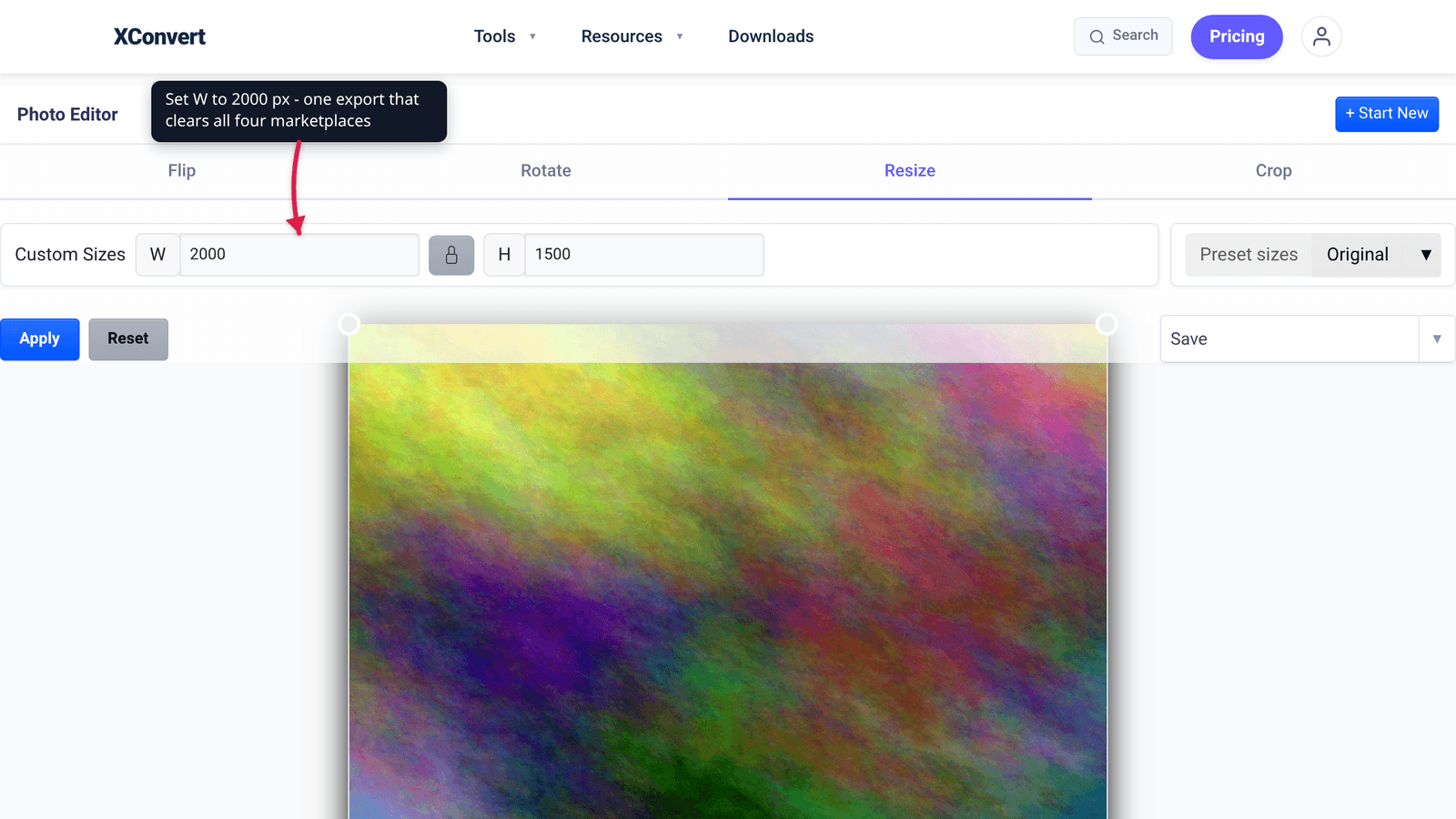
- Open xconvert.com/image-resizer and click Select Image to add your photo (from your computer, Google Drive, or Dropbox). Batch is supported, so a whole product shoot can go in at once.
- When the Photo Editor opens, use the Crop tab to square the shot up, leaving margin so the product fills roughly 85% of the frame.
- Switch to the Resize tab and, under Custom Sizes, set W and H to 2000. Keep the aspect-ratio lock engaged so nothing stretches.
- Click Save, or open the ▾ beside it and choose Download as JPG.
- For the Etsy copy, run that 2000 px JPG through the image compressor and use Specific file size to target comfortably under 1 MB.
Your image uploads over an encrypted connection, is processed on our servers, and is deleted automatically a few hours later. Nothing stays around.
For the underlying logic of when to change dimensions versus when to change file size, resizing an image for the web covers the distinction.
FAQ
What size should product photos be if I sell on all four marketplaces?
2000 × 2000 px, square, sRGB JPEG. It satisfies Etsy’s “at least 2000 pixels,” exceeds eBay’s suggested 1600 × 1600 and Amazon’s 1,000+ px zoom threshold, and is close to Shopify’s 2048 × 2048 sweet spot. Square also matches eBay’s advice that 1:1 looks best and Etsy’s that the first photo be landscape or square.
Does Etsy actually reject photos over 1 MB?
No — and the distinction matters. Etsy says images larger than 1 MB “may not finish uploading, especially on a slower internet connection.” That is a warning about upload reliability, not a validator that bounces the file. Staying under 1 MB removes a class of stalled uploads, and since Etsy re-compresses images for page performance regardless, you lose very little by doing it.
Why does my transparent PNG show a black background on Etsy?
Because Etsy does not support transparency: transparent PNGs “are not supported,” and “the transparent parts of the image will appear black on Etsy.” Flatten onto white before uploading. Amazon reaches the same practical outcome by a different route — its main image must be pure white at RGB 255, 255, 255.
Can I upload the same file to Amazon and Etsy?
You can, but don’t optimise it the same way — Amazon asks for the highest JPEG quality, Etsy warns against files over 1 MB. Export the same 2000 px master twice; the dimensions stay identical, so your crop carries over to both.
Do marketplace photos need to be 300 DPI?
No. Amazon lists a minimum of 72 dpi, the only DPI figure any of these four publish. DPI is a metadata tag telling a printer how large to render an image; on a web page only the pixel count matters, so a 2000 × 2000 photo tagged 72 dpi and the same photo tagged 300 dpi are identical on screen. If you also print catalogues, DPI for web vs print explains where the number becomes real.
My phone shoots HEIC — is that a problem?
Only on Amazon. Shopify, Etsy and eBay all list HEIC among their accepted formats; Amazon’s list is JPEG, TIFF, PNG and non-animated GIF, so HEIC has to be converted first. Converting once from the original — rather than exporting a JPEG, editing it, and re-saving — also avoids the repeated-save quality loss Amazon warns about.
Can I add my logo, a “free shipping” badge or a watermark?
Not if you care about search placement. eBay states that badges, logos, copyright notices and watermarks “can affect your listing’s placement in search results.” Amazon prohibits text and pricing on images, its own logos and trademarks, and anything resembling badges such as “Amazon’s Choice” or “Best seller.” Put the shipping promise in the listing copy, not on the photo.
Sources
Last verified 2026-08-31.
- Shopify Help Center — Product media types — 20 MB file-size limit, 5000 × 5000 px / 25 MP ceiling, 2048 × 2048 px square recommendation, accepted file types.
- Etsy Help — Requirements and Best Practices for Images in Your Etsy Shop — accepted file types, the 2000 px and 635 px figures, the 1 MB upload warning, no transparency or animated GIF, sRGB guidance.
- Etsy Help — How to Create a Listing — 20 photos and 2 videos (5–15 seconds) per listing.
- eBay — Adding pictures to your listings — 12 MB per photo, 24 pictures per listing, 500 × 500 px minimum, ~1600 × 1600 px recommendation, accepted formats, watermark warning, 90-day photo storage.
- Amazon Seller Central — Product image guide — 500 px minimum and 10,000 px maximum on the longest side, 1,000+ px zoom threshold, 72 dpi minimum, accepted formats, pure white main-image background, 85% frame fill.
- Amazon Seller Central — Technical image file requirements — RGB colour mode, CMYK not preferred, ICC-profile warning, “minimal or no compression,” unsupported formats list.