 By Stephanie Taylor
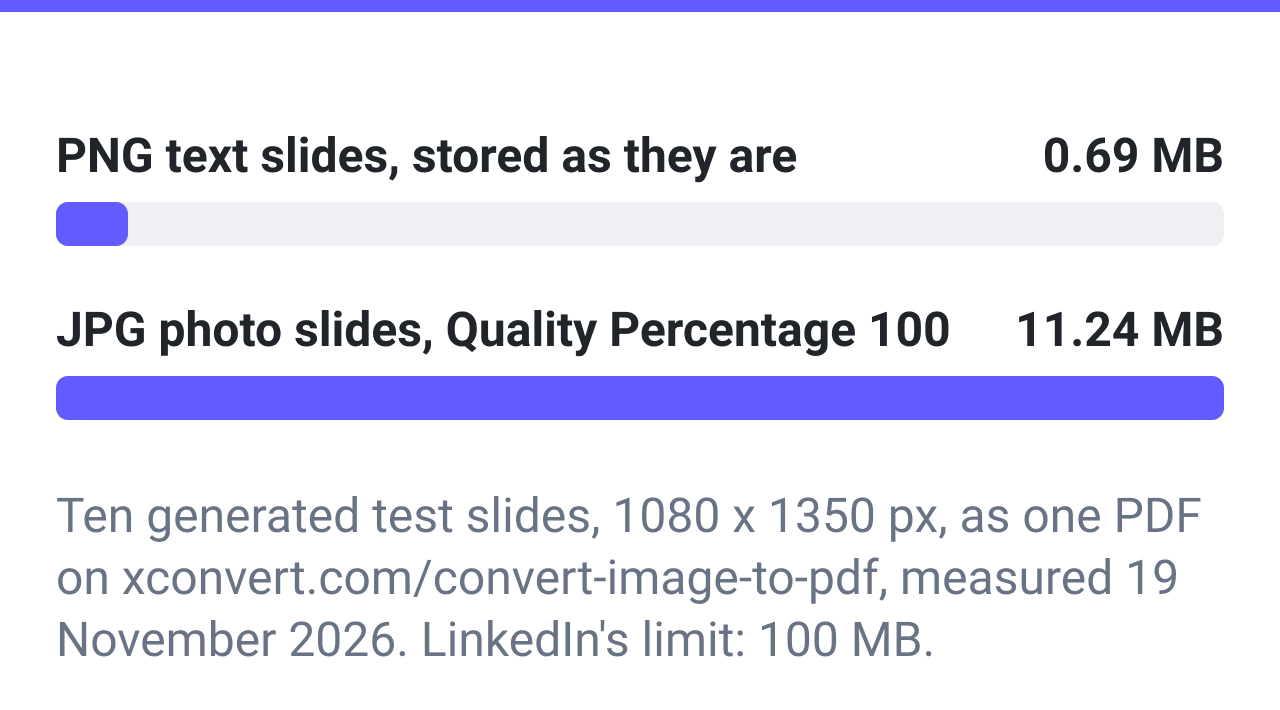
As of November 2026, the PDF behind a LinkedIn carousel can be at most 100 MB and 300 pages, with every page the same size. Slides saved as images? Turn the images into one PDF with Paper size Original and no margin.
Checked on 2026-11-19 on xconvert.com/convert-image-to-pdf. No LinkedIn account was used. Sources at the end.
LinkedIn’s limits for a carousel PDF
| Rule | LinkedIn’s words, read November 2026 | Page |
|---|---|---|
| File size and pages | “The file size cannot exceed 100MB and 300 pages.” | Help: documents |
| File types | “PPT, PPTX, DOC, DOCX, and PDF” | Help: documents |
| Page size | “PDFs with multiple sized pages must be fit to the same page size.” | Help: documents |
| Layers | “PDFs with multiple layers must be flattened or merged” | Help: documents |
| Links, in a document ad | “Hyperlinks in the document will only be clickable if the member downloads the document.” | Help: document ads |
| Shape, in a document ad | “Aspect Ratio: Vertical, Horizontal, Square” | Document Ads Specifications |
| Page size in pixels | not stated | all three pages |
LinkedIn’s two help pages say document, never carousel. The help page for documents shows “Last updated: 3 years ago”.
Which page size, and why every slide needs the same one
For a post, LinkedIn’s one rule on page size is a single size for the whole PDF.
With Paper size Original, each page takes the size of its picture, one point per pixel: a slide of 1080 x 1350 px became a page of 1080 x 1350 points. That size is the test’s choice, not a figure of LinkedIn’s.
Slides of 1080 x 1350, 1080 x 1080 and 1920 x 1080 px came back as one PDF with three page sizes. A paper format gave one size, with white around each slide (below). By our code, untested, Cover with no margin crops it instead.
That makes the page size a layout decision. Give every slide the same width and height in pixels. Lay the slides out at that one size first, then export.
What happens over the limit?
LinkedIn’s help page says only that the file “cannot exceed” the two figures. What the upload shows for a larger file is on none of the three pages.
Settings that fit (measured)
Slides of 1080 x 1350 px, generated for the test, were built into one PDF per row on 2026-11-19, each with Paper size Original and No margin (0").
| Slides in | Other setting | Same pixels as the slides | |
|---|---|---|---|
| 10 PNG, text on flat color, 0.71 MB | none | 0.69 MB | yes, 10 of 10 |
| the same | Quality Percentage 100 | 0.69 MB, same size | yes, 10 of 10 |
| the same | Image Transparency Removed | 0.77 MB | no, stored as JPEG |
| 10 JPG, photo-like, 3.03 MB | Quality Percentage 75, as loaded | 1.93 MB | no |
| the same | Quality Percentage 90 | 4.18 MB | no |
| the same | Quality Percentage 100 | 11.24 MB | no |
| 2 PNG, photo-like, 3.03 MB | none | 3.27 MB | yes, 2 of 2 |
| the same | Image Transparency Removed | 0.39 MB | no, stored as JPEG |
- Text on flat color: export PNG with a lower-case extension. Two of the same slides named SLIDE-01.PNG and SLIDE-02.PNG were stored as JPEG.
- Photo-like JPG slides: all three settings encoded them again; only 75 gave a PDF smaller than the slides.
- Photo-like PNG slides: the heaviest. Removed trades exact pixels for size.
None of the fourteen test PDFs has layers to flatten or merge.
By arithmetic, not a test: 300 pages of the text slides weigh 20.7 MB, so the page limit comes first. The JPG slides at Quality Percentage 100 reach 100 MB at 88 pages, the photo-like PNG slides at 61.
On our merge page for the same job, 23 of the 96 jobs that chose Original in the 30 days to 18 November 2026 left a margin on (8 of the 19 visitors we could tell apart did so at least once).
In the test, a margin left on Narrow (0.5") drew each slide inside a white border: 12.9 % of the page. With nothing changed, each slide sits on an A4 page, 31.7 % of it white: see why pictures get white bars in a PDF.
Turn slide images into the PDF
- On the image to PDF page, click Upload and pick the slides.
- The list is the page order and is not sorted by name: to move a slide, drag the grip at the left of its row. Merging images in the right order covers ordering on our merge page.
- Under Margin, click No margin (0"). Under Paper size, choose Original.
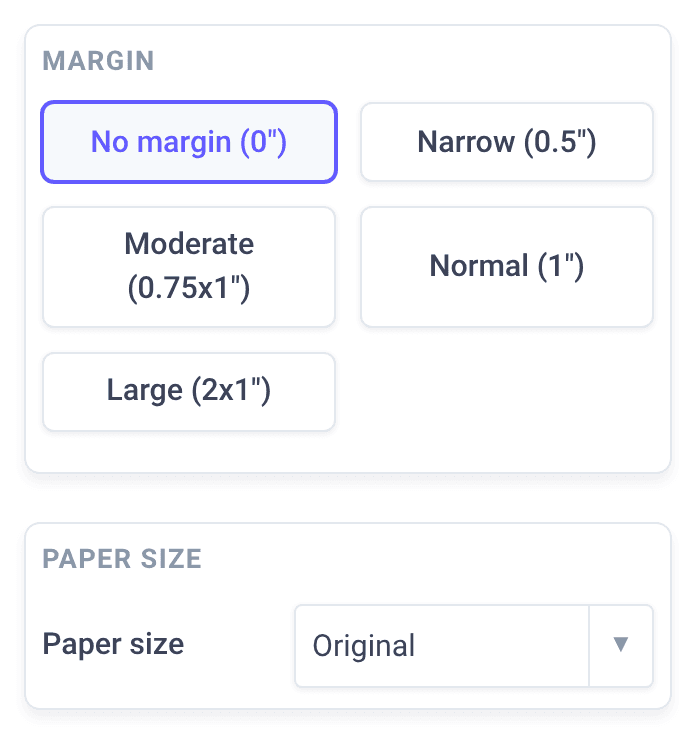
- Leave Combine? on Single PDF and Page layout on Portrait, also for wide slides: Landscape swapped the width and height of every page in the test.
- Click Convert. When the card reads “Completed”, click Download.
Files are processed on our servers, not in your browser, and are deleted automatically about 5 hours after they were written.
When our page is the wrong choice
- Your program exports a PDF. Upload that file to LinkedIn: our page is for slides you have only as pictures. LinkedIn’s help page says “Convert files to PDFs whenever possible to ensure the highest quality upload.”
- Text or links must work. The result is a PDF of pictures: its text cannot be selected or searched, and a link drawn on a slide does not work.
After the upload: what you can no longer change
LinkedIn’s upload steps take one file (“choose one”) and ask for a title.
After posting, “you can’t change or edit the document in the post”; the description can be edited and the post removed. Members who can view the post “will be able to download your document as a PDF”.
So the last check comes before the post. Open the PDF, count its pages and read each slide once at full size. Have the title and the text of the post ready before you upload.
What we could not confirm
- Why a carousel can look soft on LinkedIn. Nothing was uploaded there. The test shows only that the program drawing the PDF matters: the PDF of the PNG text slides holds their pixels exactly, yet at 72 dpi Ghostscript 10.06.0 changed 0 pixels and Poppler 26.01.0 changed 42,794 to 43,279 of 1,458,000 a page, all in the text.
- Mixed page sizes. Whether LinkedIn refuses a PDF with several page sizes or fits them.
- Which megabyte LinkedIn counts. Its pages do not say. The arithmetic above uses 1,000,000 bytes.
- A phone. The options are the same in a 390 px wide window; no job was run on a phone.
- Transparent slides. Every test slide was opaque.
Sources
- LinkedIn Help: Upload and share documents on LinkedIn, which shows “Last updated: 3 years ago”: 100MB and 300 pages, the file types, one page size, layers, “(choose one)”, the title, no edit after posting, the download as a PDF, “Convert files to PDFs whenever possible”. Read 2026-11-19.
- LinkedIn Help: Document ads advertising specifications, a page about ads that shows “Last updated: 1 year ago”: hyperlinks are clickable only after a download. Read 2026-11-19.
- LinkedIn: Document Ads Specifications, a page about ads with no date: “Aspect Ratio: Vertical, Horizontal, Square”. Read 2026-11-19.
- Our measurements: fourteen jobs on xconvert.com/convert-image-to-pdf on 2026-11-19 with slides generated for the test; each PDF’s page sizes read with pdfinfo and its stored pictures compared with the uploaded slides pixel by pixel; the PDF of the ten PNG slides drawn back at 72 dpi with Ghostscript 10.06.0 and Poppler 26.01.0; megabytes are bytes divided by 1,000,000; the pages per 100 MB are arithmetic; job counts from 2,815 jobs on xconvert.com/merge-image-to-pdf, 20 October to 18 November 2026.