 By Stephanie Taylor
You have a 480 MB folder of holiday photos and a 900 MB screen recording, the upload form caps at 500 MB, so you right-click and zip it. Windows churns for two minutes and hands back a file that is 478 MB — or, for the video on its own, very slightly larger than the original. This is not a broken zipper, a wrong setting, or a slow computer. It is exactly what the ZIP specification and the compression algorithm inside it are designed to do, and the reason is worth understanding once: it tells you precisely which files ZIP will help with and what to do about the ones it won’t.
Quick answer: ZIP compresses with DEFLATE, which shrinks data by finding repetition and replacing it with back-references. JPG, HEIC, PNG, MP4, MOV, MP3, AAC, GIF and PDF have all already had their repetition squeezed out by their own codecs, so DEFLATE finds nothing left to remove — and the ZIP container adds roughly 76 bytes of structural overhead per file on top, which is why a zipped video can come out fractionally bigger. RFC 1951 states the principle outright: “A simple counting argument shows that no lossless compression algorithm can compress every possible input data set.” ZIP’s real value on media is bundling, not shrinking. To make media smaller you have to re-encode the media itself.
Jump to a section
- What ZIP actually does to your bytes
- Why already-compressed files have nothing left to give
- Zipping can make a file bigger — here’s the arithmetic
- What actually shrinks it: a routing table
- What ZIP is genuinely good at
- Make a ZIP on xconvert
- FAQ
What ZIP actually does to your bytes
A ZIP file does two separate jobs, and people conflate them: it bundles many files into one container, and it compresses each of them. Only the second job affects file size, and it is done by an algorithm called DEFLATE — compression method 8 in the ZIP specification, which PKWARE’s own format document calls “the method used by default by most ZIP compatible application programs.”
DEFLATE is defined in RFC 1951, and its mechanism is simple to describe. It “compresses data using a combination of the LZ77 algorithm and Huffman coding”. In practice that means the output is made of two kinds of thing: “literal bytes (of strings that have not been detected as duplicated within the previous 32K input bytes), and pointers to duplicated strings”.
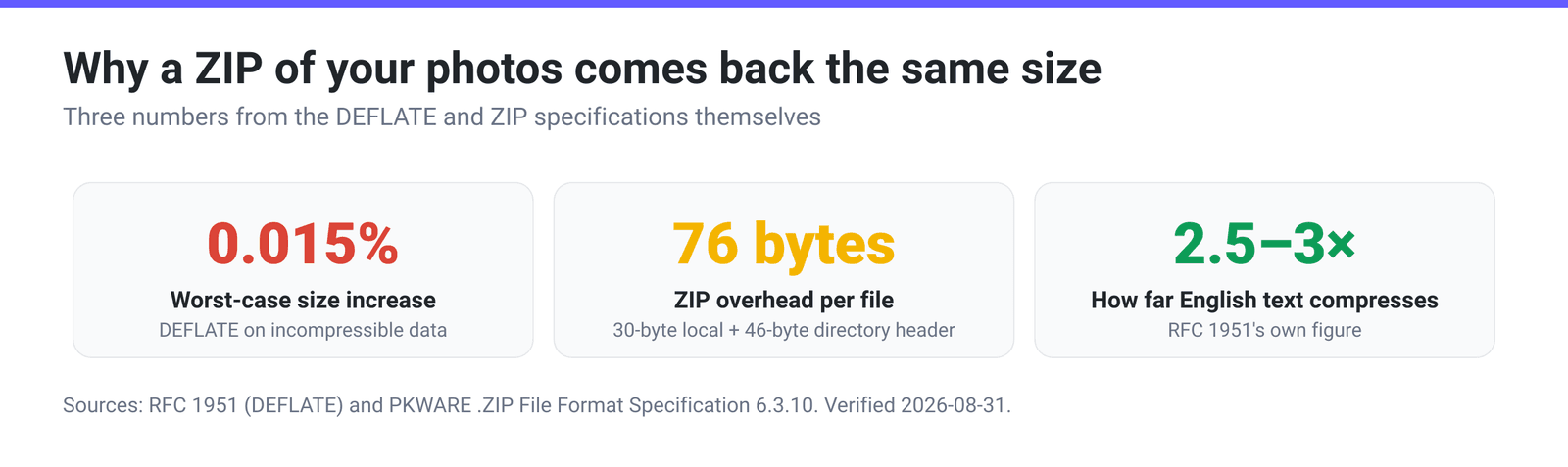
So DEFLATE’s entire saving comes from finding sequences of bytes it has seen before within the last 32 KB and replacing them with a short reference. That’s it. Where a file is full of repetition — English prose, CSV columns, log lines, XML tags, source code, the long runs of identical pixels in a BMP — that works spectacularly. RFC 1951 gives its own figures: “English text usually compresses by a factor of 2.5 to 3; executable files usually compress somewhat less; graphical data such as raster images may compress much more.”
Where there is no repetition left, it does nothing.
Why already-compressed files have nothing left to give
Every format below already ran its own compression pass — usually a much cleverer one, tailored to its data — before the file ever reached your disk:
- JPG / JPEG / HEIC — the image is transformed, quantised and then entropy-coded. The output is close to noise as far as a byte-matcher is concerned.
- PNG — this one surprises people: the PNG specification defines exactly one compression method, and it is DEFLATE. “PNG compression method 0 is deflate compression with a sliding window… of at most 32768 bytes,” and “All conforming PNG images shall be compressed with this scheme.” Zipping a PNG is asking DEFLATE to compress its own output.
- GIF — LZW-compressed, a close relative of the same idea.
- MP4 / MOV / MKV — H.264, HEVC or AV1 inside, which remove redundancy between frames as well as within them. Far more aggressive than anything a general-purpose zipper can do.
- MP3 / AAC / M4A / Opus — perceptual codecs that permanently discarded the parts of the signal you can’t hear, then entropy-coded what was left.
- PDF — content streams and embedded images are typically already Flate-compressed (the same DEFLATE), which is why the PDF compressor’s Ghostscript presets work by resampling images, not by squeezing bytes.
- DOCX / XLSX / PPTX / EPUB / JAR / APK — these are not merely compressed, they are already ZIP archives. Microsoft’s own Open XML documentation tells you to “rename the extension on the minimum document from .docx to .zip” to look inside; the parts of the document are files in a ZIP package. Zipping a
.docxwraps one ZIP inside another.
That’s the whole explanation. There is no setting, no “maximum compression” level and no better zip utility that changes it — the redundancy DEFLATE hunts for was already spent by the codec that made the file.
Zipping can make a file bigger — here’s the arithmetic
Two separate effects push the other way.
DEFLATE itself has a floor. RFC 1951 is explicit: “A simple counting argument shows that no lossless compression algorithm can compress every possible input data set. For the format defined here, the worst case expansion is 5 bytes per 32K-byte block, i.e., a size increase of 0.015% for large data sets.” Tiny, but not zero — and it applies precisely to the incompressible data you’re most likely to be zipping.
The ZIP container has fixed per-file overhead. From the .ZIP File Format Specification, every file inside an archive is described twice:
- a local file header — 30 fixed bytes, plus the filename and any extra field;
- a central directory file header — 46 fixed bytes, plus the filename again, plus extra field and comment.
Then the archive as a whole carries a 22-byte end of central directory record. So each file costs at least 76 bytes of structure plus two copies of its name, before a single byte of content. Zip 500 photos and you’ve added roughly 38 KB of bookkeeping — invisible against 2 GB of JPEGs, but it’s real, and on a single already-compressed file it is the reason the ZIP can be marginally larger than what went in.
Good zip utilities notice this and fall back to compression method 0 — “the file is stored (no compression)” — for data that DEFLATE couldn’t improve. That’s why a zipped MP4 usually comes out at “same size plus a few dozen bytes” rather than measurably larger. The archive isn’t failing; it correctly decided there was nothing to gain.
What actually shrinks it: a routing table
If the goal is fewer bytes rather than fewer files, you have to re-compress the content in its own format. Use this to route:
| What you have | Why ZIP can’t help | What actually makes it smaller |
|---|---|---|
| JPG / JPEG / HEIC photos | Already DCT-transformed and entropy-coded | Re-encode at lower quality or fewer pixels — JPEG compressor |
| PNG screenshots and graphics | PNG is DEFLATE internally | Reduce the colour palette or resize — PNG compressor |
| MP4 / MOV / MKV video | Inter-frame codec has removed far more than DEFLATE could | Lower the bitrate or resolution — MP4 compressor |
| MP3 / AAC / M4A audio | Perceptual codec already discarded inaudible data | Lower the bitrate, or go mono for speech — audio compressor |
| Animated GIF | LZW-compressed already | Fewer colours, fewer frames, smaller frame — the GIF compressor’s Max file size mode |
| Streams usually already Flate-compressed | Downsample the images inside it — PDF compressor | |
| DOCX / XLSX / PPTX | The file is already a ZIP archive | Shrink the images before you place them in the document |
| WAV / AIFF / BMP / uncompressed TIFF | Nothing has compressed it yet | ZIP genuinely helps — or convert to FLAC / PNG for a much bigger win |
| Text, CSV, JSON, logs, source code | Nothing has compressed it yet | ZIP is exactly the right tool; expect a large reduction |
The pattern is easy to remember: ZIP helps when nothing has compressed the file yet. Anything that already ends in a media extension has been compressed once, and the only way to make it smaller is to compress it again as that media, accepting the quality cost that comes with it.
What ZIP is genuinely good at
Dropping the size expectation doesn’t make ZIP useless — it makes it useful for the right reasons:
- One attachment instead of forty. Email clients, ticketing systems and upload forms almost all handle a single file better than a pile of them.
- Preserving folder structure. A ZIP carries the directory tree; forty loose attachments don’t.
- Universal extraction. Windows and macOS both open ZIP with a double-click, no software to install — unlike RAR or 7z.
- Real compression on the right content. Log bundles, database dumps, CSV exports, code and design source files often shrink dramatically, exactly as RFC 1951’s 2.5–3× figure for text suggests.
- A single integrity-checked container. Every entry carries a CRC-32, so a corrupted transfer is detected rather than silently accepted.
If you need to get under a hard size limit, the sequence that actually works is: compress the media first, then zip the results. Zipping first and hoping is the step that wastes the afternoon.
Make a ZIP on xconvert
- Open xconvert.com/archive-file-to-zip and click Upload to add your files — or drag them onto the page.
- Add every file you want in the archive; they’ll all go into one
.zip. - Click Archive and download the
.zip. - Going the other way? The ZIP extractor unpacks an archive without installing anything — it uploads the file, expands it on our servers and hands the contents back.
Because the output format is fixed to ZIP, there is nothing else to configure — and, as above, no setting that would make an archive of already-compressed media any smaller.
Your files upload over an encrypted connection, are processed on our servers, and are deleted automatically a few hours later.
For the step-by-step version on Windows and Mac, see how to make a ZIP file online; for whether a different archive format would do better on your content, ZIP vs RAR vs 7z.
FAQ
Why doesn’t zipping make my files smaller?
Because ZIP’s DEFLATE algorithm only saves space by replacing repeated byte sequences, and JPG, PNG, MP4, MP3, GIF and PDF files have already had their repetition removed by their own codecs. There is nothing left for DEFLATE to find. ZIP still bundles them into one container, which is genuinely useful — it just won’t reduce the byte count.
Why is my ZIP file bigger than the original?
Two reasons, both documented. DEFLATE has a worst-case expansion of “5 bytes per 32K-byte block, i.e., a size increase of 0.015%” on data it can’t compress, and the ZIP container itself adds a 30-byte local header plus a 46-byte central-directory entry per file — plus the filename twice and a 22-byte end-of-archive record. On a single already-compressed file that overhead is the whole story.
Does using “maximum compression” or a better zip program help?
Barely. Higher DEFLATE levels make the algorithm search harder for repetition, which costs time; if the repetition isn’t there, a longer search finds nothing. 7z and RAR use stronger algorithms and will beat ZIP on compressible content, but they face the same wall on media — see ZIP vs RAR vs 7z for where the difference is real.
Why does zipping a DOCX or XLSX gain nothing at all?
Because those files are already ZIP archives. Microsoft’s Open XML documentation says so directly — rename a .docx to .zip and you can open it and see the document’s parts inside. Zipping one just nests an archive inside another archive and adds a fresh set of headers.
What kinds of files DO compress well in a ZIP?
Anything that hasn’t been compressed yet: plain text, CSV, JSON, XML, log files, source code, database dumps, uncompressed WAV or AIFF audio, BMP images and uncompressed TIFF scans. RFC 1951’s own guidance is that “English text usually compresses by a factor of 2.5 to 3” — that’s a 60–67% reduction, and structured data with repetitive fields often does better still.
How do I actually get a folder of photos and videos under an upload limit?
Compress the media itself, then bundle. Run the photos through the JPEG compressor and the video through the MP4 compressor — both let you aim at a target size — and only then put the smaller results into a ZIP for a single tidy upload. Doing it in the other order accomplishes nothing.
Sources
Last verified 2026-08-31.
- RFC 1951 — DEFLATE Compressed Data Format Specification version 1.3 — DEFLATE “compresses data using a combination of the LZ77 algorithm and Huffman coding”; literals and “pointers to duplicated strings” within the previous 32K bytes; “no lossless compression algorithm can compress every possible input data set”; worst-case expansion of 5 bytes per 32K block (0.015%); English text compressing by a factor of 2.5 to 3.
- PKWARE — .ZIP File Format Specification, APPNOTE.TXT v6.3.10 — compression method 0 “the file is stored (no compression)” and method 8 Deflate as the default; the 30-byte local file header, 46-byte central directory file header and 22-byte end of central directory record.
- W3C / ISO — Portable Network Graphics (PNG) Specification (Third Edition) — “PNG compression method 0 is deflate compression with a sliding window… of at most 32768 bytes” and “All conforming PNG images shall be compressed with this scheme.”
- Microsoft Learn — Structure of a WordprocessingML document — a
.docxis a ZIP package; rename the extension to.zipto inspect the parts inside.