 By James
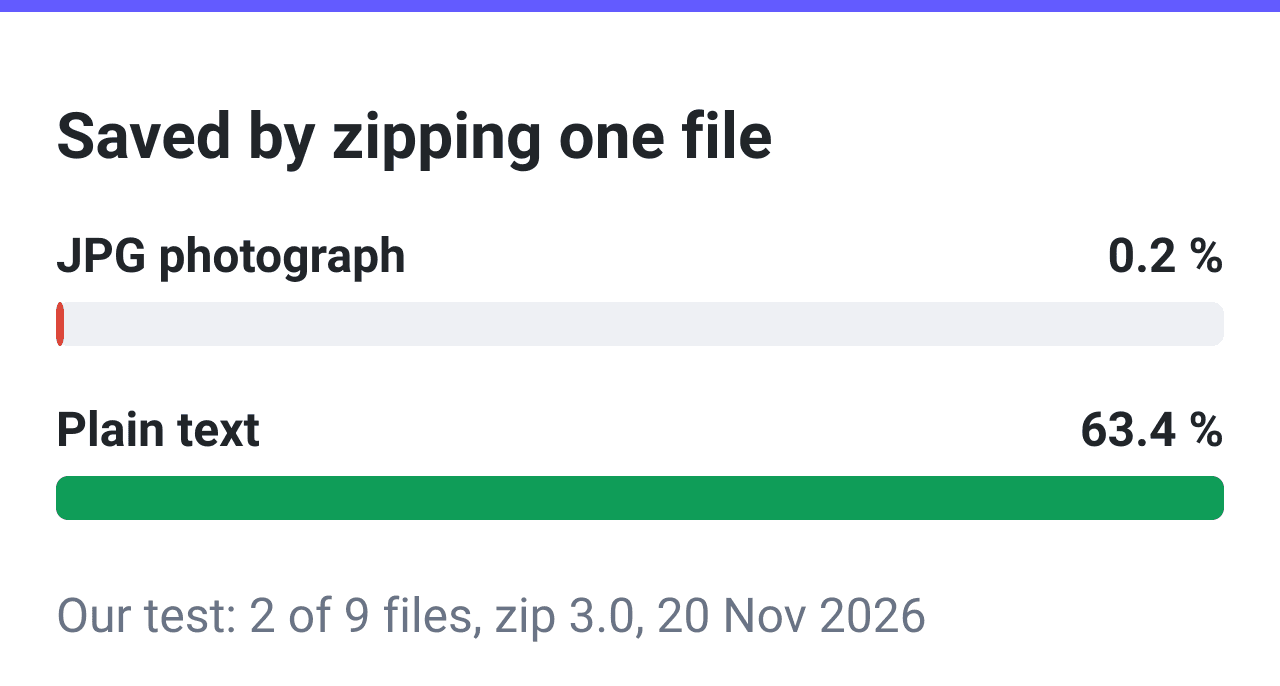
A ZIP of photos, videos and PDFs is hardly smaller than the folder: those files are already compressed. Our 31.49 MB test folder made a 31.16 MB ZIP. Shrink the files first, PDFs with the PDF compressor, then zip again or send a link.
Checked on 2026-11-20 on the PDF Compressor and the image and video compressors, and with zip 3.0 and 7-Zip 26.00 on Linux. No mail was sent: each limit is quoted from the service’s help page. Sources at the end.
Find your symptom
The order rests on search suggestions, not on a count of people. Of 90 collected on 20 November 2026, 32 pair “zip” with email, send, attach or Outlook; 5 of those say “still” and 4 “won’t attach” or “won’t send”.
The suggestions do not tell the four rows apart: the order is ours.
| Symptom | Cause | Fix |
|---|---|---|
| The ZIP is almost as large as the folder | The files inside were already compressed (cause 1) | Compress the files, then zip again |
| The ZIP is under the limit and is still refused | Inside a mail it is about a third larger (cause 2) | Aim at the size in the table of cause 2 |
| The mail is sent and comes back | The receiving side has a lower limit (cause 3) | A smaller ZIP, or a link |
| Gmail refuses a ZIP that is not large | A blocked file type or a password inside it (cause 4) | See what Gmail blocks (cause 4) |
Cause 1: the files inside were already compressed
Confirm it. Compare the size of the folder with the size of its ZIP. A file of each kind, zipped alone with zip 3.0 at its default level on 20 November 2026:
| Kind of file | Before | In a ZIP | Saved |
|---|---|---|---|
| JPG photograph | 4.10 MB | 4.10 MB | 0.2 % |
| PNG, the photograph at 1440 x 956 px | 2.50 MB | 2.50 MB | 0.2 % |
| MP4 video | 3.15 MB | 3.14 MB | 0.4 % |
| PDF of photographed pages | 1.78 MB | 1.77 MB | 0.3 % |
| DOCX with text and two photographs | 0.75 MB | 0.75 MB | 0.1 % |
| MP3 recording | 2.58 MB | 2.50 MB | 3.1 % |
| BMP, the same pixels as the PNG | 4.13 MB | 3.55 MB | 13.9 % |
| WAV recording | 4.85 MB | 3.91 MB | 19.3 % |
| Plain text | 2.00 MB | 0.73 MB | 63.4 % |
These are nine files, not a rule for every file of a kind. Zip ran its compression on each one and saved 0.1 to 3.1 % in the first six rows. Why zipping does not shrink them gives the reason.
A higher level or another program changes little. On our test folder, zip’s highest level made the ZIP 316 bytes smaller.
7-Zip at its highest level made a 31.11 MB ZIP and a 31.06 MB 7z archive. Our own ZIP page has no compression setting: a 4.10 MB JPG took 4.10 MB in its archive.
Fix it: shrink the files, then zip. For a PDF, on the PDF Compressor (linked at the top):
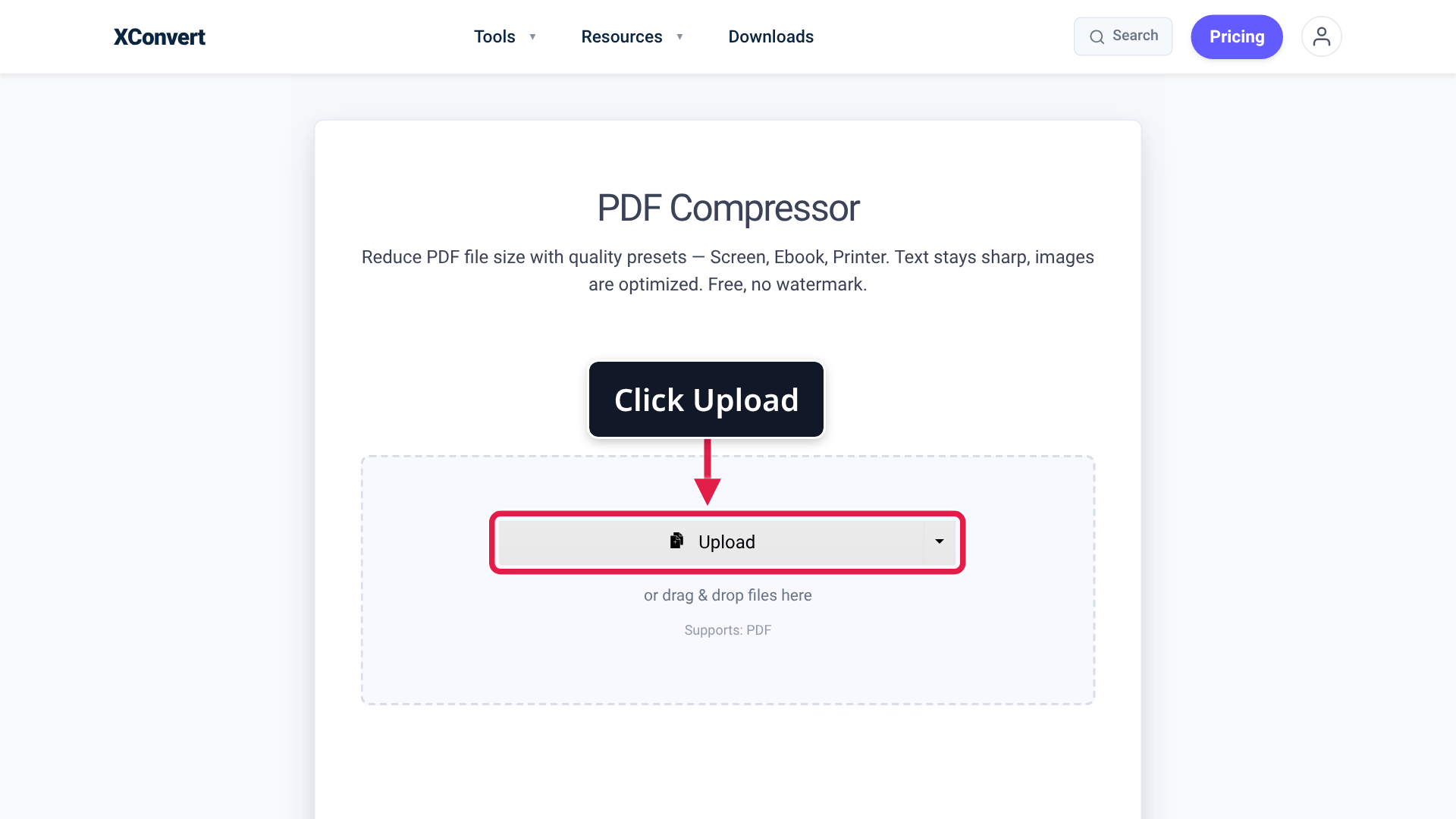
- Click Upload and choose the PDF.
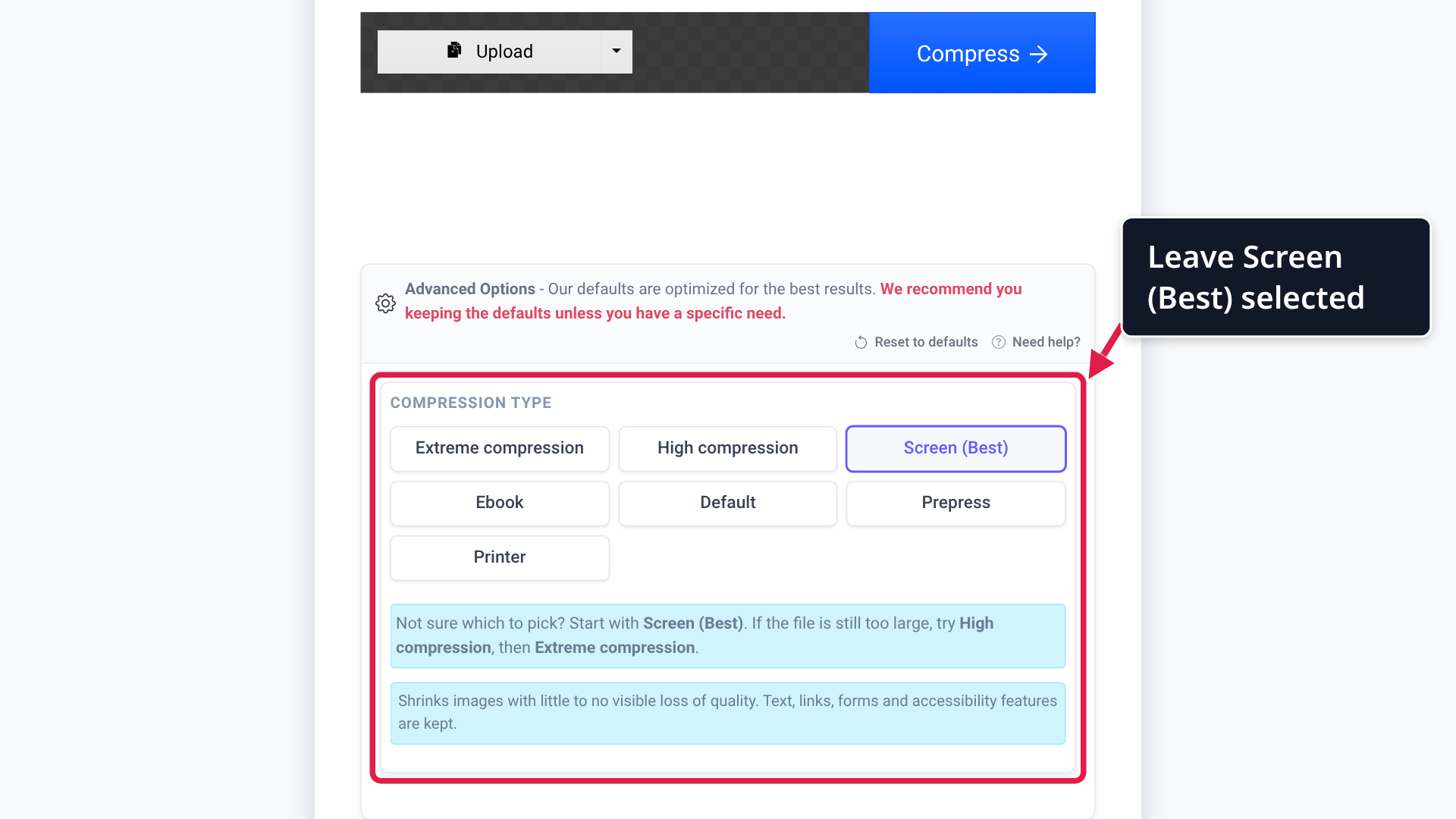
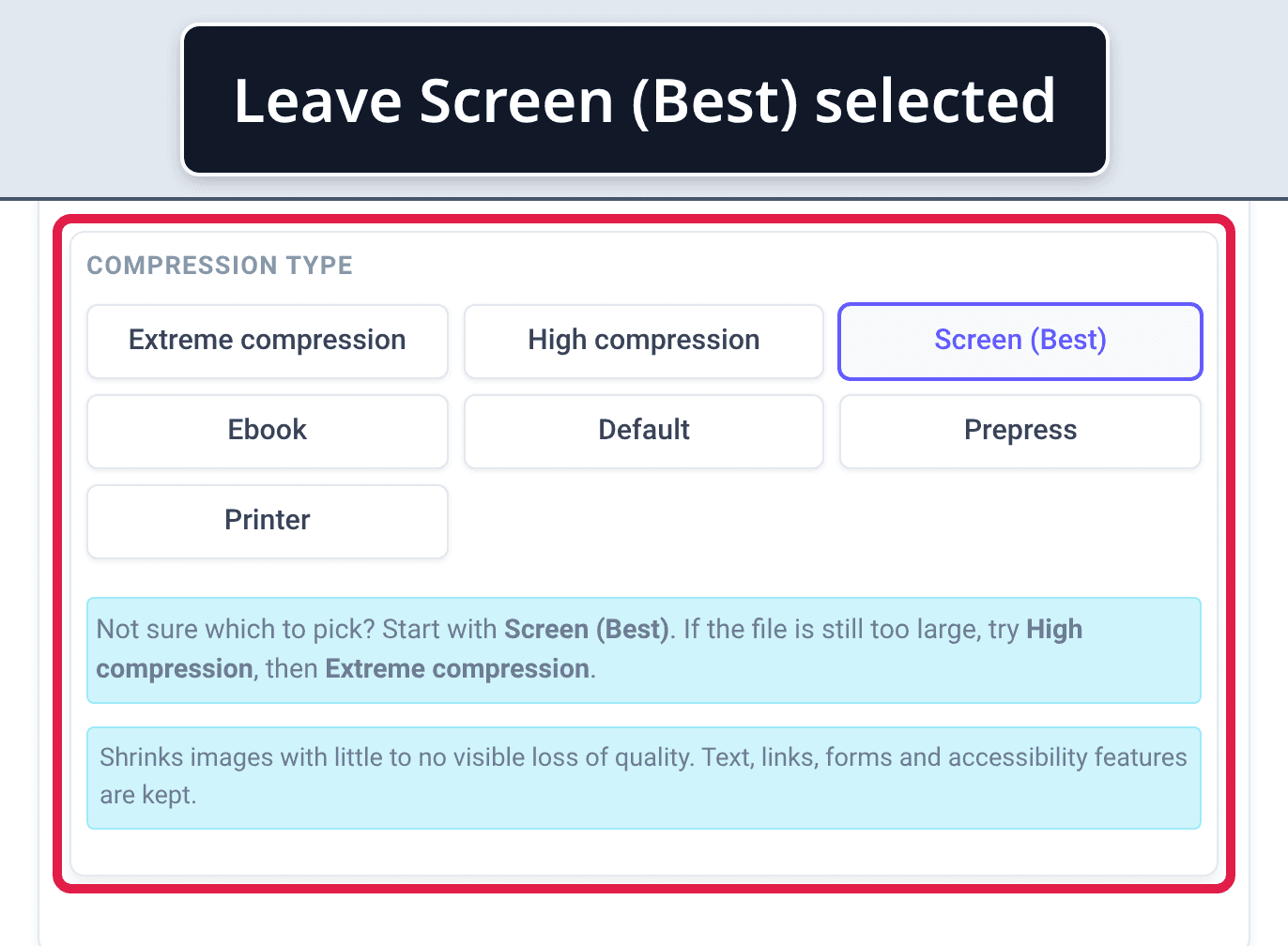
- Under COMPRESSION TYPE, leave Screen (Best) selected, as the page loads it.
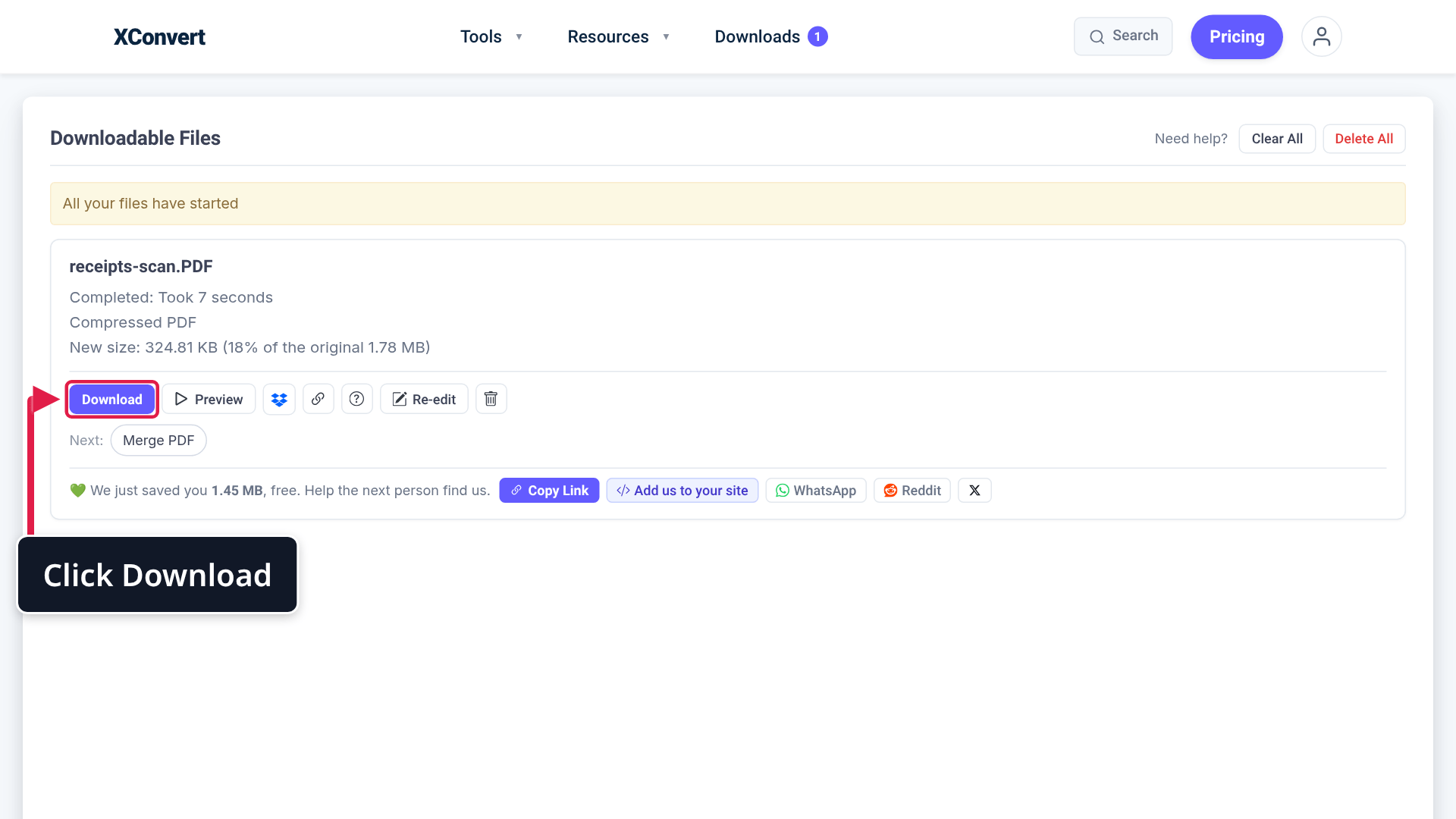
- Click Compress. The downloads page opens, and the card reads New size with the share of the original: “New size: 324.81 KB (18% of the original 1.78 MB)” for one test PDF.
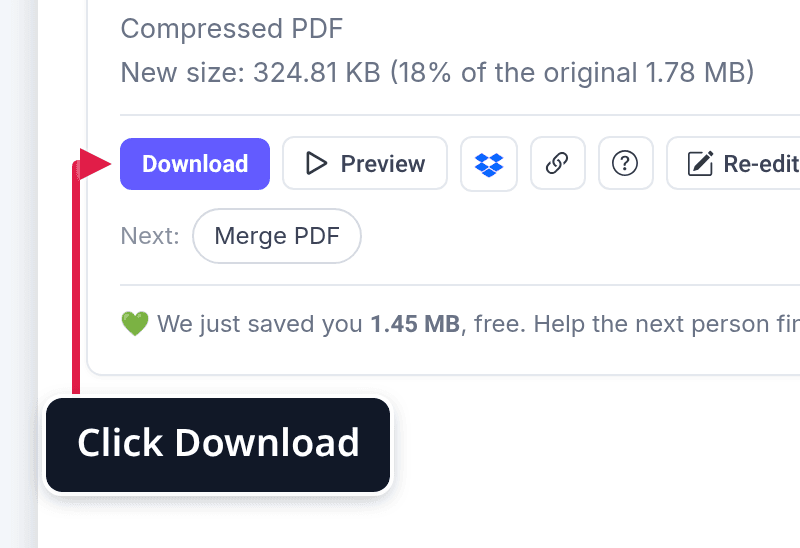
- Click Download.
The second test PDF came out at 28 % of its size. In both, the pictures went from 300 ppi to 200 and 250 ppi. Only the pictures inside a PDF lose quality; the text stays selectable.
If the result is still too large, the page says to try High compression, then Extreme compression. Neither was run in this test.
The whole folder, one run on 20 November 2026: the two PDFs as above, the photographs and the clip through the image and video compressors at the settings those pages load with. Nine files, each under 5 MB.
| Step | Size | Against the folder |
|---|---|---|
| The folder: six JPG, two PDF, one MP4 | 31.49 MB | |
| Its ZIP | 31.16 MB | 1.0 % smaller |
| That ZIP inside a mail | 42.65 MB | 35.4 % larger |
| The ZIP of the nine compressed files | 20.34 MB | 35.4 % smaller |
| That ZIP inside a mail | 27.84 MB | 11.6 % smaller |
The second ZIP is under 25 MB as a file and over 25 MB inside a mail. This run produced no ZIP under the 18.2 MB of cause 2.
Cause 2: the ZIP is about a third larger inside the mail
An attachment travels as text, in an encoding called base64. RFC 2045 says of that encoding: “the encoded data are consistently only about 33 percent larger than the unencoded data”.
With the line ends of a mail it is more: a message built around each of six test files on 20 November 2026 weighed 1.368 times the file.
The last column assumes one attachment and a short text.
| Service | Limit (read November 2026) | Largest ZIP if the encoded message counts |
|---|---|---|
| Gmail, personal accounts | 25 MB | 18.2 MB |
| Outlook.com | 25 MB | 18.2 MB |
| Yahoo Mail | 25 MB for all attachments of a message | 18.2 MB |
| iCloud Mail | 20 MB a message | 14.6 MB |
| The Outlook program, internet accounts | 20 MB | 14.6 MB |
| The Outlook program, Exchange accounts | 10 MB by default | 7.3 MB |
| Microsoft mailboxes (Exchange Online) | 35 MB to send, by default | 25.5 MB |
What is not confirmed. Of the pages in the table, only the Exchange Online page names encoding: messages routed outside Microsoft’s datacenters “are subject to an additional 33% translation encoding increase”.
The pages of Gmail, Outlook.com, Yahoo Mail and iCloud Mail do not say whether the encoding counts. No refusal was reproduced here.
Cause 3: the receiving side has a lower limit
A limit applies on arrival too. As read in November 2026, Yahoo’s 25 MB holds “both for incoming and outgoing email”. Microsoft mailboxes receive 36 MB by default, and administrators “can specify a custom limit between 1 MB and 150 MB”.
Microsoft gives two defaults for a work account: 10 MB on its Outlook help page, 35 MB in its service description. Email attachment limits has each service’s limit and what happens over it.
When you cannot know the other side’s limit, send a link. The services have one built in:
| Service | Its own link route (read November 2026) |
|---|---|
| Gmail | Over the limit it “automatically removes the attachment and adds it as a Google Drive link” |
| Outlook.com | “The attachment size limit for OneDrive files is 2GB.” |
| iCloud Mail | “up to 5GB with Mail Drop turned on” |
A link changes what you check before sending. See who can open it and how long it stays valid before the address goes out. That is a hosting step, and it comes after the compression.
Cause 4: the ZIP is blocked, not too large
Gmail does not allow certain types of files “when found within archives”, nor “Password-protected archives with archived content”. That refusal is about what is inside, not about size: see which file types Gmail blocks.
When the PDF compressor helps and when it does not
It helps when the weight is in PDFs made of pictures. From 21 October to 19 November 2026, 168 PDFs over 25 MB were compressed here at Screen (Best): 107 (64 %) came out at 25 MB or less, 77 (46 %) at 18 MB or less.
Those are jobs on PDFs of any origin, not ZIPs that were rescued, and no promise for one file.
It is the wrong tool when:
- The file is the ZIP. The page takes PDF files only: compress the PDFs before you zip them.
- You need an exact size. Compression Type is the only setting: there is no box for a target size.
- The PDF needs a password to open. It cannot be compressed until that password is removed.
- The weight is photos or video. Use the image compressor or the video compressor. Both load with File size (%) at 80: the test photographs came out at 58 to 80 % of their size and the clip at 77 %, all with fewer pixels. A lower value was not tested.
- The files are text, BMP or WAV. Zipping does save something there: see the table of cause 1.
- Nothing may leave your computer. Files are processed on our servers, not in your browser, and uploads and results are deleted about 5 hours after they were written.
Sources
All read on 2026-11-20.
- Limits, each on the service’s own page: Gmail Help, send attachments (25 MB for personal accounts; a Google Drive link over the limit); Microsoft Support, sending limits in Outlook.com (25 MB; OneDrive files 2GB); Microsoft Support, reduce attachment size in Outlook (20 MB for internet accounts, 10 MB by default for Exchange accounts); Microsoft Learn, Exchange Online limits (35 MB for sending and 36 MB for receiving by default, a custom limit between 1 MB and 150 MB, the 33% encoding increase); Yahoo Help (25MB in total, incoming and outgoing); Apple Support, iCloud Mail limits (20MB, up to 5GB with Mail Drop).
- Gmail Help, file types blocked in Gmail (files within archives; password-protected archives).
- RFC 2045, section 6.8 (base64: about 33 percent larger; lines of no more than 76 characters).
- Tests of 2026-11-20, one run each. Zipping: nine files of 0.75 to 4.85 MB, each zipped alone, and the test folder, with zip 3.0 and 7-Zip 26.00 on Linux. The size inside a mail: a message with one attachment built with Python’s email library and measured; no mail was sent. On the site: eleven jobs with files under 5 MB, two on the PDF Compressor (/compress-pdf), seven on the image compressor, one on the video compressor and one on the ZIP page. The photographs are CC0 files from Wikimedia Commons, the recording is a public-domain LibriVox reading, the text is from Project Gutenberg. Nobody judged a result by eye. MB means 1,000,000 bytes.
- Job counts from our own records: 1,272 finished jobs of the PDF Compressor with one upload and one result, 21 October to 19 November 2026; file sizes and the Compression Type only.
- Search suggestions: 18 autocomplete requests to Google, DuckDuckGo and Bing on 2026-11-20, 90 distinct suggestions, counted by pattern.