 By Stephanie Taylor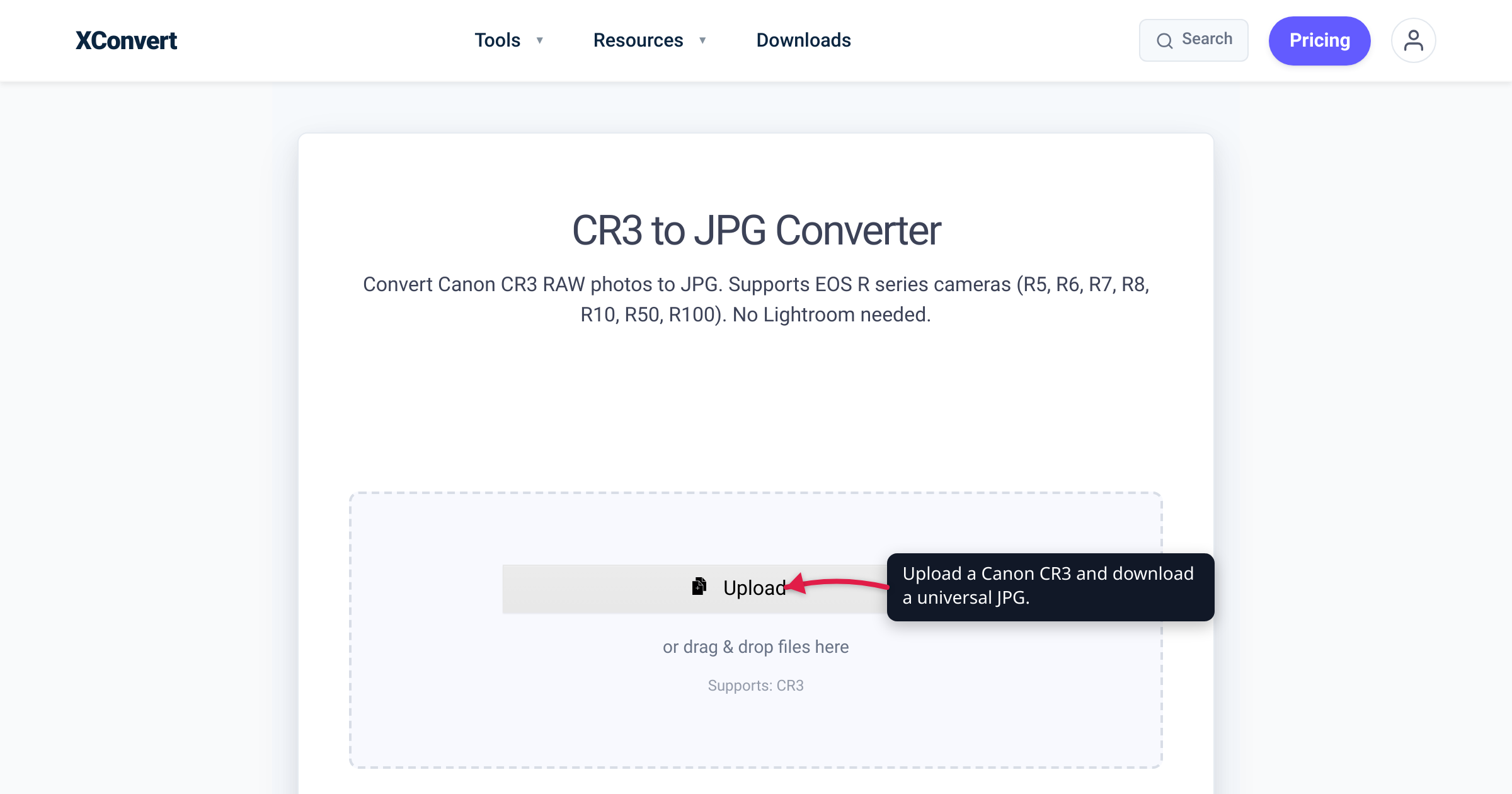
You upgrade from an old Canon DSLR to an EOS R body — or pull the first card out of an EOS M50 — and every photo comes off as a .CR3 file your laptop can’t preview and your older Photoshop refuses to open. Nothing is corrupt. CR3 is the RAW format Canon has used since 2018, and software released before your camera existed simply doesn’t know it. This guide covers which cameras write CR3, what the space-saving C-RAW option really does, and why older software rejects the format (plus the three fixes) — verified against Canon’s spec sheets, Adobe’s compatibility tables, and Microsoft’s documentation.
Quick answer: CR3 is Canon’s newer RAW format — introduced with the EOS M50 in 2018 and written by the EOS R mirrorless line plus late DSLRs like the EOS 90D and EOS-1D X Mark III. It replaced the TIFF-based CR2 with a new MP4-family container, so support is per-camera: Adobe apps need Camera Raw 10.3 or newer (newer bodies, newer versions), Windows Explorer needs Microsoft’s free Raw Image Extension, and perpetual-license Lightroom 6 never got CR3 at all. To view or send the photo, drop the file into the xconvert CR3 to JPG converter and convert — and keep the CR3 as your editing master.
Jump to a section
- What CR3 is — and which cameras write it
- C-RAW: the half-size RAW inside CR3
- Why your software rejects CR3 — and the three fixes
- Keep the RAW: convert a copy, archive the original
- Convert CR3 to JPG on xconvert
- FAQ
- Sources
What CR3 is — and which cameras write it
CR3 is Canon’s third-generation RAW format. It debuted in 2018 on the EOS M50 — Canon’s official spec chart lists the M50’s recording format as “JPEG/RAW (CR3 a Canon 14-bit RAW format)” — and it has been Canon’s RAW ever since:
- The EOS R mirrorless line — EOS R, RP, R5, R6, R7, R8, R10, R50, R100 and their Mark II successors all record CR3, per Adobe’s camera-support table. Canon’s EOS R launch announcement lists “CR3 (RAW/C-RAW)” as a headline feature.
- The final DSLR generation — the EOS 90D and the flagship EOS-1D X Mark III write CR3, not CR2.
- Later EOS M bodies such as the M50 Mark II.
If your Canon predates 2018 — a Rebel, a 5D/6D/7D, the early M bodies — it writes CR2 instead, which has its own walkthrough in convert CR2 to JPG.
The change under the hood is why your software cares. CR2 was built on the TIFF container; CR3 moved to the ISO Base Media File Format — the same container family as MP4 — with Canon’s custom “crx” codec inside. A RAW reader written for CR2 can’t be nudged into reading CR3; it needs new decoding code. And like every RAW format, a CR3 isn’t a viewable picture yet: it’s 14-bit sensor data that must be demosaiced and rendered before anything can display it — which is why browsers, chat apps, and upload forms reject it, and why the practical fix for sharing is a JPG.
C-RAW: the half-size RAW inside CR3
CR3 also added a choice to the image-quality menu: RAW or C-RAW (“Compact RAW”). Both save a .CR3 file at the sensor’s full pixel resolution — on the M50’s spec chart, RAW and C-RAW are both 6000 × 4000. What differs is size, and how it’s achieved:
- Roughly 40–50% smaller files. Canon’s own example for the 45-megapixel EOS R5: 45.4 MB per RAW versus 22 MB per C-RAW. Canon set the general expectation around 40%; independent testing across six scenes measured 27–54%, averaging ~42%.
- It’s lossy — mildly. Canon confirmed to reviewer Bryan Carnathan that C-RAW uses a lossy compression algorithm, and named exactly one downside: potentially more noise in shadows when files are pushed hard. His side-by-sides needed ~3-stop exposure pushes viewed at 400% magnification before differences appeared.
- Deeper bursts. Smaller files stretch the buffer: the M50 sustains about 10 RAW frames in high-speed continuous shooting but 16 with C-RAW (15 vs 32 in low-speed), per the same spec chart.
If you fill cards on burst-heavy days, C-RAW buys real capacity for a tradeoff Canon itself limits to pushed shadows; if you routinely rescue deep underexposure, shoot standard RAW. For converting to JPG it makes no difference: both flavors arrive as .cr3 files and go through the identical workflow below.
Why your software rejects CR3 — and the three fixes
RAW support is per-camera, not per-extension: every RAW developer ships an explicit list of camera models it can decode, and a CR3 from a body newer than that list fails even in software that opens other CR3 files happily. Adobe’s compatibility table shows how the bar keeps rising:
| Camera | RAW format | Camera Raw needed | Lightroom Classic needed |
|---|---|---|---|
| EOS M50 (first CR3 body) | CR3 | 10.3 | 7.3 |
| EOS R | CR3 | 11.0 | 8.0 |
| EOS RP | CR3 | 11.2.1 | 8.2.1 |
| EOS 90D | CR3 | 11.4 | 8.4 |
| EOS-1D X Mark III | CR3 | 12.2 | 9.2 |
| EOS R5 / R6 | CR3 | 12.4 | 9.4 |
| EOS R7 / R10 | CR3 | 14.4 | 11.4 |
| EOS R8 / R50 | CR3 | 15.2 | 12.2 |
| EOS R5 Mark II | CR3 | 16.4 | 13.4 |
(Minimum versions from Adobe’s supported-cameras table. Note the table’s perpetual-license column: it lists no version at all for any CR3 camera — standalone Lightroom 6 never received CR3 support.)
The fixes, in order of effort:
- Update what you have. Current subscription Photoshop/Lightroom decodes every camera above. On the Canon side, the free Digital Photo Professional follows the same per-camera rule — update it before assuming a file is broken — and Canon launched the DPP Express iPad app alongside the EOS R specifically to process CR3 files.
- Can’t update? Bridge the gap. Adobe’s official backward-compatibility route is the free Adobe DNG Converter, which turns CR3s into DNG files that older versions of Photoshop, Lightroom, Bridge, After Effects, and Photoshop Elements can open. For Windows itself, install Microsoft’s free Raw Image Extension from the Microsoft Store (requires Windows 10 version 1903, the May 2019 Update, or later): it adds CR3 thumbnails in File Explorer and viewing in Photos — a viewer, not an editor.
- Just need to see or send the photo? Convert it to JPG. One conversion produces a file that opens on every device with nothing installed — walkthrough below.
Keep the RAW: convert a copy, archive the original
A JPG is an 8-bit, lossy render; your CR3 holds 14-bit sensor data. Converting doesn’t visibly hurt the photo at a high quality setting, but it permanently flattens the editing headroom — highlight recovery, shadow lifts, after-the-fact white balance — that you shot RAW to get. (The full breakdown of what RAW-to-JPG discards is in the CR2 guide; it applies unchanged to CR3.)
So follow the professional default: archive the CR3 as your digital negative, and convert a copy to JPG for anything that needs to open elsewhere. If storage pressure is the real problem, that’s what C-RAW addresses going forward — deleting RAWs of shots you might re-edit is the one move you can’t undo.
Convert CR3 to JPG on xconvert
The xconvert CR3 to JPG converter renders Canon’s 14-bit RAW into a standard JPG on our servers — no Canon or Adobe software required:
- Open xconvert.com/convert-cr3-to-jpg and click + Add Files — add the file From my Computer, From Google Drive, or From Dropbox. The page confirms Supports: CR3, and RAW and C-RAW
.cr3files upload the same way. - The output on this page is already JPG; open Advanced Options to fine-tune (“Our defaults are optimized for the best results”). Under File extension you can pick JPG or JPEG — the identical format with a different suffix.
- Set the Quality Preset — Very High (Recommended) for the sharpest render, lower to shrink the file. Resolution Percentage stays at Keep original unless you want to downscale; the Width / Height (Keep aspect ratio) fields give exact pixel control.
- Click Convert, then download your JPG.
Your CR3 uploads over an encrypted connection, is processed on our servers and deleted automatically a few hours later. Because the rendering happens server-side, it works the same from a phone, a Chromebook, or a locked-down work machine. Converting a whole shoot — or mixed Canon, Nikon, and Sony cards? Use the multi-format Image Converter and the workflow in batch-convert RAW photos to JPG.
FAQ
Why won’t my CR3 files open in Photoshop or Lightroom?
Your Camera Raw plug-in predates your camera. CR3 decoding starts at Camera Raw 10.3 / Lightroom Classic 7.3 (EOS M50), and every newer body raises the minimum — an EOS R5 Mark II needs Camera Raw 16.4. Update the app, run the file through the free Adobe DNG Converter, or convert the CR3 to JPG if you just need the picture.
Is CR3 better than CR2?
They’re different generations doing the same job. CR2 (2004–2018) is TIFF-based; CR3 (2018 onward) uses an MP4-family container and adds the C-RAW half-size option. You don’t choose between them — the camera body dictates the format. CR3’s only practical downside is that it demands newer software.
What is C-RAW, and does it hurt image quality?
C-RAW is CR3’s compact variant: full sensor resolution, roughly 40–50% smaller files, achieved with lossy compression. Canon’s stated tradeoff is potential extra shadow noise when files are pushed hard in editing; independent testing needed ~3-stop pushes at 400% zoom to spot differences. For normal exposures and edits it’s effectively indistinguishable.
How do I see CR3 thumbnails in Windows File Explorer?
Install Microsoft’s free Raw Image Extension from the Microsoft Store — it adds CR3 thumbnails in File Explorer and opens the files in Photos. It requires Windows 10 version 1903 (May 2019 Update) or newer, and it only displays RAW files; for sharing you still want a JPG conversion.
Can Lightroom 6 open CR3 files?
No. Adobe’s camera-support table lists no perpetual-license Lightroom version for any CR3 camera — the column shows a dash for every body from the EOS M50 onward. Your options: current subscription Lightroom, Adobe’s free DNG Converter to feed Lightroom 6 a DNG it understands, or converting to JPG.
Does converting CR3 to JPG lose quality?
You lose editing latitude more than visible quality. JPG is an 8-bit, lossy format, so the 14-bit RAW’s recovery headroom is gone — but at a high quality preset the JPG looks equivalent for viewing, web use, and printing. Keep the original CR3 and convert a copy.
Can I convert CR3 to JPG on my phone?
Yes. The xconvert CR3 to JPG converter runs in any browser and does the rendering on our servers, so a phone works as well as a desktop: upload the .cr3, tap Convert, download the JPG.
Sources
Last verified 2026-07-15.
- Canon EOS M50 specifications chart (PDF) — recording format “JPEG/RAW (CR3 a Canon 14-bit RAW format)”; RAW and C-RAW both at full 6000 × 4000 resolution; burst depth 10 RAW vs 16 C-RAW frames (high-speed continuous).
- Canon U.S.A. press release — The All-New EOS R System (September 2018) — EOS R feature list includes “CR3 (RAW/C-RAW)”; DPP Express announced for processing CR3 files on iPad.
- Canon U.S.A. — RAW Image Fundamentals — C-RAW (“Compact RAW”) keeps full sensor resolution; EOS R5 file sizes 45.4 MB RAW vs 22 MB C-RAW; Canon RAW records 12-, 13-, or 14-bit data.
- Adobe — Cameras supported by Camera Raw — per-camera minimum Camera Raw / Lightroom Classic versions in the table above; CR3 listed as the raw extension for the EOS R line, 90D, and 1D X Mark III; no perpetual-Lightroom version for any CR3 body; latest camera support for older software “through the free Adobe DNG Converter.”
- Adobe — Digital Negative Converter — the DNG Converter provides “backwards compatibility for the latest cameras for use in older versions of Photoshop, Lightroom, Bridge, After Effects, and Photoshop Elements.”
- Microsoft Q&A — CR3 thumbnails in File Explorer — the Raw Image Extension adds CR3 support (Explorer thumbnails + Photos app) and requires Windows 10 version 1903 (May 2019 Update).
- The-Digital-Picture — Should I Use Canon’s C-RAW Image File Format? — CR3/C-RAW introduced with the EOS M50; Canon’s ~40%-smaller guidance and measured 27–54% savings; Canon’s confirmation of the lossy algorithm and the pushed-shadow-noise tradeoff.
- Wikipedia — Raw image format — CR3 uses the ISO Base Media File Format container with the custom “crx” codec (2018); CR2 is TIFF-based; raw files carry the sensor’s 12–14-bit data.
- xconvert CR3 to JPG converter — live tool UI: + Add Files, Supports: CR3, Advanced Options, Quality Preset, Resolution Percentage, Width/Height, File extension (JPG/JPEG), as shown on the page.