 By Stephanie Taylor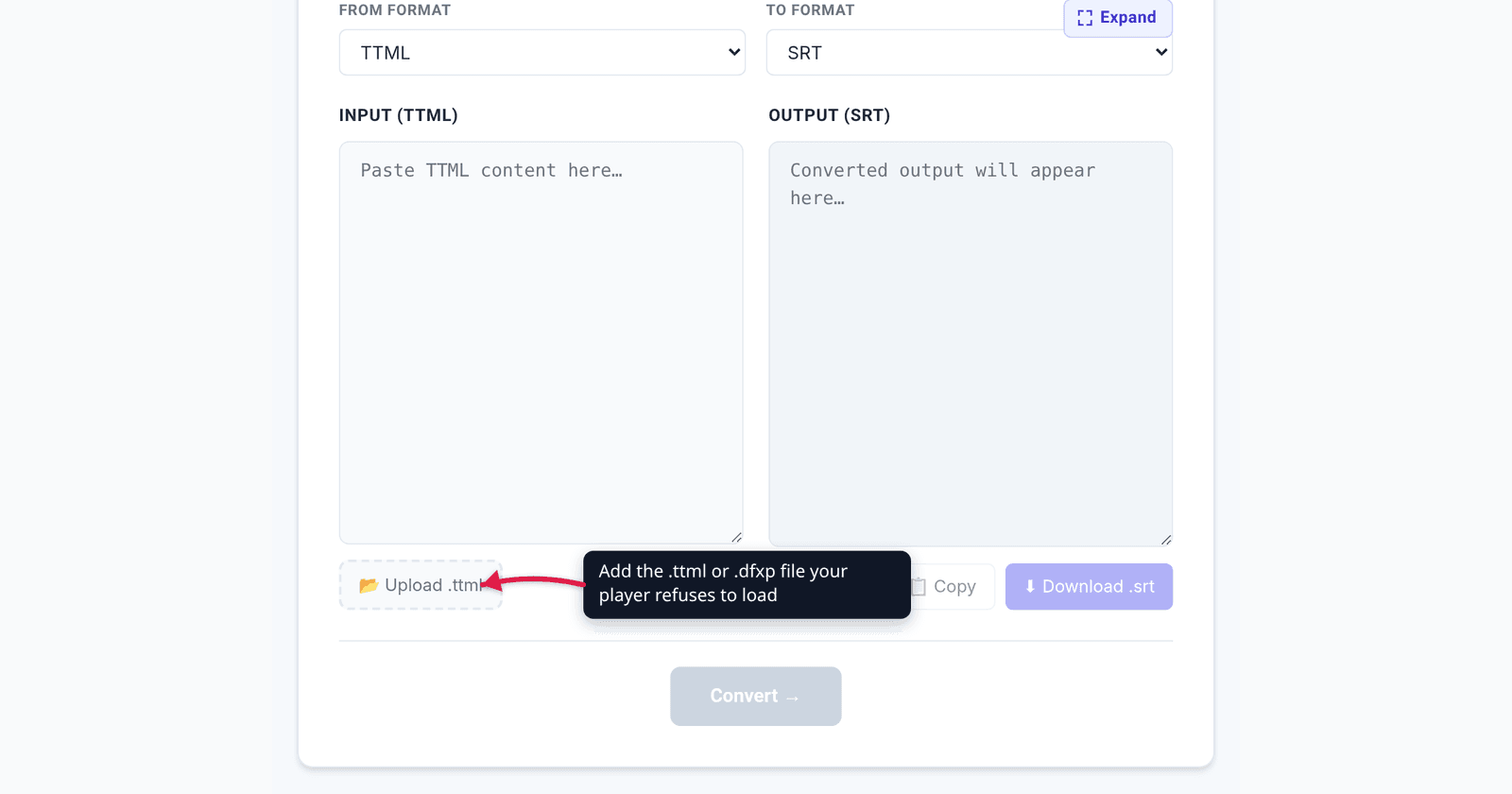
A caption file arrives from a broadcaster or a localisation vendor and it ends in .ttml, .dfxp or just .xml. You drop it next to the video in Plex and nothing happens. You drag it into VLC and it is ignored. You open it in a text editor and find XML with <p begin="00:00:04.200" end="00:00:07.100"> — the timings are all there, the text is all there, and no player will touch it. Here is what those files actually are, why DFXP and TTML are the same format under two names, and exactly what you lose when you flatten one to SRT.
Quick answer: DFXP is the old name for TTML — same XML, different label, and both often ship with a plain
.xmlextension. SRT is the format players actually auto-load, so converting is usually the right move. You keep the cue text and the timings; you lose positioning, styling, region layout and any TTML metadata. Convert.ttmlfiles on xconvert’s TTML to SRT converter and.dfxpfiles on the DFXP to SRT converter — for both, processing happens locally in your browser. One caveat before you start: they read clock times (00:00:04.200) only, so a file timed in seconds, frames or ticks converts to cues that all sit at zero.
Jump to a section
- DFXP and TTML are the same format
- Where these files come from
- Why SRT is the format that actually plays
- What survives the conversion, and what doesn’t
- The timing trap: frames and ticks
- Convert TTML or DFXP to SRT on xconvert
- FAQ
DFXP and TTML are the same format
This is the single fact that unblocks most people. The W3C’s TTML 1 Recommendation says so in as many words:
“In previous drafts of this specification, TTML was referred to as DFXP (Distribution Format Exchange Profile). This latter term is retained for historical reasons in certain contexts, such as profile names and designators…”
So DFXP was the working name; TTML is the published name. A .dfxp file is a TTML document. A .ttml file is a TTML document. And an .xml file handed over by a captioning house is very often also a TTML document — the extension carries no information about the contents. YouTube’s own caption-format documentation makes the point unusually plainly: its supported-formats table gives DFXP a single row covering both .ttml and .dfxp, and says of them, “These files types are interpreted as TTML files.”
What differs between files you will actually receive is the profile — a constrained subset of TTML defined for a particular delivery chain:
| Name | What it is | Status |
|---|---|---|
| TTML 1 | The base Timed Text Markup Language. Third Edition is a W3C Recommendation dated 8 November 2018 | W3C Recommendation |
| TTML 2 | The successor, with richer styling (including ruby annotation and animation) | W3C Recommendation |
| DFXP | The pre-publication name for TTML; survives in profile designators and in the .dfxp extension | Historical alias |
| IMSC 1.1 | Two profiles of TTML2 for subtitle delivery — a Text Profile and an Image Profile. W3C Recommendation, 8 November 2018 | W3C Recommendation |
| EBU-TT-D | The EBU’s TTML-based distribution format for subtitles over IP networks (Tech 3380, v1.0.1, May 2018) | EBU specification |
All five open in a text editor as XML. All five carry <p> elements with begin and end attributes. Only the details of styling, layout and permitted attributes differ.
Where these files come from
TTML/DFXP is a delivery and interchange format, not a consumer one. You typically get one because a broadcaster or streaming platform supplied captions in their required deliverable (usually an IMSC or EBU-TT profile), because a localisation vendor exported the master rather than a player-ready sidecar, because a caption tool exported “XML” without saying which XML, or because a legacy Flash-era workflow produced .dfxp — which is where most surviving .dfxp files date from.
The common thread: the file was produced for a pipeline, and you are trying to use it in a player. Those are different jobs, which is why the file is technically perfect and practically useless.
Why SRT is the format that actually plays
SRT (SubRip) has no formal standard body behind it — it is a plain-text de-facto format that won on sheer simplicity: a cue number, a timestamp line, the text, a blank line. That simplicity is exactly why it is the format with the widest player pickup.
| Destination | Takes TTML / DFXP? | Takes SRT? | Notes |
|---|---|---|---|
| VLC, mpv, desktop players | Partial and inconsistent | Yes | SRT sidecars are auto-detected next to the video file |
| Plex, Jellyfin, Emby | Not reliably | Yes | Sidecar naming (Movie.en.srt) is the standard mechanism |
HTML5 <video> | No | No | The <track> element requires WebVTT — MDN: “The tracks are formatted in WebVTT format (.vtt files)” |
| YouTube | Yes | Yes | YouTube accepts .ttml, .dfxp, .srt, .vtt, .sbv and a long list of broadcast formats |
| Smart TVs, set-top boxes | Varies by profile | Usually | Devices in broadcast chains often want a specific TTML profile, not TTML generally |
| Editing software | Varies | Yes | SRT is the near-universal import |
Two things fall out of that table. First, if your destination is a web page, SRT is not your endpoint either — browsers only accept WebVTT. Second, YouTube is the outlier that takes the original file, so if YouTube is the only destination you may not need to convert at all.
What survives the conversion, and what doesn’t
TTML is a styling and layout language that happens to carry text. SRT is text that happens to carry timings. Flattening one to the other is a deliberate loss of information, and it is worth knowing which information.
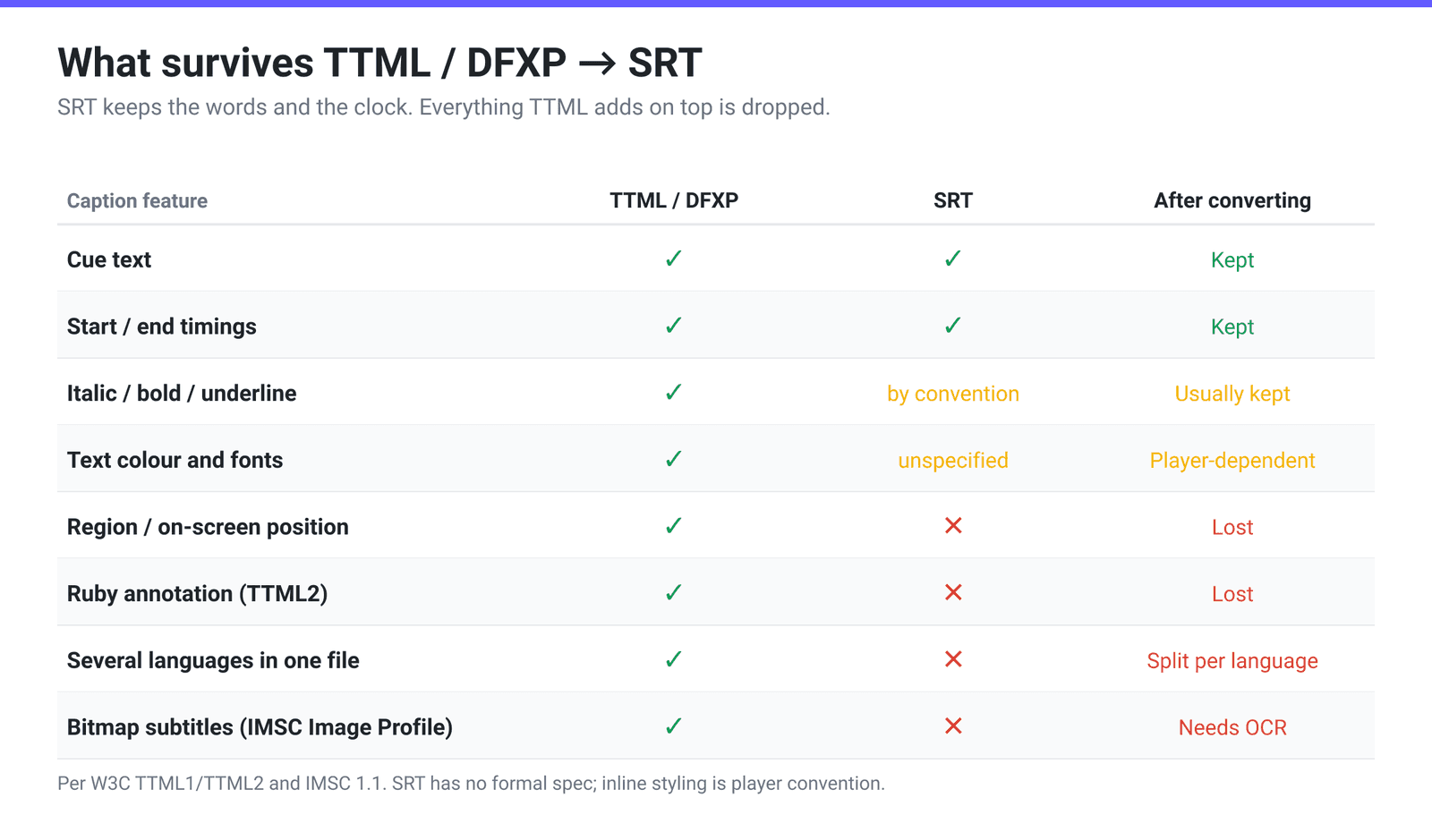
The losses that matter in practice:
- Positioning and regions. TTML places cues inside declared
<region>boxes, so a caption can sit top-left to avoid burned-in text underneath. SRT has no positioning concept at all — every cue lands wherever the player puts subtitles, which is bottom-centre. - Styling. Colours, fonts, backgrounds, outlines and opacity are all TTML style attributes with no SRT equivalent. Most players do honour inline
<i>,<b>and<u>in SRT, and many honour<font color="…">, but none of that is specified anywhere — it is convention, and support varies. - Multiple languages in one document. TTML can carry several
xml:langdivisions in one file; SRT is one language per file, so a multilingual TTML has to become several SRTs. - Ruby annotation (furigana over Japanese kanji, a TTML2 feature) has no SRT representation whatsoever.
And one hard stop worth checking first: IMSC defines an Image Profile whose subtitles are bitmap images, not text. The W3C abstract describes the two profiles as “a text-only profile and an image-only profile.” If your file is the image profile, there is no text to extract — the words are pixels, and recovering them needs optical character recognition, which xconvert does not do. Open the file in a text editor: base64 blobs and no readable dialogue means that is what you have.
The timing trap: frames and ticks
SRT timestamps are always the same shape: HH:MM:SS,mmm. TTML timestamps are not, and this is where naive conversions go wrong.
The TTML specification allows a time expression as clock-time (00:00:04.200, and optionally with a frames field) or as offset-time with a metric — h, m, s, ms, f for frames, or t for ticks. So all of these are valid TTML and all mean different things:
begin="00:00:04.200"— plain clock time with a fractional part. This is the only form our converter reads.begin="4.2s"— offset time in seconds.begin="105f"— offset time in frames, which is only meaningful once you knowttp:frameRate(and, for NTSC-family rates,ttp:frameRateMultiplier).begin="42000000t"— offset time in ticks, meaningless withoutttp:tickRate.
Check your file before you trust the output. Our converter’s time parser matches one shape — [HH:]MM:SS followed by a . or , and a fractional part — and returns zero for anything else. So 4.2s, 105f and 42000000t all become 00:00:00,000, and so does a bare clock time with no fraction such as 00:00:04. Nothing warns you: the cue count is right, the text is right, and every timestamp is zero. Open the TTML in a text editor and look at the begin attributes. If they all look like 00:00:04.200, you are fine. If they end in s, ms, f or t, this converter is the wrong tool for that file — get the supplier to re-export in clock time, or convert with something that reads ttp:frameRate and ttp:tickRate.
Convert TTML or DFXP to SRT on xconvert
The converters are extension-specific, so pick the page that matches the file you have:
- Open xconvert.com/convert-ttml-to-srt for a
.ttmlfile, or xconvert.com/convert-dfxp-to-srt for a.dfxpfile. - Click 📂 Upload .ttml (or Upload .dfxp) and pick your caption file.
- A plain
.xmlfile needs no rename. The parser is chosen by the From dropdown, not by the file’s extension, and the picker’s accept list includestext/*, so an XML caption file is selectable as-is — if your file manager greys it out, switch the picker to All Files. - Look at the first timestamp in the output before you save it. If every cue starts at
00:00:00,000, the source used offset, frame or tick times, which this converter reads as zero (see the timing trap). Nothing is flagged on screen, so this check is the only thing that catches it. - Click Convert → and save the
.srt. - Rename the result to match your video (
Movie.en.srtnext toMovie.mkv) so Plex, Jellyfin and VLC pick it up automatically.
Because this is a text-only transform, the whole conversion happens locally in your browser, and nothing is stored afterwards. That also means a very large broadcast caption file converts as fast as your machine can parse it.
If your destination is a web page rather than a player, take the SRT one step further: converting SRT to VTT covers the WebVTT header and the timestamp change that HTML5 <track> requires.
FAQ
What is the difference between TTML and DFXP?
There is no format difference. DFXP (Distribution Format Exchange Profile) was the name used in the draft specifications for what the W3C ultimately published as TTML; the spec itself says the term “is retained for historical reasons in certain contexts, such as profile names and designators.” In practice .dfxp files tend to be older, often from Flash-era workflows, but a .dfxp and a .ttml are read by the same parser.
Why won’t VLC or Plex load my .ttml subtitle file?
Two reasons stack up. Media servers detect sidecar subtitles by extension, and .ttml/.dfxp/.xml are not in the list they scan for, so the file is never considered in the first place. And even when a player is pointed at the file directly, TTML support is partial and profile-dependent rather than universal, because TTML is a full styling and layout language rather than a simple cue list. Converting to SRT sidesteps both problems.
Can I just rename a .ttml file to .srt?
No. TTML is XML with <p begin="…" end="…"> elements; SRT is numbered blocks with HH:MM:SS,mmm --> HH:MM:SS,mmm timestamp lines. A rename produces a file the player opens and then discards as unparseable. Renaming .xml to .ttml is fine, though, because those two really do contain the same thing.
Will I lose the caption positioning and colours?
Yes, and that is inherent to SRT rather than to any particular converter. SRT has no region, no positioning and no styling model — a cue is text with a start and an end. Italic, bold and underline usually survive because most players honour inline HTML-style tags by convention, but top-of-screen placement and per-cue colour do not. If positioning matters, convert to ASS/SSA instead, which does have a positioning model.
My converted subtitles are out of sync from the very first line. Why?
Check whether they are all at zero first, because that is a different problem. Our TTML parser reads only clock times with a fractional part (00:00:04.200); offset times (4.2s), frame times (105f), tick times (42000000t) and bare clock times (00:00:04) all parse as 0, so every cue stacks at 00:00:00,000 with no error message. If that is what you are seeing, the fix is a source file in clock time, not a timing nudge.
If the timings are present but wrong, then it is a frame-rate or tick-rate issue in whatever produced the file. TTML timings in frames or ticks are interpretable only alongside the document’s ttp:frameRate or ttp:tickRate. A constant offset points at a frame-rate mismatch; a slow drift points at the NTSC 1000/1001 multiplier being applied where it shouldn’t be, or vice versa.
My TTML file has no readable text in it — just image data. What now?
You have an IMSC Image Profile file. IMSC defines two profiles, “a text-only profile and an image-only profile,” and the image profile stores each subtitle as a bitmap rather than as characters. There is no text to extract, so no format conversion can produce an SRT from it — recovering the words needs OCR, which xconvert does not do. Ask whoever supplied the file for the text profile, which they will almost always have.
Does the conversion upload my caption file anywhere?
No. TTML-to-SRT is a text transform, so processing happens locally in your browser, on your own machine. That matters more than usual for captions, which routinely contain unreleased dialogue under embargo.
Sources
Last verified 2026-08-31.
- W3C — Timed Text Markup Language 1 (TTML1), Third Edition — Recommendation dated 8 November 2018; the DFXP naming note quoted above.
- W3C — TTML1 time expression syntax — clock-time and offset-time forms and the
f/tmetrics governed byttp:frameRateandttp:tickRate. - W3C — TTML Profiles for Internet Media Subtitles and Captions 1.1 (IMSC 1.1) — Recommendation 8 November 2018; defines the text-only and image-only profiles.
- EBU Tech 3380 — EBU-TT-D Subtitling Distribution Format (PDF) — the TTML-based format for subtitle distribution over IP, v1.0.1 (May 2018). Linked as the PDF because the HTML publication page returns 403 to ordinary clients.
- YouTube Help — Supported subtitle and caption files — gives DFXP one row covering
.ttmland.dfxp(“These files types are interpreted as TTML files”), alongside SRT, VTT, SBV and the broadcast formats. - MDN —
<track>: The Embed Text Track element — HTML5 text tracks are WebVTT.vttfiles. - xconvert’s subtitle converter source (
parsers.ts) — theparseTimeregex accepts[HH:]MM:SS[.,]fractionand returns0for every other TTML time expression, which is where the offset/frame/tick caveat above comes from.