 By James
Your DAW rejects a 48 kHz field recording because the session runs at 44.1 kHz. Your transcription service wants 16 kHz mono. Your CD burner wants Red Book. All three fixes have the same shape: a .wav goes in and a .wav comes out. It reads like a typo, but WAV-to-WAV is a real job — and the audio equivalent, MP3-to-MP3, is a different job with the opposite risk profile. This guide explains what actually changes in a same-format audio pass, which of those changes you can undo, and why one of these two is free and the other is not.
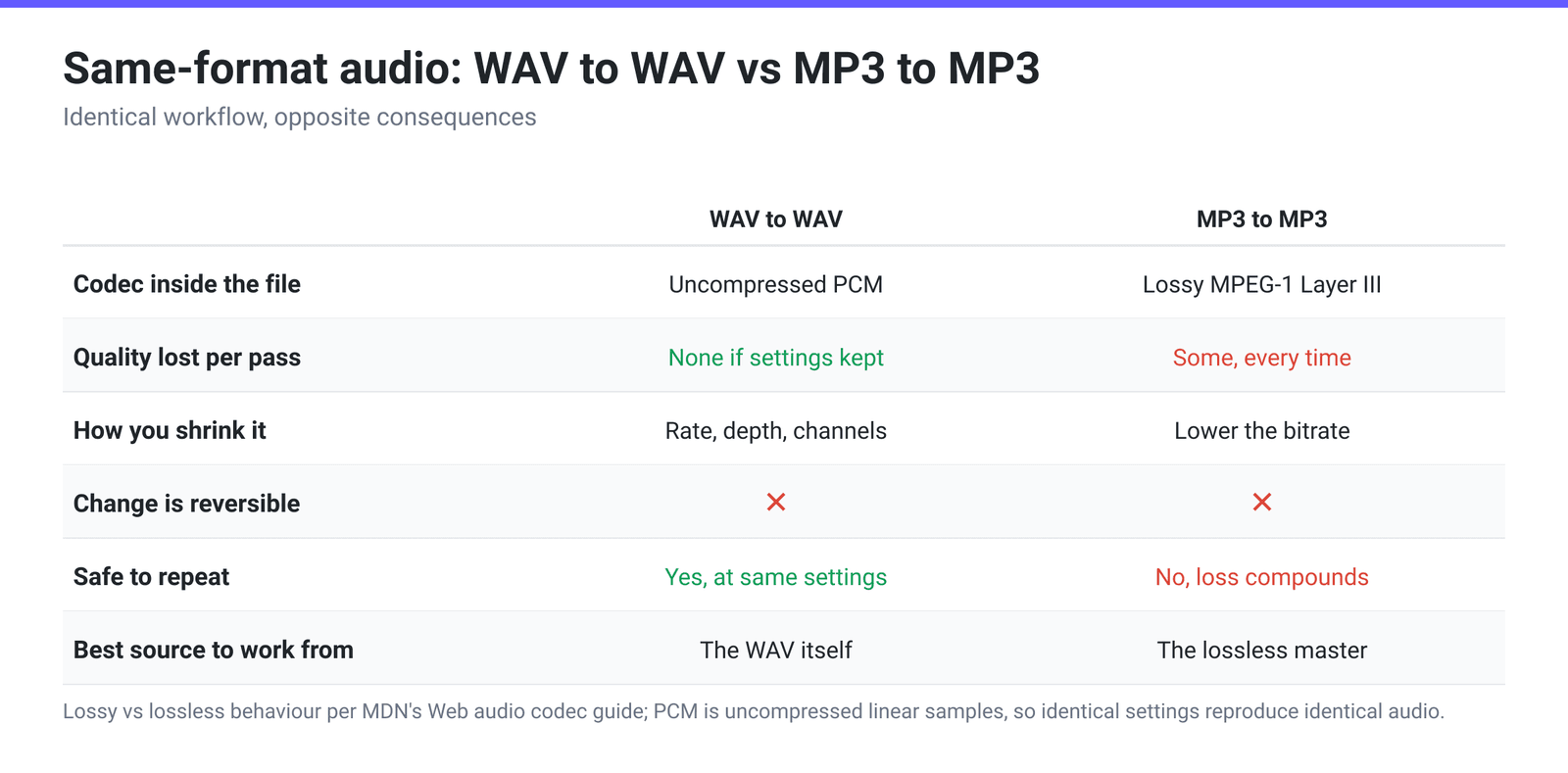
Quick answer: The extension names the container; the settings inside decide what you get. WAV-to-WAV is lossless when you keep the sample rate, bit depth and channel count — WAV holds uncompressed PCM, so identical settings in means identical samples out. You change one of those three (or trim, or rewrite a broken header) and the file changes; drop any of them and you lose information permanently. MP3-to-MP3 is never free. MP3 is lossy, so every pass decodes and re-compresses, and MDN’s own guidance is explicit that recompressing lossy audio “would be compounded.” Re-encode MP3 only to hit a size cap you cannot avoid, and always start from the lossless master when you still have it.
Jump to a section
- The asymmetry: lossless in, lossless out
- What actually changes in a WAV-to-WAV pass
- The PCM arithmetic behind every size decision
- Which changes you can undo, and which you cannot
- MP3 to MP3: same UI, opposite consequence
- Re-save a WAV on xconvert
- FAQ
The asymmetry: lossless in, lossless out
WAV is not a codec. It is a RIFF container, and what it normally holds is linear PCM — the raw sample values, uncompressed. There is no psychoacoustic model deciding what to throw away, because nothing is being thrown away. That single fact is what separates WAV-to-WAV from every other same-format conversion.
MP3, AAC and Opus are the opposite. MDN’s Web audio codec guide describes lossy codecs as taking “advantage of the fact that the human ear is not a perfect interpreter of audio… They strip away audio frequencies that aren’t used much, tolerate loss of precision in the decoded output, and use other methods to lose audio content, quality, and fidelity to produce smaller encoded media.” Decoding one of those and re-encoding it means a second encoder guessing about audio that a first encoder already mangled.
Our roundup of same-format jobs, Why Convert MP4 to MP4?, counted roughly 604 WAV-to-WAV and 2,520 MP3-to-MP3 jobs in a single 30-day sample of xconvert’s production usage. Same-extension conversion is not an edge case — it is mainstream, and audio leads the table.
What actually changes in a WAV-to-WAV pass
Four things, and a fifth that happens whether you asked for it or not.
| What you change | What it does | What it costs |
|---|---|---|
| Sample rate | Sets the highest frequency the file can represent — half the rate, per the sampling theorem. 48 kHz reaches 24 kHz; 16 kHz reaches 8 kHz. | Lowering it discards everything above the new half-rate, permanently. Raising it adds bytes and no information. |
| Channel count | Stereo → mono folds two channels into one. | Halves the data. Irreversible: you cannot separate a mono mix back into two channels. |
| Bit depth (the PCM variant) | 16-, 24- or 32-bit little-endian PCM sets the resolution of each sample and the dynamic range headroom. | Going 24-bit → 16-bit quantises every sample. Going up adds bytes, not detail. |
| Trim | Writes out only a start time and duration. | Nothing, if the rest of the settings are unchanged — PCM is not re-compressed, so the kept region is bit-for-bit the same samples. |
| The header, always | Any re-save rewrites the RIFF header and chunk table from scratch. | Usually a benefit: it is how a WAV with a malformed header, a stray metadata chunk, or a broken length field becomes readable again. |
That last row is the quiet reason a lot of WAV-to-WAV jobs exist. A recorder that died mid-take, a truncated transfer, a length field that does not match the actual data — a clean re-save rebuilds the structure. It cannot invent audio that was never written to disk, but it often turns “this file won’t open” into “this file opens.”
The PCM arithmetic behind every size decision
Uncompressed PCM has no mystery to its size. The bitrate is exactly:
bitrate = sample rate × bit depth × channels
Which makes every trade-off predictable before you run anything:
| Setting | Bitrate | One hour |
|---|---|---|
| 48 kHz / 24-bit / stereo | 2,304 kbps | ~1.04 GB |
| 48 kHz / 16-bit / stereo | 1,536 kbps | ~691 MB |
| 44.1 kHz / 16-bit / stereo (CD) | 1,411 kbps | ~635 MB |
| 44.1 kHz / 16-bit / mono | 706 kbps | ~318 MB |
| 24 kHz / 16-bit / mono | 384 kbps | ~173 MB |
| 16 kHz / 16-bit / mono | 256 kbps | ~115 MB |
| 8 kHz / 16-bit / mono | 128 kbps | ~58 MB |
Two things follow. First, stereo → mono is the cheapest halving available for anything with one voice in it — the second channel of a solo recording is near-duplicate data. Second, the numbers explain why WAV hits a wall on long recordings: standard RIFF uses 32-bit addressing, and as EBU Tech 3306 puts it, “with 32 bits a maximum of 4294967296 bytes = 4 Gbyte can be addressed.” At 44.1 kHz / 16-bit stereo that is about six and three-quarter hours in one file (4 GiB ÷ 176,400 bytes per second = 6 h 46 min); the RF64 extension exists precisely to break that barrier.
Which changes you can undo, and which you cannot
This is where “lossless format” gets misread as “lossless operation.” The format is lossless. Some of the operations are not.
- Trim at unchanged settings — reversible in principle. You still hold the original; the trimmed copy is a true subset of its samples.
- Header rewrite — harmless. Nothing about the audio data changes.
- Downsampling — not reversible. Resampling 44.1 kHz to 16 kHz throws away everything above 8 kHz. Resampling back afterwards gives you a file with the right header numbers and a permanent hole in its top octaves.
- Stereo → mono — not reversible. Two channels are summed; duplicating the mono channel later gives you a two-channel file, not stereo.
- 24-bit → 16-bit — not reversible. Eight bits of resolution per sample are gone. On a quiet, wide-dynamic-range recording this is where dither belongs; on ordinary speech at healthy levels it is inaudible.
- Upsampling and bit-depth padding — not useful. 44.1 → 48 kHz, or 16 → 24-bit, makes a bigger file with the same information in it. Do it when a downstream tool demands that format, never as a “quality upgrade.”
The practical rule: keep the highest-resolution original and treat every derived WAV as disposable. Re-derive from the master, not from a previous derivative.
MP3 to MP3: same UI, opposite consequence
Everything above inverts when the payload is lossy. An MP3-to-MP3 pass has to fully decode the compressed stream back to PCM and then re-compress it with a fresh set of psychoacoustic decisions. The second encoder cannot know which artefacts in its input are music and which are the first encoder’s leftovers, so it spends bits preserving both.
MDN’s codec-selection guidance states the rule plainly: “Will the encoded audio be getting remixed or recompressed? If so, avoid lossy compression, which would be compounded by recompressing the audio; or at least use as little compression as possible.”
That does not make MP3-to-MP3 pointless — it makes it purposeful:
- Legitimate: the file has to fit a hard cap and the lossless master is gone. Re-encoding a 320 kbps MP3 down to 128 kbps is a real, useful trade.
- Legitimate: a player or car stereo chokes on an unusual MP3 variant, and a clean re-encode produces a file it accepts.
- Not legitimate: re-encoding at a higher bitrate. A 128 kbps MP3 pushed to 320 kbps is bigger and no better — the discarded frequencies do not come back.
And the corollary that matters most: converting MP3 to WAV does not restore anything. It produces a large, lossless container around already-degraded audio. WAV is a good destination for a master, not a repair for a lossy file.
Re-save a WAV on xconvert
The WAV to WAV converter opens on exactly the knobs described above, and nothing else — there is no bitrate field, because uncompressed PCM does not have one to set.
- Open xconvert.com/convert-wav-to-wav and drag your file onto the drop zone, or click Upload (From my Computer, Google Drive or Dropbox). Batch upload works — that is how you normalise a folder of mismatched session files in one pass.
- Expand Advanced Options. Three groups show by default: Audio Channel, Audio Sample Rate and Trim.
- Set Audio Sample Rate. It opens on ORIGINAL; the selectable rates are 8000, 12000, 16000, 24000, 44100 and 48000 Hz — 44100 Hz for CD and music, 48000 Hz for anything syncing to video, 16000 Hz for speech-to-text.
- Set Audio Channel — ORIGINAL, MONO or STEREO. Optionally switch Trim from Unchanged to Trim and enter a Start time and Duration in seconds or
HH:MM:SS.sss. - To change bit depth, turn on the Show All Options toggle at the top of Advanced Options. That reveals Audio Codec, where the PCM variants live: PCM 16-bit Little Endian by default, with 24-bit and 32-bit alternatives plus A-law and mu-law for telephony work.
- Click Convert and download.
Your file uploads over an encrypted connection, is processed on our servers, and is deleted automatically a few hours later.
If the target is specifically Red Book CD, the walkthrough in Convert Audio to 16-bit / 44.1 kHz WAV takes it further.
FAQ
Does converting WAV to WAV lose quality?
Not if you leave the sample rate, bit depth and channel count alone — WAV carries uncompressed PCM, so identical settings produce identical samples. Quality only leaves when you deliberately lower one of those three. Downsampling, folding stereo to mono and truncating 24-bit to 16-bit are all one-way doors; trimming and re-writing the header are not.
Why does my DAW complain about a WAV’s sample rate?
Because it has to resample on the fly to play the file inside a session running at a different rate, and doing that per-track, in real time, is both a CPU cost and a source of subtle drift. Re-saving the file once at the session rate — 44.1 kHz or 48 kHz — settles it permanently. Do the conversion from the highest-resolution copy you have, not from a file you already downsampled.
Can I make a WAV smaller without leaving WAV?
Yes, but only by changing what the PCM contains: fewer channels, a lower sample rate, or fewer bits per sample. There is no quality slider, because uncompressed audio has no compression to tune. Stereo-to-mono is the biggest free win for speech. If you need a genuinely large reduction and can leave uncompressed PCM behind, FLAC is lossless at roughly half the size, and How to Compress a WAV File covers the options in order.
Is converting MP3 to MP3 at the same bitrate harmless?
No. It still decodes to PCM and re-encodes, and the second encoder makes its own decisions about what to discard. The loss at 256–320 kbps is small and often inaudible on ordinary playback gear, but it is not zero and it compounds across passes. If nothing about the file needs to change, do not re-encode it.
Why is my WAV capped around 4 GB?
Because standard RIFF/WAVE addresses chunk sizes with 32-bit fields. EBU Tech 3306 spells it out: “with 32 bits a maximum of 4294967296 bytes = 4 Gbyte can be addressed.” That is about six and three-quarter hours of 44.1 kHz / 16-bit stereo — 4 GiB divided by 176,400 bytes per second is 6 h 46 min. Long-form recording needs the RF64 / BW64 extension, or you split the capture — or you lower the sample rate and channel count to buy headroom.
Should I convert MP3 to WAV to improve it?
No. The container changes; the audio does not. You get a file that is roughly ten times larger carrying exactly the same already-lossy audio. WAV is worth converting to when a DAW, sampler or CD burner requires uncompressed PCM input — not as a quality upgrade.
Sources
Last verified 2026-08-31.
- MDN — Web audio codec guide — lossy versus lossless behaviour, and the warning that recompressing lossy audio is “compounded.”
- EBU Tech 3306 — MBWF / RF64 — “The reason for the 4 Gbyte barrier is the 32-bit addressing in RIFF/WAVE and BWF.”
- IEC 60908:1999 — Audio recording, Compact disc digital audio system — the standard behind the Red Book CD parameters.
- xconvert — Why Convert MP4 to MP4? — our own 30-day production sample of same-format jobs.