 By James
It is the last day of the application window, the portal says “Signature file size must be between 10 KB and 20 KB”, your scan is 46 KB, and every “exam photo size” page you open gives a different set of numbers. Those pages copy each other rather than the notices — and several are now badly out of date, because SSC has stopped accepting an uploaded photograph at all. This guide gives you the specifications read straight out of each authority’s own 2026 notice or information bulletin, and shows how to hit an exact KB figure and an exact pixel size in one pass.
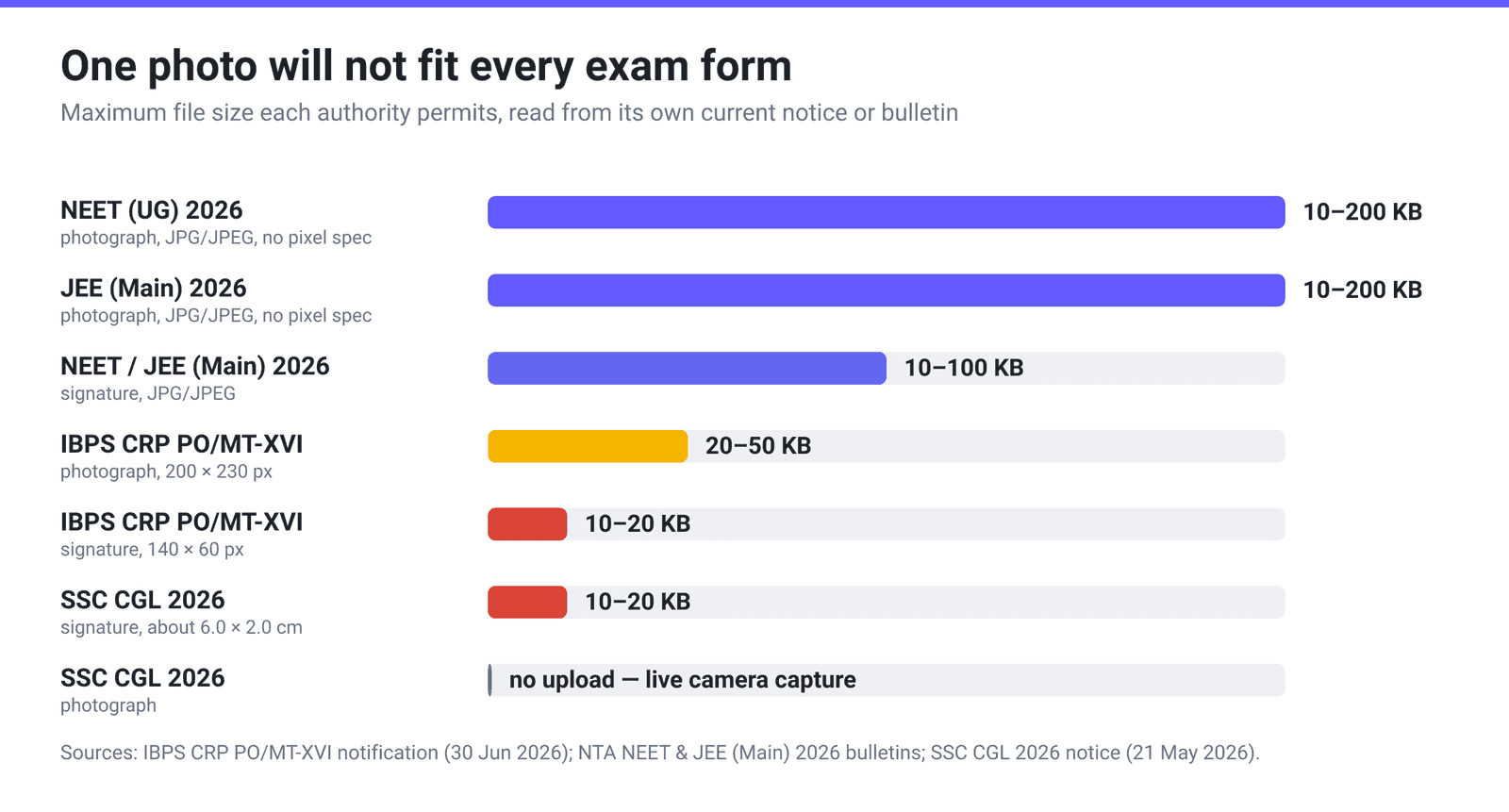
Quick answer: There is no single photo-and-signature spec for Indian government exam forms — the numbers are set per exam, per cycle, and they genuinely disagree. Verified from the authorities’ own current documents: IBPS banking exams want a photograph of 200 × 230 px, 20–50 KB and a signature of 140 × 60 px, 10–20 KB. NTA (NEET UG 2026 and JEE Main 2026) wants a photograph of 10–200 KB and a signature of 10–100 KB, in JPG/JPEG, with no pixel size specified at all. SSC (CGL 2026) no longer takes an uploaded photograph — the photo is captured live through your camera — and only the signature is uploaded, at 10–20 KB. Always open your own exam’s notice and use the number in it; then aim for the middle of the permitted range, never the edge.
Jump to a section
- Why every site gives you different numbers
- The verified specs, straight from the notices
- What changed: SSC no longer accepts an uploaded photo
- Reading a spec written in centimetres
- The three ways forms actually get rejected
- Hit an exact KB and pixel size on xconvert
- FAQ
Why every site gives you different numbers
Because the authorities genuinely give different numbers, and each one changes them between cycles. A photograph that is perfectly valid for NEET at 180 KB is nearly four times over the IBPS ceiling. A signature sized for a bank exam at 140 × 60 pixels has no pixel requirement at all under NTA. There is no universal “exam photo size”, and any page that offers you one is guessing.
The second reason is timing. Recruitment bodies revise these instructions notice by notice. The safest habit is simple: the specification that governs your application is the one printed in the notice or information bulletin for your exam, for this cycle — not a summary table, including this one. Everything below is dated so you can tell how fresh it is.
The verified specs, straight from the notices
Every figure in this table was read out of the authority’s own PDF, all linked at the end.
| Exam (cycle) | Photograph | Signature | Format |
|---|---|---|---|
| IBPS CRP PO/MT-XVI (detailed notification, 30 Jun 2026) | 200 × 230 px preferred, 20–50 KB | 140 × 60 px preferred, 10–20 KB | JPG / JPEG |
| NEET (UG) 2026 (NTA Information Bulletin) | 10–200 KB, no pixel size given | 10–100 KB, no pixel size given | JPG / JPEG |
| JEE (Main) 2026 (NTA Information Bulletin) | 10–200 KB, no pixel size given | 10–100 KB, no pixel size given | JPG / JPEG |
| SSC CGL 2026 (notice of 21 May 2026) | Not uploaded — captured live via camera | 10–20 KB, about 6.0 cm × 2.0 cm | JPEG / JPG |
The IBPS notification also specifies uploads the other bodies don’t ask for, and they trip people up because they are easy to miss:
- Left thumb impression — 240 × 240 px at 200 DPI (i.e. 3 cm × 3 cm), 20–50 KB, JPG/JPEG.
- Hand-written declaration — 800 × 400 px at 200 DPI (i.e. 10 cm × 5 cm), 50–100 KB, JPG/JPEG, written in English in your own handwriting and not in capital letters.
- Supporting certificates go up as PDF, not exceeding 500 KB, page size A4.
IBPS also tells you how to scan in the first place: minimum 200 dpi and “Set Colour to True Colour.” That matters more than it sounds — scanning a signature at 75 dpi in greyscale is the most common way to end up with a file that is below the minimum size and can’t be fixed by compressing.
One more detail that costs people a resubmission, and it is not only an NTA thing: NEET, JEE Main and IBPS all require you to capture a live photograph through a webcam or phone camera during the form-filling session, in addition to uploading the scanned passport-size photo. IBPS puts it in the same annexure — “In addition to the above photograph, candidates will also be required to capture and upload their live photograph” — and NTA matches the live photograph against the Aadhaar database. They are two separate images, and the uploaded one still has to meet its KB range. SSC is the only one of the four that has replaced the uploaded photograph rather than added to it.
What changed: SSC no longer accepts an uploaded photo
This is the single biggest thing the aggregator tables get wrong, and it is worth stating plainly.
In SSC’s current notices — Combined Graduate Level Examination 2026 (uploaded 21 May 2026) and Stenographer Grade ‘C’ & ‘D’ 2026 (24 April 2026) — the photograph is captured live through your webcam or phone camera at the time of application. The notice tells candidates to “find a place with good light and plain background”, keep the camera at eye level, and not to wear “a cap, mask or glasses/spectacles while capturing the photo”; those who can’t use a webcam are pointed to a QR code that downloads a capture app. It goes further: “In no case should the candidate capture the photographs of his/her pre-existing photograph.” Photographing an old printed passport photo, or holding a phone up to a screen showing your JPG, is explicitly grounds for rejection.
So for SSC, there is now no photo file to compress. The only file you upload is the signature, at 10–20 KB in JPEG/JPG.
Two footnotes for accuracy. First, the SSC CGL 2026 notice is internally inconsistent about the signature’s physical size: the main instruction (paragraph 9.6) and the annexure both say about 6.0 cm × 2.0 cm, while a later appendix says 4.0 cm × 2.0 cm. When a document disagrees with itself, follow the numbered instruction in the main body. Second, the NEET (UG) 2026 bulletin has a similar wobble on finger and thumb impressions — 10–200 KB in one place, 50–300 KB in another. The safe move is to land inside both stated ranges, which for that example means somewhere between 50 KB and 200 KB.
Reading a spec written in centimetres
SSC states the signature size in centimetres. IBPS gives both — and, for the photograph, the two do not reconcile. Its annexure heading reads “Photograph Image: (4.5cm x 3.5cm)”, in that order and with no width-or-height labels, while the pixel spec beneath it is 200 x 230 pixels (preferred). Those are different shapes: 200/230 is 0.87, while 3.5/4.5 is 0.78. Nor is there a DPI that produces both — 200 px across 3.5 cm implies about 145 dpi, but 230 px across 4.5 cm implies about 130 dpi. IBPS names a DPI for its other uploads — 200 DPI for the thumb impression and the declaration, both of which do check out — but names none for the photograph; at its general “minimum of 200 dpi”, a 3.5 × 4.5 cm photo would be 276 × 354 px, not 200 × 230. To convert between the two units at all, you need the DPI the image was scanned at:
pixels = centimetres ÷ 2.54 × DPI
At IBPS’s recommended 200 dpi, SSC’s 6.0 cm × 2.0 cm signature works out to roughly 472 × 157 pixels; at 100 dpi it is about 236 × 79. Since SSC doesn’t state a DPI for the signature, treat the centimetre figure as a guide to proportion — a signature box roughly three times as wide as it is tall — rather than an exact pixel target, and let the 10–20 KB limit be the number you actually hit.
Where a notice does give exact pixels, as IBPS does, use them literally and ignore the centimetres. IBPS’s 200 × 230 is taller than it is wide, which is the one thing the two specs agree on; a 230 × 200 landscape image is not the same thing. Do not try to derive the pixels from the centimetre figure — as above, no single DPI produces both.
The three ways forms actually get rejected
1. The signature is “miniature.” SSC published a separate instruction sheet on exactly this: it names “miniature” signatures as the major reason signatures are rejected, and advises candidates to “cut the box and then sign within the box such that signature occupies at least 80% of the box.” A correctly sized 15 KB file containing a tiny signature floating in white space will still fail. IBPS is equally blunt — if your signature on the attendance sheet doesn’t match the uploaded one, you’re disqualified.
2. The file is below the minimum, not above it. Every one of these specs is a range. A signature scanned at low DPI in greyscale can come out at 6 KB, under the 10 KB floor — and no compressor can fix that, because compressing only removes bytes. The fix is upstream: rescan at 200 dpi in colour, or photograph the signature on white paper in good light.
3. The photograph breaks a content rule, not a size rule. IBPS: no caps, hats or dark glasses; religious headwear allowed but must not cover the face; light-coloured, preferably white background. NTA: recent passport-size photo with 80% of the image being your face, ears visible, no mask, white background, and it explicitly warns that photos that “seem to be hand-made or computer made” will be treated as an unfair-means case. None of that is something a file tool can repair — reshoot instead.
Hit an exact KB and pixel size on xconvert
The xconvert JPEG compressor can hit a target size in KB and set exact pixel dimensions in the same pass — but the resolution controls are hidden by default, so the order of these steps matters.
- Open xconvert.com/compress-jpeg and click Upload to add your photo or signature scan.
- Open Advanced Options (the gear icon).
- Under Image Compression, pick Specific file size, change the unit dropdown from MB to KB, and enter a number in the middle of your exam’s range — 35 KB for a 20–50 KB photo, 15 KB for a 10–20 KB signature. Aiming at the edge of the range is how you land one kilobyte outside it.
- Only if your notice prescribes pixel dimensions: turn Auto Scale off. While it is on the page shows [Smart Scaling Active] and hides the resolution controls, because it is choosing dimensions for you. Switch it off and an Image resolution section appears — choose Width x Height, set both unit dropdowns to Pixels, and enter the exact pair (200 and 230 for an IBPS photograph).
- Under File extension, choose JPG or JPEG to match the wording in your notice. (They are the same format; some portals validate the extension string.)
- Click Compress, download, and check the downloaded file’s actual size before you upload it to the portal.
Your file uploads over an encrypted connection, is processed on our servers, and is deleted automatically a few hours later.
If you only need to change dimensions and the size is already fine, the JPEG resizer gives you the same Width x Height control without a compression target. For general portal limits rather than exam-specific ones, see compress a JPEG to 100 KB or 200 KB, and for the pixels-versus-file-size distinction in general, how to resize an image for the web.
FAQ
What photo size do Indian government exam forms need?
There isn’t one answer, and that is the whole problem. From the current official documents: IBPS wants 200 × 230 px at 20–50 KB; NTA (NEET UG 2026, JEE Main 2026) wants 10–200 KB with no pixel requirement; SSC (CGL 2026) doesn’t take an uploaded photo at all and captures it live from your camera. Open the notice or information bulletin for your own exam and this cycle, and use the figure printed there.
My signature file is only 6 KB but the form needs 10–20 KB. How do I make it bigger?
Not by compressing — compression only removes bytes. The file is small because it was scanned at low resolution or in black-and-white. Rescan at 200 dpi in colour (IBPS’s own guidance is “minimum of 200 dpi” and “Set Colour to True Colour”), or photograph the signature on white paper in good daylight. A colour scan of a signature at 200 dpi generally lands in the tens of kilobytes, which you can then bring down to the required range.
Does SSC still need an uploaded photograph?
No. In the CGL 2026 notice (21 May 2026) and the Stenographer Grade ‘C’ & ‘D’ 2026 notice (24 April 2026), the photograph is captured live via webcam or phone camera during the application, and the notice states that capturing a photo of an existing photograph will result in rejection. Only the signature is uploaded as a file, at 10–20 KB in JPEG/JPG. Pages still listing an “SSC photo size in KB” are describing an older process.
Is JPG the same as JPEG for these forms?
Yes — they are the same image format, and the notices themselves write it both ways (“JPG / JPEG”, “JPEG/JPG”). The only thing that occasionally matters is the literal extension string a portal’s validator expects, which is why xconvert’s File extension control lets you output either .jpg or .jpeg.
Should I target the minimum or the maximum of the allowed range?
Neither — aim for the middle. Ranges like 20–50 KB or 10–20 KB are hard boundaries, and a compressor targeting 20 KB can easily produce 19.6 KB. Ask for 35 KB when the range is 20–50, and 15 KB when it is 10–20. You get comfortable margin on both sides and no second attempt at 11:45 pm on the closing date.
Why does my signature keep getting rejected even though the file size is correct?
Almost always because the signature itself is too small inside the frame. SSC’s own instruction sheet on signature uploads names “miniature” signatures as the major reason for rejection and tells candidates to sign so that the signature “occupies at least 80% of the box”. Size the ink, not just the file: sign large inside a drawn box, crop tight to that box, then set the file size. IBPS additionally rejects signatures written in capital letters, and disqualifies candidates whose exam-day signature doesn’t match the uploaded one.
Do I need exact pixel dimensions, or is the KB limit enough?
It depends on your exam. IBPS states pixel dimensions (200 × 230 for the photograph, 140 × 60 for the signature) and calls them “preferred”, so match them. NTA’s NEET and JEE Main bulletins state only a KB range, so a sensible passport-shaped image inside 10–200 KB is fine. SSC states centimetres rather than pixels. When a notice is silent on dimensions, don’t invent a number from a third-party table — the stated file-size range is what the portal actually validates.
Sources
Last verified 2026-08-31.
- IBPS — Detailed notification, CRP PO/MT-XVI (30 June 2026) — photograph 200 × 230 px / 20–50 KB; signature 140 × 60 px / 10–20 KB; thumb impression 240 × 240 px at 200 DPI / 20–50 KB; hand-written declaration 800 × 400 px at 200 DPI / 50–100 KB; certificates as PDF under 500 KB; “minimum of 200 dpi”, “Set Colour to True Colour”.
- NTA — Information Bulletin, NEET (UG) 2026 — photograph JPG/JPEG 10–200 KB; signature JPG/JPEG 10–100 KB; the 80%-face and white-background rules; the finger/thumb-impression range discrepancy (10–200 KB vs 50–300 KB).
- NTA — Information Bulletin, JEE (Main) 2026 — photograph JPG/JPEG 10–200 KB; signature JPG/JPEG 10–100 KB; live photograph required in addition to the scanned upload.
- SSC — Notice of Combined Graduate Level Examination 2026 (21 May 2026) — live camera capture of the photograph; scanned signature JPEG/JPG 10 to 20 KB, about 6.0 cm × 2.0 cm (para 9.6); the 4.0 cm figure in the later appendix.
- SSC — Notice of Stenographer Grade ‘C’ & ‘D’ Examination 2026 (24 April 2026) — the same live-capture photograph procedure and 10–20 KB signature specification.
- SSC — Instructions to candidates for uploading of signatures (15 August 2024) — “miniature” signatures named as the major reason for rejection; sign so the signature occupies at least 80% of the box; listed reasons photographs are rejected.