 By Stephanie Taylor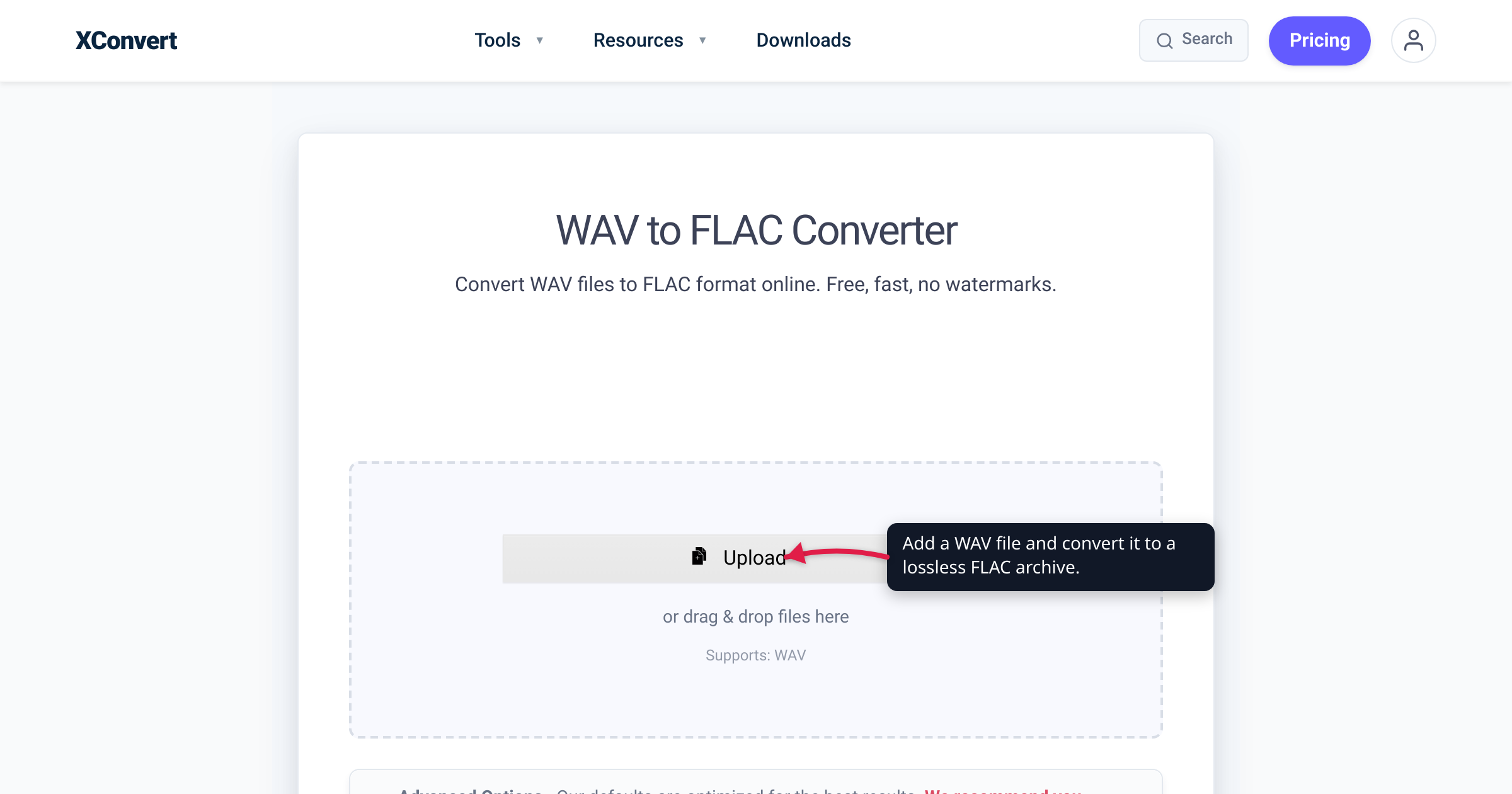
Your session recordings, sample libraries, and CD rips live as WAV files, and they are eating your drive alive — a single CD-quality album is close to 600 MB of uncompressed audio. Converting those masters to FLAC shrinks them by roughly a third to a half with zero quality loss: FLAC is lossless, so it decodes back to the exact same audio, and it even stores a fingerprint of the original so you can prove nothing degraded years later. We verified the lossless guarantee, the checksums, and the size range against the Xiph.Org FLAC documentation and the FLAC specification (RFC 9639).
Quick answer: For archiving, FLAC is the better master container than WAV. It stores the identical audio (bit-for-bit lossless) at typically 50–70% of the WAV size — a ~30–50% space saving — while adding proper tags, embedded cover art, and built-in integrity checksums that WAV lacks. You never lose anything: you can always decode a FLAC back to a WAV that is bit-for-bit identical to the original. Keep WAV only when a piece of old or pro gear (or your DAW) specifically needs uncompressed input.
Jump to a section
- Why FLAC beats WAV for archiving
- It’s truly lossless — and you can prove it
- How much space you’ll actually save
- When to keep WAV instead
- Convert WAV to FLAC on xconvert
- FAQ
Why FLAC beats WAV for archiving
WAV is uncompressed PCM — the rawest possible way to store audio. That makes it a great working format, but a wasteful archive format. FLAC (Free Lossless Audio Codec) stores the same audio samples, just packed more efficiently, and it does three things WAV can’t:
- It’s smaller — for free. FLAC losslessly compresses the audio to roughly half to two-thirds of the WAV size (details below). No quality is traded away; you simply stop paying for the empty space uncompressed PCM leaves on disk.
- It holds real metadata. FLAC stores rich tags (artist, album, track, year, notes) and embedded cover art in dedicated metadata blocks, defined in the FLAC specification. WAV tagging is limited and inconsistently supported, which makes a large WAV library awkward to organize and search. For a collection you intend to keep for years, proper, portable tags matter.
- It can verify its own integrity. This is the archivist’s feature. When FLAC encodes your audio, it stores a 128-bit MD5 checksum of the unencoded audio in the file’s STREAMINFO header, plus a CRC on every frame. That means a FLAC file carries a built-in way to confirm, at any point in the future, that it still decodes to exactly the audio you put in. A plain WAV has no such self-check.
If you have ever wondered why a FLAC of your rip is already about half the size of the WAV, our companion piece on whether FLAC is already compressed explains the losslessly-compressed nature of the format in depth.
It’s truly lossless — and you can prove it
“Lossless” is not marketing here; it is the defining, testable property of the format. Per the FLAC specification (RFC 9639), lossless compression means “decompressing losslessly compressed information returns exactly the original data,” and the spec’s abstract states FLAC compresses audio “without losing information.” Xiph.Org, which develops FLAC, puts it plainly: audio is “compressed in FLAC without any loss in quality.” Encode a WAV to FLAC and decode it back, and you get a bit-for-bit identical PCM stream — not “indistinguishable,” but literally the same bytes.
You do not have to take that on faith, and that is what makes FLAC such a strong archive format:
- The MD5 fingerprint. The STREAMINFO metadata block stores an MD5 checksum computed over all the original, unencoded audio samples. As RFC 9639 describes it, this “allows the decoder to determine if an error exists in the audio data even when, despite the error, the bitstream itself is valid.” A standard FLAC integrity test (for example,
flac -t) decodes the file and compares it against that stored signature — if the audio ever bit-rots or gets truncated, the check fails loudly instead of silently. - Per-frame CRCs. On top of the whole-file MD5, every audio frame carries its own checksums: an 8-bit CRC in the frame header and a 16-bit CRC in the frame footer covering the entire encoded frame. These catch localized corruption anywhere in the stream.
The practical upshot for archiving: a FLAC master is a self-describing, self-checking copy of your WAV. You can decode it back to an identical WAV whenever a tool demands uncompressed input, and you can periodically verify the archive to catch storage rot — neither of which raw WAV gives you.
How much space you’ll actually save
The compression is real and immediate. Per Wikipedia’s FLAC article, “digital audio compressed by FLAC’s algorithm can typically be reduced to between 50 and 70 percent of its original size” — so a FLAC lands at roughly half to two-thirds of the equivalent WAV, which is a ~30–50% reduction. The exact figure depends entirely on the music: sparse acoustic or spoken-word material compresses well, while dense, loud, noisy mixes compress less. Here is the shape of it for a typical 3-minute, CD-quality stereo track (16-bit / 44.1 kHz):
| Format | Type | Approx. size (3-min track) | Approx. size (album, ~50 min) |
|---|---|---|---|
| WAV / PCM | Uncompressed | ~30 MB | ~600 MB |
| FLAC | Lossless (50–70% of WAV) | ~15–21 MB | ~300–420 MB |
Across a big library the saving compounds fast: a few hundred CD rips can reclaim tens of gigabytes with no audible — and no measurable — difference, because the audio is identical. If you want to push a FLAC even smaller than this, you can’t do it losslessly (that space is already gone); you’d have to move to a lossy codec, which is a different trade-off entirely — see MP3 vs WAV vs FLAC for when each format makes sense.
When to keep WAV instead
FLAC is the better archive, but WAV still earns its place in a few situations, and honesty matters more than dogma:
- Maximum compatibility. WAV plays on virtually anything, including old hardware, embedded players, and some professional or broadcast gear that never learned to read FLAC. If a file has to open on an unknown or legacy device, uncompressed WAV is the safest bet.
- Active editing in a DAW. Many audio workstations prefer (or require) uncompressed audio for real-time editing and multi-track work, because there is no decode step. Keep your working files as WAV; archive the finished master as FLAC.
- Feeding a tool that demands PCM. Some mastering, analysis, or legacy-import tools only accept WAV.
The key point: none of these are archiving arguments, and none cost you anything, because the conversion is reversible. Archive the master as FLAC to save space and gain integrity checks, and decode a bit-identical WAV on demand whenever a stubborn tool needs one.
Convert WAV to FLAC on xconvert
The xconvert WAV to FLAC converter does the conversion on our servers, with the pass-through controls an archivist wants:
- Open xconvert.com/convert-wav-to-flac and click Upload (“Add files”) to add your WAV — From my Computer, Google Drive, or Dropbox.
- Open Advanced Options (the gear icon) to see the archive settings.
- Leave Audio Channel and Audio Sample Rate on ORIGINAL, and Trim on Unchanged. This keeps the FLAC a faithful, bit-exact copy of your WAV — your bit depth is preserved automatically, so a 24-bit/96 kHz master stays 24-bit/96 kHz.
- Set the Compression level if you like. The slider goes up to 12 and xconvert defaults to 12 — the most thorough setting, which produces the smallest file. Every level is lossless, so this only trades encode time for a little size; the default is a fine “archive it and forget it” choice. Drop toward the low end (around 1–3) if you’d rather encode a huge library faster and don’t mind a marginally larger file.
- Click Convert (the step is labeled Convert and Download), then download your FLAC archive.
Your file is uploaded over an encrypted connection, is processed on our servers, and deleted automatically a few hours later — no sign-up, no watermark. Because FLAC is lossless, you can keep it as your master and re-derive an identical WAV, or make lossy MP3 copies for sharing, any time.
FAQ
Is converting WAV to FLAC lossless?
Yes — completely. FLAC stores the exact same audio samples as the WAV, just compressed. Per the FLAC specification, decompressing “returns exactly the original data,” so decoding your FLAC back to WAV yields a bit-for-bit identical result. You lose file size, never quality.
How much smaller is FLAC than WAV?
Typically 50–70% of the WAV size, i.e. a ~30–50% space saving, per the widely-cited FLAC compression range. The exact ratio depends on the music — quiet, sparse recordings compress more; dense, loud mixes compress less — but you’ll always land meaningfully smaller than the uncompressed WAV with no quality cost.
Should I archive my music in WAV or FLAC?
FLAC, in almost every case. It stores the identical audio at roughly half to two-thirds the size, handles tags and cover art properly, and carries built-in checksums (an MD5 of the original audio plus per-frame CRCs) so you can verify the archive hasn’t degraded. Reserve WAV for files you’re actively editing or for gear that can’t read FLAC.
Can I convert FLAC back to WAV without losing quality?
Yes. Because FLAC is lossless, decoding it produces a WAV whose PCM data is bit-for-bit identical to the original — and the FLAC’s stored MD5 checksum lets a decoder confirm that. This is exactly why FLAC is safe as a master: archiving to FLAC is fully reversible.
What compression level should I use for archiving?
Any of them are fine for quality — all FLAC levels are lossless and decode to the identical waveform; the level only affects encode time and a few percent of file size. xconvert defaults to the maximum (12) for the smallest file, which is a sensible archive default. Choose a lower level only if you want to encode a large library faster.
Does converting to FLAC change my bit depth or sample rate?
No. With Audio Channel and Audio Sample Rate left on ORIGINAL, the FLAC preserves your source exactly — including bit depth. A 16-bit/44.1 kHz rip stays 16-bit/44.1 kHz; a 24-bit/96 kHz master stays 24-bit/96 kHz. The FLAC is a smaller container for the same audio, not a re-sampling of it.
Sources
Last verified 2026-07-16.
- RFC 9639 — Free Lossless Audio Codec (FLAC) — the FLAC specification: lossless definition (“returns exactly the original data”); STREAMINFO 128-bit MD5 checksum of the unencoded audio (§8.2); frame-header CRC-8 (§9.1.8) and frame-footer CRC-16 (§9.3) for error detection; FLAC metadata blocks (tags and embedded cover art).
- Xiph.Org — FLAC — FLAC develops as a lossless codec: audio “compressed in FLAC without any loss in quality.”
- Xiph.Org — FLAC format overview — corroborates the STREAMINFO MD5 signature of the unencoded audio (“useful for checking an entire stream for transmission errors”) and the 8-bit header / 16-bit frame CRCs.
- Wikipedia — FLAC — “digital audio compressed by FLAC’s algorithm can typically be reduced to between 50 and 70 percent of its original size.”
- xconvert — WAV to FLAC converter — funnel tool; verified UI labels (Upload / Add files; From my Computer / Google Drive / Dropbox; Advanced Options; Compression level slider, default 12; Audio Channel and Audio Sample Rate ORIGINAL; Trim Unchanged; Convert and Download).