 By James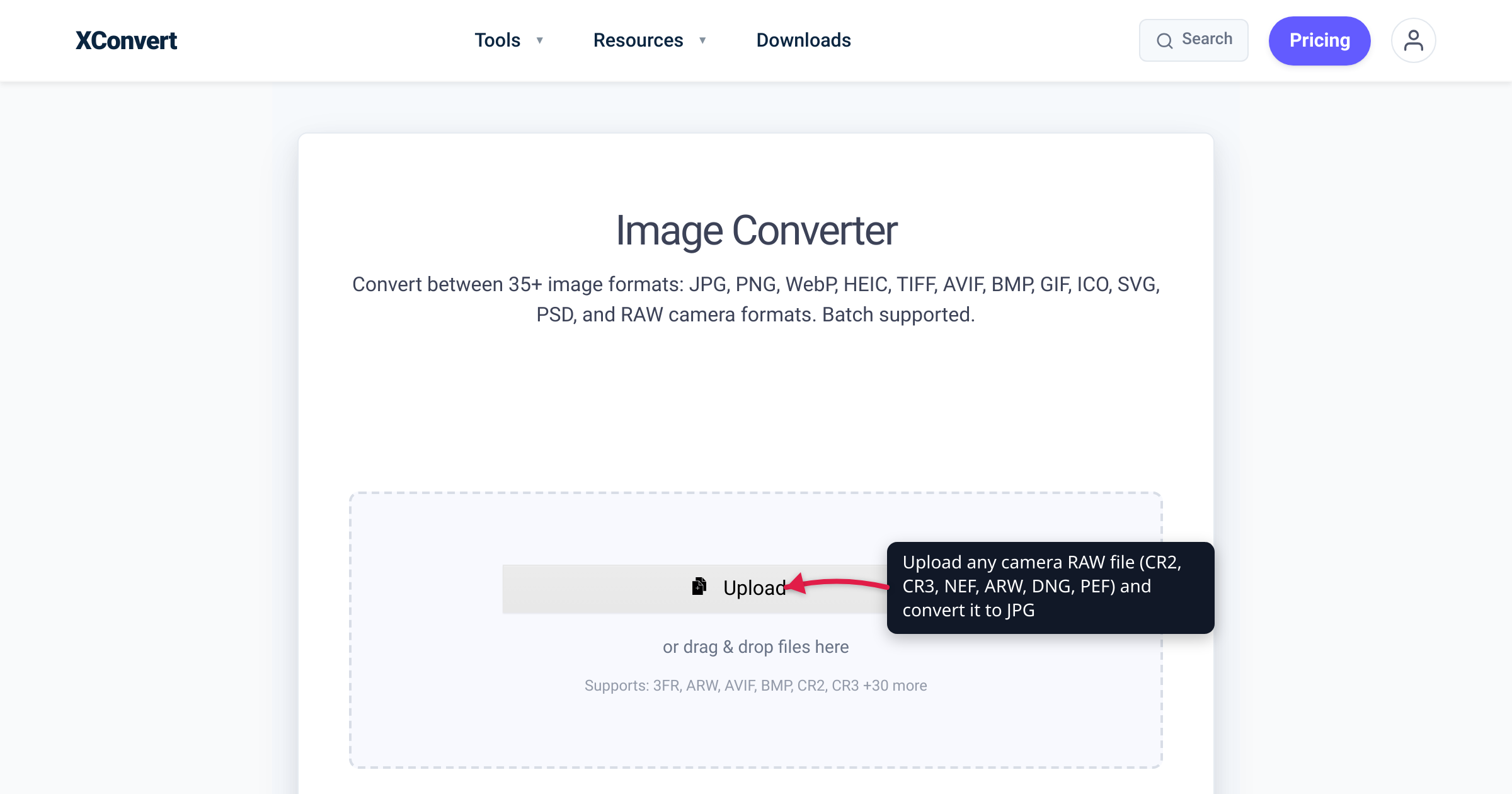
You copy a shoot off the SD card, double-click the first frame, and — nothing. The .CR3 or .ARW files your camera previewed a minute ago sit there as blank icons. That’s camera RAW: every brand writes its own proprietary format with its own extension, and no computer opens all of them out of the box. This guide is the map — which brand writes which format, what a RAW file actually is, why support breaks, and the fastest route to a shareable JPG. Every brand and extension claim below is verified against the vendor’s own pages and cited at the end.
Quick answer: A RAW file is your camera sensor’s unprocessed data plus metadata — not a finished, viewable image. Each brand has its own format: Canon .CR2 (older DSLRs) and .CR3 (2018 onward, including all EOS mirrorless), Nikon .NEF (plus .NRW on COOLPIX compacts), Sony .ARW, Pentax .PEF or .DNG, Fujifilm .RAF, Olympus/OM System .ORF, Panasonic .RW2. Adobe’s DNG is the one openly published RAW format. Support is per camera model, not per extension — that’s why new cameras break old software. To view or share anywhere, convert to JPG.
Jump to a section
- The map: which brand writes which RAW format
- What a RAW file actually is (and isn’t)
- Why RAW files won’t open — and the three fixes
- RAW or JPEG: which should you shoot?
- Convert any RAW photo to JPG on xconvert
- FAQ
The map: which brand writes which RAW format
Eight rows cover almost every RAW file you’ll ever be handed:
| Brand | RAW extension(s) | Which cameras write it | Free vendor software |
|---|---|---|---|
| Canon | .CR2, .CR3 | .CR2: earlier EOS DSLRs · .CR3: newer bodies, incl. all EOS mirrorless | Digital Photo Professional (DPP) |
| Nikon | .NEF, .NRW | .NEF: DSLRs and Z mirrorless · .NRW: high-end COOLPIX compacts | NX Studio |
| Sony | .ARW | Alpha (α) bodies and RX compacts | Imaging Edge Desktop |
| Pentax (Ricoh) | .PEF or .DNG | K-series DSLRs — you choose the format in-camera | Digital Camera Utility 5 |
| Adobe / open standard | .DNG | Pentax and Leica in-camera; iPhone (Apple ProRAW); Adobe DNG Converter output | Adobe DNG Converter |
| Fujifilm | .RAF | X series and GFX | RAW File Converter EX / X RAW Studio |
| Olympus / OM System | .ORF | Olympus and OM System bodies | Olympus Viewer / OM Workspace |
| Panasonic | .RW2 | LUMIX | LUMIX RAW Codec (Windows viewer) |
Canon: CR2 gave way to CR3 in 2018. Earlier EOS digital SLRs record .CR2; Canon’s RAW explainer says newer cameras, “including all mirrorless models,” create the updated .CR3 — it debuted in Canon’s September 2018 EOS R launch materials as “CR3 (RAW/C-RAW)”. C-RAW is the space-saving option: full pixel resolution at roughly half the size (Canon quotes 45.4 MB vs 22 MB per file on the 45-megapixel EOS R5). Convert either — CR2 to JPEG or CR3 to JPG — and see converting CR2 to JPG (Canon RAW) for the full Canon walkthrough.
Nikon: NEF on the big cameras, NRW on compacts. NEF — Nikon Electronic Format — “is Nikon’s RAW file format,” keeping 12-bit or 14-bit data where a JPEG keeps eight, with the camera’s look stored as editable instructions rather than baked into the pixels. High-end COOLPIX compacts write .NRW instead — 12-bit uncompressed RAW, per Nikon’s support pages. Nikon’s free NX Studio opens both (“.NEF and .NRW”). Online: NEF to JPG.
Sony: ARW, quietly versioned. Sony bodies write .ARW, but the spec sheets reveal a moving target: the a7 IV records “RAW (Sony ARW 5.0 format compliant)”; the RX100 VII compact, “RAW (Sony ARW 2.3 format)”. Same extension, different generations — part of why older software chokes on newer Sony files; Sony’s free Imaging Edge Desktop is what develops them. Online: ARW to JPG.
Pentax: your pick of PEF or DNG, in-camera. Ricoh’s current Pentax bodies — K-3 Mark III, KF, K-70, K-1 Mark II — all list “RAW (14bit): PEF, DNG” on their official spec pages: you choose Pentax’s proprietary .PEF or the open .DNG in the shooting menu, making Pentax the rare brand whose RAW can be non-proprietary straight out of the camera. Online: PEF to JPG.
DNG: the open exception. Adobe launched the Digital Negative (DNG) spec in 2004 as “a publicly available archival format” for RAW — an openly published, TIFF 6.0-based spec anyone can adopt. Adobe lists Leica, Casio, Ricoh, Samsung and Pentax among direct-DNG camera brands, and your phone may shoot it too: Apple ProRAW “uses the industry standard digital negative (DNG) file format” on iPhone 12 Pro and later Pro models, with .dng originals. Adobe’s free DNG Converter rewrites RAW “from more than 600 cameras” into DNG, and the US Library of Congress uses DNG for archiving. Online: DNG to JPG.
The others. Fujifilm’s X series and GFX write .RAF (“RAW (.RAF) data … recorded by the X series,” per Fujifilm’s software page), Olympus and OM System bodies write .ORF (“Olympus’s own proprietary file format”), and Panasonic LUMIX writes .RW2 — the extension Panasonic’s own RAW-codec page uses. All three, plus rarer formats, go through the multi-format image converter, whose supported list starts “3FR, ARW, AVIF, BMP, CR2, CR3 +30 more.”
What a RAW file actually is (and isn’t)
A RAW file is the sensor’s measurement, not a picture. Canon describes it at the photosite level: each pixel location records brightness, and that data lands on the memory card “unprocessed.” Nikon calls RAW files “digital negatives” that “contain all the image information captured by the camera’s sensor, along with the image’s metadata.” Three consequences follow:
- It isn’t viewable as-is. White balance, tone and sharpening ride along as editable instructions rather than applied pixels (Nikon: the values “are retained as instruction sets included in the file”; Sony: “digital processing is not performed on this file format”). Something — the vendor’s app, Lightroom, or a converter — has to develop the data into a displayable JPEG or TIFF.
- It keeps far more tonal data. Canon: “12-, 13-, or 14-bit recording … vs. the industry-standard 8-bit recording in processed JPEG files”; Nikon says that depth gives “a far greater tonal range than an eight-bit JPEG.” That’s the headroom for rescuing exposure or white balance later.
- It’s big. More bits and little-to-no lossy compression mean, as OM System puts it, “the file sizes are much larger” than JPEG: about 45.4 MB per frame on Canon’s 45-megapixel EOS R5, and roughly 25–75 MB for iPhone ProRAW (12 MP vs 48 MP).
None of this is a flaw — RAW is deliberately a master file. It just isn’t a sharing file.
Why RAW files won’t open — and the three fixes
Here’s the trap hidden in that map: software supports camera models, not extensions. A new body’s .CR3 or .ARW has newer internals than last year’s, so an app that opens your old camera’s RAW can fail on the new one. Adobe’s Camera Raw troubleshooting names the classic cause: “your camera is newer than your version of Photoshop.” Sony’s ARW 2.3-vs-5.0 spec sheets are the same story from the other side.
Operating systems work the same way. Apple publishes a per-release list of supported camera RAW formats (“Digital camera RAW formats supported by iOS 26, iPadOS 26, macOS 26, visionOS 26”), and Windows needs Microsoft’s free Raw Image Extension from its Store to view RAW files in the Photos app. That’s how one file can preview fine on your phone yet sit as a blank icon on your PC.
Three fixes, cheapest first:
- Update the decoder — OS updates, the latest Camera Raw plug-in, or the Raw Image Extension on Windows.
- Install the maker’s free developer — Canon Digital Photo Professional, Nikon NX Studio, Sony Imaging Edge Desktop, Ricoh Digital Camera Utility 5, Fujifilm RAW File Converter EX / X RAW Studio, OM System’s OM Workspace. Each vendor supports its own newest bodies first.
- Leave the proprietary format — Adobe’s free DNG Converter rewrites RAW “from more than 600 cameras” into DNG for older editors; or, when the goal is just seeing and sharing the photos, skip the installs and convert the RAW to JPG online.
RAW or JPEG: which should you shoot?
The decision is about what happens after the shutter:
Shoot RAW when the shot matters and you’ll edit it — tricky light, high contrast, anything you might print large or publish. You keep the 12–14-bit data and, as Sony’s guide puts it, can readjust white balance, saturation and contrast after capture.
Shoot JPEG when the photo must be usable the moment you take it — casual shots, fast sharing, long bursts, tight card space — and you won’t post-process. The camera develops the image for you, at a fraction of the size.
Unsure? Shoot both. Most cameras record the two simultaneously — Pentax’s spec sheets list simultaneous RAW + JPEG capture, and OM System describes RAW+JPEG mode saving two files per shot. Share the JPEG today; keep the negative forever.
The mental model: RAW is the negative, JPEG is the print — which is why “how do I open/send/upload this RAW file?” almost always resolves to “make a JPG of it.”
Convert any RAW photo to JPG on xconvert
The xconvert image converter develops RAW server-side — no vendor apps, codec packs or OS updates needed, so it works the same on Windows, Mac, Chromebook or a phone:
- Open xconvert.com/image-converter and click Upload — add files from your computer, Google Drive, or Dropbox. The page lists what it accepts (“Supports: 3FR, ARW, AVIF, BMP, CR2, CR3 +30 more” — CR2/CR3, NEF, ARW, DNG, PEF, RAF, ORF and RW2 included), and you can queue one file or a whole shoot.
- Leave the Image File Extension dropdown on JPG (the default).
- Optionally open Advanced Options to change the Quality Preset (Very High (Recommended) is the default) or set an Image resolution for smaller files.
- Click Convert.
- Download your JPGs.
Prefer a dedicated page for your camera’s format? CR2 to JPEG, CR3 to JPG, NEF to JPG, ARW to JPG, DNG to JPG and PEF to JPG are the same converter with the right label on the door.
Your file uploads over an encrypted connection, is processed on our servers, and is deleted automatically a few hours later — nothing lingers. Converting a whole card’s worth in one go? The bulk workflow is in batch-convert RAW photos to JPG.
FAQ
Is RAW better than JPEG?
For editing, yes; for using the photo right now, no. RAW keeps 12–14-bit sensor data versus JPEG’s 8-bit, so it withstands corrections far better — but it isn’t universally viewable and each file is many times larger. “Better” depends on whether the file’s job is master or deliverable.
Why are RAW files so big?
Because they store 12–14 bits per photosite with little or no lossy compression, versus JPEG’s compressed 8-bit pixels. OM System says it plainly: RAW files “are not compressed to the extent of JPEG files,” so “the file sizes are much larger.” Vendor examples: about 45.4 MB per frame on Canon’s 45 MP EOS R5; 25–75 MB for iPhone ProRAW (12 vs 48 MP).
Should I shoot RAW or JPEG — or both?
If you’re unsure, shoot RAW+JPEG — most cameras record both at once (Pentax lists it on its spec sheets; OM System describes it). You get a shareable JPEG now plus the negative for editing later. Go RAW-only once you always post-process; JPEG-only if you never do and need the card space.
Why won’t my RAW files open on my computer?
Because RAW support is per camera model, and something in your chain predates your camera — Adobe’s troubleshooting names it: “your camera is newer than your version of Photoshop.” Update the app or OS, install Windows’ free Raw Image Extension or the camera maker’s free developer, convert to DNG — or just convert the files to JPG online with nothing installed.
Is DNG the same as RAW?
DNG is RAW — the openly published kind. Adobe released the spec in 2004 so raw sensor data wouldn’t be locked into vendors’ private formats; Pentax and Leica can write it in-camera, iPhone ProRAW photos are DNG files, and Adobe’s free converter turns more than 600 cameras’ RAW into it. A DNG still holds undeveloped sensor data — it still needs a JPEG export for everyday sharing.
Does converting RAW to JPG lose quality?
Technically yes — and that’s the point. A JPEG is the developed, 8-bit, compressed print of your 12–14-bit negative: at a high quality setting the difference is generally invisible on screen, but the editing headroom is gone. Export JPGs for sharing and keep the RAW as the master — conversion doesn’t touch the original.
Sources
Last verified 2026-07-16.
- Canon U.S.A. — RAW Image Fundamentals — CR2 on earlier EOS DSLRs vs .CR3 on newer cameras “including all mirrorless models”; 12-, 13-, or 14-bit RAW vs 8-bit JPEG; unprocessed sensor data; EOS R5 45.4 MB RAW / 22 MB C-RAW; free Digital Photo Professional.
- Canon U.S.A. — EOS R system press release, September 5, 2018 — “CR3(RAW/C-RAW)” in the 2018 EOS R feature list.
- Nikon USA — Nikon Electronic Format (NEF) — NEF is Nikon’s RAW format; 12-/14-bit vs 8-bit; settings retained as instruction sets; “digital negatives.”
- Nikon Support — What is an NRW (RAW) file? — NRW as the RAW format for high-end COOLPIX compacts; 12-bit uncompressed;
.NRWextension. - Nikon USA — NX Studio — Nikon’s free viewer/developer for “RAW .NEF and .NRW image files” across Z mirrorless, DSLR, COOLPIX and Nikon 1.
- Sony a7 IV Help Guide — Specifications — still-image format “RAW (Sony ARW 5.0 format compliant).”
- Sony RX100 VII Help Guide — Specifications — “RAW (Sony ARW 2.3 format)” on the RX compact line.
- Sony a7 IV Help Guide — File Format (still images) — “digital processing is not performed” on RAW; 14-bit capture (12-bit in some modes); Imaging Edge Desktop for development and JPEG/TIFF export.
- Adobe — Digital Negative (DNG) — DNG as “a publicly available archival format” launched in 2004; openly published TIFF 6.0-based spec; Leica/Casio/Ricoh/Samsung/Pentax direct-DNG cameras; Library of Congress archival use.
- Adobe — Adobe DNG Converter — free utility that converts RAW files “from more than 600 cameras” to DNG.
- Adobe — Troubleshoot Camera Raw — RAW files fail to open when “your camera is newer than your version of Photoshop”; fix via Camera Raw updates or the DNG Converter.
- Apple — About Apple ProRAW — ProRAW “uses the industry standard digital negative (DNG) file format”; iPhone 12 Pro and later Pro models;
.dngoriginals; ~25 MB (12 MP) / ~75 MB (48 MP) file sizes. - Apple — Digital camera RAW formats supported by iOS 26, iPadOS 26, macOS 26, visionOS 26 — Apple’s per-OS-release camera RAW support list.
- RICOH IMAGING — PENTAX K-3 Mark III specifications — “RAW (PEF/DNG)”; “RAW (14bit): PEF, DNG”; simultaneous RAW + JPEG capture. (The KF, K-70 and K-1 Mark II official spec pages list the same RAW options.)
- RICOH IMAGING — Digital Camera Utility 5 — Ricoh’s official image-processing software for PENTAX cameras, handling PEF/DNG RAW plus JPEG/TIFF.
- Fujifilm — RAW FILE CONVERTER EX powered by SILKYPIX — develops “RAW (.RAF) data … recorded by the X series”; Fujifilm’s free RAW development software.
- OM SYSTEM Learn Center — Why Shoot in RAW? — “.orf” as “Olympus’s own proprietary file format”; no/lossless compression and no image processing; larger file sizes; RAW+JPEG two-file behavior; software needed to convert to TIFF/JPEG.
- Panasonic — LUMIX RAW Codec download — identifies LUMIX RAW image files by the
.RW2extension; Windows viewing codec. - Microsoft Store — Raw Image Extension — the free Windows add-on for viewing camera RAW files.
- xconvert Image Converter — live tool UI: Upload (From my Computer / Google Drive / Dropbox), “Supports: 3FR, ARW, AVIF, BMP, CR2, CR3 +30 more”, Image File Extension (JPG default), Advanced Options with Quality Preset “Very High (Recommended)” and Image resolution.