 By Stephanie Taylor
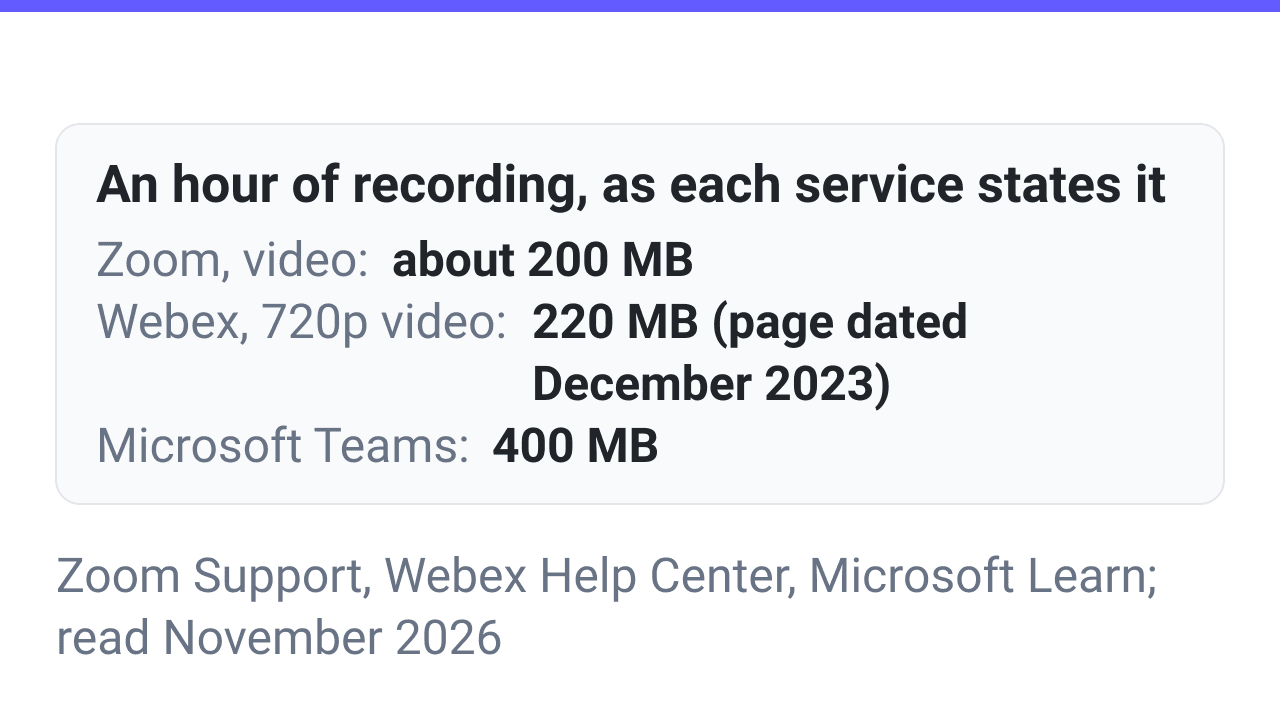
An hour of Zoom recording uses about 200 MB for video, about 20 MB for screen sharing, by Zoom’s estimate. Microsoft gives 400 MB for an hour of Teams, Webex 220 MB at 720p. Too big to send? Compress it to a size you type.
Checked on 2026-11-20 on xconvert.com/video-compressor. No meeting was recorded for this page: each service’s figure is quoted from its own page. Sources at the end.
Recording file size per hour, service by service
| Service, and what is recorded | One hour, in the service’s words | Bitrate that implies | Source, last checked |
|---|---|---|---|
| Zoom, “recording video” | “about 200MB” | 0.44 Mbit/s | Zoom Support, 20 Nov 2026 |
| Zoom, “Recording screen sharing” | “about 20MB” | 0.04 Mbit/s | same page, 20 Nov 2026 |
| Microsoft Teams, “a one-hour recording” | “400 MB” | 0.89 Mbit/s | Microsoft Learn, 20 Nov 2026 |
| Webex, “720p (High Definition) video” | “220 MB per hour” | 0.49 Mbit/s | Webex Help Center, page dated December 15, 2023; 20 Nov 2026 |
| Webex, “360p (High Quality) video” | “40 MB per hour” | 0.09 Mbit/s | same page, 20 Nov 2026 |
| Webex, “Application/desktop sharing” | “110 MB per hour” | 0.24 Mbit/s | same page, 20 Nov 2026 |
| Webex, “VoIP audio” | “30 MB per hour” | 0.07 Mbit/s | same page, 20 Nov 2026 |
Zoom calls its two figures “an approximation, since the resolution and types of video or screen sharing content can affect the amount of storage used”. Webex calls its sizes “estimated”.
The bitrate column is our calculation: Mbit/s = MB per hour × 8 ÷ 3,600, with 1 MB taken as 1,000,000 bytes. None of the pages says which megabyte it means.
For scale: YouTube recommends 8 Mbps for a 1080p upload at 24 to 30 frames a second (read November 2026). That is 3.6 GB an hour, eighteen times Zoom’s figure for video.
What uploads with Zoom’s file name weigh
Zoom’s page says a recording’s video file is “named video[random number].mp4 by default”. The table counts uploads to our tools with such a name, from 22 October to 20 November 2026, that held video and ran ten minutes or longer.
| Uploads named that way | n | 25th percentile | Median | 75th percentile |
|---|---|---|---|---|
| Ten minutes or longer | 33 | 174 MB per hour | 216 MB per hour | 435 MB per hour |
| of them, short side 700 to 999 pixels | 30 | 182 MB per hour | 226 MB per hour | 459 MB per hour |
The 33 uploads are 31 different files. Their median length was 31 minutes and none ran 45 to 75 minutes: the table gives a rate per hour from shorter recordings, not the size of an hour-long file.
Other software may write the same name, and a renamed recording is not counted. These are files someone brought to a converter or a compressor, sized as they arrived, not a sample of all recordings.
The median, 216 MB an hour (0.48 Mbit/s), lies near Zoom’s “about 200MB”. That is an observation on 33 uploads, not a test of Zoom’s figure.
Why yours is bigger or smaller: the picture decides
Zoom names two causes: the resolution and the kind of content. Webex’s rows show the first: 40 MB an hour at 360p, 220 MB at 720p.
The second was measured here. Two one-minute clips were cut from one published recording of a real video meeting and encoded by us with the same settings, at 1280 x 720.
One is a stretch with a moving picture and almost no readable text, the other a stretch of slides. Which is which was measured, not watched.
The moving-picture minute came to 4.02 MB, or 241 MB an hour at that rate; the slides minute to 1.79 MB, or 107 MB an hour. That is less than half, from the picture alone.
Both sizes follow from the encoder settings we chose, not from what Zoom, Teams or Webex writes. Our per-hour figures are bytes × 3,600 ÷ the clip’s seconds ÷ 1,000,000: they assume that the hour looks like the minute.
How to work out any other length
Size in MB = MB per hour × minutes ÷ 60. Ninety minutes at Zoom’s figure for video: 200 × 90 ÷ 60 = about 300 MB. For GB, divide by 1,000: Zoom’s hour of video is about 0.2 GB.
For a file you already have, run it the other way: MB per hour = MB ÷ minutes × 60. Why size follows the bitrate and the length, whatever the resolution, is in resolution vs bitrate.
If your recording is too big to send or upload
Without a paid plan the video compressor takes a file of up to 400 MB (400,000,000 bytes as the page counts). The Basic plan allows 1,000 MB, Pro 4,000 MB.
An hour at Zoom’s or Webex’s figure is inside the 400 MB. An hour of Teams at Microsoft’s figure is at the limit: it may not fit.
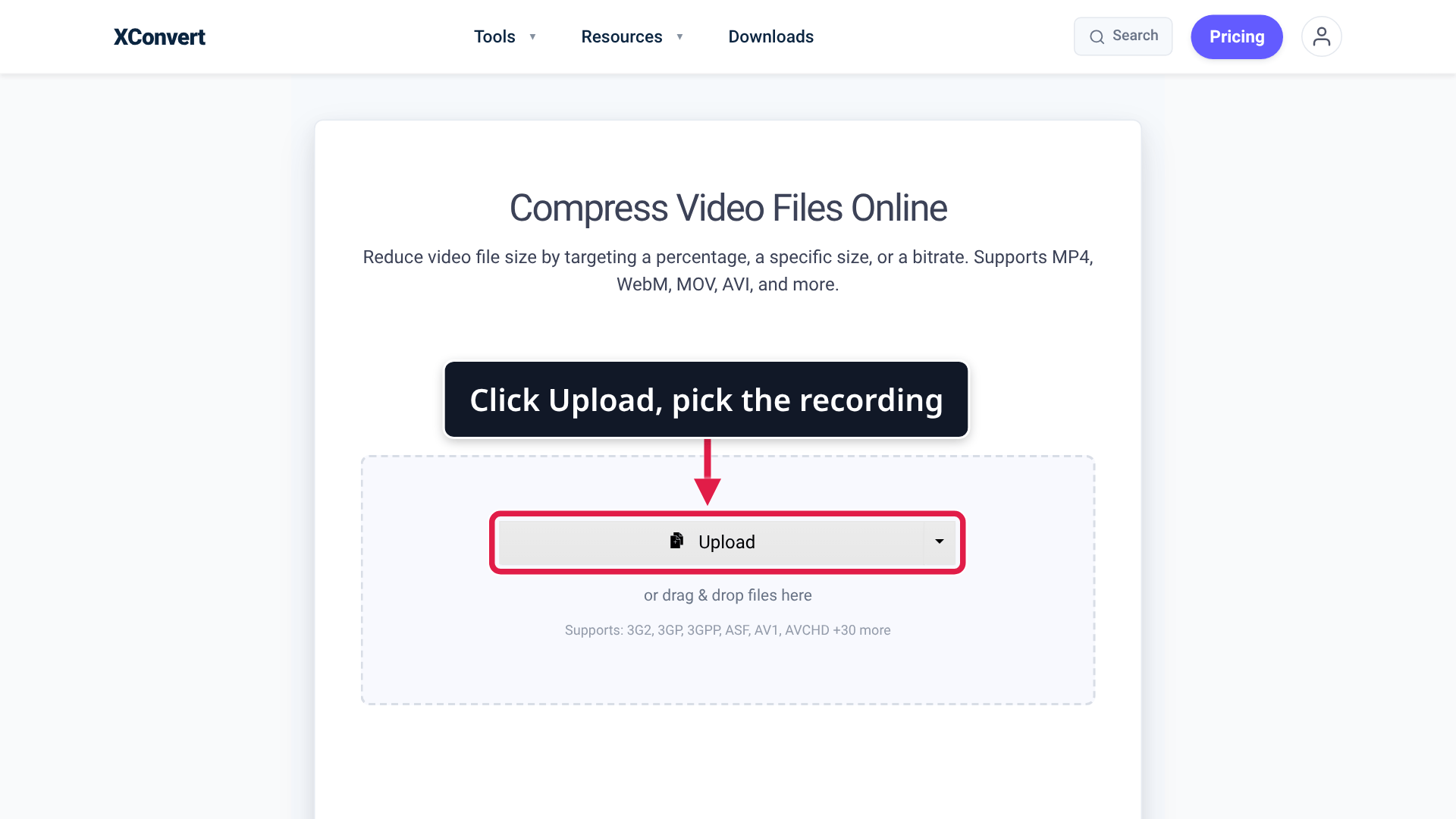
- On the video compressor, click Upload and pick the recording.
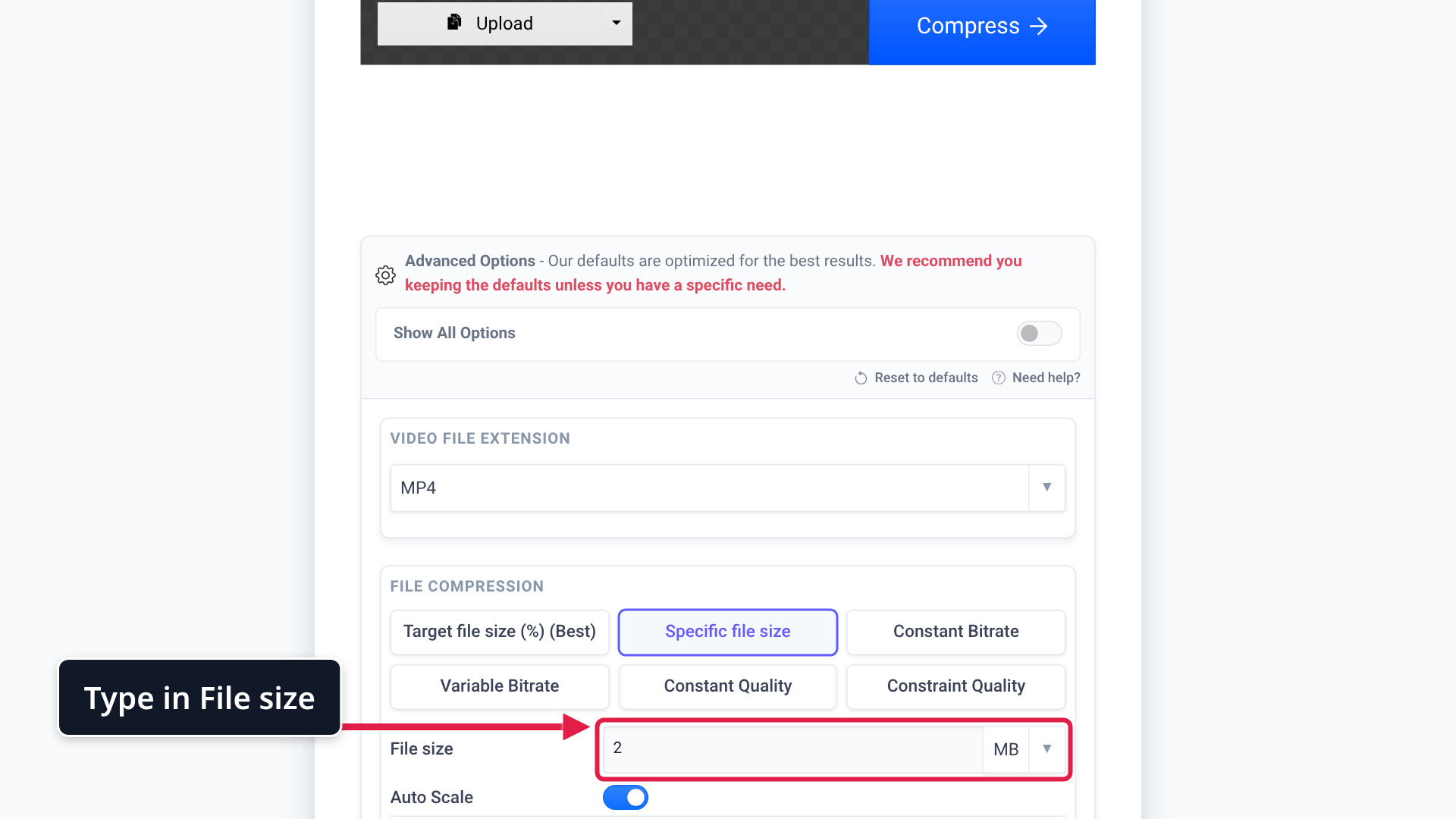
- Under FILE COMPRESSION, click Specific file size.
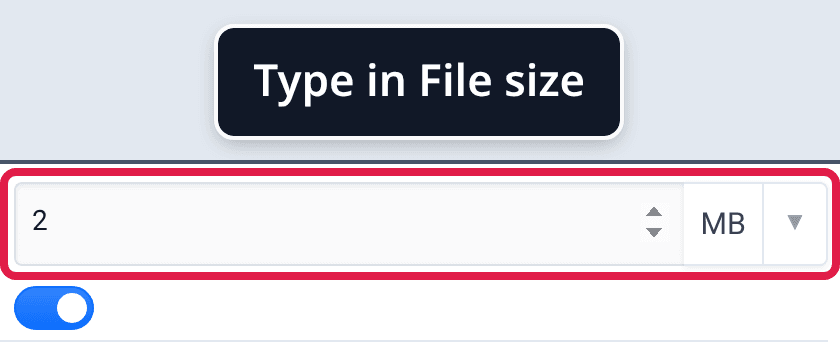
- In File size, which opens with 24 and MB, type the size you need; the unit list holds B, KB and MB. Pictured: 2 typed for the 4.02 MB one-minute test clip; no job was run with that number.
- Click Compress. On the downloads page, wait for “Completed”, read the line that begins “New size”, then click Download.
The file is processed on our servers, not in your browser. Uploads and results are deleted automatically about 5 hours after they were written.
Measured: the two test clips through the compressor
Eight jobs on 2026-11-20, one per cell, on the two one-minute clips. “An hour” is the result scaled by the formula above. SSIM compares a result with its upload: 1.000 is the same picture. Nobody watched or listened to a result.
| Setting | Moving picture, 4.02 MB | Slides, 1.79 MB |
|---|---|---|
| As the page opens: Target file size (%) (Best), File size (%) at 80, Auto Scale ticked | 3.10 MB (77 %), 960 x 528, SSIM 0.989: 186 MB an hour | 1.40 MB (78 %), 960 x 528, SSIM 0.988: 84 MB an hour |
| Specific file size, 417 KB typed | 399.6 KB, 960 x 528, SSIM 0.914: 24.0 MB an hour | 389.2 KB, 960 x 528, SSIM 0.966: 23.4 MB an hour |
| Constant Quality, CRF 23, Keep original | returned unchanged | returned unchanged |
| Constant Quality, CRF 28, Keep original | returned unchanged | 1.35 MB (76 %), 1280 x 720, SSIM 0.997: 81 MB an hour |
417 KB is one minute at 25 MB an hour. Google’s page, read November 2026: “For personal Gmail accounts, the limit is 25 MB.” A typed size is a target: both results came in under it, at 95.8 % and 93.3 %.
The price: the moving picture was left about 30 thousand bits a second of video, and its sound fell from 63 to 16 thousand.
With Auto Scale ticked, the size modes lowered the picture to 960 x 528. The card says “Resolution reduced by 25% to fit your size limit”.
Constant Quality has no size target. Where it gained nothing, the card said: “This video is already well compressed — these settings wouldn’t make it smaller, so we kept your original unchanged.”
Our clips were themselves encoded at CRF 23, so that setting had little left to take. What the mode does to a file written by Zoom or Teams was not tested.
When the compressor or a smaller picture is the wrong choice
- The mail is Gmail. Over the limit, Google’s page says, “Gmail automatically removes the attachment and adds it as a Google Drive link in the email”.
- Only the sound matters. Zoom’s page lists an audio-only file beside the video, “named audio[random number].m4a by default”. Webex’s estimate for audio alone is 30 MB an hour.
- The file is over 400 MB and you have no paid plan. Two hours of Teams at Microsoft’s figure are 800 MB.
- The recording is from Teams. The people invited may already have a link to it. Microsoft’s page says recordings “are stored in either OneDrive for work or school and SharePoint”; for a meeting outside a channel, “All meeting invitees, except for external participants, automatically get a personally shared link.”
If slide text has to stay readable, a smaller picture is the wrong trade. Compressing a lecture recording for Canvas or Moodle covers what a course site accepts and the setting that keeps the picture size.
If the size cannot be met at this picture size, making a video lower quality on purpose shows what each step down in resolution gives up.
What we could not confirm
- Google Meet. Google’s two pages on recording state no size per hour. One says that a recording stops after eight hours and that a shared screen is recorded at “up to 1080p”.
- Zoom by layout or resolution. Zoom’s page gives one figure for video and none per layout, per resolution or for the audio-only file.
- The resolution behind Teams’ 400 MB. Microsoft’s page gives none.
- A newer Webex figure. The page read is dated December 15, 2023; no newer one was looked for.
Using this table
You may quote or copy the table with a link to this page; to point at the table itself, add #per-hour to the page’s address.
The rows are read again within 60 days: the next check is due by 19 January 2027.
Change log
- 2026-11-20: first version. All seven rows read on that day.
Sources
- Zoom Support: Understanding recording file formats: about 200MB an hour for recording video, about 20MB for screen sharing, “an approximation”, the default names of the video and audio-only files. Read 2026-11-20.
- Microsoft Learn: Teams meeting recording and transcript storage and permissions in OneDrive and SharePoint: “The size of a one-hour recording is 400 MB.”; no resolution for that hour; where recordings are stored and who gets a link. Read 2026-11-20.
- Webex Help Center: What is the Average Size for a 1 Hour Network-Based Recording?, dated December 15, 2023: the four estimated sizes per hour. Read 2026-11-20.
- Google Meet Help: Record a video meeting and Google Workspace Admin Help: Set recording quality limits for Google Meet: no size per hour on either page; the stop after eight hours and “up to 1080p” on the first. Read 2026-11-20.
- YouTube Help: YouTube recommended upload encoding settings: 8 Mbps for a 1080p upload at standard frame rates (24, 25, 30). Read 2026-11-20.
- Gmail Help: Send attachments with your Gmail message: 25 MB for personal Gmail accounts; the Google Drive link over the limit. Read 2026-11-20.
- Wikimedia Commons: August 2024 Future Audiences office hours, by LWyatt (WMF), license CC BY-SA 4.0: the recording both test clips were cut from. The clips are adaptations, encoded by us. Fetched 2026-11-20.
- Our measurements: eight jobs on xconvert.com/video-compressor on 2026-11-20, one at a time, with the two one-minute clips, each under 5 MB. Sizes, picture sizes and bitrates were read from each file with ffprobe; SSIM with ffmpeg over all 1,500 frames, each result scaled back to 1280 x 720. Which clip is which: words read in sampled frames and movement between frames.
- Our counts: uploads to any of our tool pages from 22 October to 20 November 2026 (UTC) named “video”, then 6 to 12 digits, then “.mp4”, that held video and ran ten minutes or longer: 33 uploads, 31 different files. Counts and percentiles only; no name or owner was read out.