 By Stephanie Taylor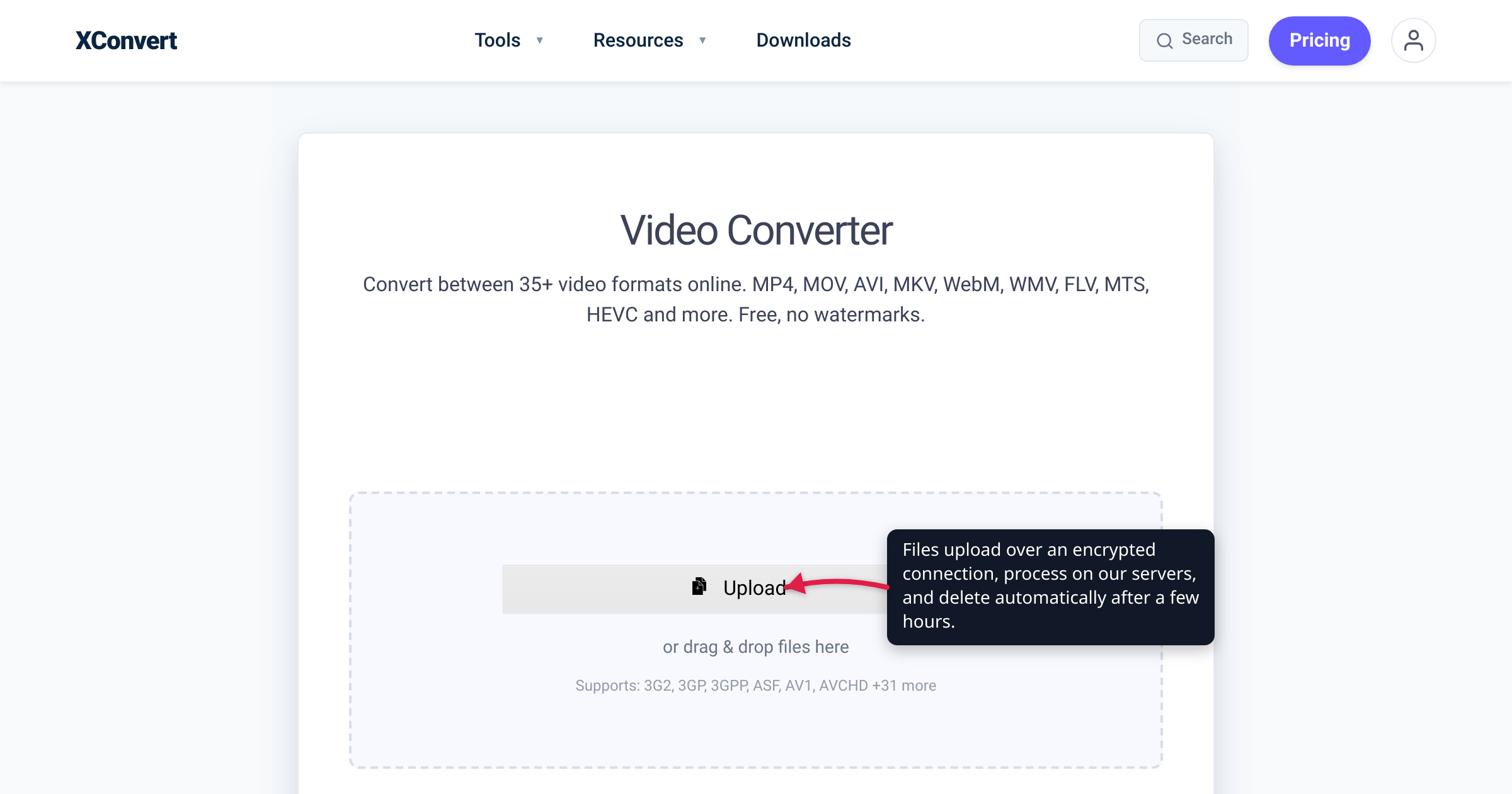
You need to turn a .mov into an .mp4, so you paste it into the first free converter Google shows you — and then a small doubt lands: where does my file actually go, and who else can see it? It’s a fair question. In March 2025 the FBI’s Denver field office warned that criminals were running fake “free file converter” sites that convert your file as promised while quietly planting malware or scraping it for personal data. That doesn’t mean every online converter is dangerous — it means “is this one safe?” is worth answering deliberately. This guide explains, honestly, what really happens to a file you upload (including on xconvert), the specific things that separate a trustworthy converter from a sketchy one, and a checklist you can apply to any of them. We verified xconvert’s own stated policy on its live tool pages and the FBI warning against the Bureau’s own bulletin.
Quick answer: A reputable online converter is safe to use, but “safe” is specific, not magic. With a server-side converter — which is how most of them, xconvert included, work — your file is genuinely uploaded to a server and processed there. So the questions that matter are: is the upload encrypted (HTTPS/TLS)? Are files auto-deleted quickly? Is there a watermark or forced sign-up? Does the site push intrusive or malicious ads? And could the downloaded file be malware? Judge a converter on those, not on a vague promise.
Jump to a section
- What actually happens to your file
- The 5 questions that decide if a converter is safe
- Could a “converted” file be malware?
- A checklist for judging any converter
- What happens to your file on xconvert
- FAQ
What actually happens to your file
Most online converters — xconvert included — are server-side. When you pick a file, it’s uploaded over the internet to the service’s servers, converted there by software you don’t see, and the finished file is sent back for you to download. Being transparent about that is the whole point of this article: your file does leave your device. Some tools genuinely run in the browser instead — xconvert’s PDF page tools, image crop/rotate editors and subtitle converters work that way, processing locally without an upload — but heavyweight conversion is server-side work, and a tool that claims in-browser processing for video transcodes or RAW development isn’t being straight with you.
Server-side isn’t a red flag — it’s just how heavyweight conversion works. Transcoding a video with H.265, rasterizing a PDF, or re-sampling audio needs real CPU and libraries like FFmpeg that a browser tab can’t reliably run on a large file. The upload is the cost of that horsepower. The safety question isn’t whether your file is uploaded; it’s how the service treats it once it’s there — in transit, at rest, and after you’re done.
The 5 questions that decide if a converter is safe
1. Is the upload encrypted? Check that the address bar shows https://, not http://. HTTPS “uses TLS to encrypt all communication between a client and a server,” per MDN — and TLS is designed to prevent “tampering with and eavesdropping on” what you send, so “no third party can eavesdrop or tamper with any message.” In plain terms: over HTTPS, someone sharing your coffee-shop Wi-Fi can’t read your file as it uploads. A converter still served over plain http:// in 2026 is an immediate no.
2. How long are files kept — and are they auto-deleted? A trustworthy converter deletes your uploads and results automatically, and says so. Vague or missing retention language is the warning sign. You want an explicit statement like “deleted automatically after a few hours,” not silence.
3. Is there a watermark or a forced sign-up? A slapped-on watermark or a “create an account to download” wall isn’t a security hole by itself, but it tells you the tool is built to extract something from you — and a forced sign-up means your email (and whatever else) is now tied to the file you converted. The cleanest tools let you convert and download without an account.
4. Does the site bury you in ads? Aggressive pop-ups, fake “Download” buttons, and redirect-heavy pages aren’t just annoying — “malvertising” (malicious advertising) is a real delivery route for drive-by downloads. If you can’t find the actual convert button among the fake ones, that’s a signal about how the site is monetized and how much it cares about your safety.
5. Could the file you download be malware? This is the big one, and it deserves its own section.
Could a “converted” file be malware?
Yes — on shady sites. In a warning published March 7, 2025, the FBI’s Denver field office said agents were “increasingly seeing a scam involving free online document converter tools.” The trick is nasty precisely because it works: “These converters and downloading tools will do the task advertised, but the resulting file can contain hidden malware giving criminals access to the victim’s computer.” The same sites “can also scrape the submitted files” for personal data — social security numbers, dates of birth, phone numbers — and the FBI tied the campaign to ransomware and identity theft. Security researchers have since documented real examples of exactly these fake-converter sites.
Here’s how to avoid being a victim without swearing off online tools entirely:
- Watch what you’re handed. A PDF converter should return a
.pdf. If a “converted document” arrives as an.exe,.msi,.scr,.bat, or a.zipcontaining a.jsscript, don’t open it — that’s the payload, not your file. - Never install a “converter app” a website pushes at you. The FBI warning specifically calls out downloadable converter and “downloader” tools. A legitimate web converter runs as a website — you upload a file and it hands back the converted one; it doesn’t need you to install software for a one-off conversion.
- Stick to converters with a track record and a real name, reachable over HTTPS, rather than the top ad result for “free converter.”
- Keep your antivirus current and scan anything you’re unsure about — the FBI’s own advice is to “run up-to-date virus scan software.” Suspected victims can report to the FBI Internet Crime Complaint Center at ic3.gov.
Note the honest nuance: the risk is about malicious operators, not about the fact that conversion happens on a server. A reputable server-side converter that returns a file of the expected type over an encrypted connection is not what the FBI is warning about.
A checklist for judging any converter
Run any converter — including this one — past these:
| Green flag | Red flag |
|---|---|
https:// in the address bar | Plain http://, or certificate warnings |
| States that files are auto-deleted, and when | No word on what happens to your file |
| Convert and download with no account | Forced sign-up or email wall to get your file |
| No watermark (or clearly labeled free/paid tiers) | Watermark you must pay to remove on a “free” tool |
| One obvious convert button | A maze of fake “Download” buttons and pop-ups |
| Returns a file of the expected type | Hands you an .exe/.js/unexpected file, or an app to install |
| A named company with a privacy policy | Anonymous site, no policy, no contact |
Clear the left column and you’re on solid ground. Any red flags on the right? Close the tab.
What happens to your file on xconvert
We’ll hold ourselves to the same checklist. Here’s xconvert’s actual, stated posture — quoted from its own tool pages, not marketing spin: “Files are uploaded over an encrypted connection, processed on our servers, and deleted automatically after a few hours — no sign-up, no watermark, never shared.” The image and audio converters add that conversion “runs on our servers — files aren’t published to a public bucket or shared with third parties.”
So, plainly: yes, your file is uploaded (server-side, as explained above). It travels over an encrypted HTTPS connection, it’s converted on our servers, and it’s deleted automatically a few hours later. No account, no watermark. Using the xconvert video converter:
- Open xconvert.com/video-converter and click Upload — from your computer, Google Drive, or Dropbox. The connection is encrypted in transit.
- Choose your target format from the Video File Extension dropdown (for example, MP4).
- (Optional) Open Advanced Options for codec, resolution, or size settings; Reset to defaults starts over.
- Click Convert, wait for the server to finish, and download your file.
- Do nothing else — your upload and result are deleted automatically after a few hours; there’s no account holding onto them.
The same posture applies across the image converter and audio converter. And if the reason you’re reaching for an online tool is a file that’s simply too big to send, how to email a large PDF walks through compressing it first rather than handing it to a random site.
FAQ
Are online file converters safe to use?
A reputable one is. The risk isn’t that conversion happens on a server — that’s normal. The risk is which site you trust. Use one that serves the tool over HTTPS, states that it auto-deletes your files, doesn’t force a sign-up, and returns a file of the expected type. Avoid any site that pushes you to install a “converter app” or hands back an .exe — that’s the pattern the FBI warned about in 2025.
Do online converters keep or store my files?
A trustworthy one deletes them automatically, and says so. xconvert’s tool pages state files are “deleted automatically after a few hours” and “never shared.” The warning sign is a converter that says nothing at all about retention — assume the worst when a site is silent about what happens to your upload.
Is my file processed in my browser or uploaded to a server?
On most converters, including xconvert, it’s uploaded to a server. Real transcoding of video, audio, and PDFs needs server-grade software (like FFmpeg) that a browser tab can’t run reliably on large files. A few simple in-browser tools exist, but any service handling large or complex conversions is doing it server-side — and honest ones say so.
Can a converted file contain a virus?
On a malicious site, yes. The FBI’s Denver field office warned in March 2025 that scam converters perform the conversion but can deliver a file “with hidden malware.” The tell is the output: a document converter should return a document, not a program to run. Scan anything you’re unsure of, and never run an installer a converter site pushes at you.
Is it safe to convert sensitive documents like tax forms or IDs online?
Be extra careful. The FBI noted scam converters scrape uploads for data like social security numbers. For genuinely sensitive files, prefer a named service with a clear deletion policy over HTTPS — or convert offline. If you do use an online tool, pick one that auto-deletes and doesn’t require an account.
Does HTTPS mean the converter is safe?
It means the upload is encrypted in transit — necessary, but not sufficient. HTTPS/TLS stops others from eavesdropping on your file as it travels, per MDN. It says nothing about what the site itself does with your file once it arrives. You still need the rest of the checklist: a deletion policy, no forced sign-up, expected output, and a reputable operator.
Sources
Last verified 2026-07-16.
- xconvert video converter, image converter, audio converter — xconvert’s own stated policy: “Files are uploaded over an encrypted connection, processed on our servers, and deleted automatically after a few hours — no sign-up, no watermark, never shared”; “files aren’t published to a public bucket or shared with third parties.”
- FBI Denver — “FBI Denver Warns of Online File Converter Scam” (published March 7, 2025) — scam converters “do the task advertised, but the resulting file can contain hidden malware”; can “scrape the submitted files” for personal data; report to ic3.gov.
- BleepingComputer — “FBI warnings are true—fake file converters do push malware” — independent confirmation that real malicious converter sites exist.
- MDN Web Docs — HTTPS — “HTTPS … uses TLS to encrypt all communication between a client and a server.”
- MDN Web Docs — TLS — TLS prevents “tampering with and eavesdropping on” network communication; “no third party can eavesdrop or tamper with any message.”