 By Stephanie Taylor
It is 11:40 pm, the assignment closes at midnight, and Turnitin has just refused your paper — no error code, no explanation. Almost every time, the cause is on a short list of rules Turnitin publishes openly: a format it quietly refuses, a PDF whose text it cannot read, or a document that is simply too long. Here is that list, taken from Turnitin’s own guides, with the fix for each.
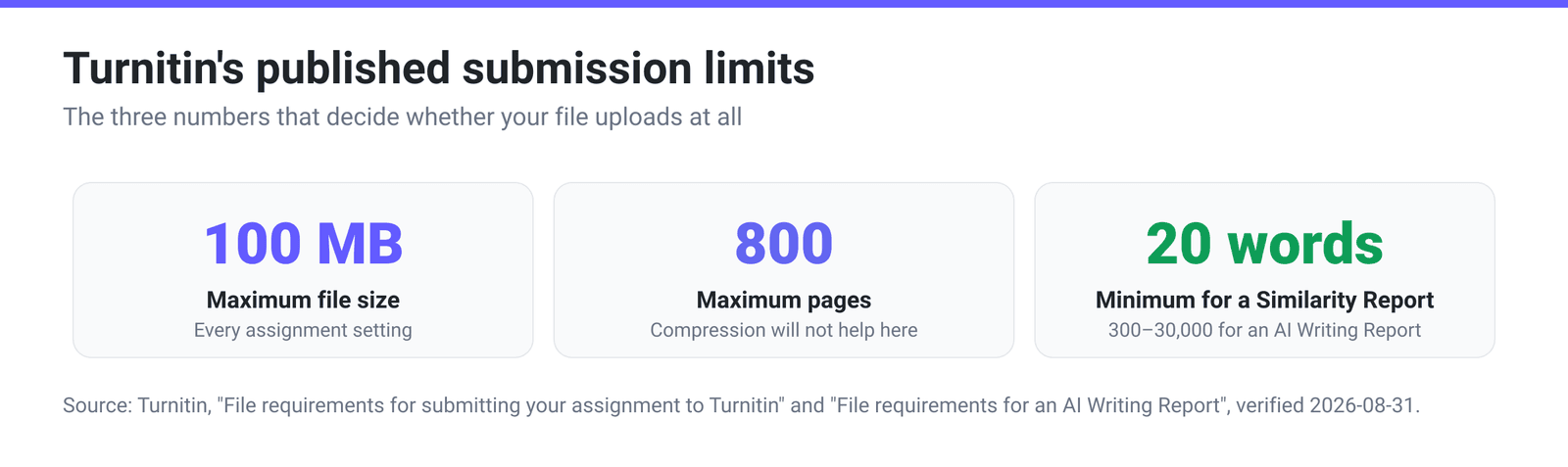
Quick answer: Turnitin accepts files under 100 MB and under 800 pages. If the assignment checks similarity, the file also needs at least 20 words and must be one of:
.doc,.docx,.txt,.rtf,.odt,.pptx,.hwp/.hwpx, HTML, Adobe PostScript, Corel WordPerfect, or a Google Doc submitted via Google Drive. Apple Pages,.docm,.wps,.odsand password-protected files are refused outright. The most common surprise rejection is a PDF whose text is not selectable — a scan, a photo, or a filled-in form.
Jump to a section
- The limits Turnitin actually publishes
- Accepted formats, and the ones Turnitin refuses
- Why a PDF that opens perfectly still gets rejected
- DOCX or PDF? Your word count is not the same
- Convert DOCX to PDF on xconvert
- FAQ
The limits Turnitin actually publishes
The rules change depending on how your instructor set the assignment up.
| Assignment setting | Max size | Max pages | Words | Accepted types |
|---|---|---|---|---|
| Allow any file type | Under 100 MB | Under 800 | None stated | Any file |
| Allow only files Turnitin can check for similarity | Under 100 MB | Under 800 | Minimum 20 | The list below |
| AI Writing Report (separate feature) | Under 100 MB | Not stated | 300 min, 30,000 max | .docx, .pdf, .txt, .rtf only |
Two things are worth pulling out of that table. “Allow any file type” is not a free pass on similarity — Turnitin will accept a .pages file or a photo of your handwritten notes, it just will not generate a Similarity Report from them. And the AI Writing Report has stricter rules of its own: four formats, three languages (English, Spanish, Japanese), and 300 to 30,000 words of long-form prose, so a short reflection piece submits fine but produces no AI percentage.
Accepted formats, and the ones Turnitin refuses
This is the published list for assignments restricted to similarity-checkable files.
| Format | Extension | What to know |
|---|---|---|
| Microsoft Word | .doc, .docx | Word count read directly out of Word, including hidden text |
| Portable Document Format | .pdf | Must contain selectable text — see below |
| Plain text | .txt | The safe fallback if your word processor is unsupported |
| Rich Text Format | .rtf | The other recommended fallback |
| OpenOffice Writer | .odt | Not one downloaded from Google Docs |
| PowerPoint | .pptx, .ppsx, .pps | Converted to a static PDF; presenter notes, video and animation are dropped. .ppt “does not work with integrations” — use .pptx |
| Hangul | .hwp, .hwpx | |
| HTML, Adobe PostScript, Corel WordPerfect | — | |
| Google Docs | via Google Drive | Use the Drive picker; never upload a .gdoc, which holds only a link |
And this is the refusal list — the part that catches people out, because these files all open normally on your own computer.
| Turnitin refuses | What to do instead |
|---|---|
| Apple Pages | Export from Pages to Word or PDF; Apple documents this under “Export to Word, PDF, or another file format”. xconvert cannot open .pages either — that step has to happen in Apple’s own apps or on iCloud.com |
| Password-protected files | Remove the password in the app that set it, then save a fresh copy |
.docm (macro-enabled Word) | In Word: Save As → Word Document (.docx) |
Microsoft Works .wps | Open in a Works-compatible processor and save as .docx or .rtf |
.odt downloaded from Google Docs | Use File → Download → Microsoft Word (.docx) instead of the OpenDocument option |
.doc created in OpenOffice | Turnitin calls these “not 100% Microsoft Word equivalent” — save as .odt, or convert to PDF |
Spreadsheets made outside Excel (.ods) | Open in Excel or Google Sheets and export .xlsx |
| Text with visual effects | Strip shadows and 3D styling — this bites hardest on PowerPoint title slides |
| Image-only PDFs, PDF forms, PDF portfolios, PDFs with several embedded files | See the next section |
Why a PDF that opens perfectly still gets rejected
The sentence that explains most Turnitin PDF failures comes straight from the guide: Turnitin “will not accept PDF image files, forms, portfolios, files that do not contain highlightable text (e.g., scanned documents that are images), or documents containing multiple embedded files.”
A PDF is a container. It can hold real text — letters stored as characters with fonts embedded — or a picture of text, which is what a scanner, a phone camera, or a “print to image” workflow gives you. Both look identical on screen. Only one can be checked for similarity.
Turnitin publishes its own test and it takes ten seconds. Open the PDF, select a paragraph, copy it, paste it into Notepad or TextEdit. If words appear, the file has a text layer. If nothing appears, or you cannot select the text at all, it will be rejected.
If the test fails, there is exactly one real fix: optical character recognition, which reads the picture and reconstructs the text. xconvert does not do OCR — no converter of ours adds a text layer to a scan, and no setting changes that. Running an image-only PDF through any file converter just gives you the same picture in a different wrapper. So:
- Still have the original Word file? Submit that. Faster than any OCR, and Turnitin reads Word’s word count directly.
- Only have the scan? Google Drive will OCR a PDF or photo for free when you open it with Google Docs — but its published guidance is tight. Under “For the best results, use these tips” Google asks for a file 2 MB or smaller, text at least 10 pixels high, and pages right-side up. It is advice rather than a hard cap, but 2 MB still rules out most multi-page scans.
- Bigger or messier scans need a dedicated OCR product — Adobe Acrobat’s Scan & OCR, ABBYY FineReader, or your library’s scanning station.
Two smaller traps hide in the same sentence. A PDF form with fillable boxes is refused even when its text is selectable, so flatten it first; a PDF portfolio is refused as a structure, so export the document on its own.
Turnitin also recommends producing PDFs with Adobe Acrobat or Microsoft Word 365, warning that PDFs from other tools “may not work”. Read that as a reason to run the copy-paste test on whatever PDF you are about to submit, whoever made it. For the wider version of this problem, see your scanned PDF turned into a picture in Word.
DOCX or PDF? Your word count is not the same
This is barely documented outside Turnitin’s own help centre, and it matters when your assignment has a word limit your instructor checks inside Turnitin.
| You submit | How Turnitin counts | What can go missing |
|---|---|---|
.doc, .docx | Extracted directly from Microsoft Word | Nothing — formatting and hidden text are parsed too |
.pdf | Turnitin’s text extraction system reads the visible text layer | Hidden text, scanned image text, and complex layout such as columns and tables |
.txt | Text extraction, with “minimal discrepancies” | Effectively nothing |
A paper with two columns, several tables or many figure captions can therefore report a lower count as a PDF than Word showed you. Character set matters too: Turnitin often counts Chinese, Japanese and Korean characters as individual words, treats long German compounds as one word, and can differ from Word on Thai and Arabic. A mismatch in those languages is normal, not a fault.
Practical rule: if the assignment accepts both, submit the .docx. Convert to PDF when the assignment demands PDF, or when your source format sits on the refusal list.
Convert DOCX to PDF on xconvert
When the assignment specifies PDF, the DOCX to PDF converter turns a Word file into a text PDF — the words stay words rather than becoming a picture of your page, which is exactly what Turnitin needs.
- Open xconvert.com/convert-docx-to-pdf and click Upload, then From my Computer (Google Drive and Dropbox sit in the same menu). You can also drag the file onto the drag & drop files here area.
- Queue several files if you have chapters or appendices — they convert in one batch with the same settings.
- Look at Advanced Options (the gear panel, already open on the page) only if you are curious. It carries a single group, Compression Type — Screen (Best), Ebook, Default, Prepress, Printer. Nothing there affects whether your words stay selectable, so leave it alone for a submission.
- Click Convert, then download the PDF.
- Run Turnitin’s own check before you submit: select a paragraph in the PDF, copy it, paste it into Notepad or TextEdit.
If the result is over 100 MB, shrink it with the PDF compressor — which preset to choose. If it is over 800 pages, split it and ask your instructor how they want the parts handled; compression cannot reduce a page count.
Your file uploads over an encrypted connection, is converted on our servers, and is deleted automatically a few hours later. No account, no watermark.
FAQ
What is the file size limit for Turnitin?
Under 100 MB, for every assignment setting. Two more limits travel with it and get forgotten: the document must be under 800 pages, and — for a Similarity Report — must contain at least 20 words.
Why does Turnitin reject my PDF when it opens fine on my computer?
Opening is not reading. Turnitin refuses PDFs that hold a picture of text rather than text — scans, photos of pages, “print to image” exports — and also refuses PDF forms, PDF portfolios, and PDFs with several files embedded inside them. Copy a paragraph and paste it into a plain-text editor; if nothing pastes, that is your rejection.
Can I submit an Apple Pages file to Turnitin?
No — Apple Pages is on Turnitin’s list of formats that will not generate a Similarity Report. Export to Word or PDF from Pages first; Apple’s own guide covers it under “Export to Word, PDF, or another file format”. xconvert cannot open .pages files either, so that step has to happen in Apple’s apps or on iCloud.com.
Does Turnitin work with scanned or handwritten work?
Not for similarity checking — Turnitin explicitly refuses “scanned documents that are images”. You need OCR to create a text layer first. xconvert does not perform OCR; use Google Drive’s free OCR under 2 MB, or a dedicated OCR product for anything larger.
Should I submit a Word document or a PDF?
The .docx, if the assignment allows it. Turnitin reads the word count straight out of Word, so the number your instructor sees matches your document, and you skip every PDF text-layer caveat. Use PDF when the assignment demands it or when your source format is on the refusal list.
My paper is over 800 pages or 100 MB. What now?
Compression fixes size, not length. Image-heavy appendices usually shrink a long way through a PDF compressor, but if the document genuinely exceeds 800 pages no compressor helps — split it and ask your instructor how to submit the parts.
Sources
Last verified 2026-08-31.
- Turnitin — File requirements for submitting your assignment — the 100 MB / 800 page / 20 word limits, the format lists, the PDF refusal wording and the copy-paste test.
- Turnitin — File requirements for accepting submissions — the instructor-facing copy of the same rules.
- Turnitin — File requirements for an AI Writing Report — 100 MB, 300–30,000 words, three languages, four formats.
- Turnitin — View and understand word count — per-format word-count derivation and character-set caveats.
- Turnitin — Trouble submitting your paper? — Turnitin’s advice to re-save in another supported format.
- Google Drive Help — Convert PDF and photo files to text — free OCR; under “For the best results, use these tips”: a file 2 MB or smaller, text at least 10 px high, pages right-side up. Guidance, not a published hard cap.
- Apple — Pages User Guide: Export to Word, PDF, or another file format — the supported escape route for
.pagesfiles.