 By James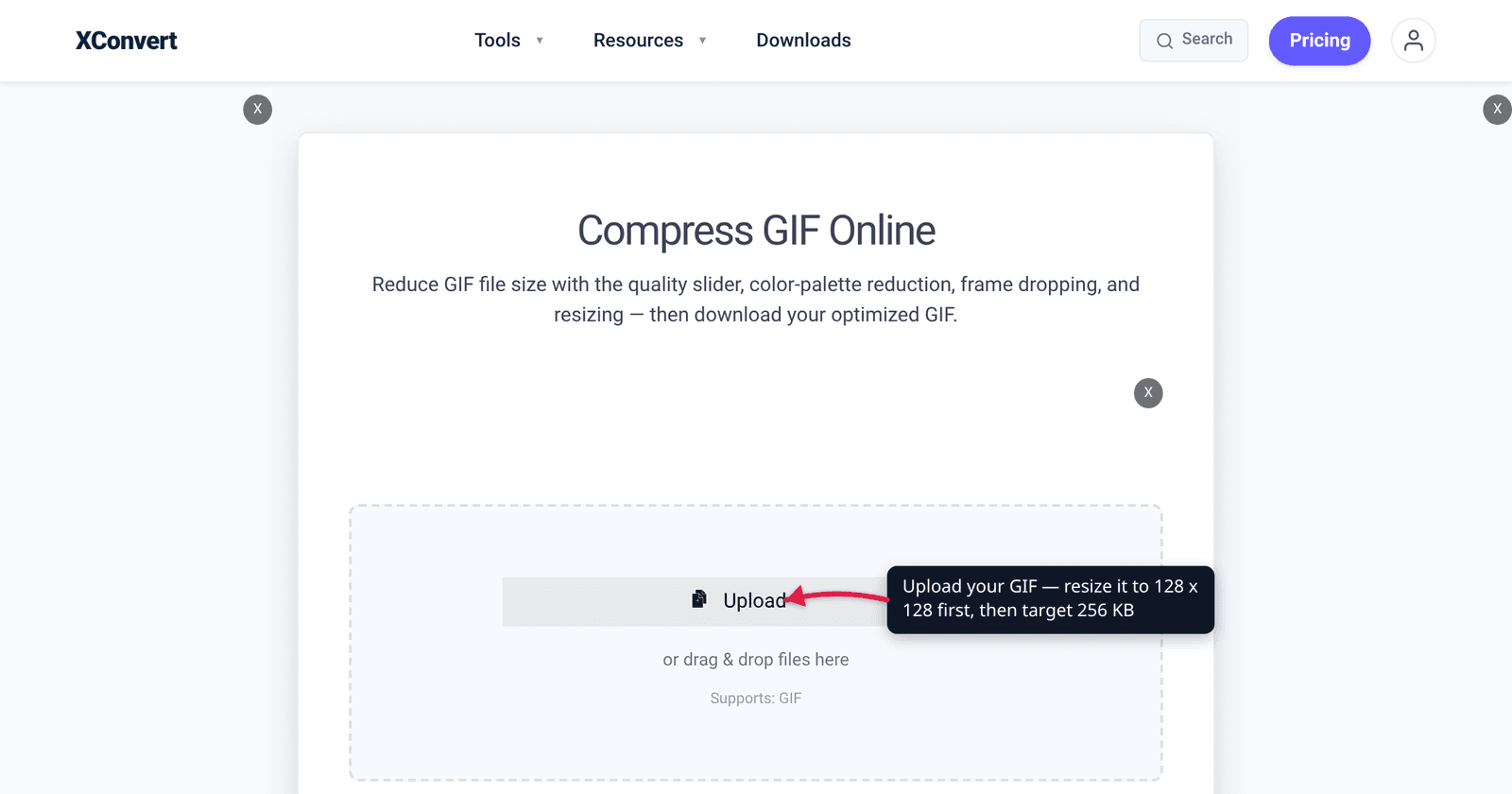
You found the perfect three-second reaction loop, dropped it into Server Settings → Emoji → Upload Emoji, and Discord bounced it. The advice you’ll find next is usually wrong in one of two ways: it quotes Discord’s attachment limit, which is roughly eighty times larger, or it quotes the sticker spec — a different canvas size and a different byte budget. Custom emoji have their own rules, they’re the strictest upload on Discord, and once you know them the fix is two short passes through a compressor.
Quick answer: A Discord custom emoji must be 128×128 and under 256 KiB (262,144 bytes), and GIF is an accepted upload format — Discord’s own API docs state both. On xconvert’s GIF compressor, do it in two passes: first switch File Compression to Custom and set Image resolution → Width x Height to 128 × 128 Pixels (resizing is only available in Custom mode); then, if it’s still too big, re-upload the result, leave File Compression on Max file size, pick Size limit → Custom size value, and type 256 with the unit on KB. Because that field uses SI kilobytes (1,000 bytes), 256 KB = 256,000 bytes, which lands roughly 6 KB under Discord’s actual 262,144-byte ceiling.
Jump to a section
- Emoji, sticker, attachment: three different rulebooks
- 256 KiB is not 256 KB — and the gap is free margin
- At 128 pixels, which lever actually matters
- Fit a GIF emoji on xconvert
- FAQ
Emoji, sticker, attachment: three different rulebooks
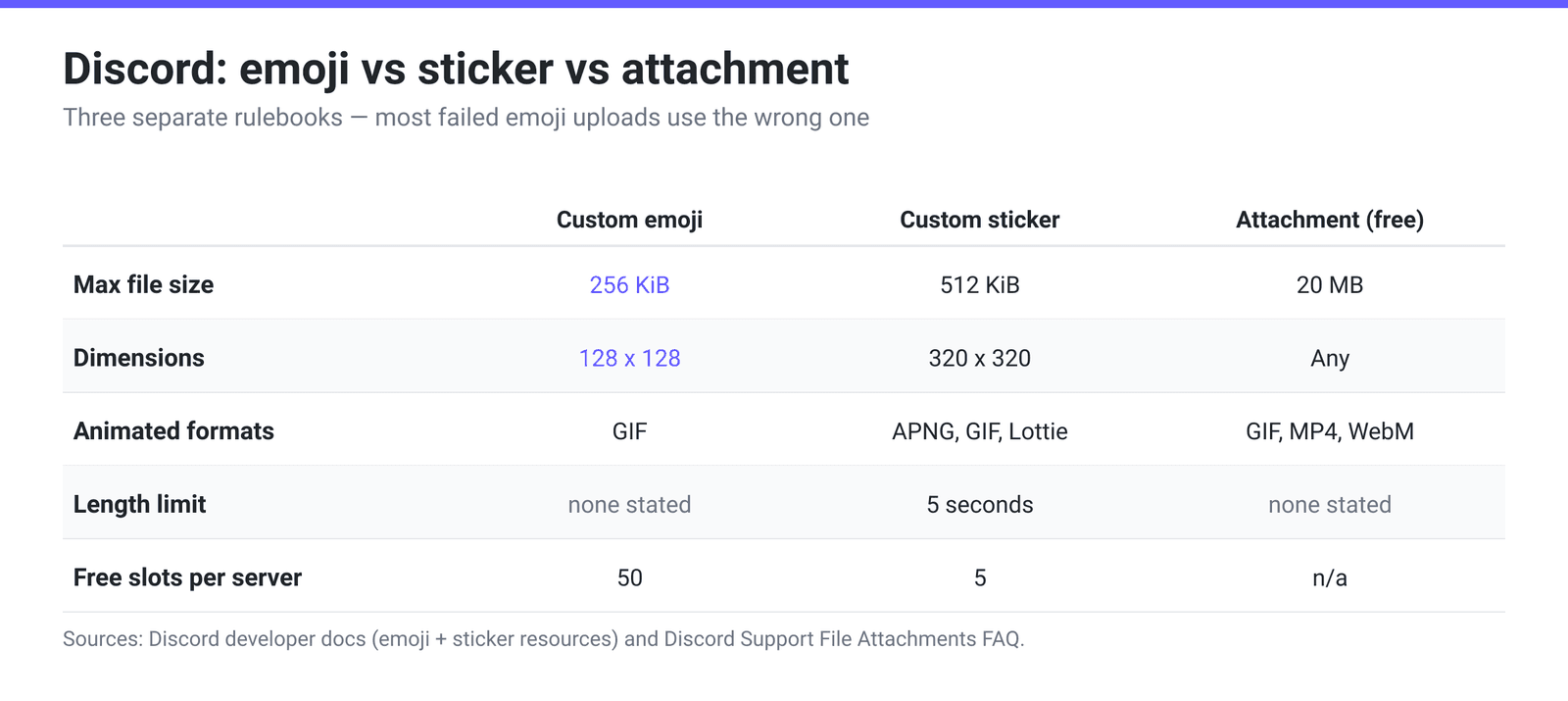
Most failed emoji uploads come from applying the wrong spec. Discord publishes three separate sets of limits, and only one of them is about emoji.
| Custom emoji | Custom sticker | Message attachment (free) | |
|---|---|---|---|
| Max file size | 256 KiB (262,144 bytes) | 512 KiB | 20 MB |
| Dimensions | 128 × 128 | 320 × 320 | Any |
| Animated formats | GIF | APNG, GIF, Lottie | GIF, MP4, WebM … |
| Length limit | None stated | 5 seconds | None stated |
| Free slots per server | 50 | 5 | n/a |
| More slots via | Nitro / Nitro Basic (+50 animated) | Server Boost levels 1–3 | n/a |
Three things fall out of that table:
- The sticker spec is a different budget, not a stricter one. Discord’s API docs say a sticker “must be a PNG, APNG, GIF, or Lottie JSON file, max 512 KiB” and that “Uploaded stickers are constrained to 5 seconds in length for animated stickers, and 320 x 320 pixels.” So GIF is accepted for stickers — but a sticker gets double the bytes on 6.25× the pixel area, and Discord’s own creator guide steers you to APNG there because APNG carries 24-bit colour and 8-bit alpha where GIF gives you 256 colours and 1-bit transparency. Guides that hand you the 320 × 320 / 512 KiB numbers are answering the sticker question, not the emoji one.
- The attachment number moved. Discord raised the free upload limit to 20 MB in August 2026, up from 10 MB — roughly eighty times the emoji cap. That’s why generic “compress it for Discord” advice is useless here.
- Animated emoji need Nitro to have a slot. Discord’s own wording: “In addition to the 50 static custom emojis, if you have Nitro or Nitro Basic, you’ll have an extra 50 slots available for animated ones too!” Without one, the server has no animated slot to put your GIF in — no amount of compression fixes that.
256 KiB is not 256 KB — and the gap is free margin
Discord’s help centre says emoji “must be under 256KB in size.” Discord’s developer documentation is more precise: “Emojis and animated emojis have a maximum file size of 256 KiB.”
That’s a KiB, the binary kilobyte — 1,024 bytes, not 1,000. So the real ceiling is:
- 256 KiB = 256 × 1,024 = 262,144 bytes
- 256 KB (SI) = 256 × 1,000 = 256,000 bytes
xconvert’s Max size field uses SI kilobytes, so typing 256 with the unit on KB targets 256,000 bytes — about 6,144 bytes (2.3%) below Discord’s actual limit. You get a small safety buffer for free without doing any arithmetic, which matters because file managers, Discord’s error message and your OS all round differently and a file that reads “256 KB” in Finder can still be 258,000 bytes.
If you want to be even safer, type 250 instead. The cost of a slightly smaller target at 128 pixels is close to invisible.
At 128 pixels, which lever actually matters
A GIF’s size is roughly pixels per frame × number of frames × palette cost. At emoji scale, those three terms are wildly unequal, and people usually pull the wrong one first.
1. Resize first — it’s not close. Going from 512 × 512 to 128 × 128 is a 16× reduction in pixel count, cutting about 94% of the per-frame data in a single step. Nothing else on the page comes near that. This is also why a “just compress harder” approach on a full-size GIF produces a mushy result: you’re spending your entire quality budget on pixels Discord is going to throw away anyway.
2. Frames are the next-biggest lever. Once the canvas is 128 px, frame count dominates. On xconvert, Drop Frames → Frames To Drop → Every 3rd frame removes one frame in three — and it’s the sweet spot we measured across GIF compression jobs in production. It’s also handled properly: when a frame is deleted, its display time is added to the frame before it, so the loop still runs for the same length of wall-clock time rather than speeding up.
3. Palette and dither are the fine tuning — and dither is a trap at this size. Dropping Color Palette Size from 256 to 64 usually costs very little visually on a 128 px emoji. Dither is the counter-intuitive one: in our own measurements, ordered dithering costs about +12% bytes at 64 colours, and Floyd–Steinberg about +25% while also flickering between frames because the pattern isn’t temporally stable. On an emoji that renders at a fraction of 128 px inline in chat, that spend buys you almost nothing.
One more from our production data worth knowing: running gifsicle -O1 over an already-optimised GIF made one test file 200% bigger. “Optimisation” flags are not free wins, which is why the compressor measures rather than assumes.
What not to bother with: cropping to a tight square before you start is genuinely worth it — your emoji ends up as a 128 × 128 image and renders far smaller than that in chat, so every pixel of empty background is budget you paid for and nobody sees. But hand-tuning a per-frame local palette is not: we measured roughly 3× the bytes for about 0.001 SSIM of quality.
Fit a GIF emoji on xconvert
The one thing to know before you start: on xconvert’s GIF compressor the resize controls and the file-size target live in different modes of the same File Compression group, so an emoji takes two passes. Pass one gets you to 128 × 128 — which very often lands under 256 KB on its own — and pass two only runs if it doesn’t.
- Open xconvert.com/compress-gif and click Upload to add your GIF (From my Computer, From Google Drive, or From Dropbox).
- In Advanced Options → File Compression, switch from Max file size to Custom. The resize, palette and frame controls only render in Custom mode.
- Under Image resolution, choose Width x Height, set both boxes to 128, and change the unit dropdown from Percent (%) to Pixels.
- Optional but usually worth it: under Colors pick By Color Reduction + Dither and set Color Palette Size to 64; for a long loop, set Drop Frames → Frames To Drop → Every 3rd frame. Then click Compress and download.
- Check the result. Under 256 KB? Upload it to Discord. Still over? Re-upload the 128 × 128 file, leave File Compression on Max file size, open Size limit and pick Custom size value, type 256, set the unit to KB, and compress again. Output lands at or under that number, best effort — the more aggressive the ask relative to the natural size, the more visible the cost.
Your GIF is uploaded over an encrypted connection, processed on our servers, and deleted automatically a few hours later. No account, no watermark.
Two notes on the same page: the Size limit dropdown also has a Discord (10 MB max) preset, but that’s for attachments and it predates the August 2026 increase to 20 MB — it’s not the emoji budget. And if you’re starting from a video rather than a GIF, trim your clip first; how to convert MP4 to GIF at high quality covers that half, and compress a GIF to a specific size covers the target-size mode in more depth.
FAQ
Why does Discord reject my emoji even though my file manager says it’s 256 KB?
Because Discord’s limit is 256 KiB — 262,144 bytes — and your file manager is probably rounding. A file shown as “256 KB” can easily be 260,000-plus bytes. Target 256 SI kilobytes (256,000 bytes) or lower and the rounding can’t hurt you. That’s exactly what typing 256 with the unit on KB in xconvert’s Max size field does.
Does the 256 KiB limit apply to animated emoji too?
Yes. Discord’s help centre is explicit that “the same naming and sizing requirements listed above apply to the animated custom emojis”, and the developer docs state the cap for “emojis and animated emojis” together. An animated GIF gets exactly the same budget as a single static PNG, spread across every frame — which is why frame count matters so much more here than in any other Discord upload.
Can I upload a GIF as a Discord sticker instead?
Yes — Discord’s API documentation says a sticker “must be a PNG, APNG, GIF, or Lottie JSON file, max 512 KiB”, with animated stickers capped at 5 seconds and 320 × 320 pixels. Note that Discord’s creator-facing guide lists only APNG and PNG, so the two Discord sources differ in emphasis; APNG really is the better choice at 320 × 320 because it carries 24-bit colour and 8-bit alpha, where GIF gives you a 256-colour palette and 1-bit transparency that shows as jagged edges on a transparent background. Two other differences: sticker slots come from Server Boost levels, not Nitro, and Discord warns that “your APNG stickers will not render if you only upload the files through the chat bar > upload file section” — use Server Settings → Stickers → Upload instead.
My emoji uploaded but it doesn’t animate. What happened?
Two likely causes. Either the server has no free animated slot — those 50 extra slots require Nitro or Nitro Basic — or the GIF lost its animation on the way in, which happens when a resizer flattens it to a single frame. Check the file before uploading: if it’s animated, the file size will be far larger than a single 128 × 128 still, which is usually a few kilobytes.
Will Discord re-compress the GIF I upload?
Effectively, yes, for display. Discord’s developer documentation says “All emoji (regardless of original format) can be served as WebP” and “The Discord client uses WebP for all emoji displayed in-app.” So the 256 KiB budget applies to what you hand Discord, not to what other people’s clients download. It also means micro-tuning your GIF’s dither pattern is wasted effort — it gets re-encoded before anyone sees it.
What size should I make the emoji if 128 × 128 still looks blurry?
128 × 128 is what Discord’s API documents for the emoji image, so there’s nothing to gain from going larger. Blurriness at that size almost always comes from the source, not the target: a small or low-detail clip upscaled to 128 px, or a subject that’s too far away in frame. Crop tightly to the subject before resizing, and skip fine text entirely — emoji render at a fraction of 128 px inline in chat, where small lettering disappears.
Sources
Last verified 2026-08-31.
- Discord Developer Docs — Emoji Resource — “Emojis and animated emojis have a maximum file size of 256 KiB”; the Create Guild Emoji
imageparameter is “the 128×128 emoji image”; “Emoji can be uploaded as JPEG, PNG, GIF, WebP, and AVIF formats”; “The Discord client uses WebP for all emoji displayed in-app.” - Discord Support — How to Add Custom Emojis on Discord — “Emojis must be under 256KB in size”; 50 static slots per server; “an extra 50 slots available for animated ones” with Nitro or Nitro Basic; “the same naming and sizing requirements … apply to the animated custom emojis.”
- Discord Developer Docs — Sticker Resource — a sticker “must be a PNG, APNG, GIF, or Lottie JSON file, max 512 KiB”; “Uploaded stickers are constrained to 5 seconds in length for animated stickers, and 320 x 320 pixels.”
- Discord Support — Tips for Sticker Creators FAQ — the creator-facing guide, which lists APNG animated / PNG static, 512KB, 320 × 320 exact, a 60 FPS cap, and the chat-bar rendering caveat. It differs from the API docs in emphasis, not in the accepted set.
- Discord Support — Custom Stickers FAQ — 5 free sticker slots, plus Boost Levels 1/2/3 adding 10/15/30.
- Discord Support — File Attachments FAQ — “As of August 2026, the free upload limit is 20MB (up from 10MB)”; Nitro Basic 50 MB, Nitro up to 500 MB.
- xconvert production measurements — dropping every 3rd frame as the measured sweet spot, ordered dither ≈ +12% bytes at 64 colours and Floyd–Steinberg ≈ +25%, per-frame local palettes ≈ 3× the bytes for ≈ 0.001 SSIM, and a
gifsicle -O1pass that made an already-optimised GIF 200% larger.